Multi timeframe – MTF indicators for ProRealTime

Viewing 15 posts - 61 through 75 (of 165 total)
  • Author
    Posts
  • #166677 quote
    ginko
    Participant
    Average

    Thanks Nicolas,

    Agreed, it seems that the strategy back test is more accurate than the multi time frame computing within indicators. That is good to know.

    It means also that when you do calculation with MTF with recursive indicators, you may need to display a huge number of bars to get an accurate result.

    20 k bars of 1 minutes are approx 1333 bars of 15 minutes.

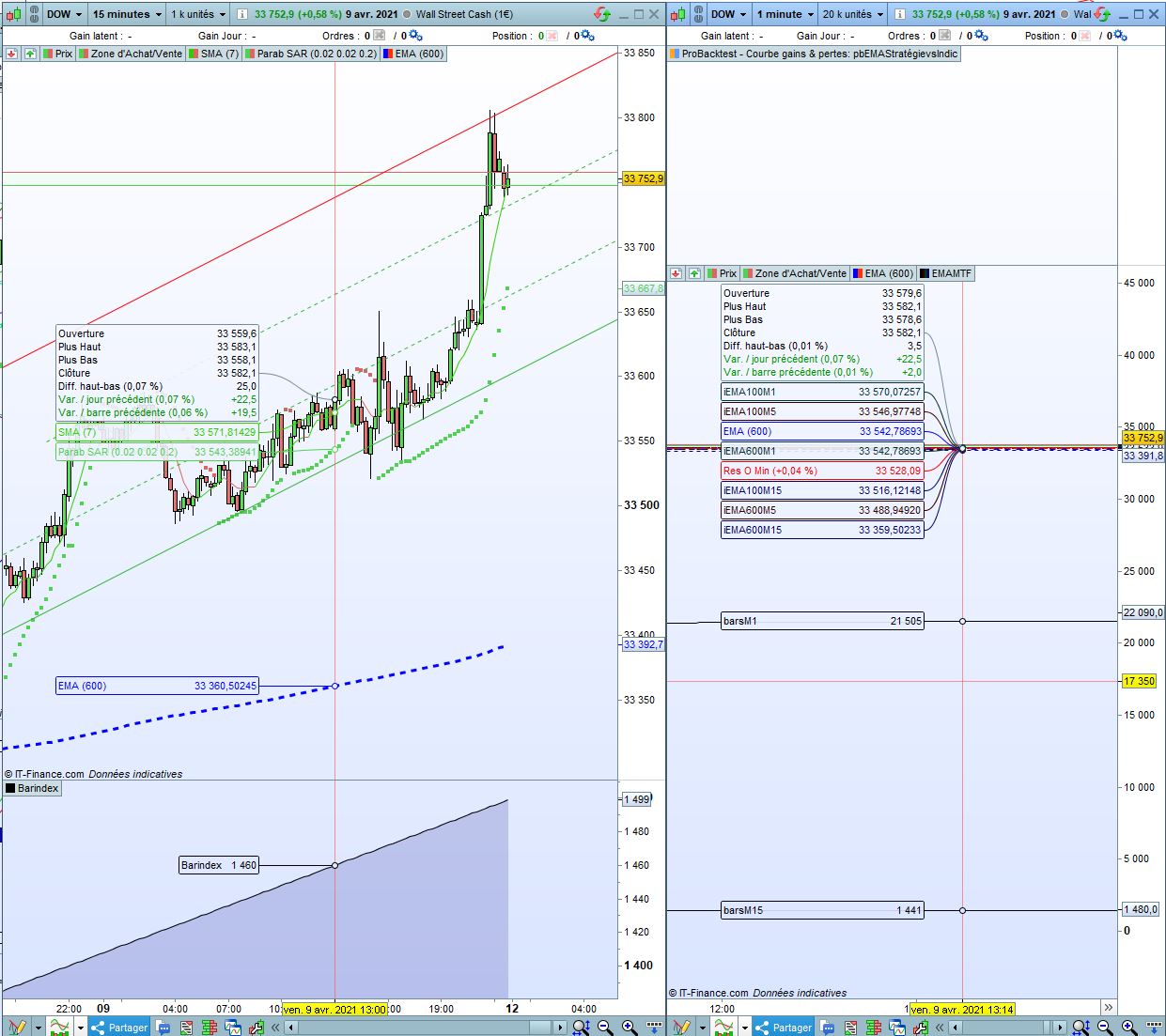
    I slightly changed the indicator to add a count of the number 15 minute  bars in the 1 minute graph.

    timeframe(15 minute)
    MMA100M15 = (ExponentialAverage[100](close))
    MMA600M15 = (ExponentialAverage[600](close))
    Currentbar15= barindex
    
    timeframe(5 minute)
    MMA100M5 = (ExponentialAverage[100](close))
    MMA600M5 = (ExponentialAverage[600](close))
    
    timeframe(1 minute)
    MMA100M1 = (ExponentialAverage[100](close))
    MMA600M1 = (ExponentialAverage[600](close))
    
    return MMA100M15 as "iEMA100M15", MMA600M15 as "iEMA600M15", MMA100M5 as "iEMA100M5", MMA600M5 as "iEMA600M5", MMA100M1 as "iEMA100M1", MMA600M1 as "iEMA600M1", currentbar15 as "barsM15" 
    

    I created also an indicator to simply count the barindex on the M15 unit chart.

    Result is follows, and might explain :

    #166707 quote
    ginko
    Participant
    Average

    Actually there is another thing that seems constant but I have not seen it documented anywhere. May be I missed something. I yes, please send me the link to the documentation.
    It seems there are always an extra 1000 bars loaded in the strategy tester / Back test WHATEVER the time frame. 1000 bars on M15, 1000 bars on M5, 1000 bars on M1 and so on.

    Is there a parameter for this setting?


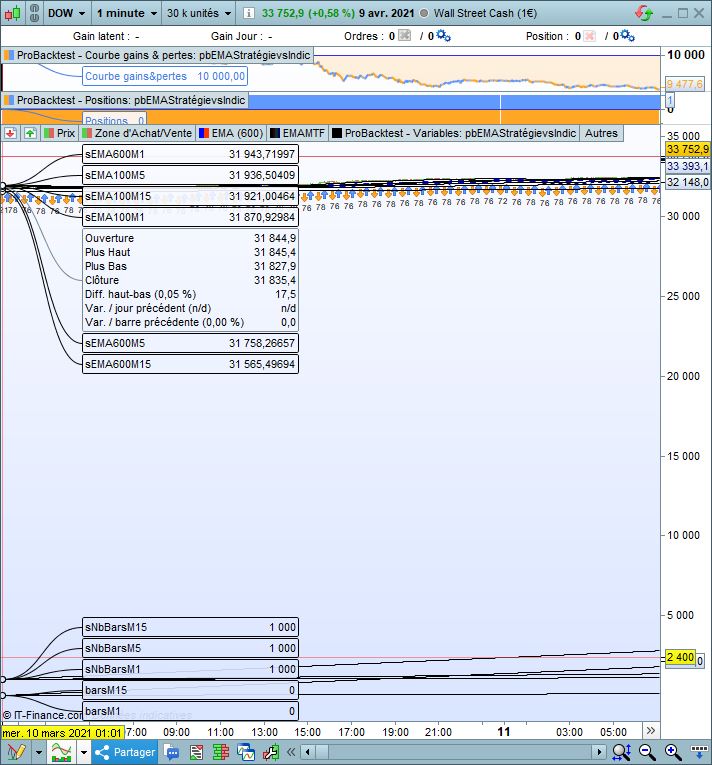
    I modified the backtest as follows to add the number of bars seen in the BT on M15 and M1 timeframes:

    sNbBarsM15 = barindex

    and

    sNbBarsM1 = barindex

    // Définition des paramètres du code
    DEFPARAM CumulateOrders = False // Cumul des positions désactivé
    
    timeframe(15 minute)
    MMA100M15 = (ExponentialAverage[100](close))
    MMA600M15 = (ExponentialAverage[600](close))
    sNbBarsM15 = barindex
    
    timeframe(5 minute)
    MMA100M5 = (ExponentialAverage[100](close))
    MMA600M5 = (ExponentialAverage[600](close))
    sNbBarsM5 = barindex
    
    timeframe(1 minute)
    MMA100M1 = (ExponentialAverage[100](close))
    MMA600M1 = (ExponentialAverage[600](close))
    sNbBarsM1 = barindex
    
    Graphonprice MMA100M15 as "sEMA100M15"
    Graphonprice MMA600M15 as "sEMA600M15"
    
    Graphonprice MMA100M5 as "sEMA100M5"
    Graphonprice MMA600M5 as "sEMA600M5"
    
    Graphonprice MMA100M1 as "sEMA100M1"
    Graphonprice MMA600M1 as "sEMA600M1"
    
    
    Graphonprice sNbBarsM15 as "sNbBarsM15"
    Graphonprice sNbBarsM5 as "sNbBarsM5"
    Graphonprice sNbBarsM1 as "sNbBarsM1"
    
    if BarIndex <8000 then
    VosConditions = 1
    else
    VosConditions = 0
    endif
    
    // généré automatiquement par PRT
    // Conditions pour ouvrir une position acheteuse
    IF NOT LongOnMarket AND VosConditions THEN
    BUY 1 CONTRACTS AT MARKET
    ENDIF
    
    // Conditions pour fermer une position acheteuse
    If LongOnMarket AND VosConditions THEN
    SELL AT MARKET
    ENDIF
    
    // Conditions pour ouvrir une position en vente à découvert
    IF NOT ShortOnMarket AND VosConditions THEN
    SELLSHORT 1 CONTRACTS AT MARKET
    ENDIF
    
    // Conditions pour fermer une position en vente à découvert
    IF ShortOnMarket AND VosConditions THEN
    EXITSHORT AT MARKET
    ENDIF
    
    // Stops et objectifs : entrez vos stops et vos objectifs ici
    

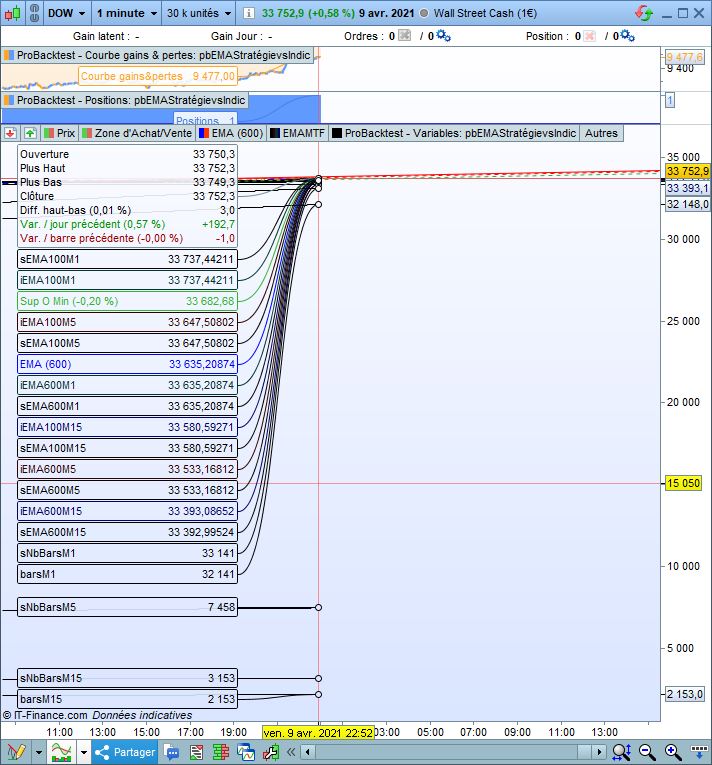
    Result is that there are 1000 more bars in the BT than displayed by an indicator :

    timeframe(15 minute)
    MMA100M15 = (ExponentialAverage[100](close))
    MMA600M15 = (ExponentialAverage[600](close))
    CurrentbarM15= barindex
    
    timeframe(5 minute)
    MMA100M5 = (ExponentialAverage[100](close))
    MMA600M5 = (ExponentialAverage[600](close))
    
    timeframe(1 minute)
    MMA100M1 = (ExponentialAverage[100](close))
    MMA600M1 = (ExponentialAverage[600](close))
    currentbarM1=barindex
    
    return MMA100M15 as "iEMA100M15", MMA600M15 as "iEMA600M15", MMA100M5 as "iEMA100M5", MMA600M5 as "iEMA600M5", MMA100M1 as "iEMA100M1", MMA600M1 as "iEMA600M1", currentbarM15 as "barsM15", currentbarM1 as "barsM1"
    
    #166718 quote
    robertogozzi
    Moderator
    Master

    Use

    DEFPARAM PreLoadBars = 0

    2K are loaded by default to make sure it can calculate indicators from the first bar.

    You can also increase that numer up to 10K.

    ginko thanked this post
    #166743 quote
    ginko
    Participant
    Average

    Thanks Roberto,

    I know this setting for indicators. It cannot be used inside a strategy.

    I was more speaking of what I found out for the Strategy back tester those 1000 bars added to each individual timeframe engine.

    I think that in a backtest using MTF, there are as many isolated calculation engines as the number of time frames : one engine for each time frame, and each engine has 1000 extra bars are allocated at strategy launch.

    Variables can be queried  only from another time frame space.

    I have seen no setting to change that extra 1000 bars number.

    #166744 quote
    robertogozzi
    Moderator
    Master

    That setting is for strategies, not indicators.

    ginko thanked this post
    #166745 quote
    ginko
    Participant
    Average

    Thanks Roberto,

    My mistake I tested it, it does change the number of bars preloaded on strategies

    DEFPARAM PreLoadBars = 4000

    gives 4000 bars preloaded for each time frame. and

    DEFPARAM PreLoadBars = 0

    gives the same number of bars on the indicator and on the strategy. Good to double check to check indicators and backtest computing are aligned.

    it seems the default is 1000

    #171286 quote
    Mishap
    Participant
    Junior

    Hi guys,

    apologies of this is a dumb question but i am new to MTF coding & hope that i have it correct.

    question is: if i have a 2 bollinger bands from 2 different time frames (say 1 min & 10 min) does it overlay the 10min onto the 1 min chart or does it  get data from the 10min chart ie: the close & the bollinger from the 10min?

    hoping this makes sense.

    timeframe (default, updateonclose)
    B1 = BollingerBandWidth[20](close)
    c1 = close
    timeframe (10 minutes, updateonclose)
    B2 = BollingerBandWidth[20](close)
    c2 = close
    
    if c1 < B1 and c2 < B2 then
    count = 1
    endif
    #171290 quote
    robertogozzi
    Moderator
    Master

    The way you placed your TIMEFRAMEs count is updated every 10 minutes as it’s part of that TF.

    Move lines 1-3 to just below line 6 to make lines 8-10 part of the default TF (you can remove UpdateOnClose from the default TF, as it sets the pace and nothing can be updated there other than at closing time).

    There you go:

    timeframe (10 minutes, updateonclose)
    B2 = BollingerBandWidth[20](close)
    c2 = close
    
    timeframe (default)
    B1 = BollingerBandWidth[20](close)
    c1 = close
    //
    if c1 < B1 and c2 < B2 then
       count = 1
    endif
    #171366 quote
    Mishap
    Participant
    Junior

    Thanks Roberto, that makes sense. The TF above any code is used until a new TF is placed.

    Legend keep up the good fight ☺️

    robertogozzi thanked this post
    #173070 quote
    druby
    Participant
    New

    Been looking into MTF. I set up the following to verify my understanding of MTF operations but the results were not what I was expecting.

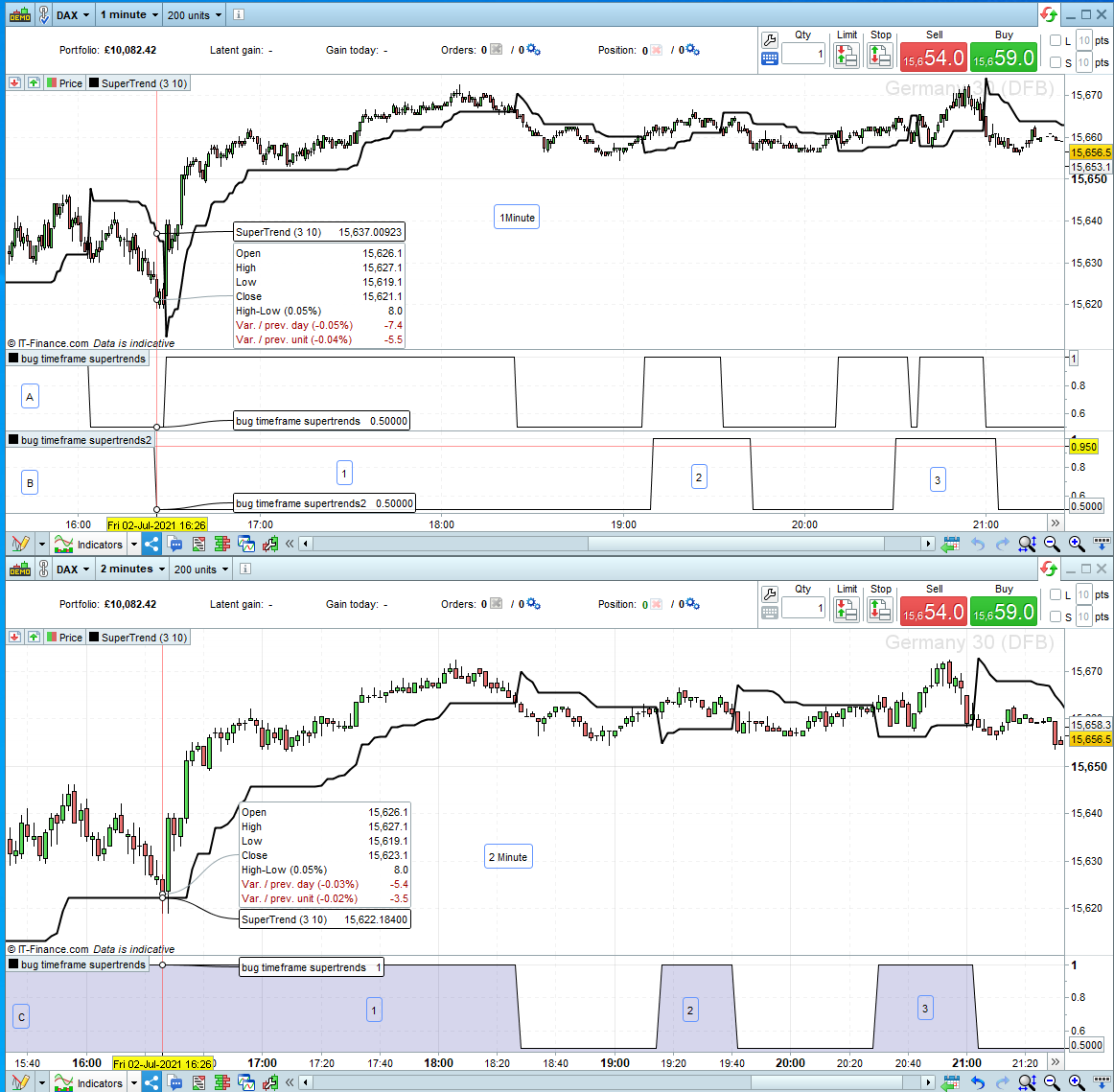
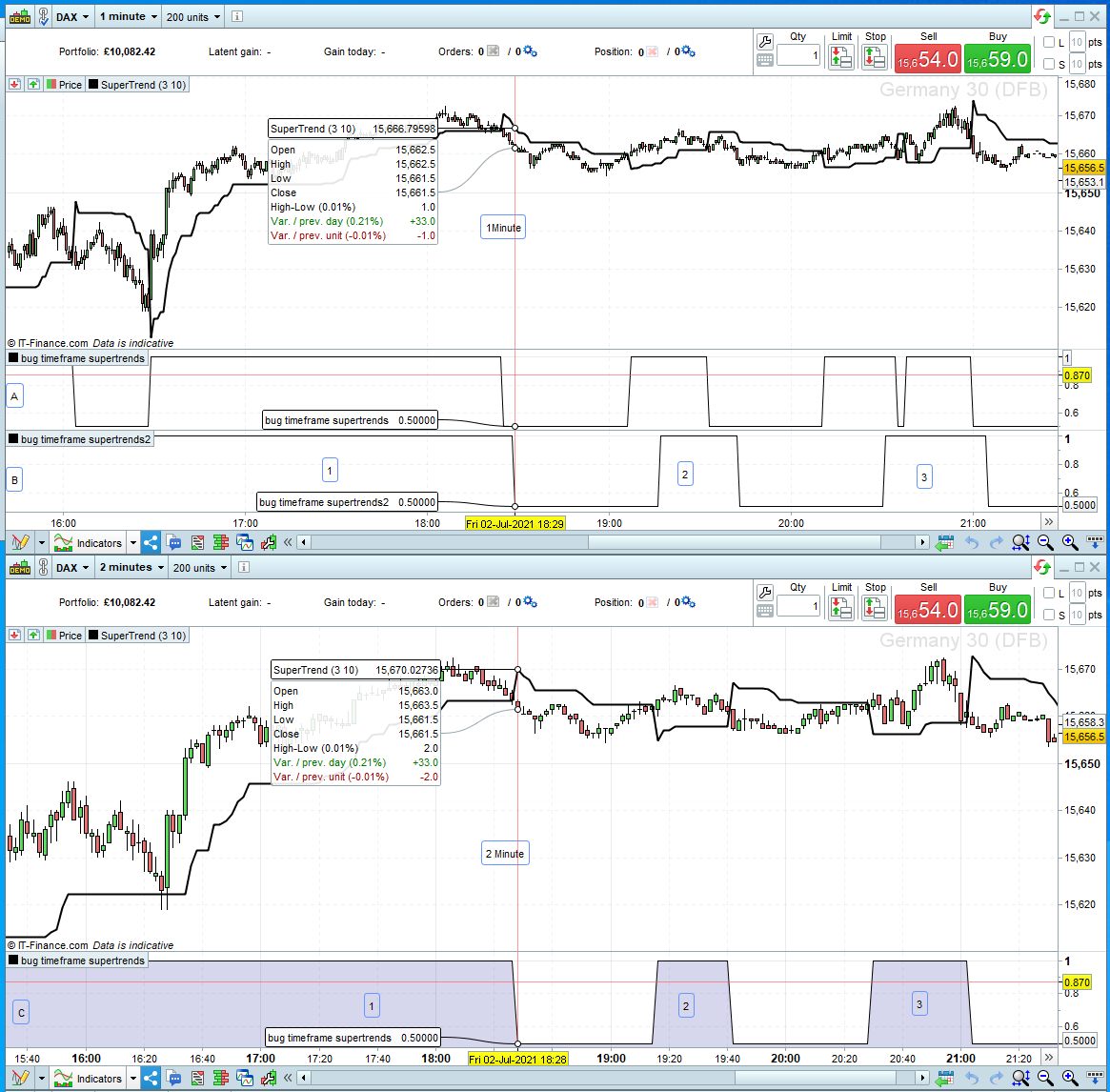
    The setup…           2 charts, see screenshot, 1 and 2 minute both with basic price candles and default supertrend.

    Below the main chart added a custom indicator, see code, to both, to give a binary indication of the price ‘close’ crossing the supertrend line.

    Further, to the 1 min chart a second custom indicator using the same code as other but prefixed with ‘timeframe(2mn)’.

    The chart labeling…     Charts – 1Minute and  2Minute            Indicators – A, B and C            Areas of Interest – 1, 2 and 3

    What I expected…   On 1min and 2min charts, indicators [A]  and [C]’s changes align up with the ‘close’, crossing the supertrend.

    At this point I was expecting indicator [B] on 1min to display the same as [C] but it didn’t in several ways.

    Problems…

    a) When [B] goes low at beginning of area 1, [C] is high, and the close doesn’t break supertrend.

    b) Why does [B] stay low when [C] stays High cover area 1.

    b) When [B] goes high at beginning of area 2, [C] goes high but not at same time.

    c) Why when [B] goes low at end of area 2, [C] now does the same.

    d) Why when [B] goes high then low at area 3, [C] also does.

    e)  bgnfgnstg    (Banged head on keyboard!)

    Investigation…         After a bit of prodding and poking, here what i found.

    After comparing the closing candles of both charts with the 2min supertrend  I found that the unexpected changes on [B],(a)(c) aligned up with the close of 1min candles breaking the 2min supertrend before the 2min candles did. This also accounted for (c)(d) since the 1min candles didn’t’ reach the 2min supertrend before the 2min candles, the opposite.

    However, I could find an explanation for (b) and why when the 2min prices closed above the 2min supertrend that [B] didn’t go back high but stay low until area 2 though it would have gone low prior to area 2.

    Conclusion…       In the scope of the TimeFrame(x) command, it appears that  ‘close’, in this case, doesn’t refer to the (x) timeframe but the default or timeframe of the chart the indicators is in. Since price is an indicator I would expect this, but since a 2min candle is made up of two 1min candles it makes sense that the close of the first minute of a 2min candle could be lower of higher than the 2 minute.

    Regarding (b) and why it stops low when all indications show it should have gone high I have no idea.

    Over to you…

    // uncomment timeframe for indicator [B]
    
    // timeframe(2mn) 
    
    // code for custom indicator [A][C}
    
    if close crosses over Supertrend[3,10]   then
    line1=1
    elsif close crosses under Supertrend[3,10]   then
    line1=0.5
    endif
    
    return line1
    #173078 quote
    robertogozzi
    Moderator
    Master

    Can you explain what you want to achieve with that indicator?

    On which TF’s do you want to use?

    It appears you are not using any TF, why did you comment it out?

    #173086 quote
    druby
    Participant
    New

    Thanks for replying.

    • I was trying to understand how to use the TF function worked and verify results, not particularly creating an specific indicator.
    • Getting 2minute data, indicator [C] results in the 1minute timeframe.
    • Regarding the commented TF in the code. It is un-commented in the custom indicator for [B] but commented in [A][C] just copied same code when created NEW indicators .

    Since sleeping on it and reading documentation it appears that most of problems I saw were  because of not using the ‘MODE’ parameter in the TF syntax. In my code for indicator [B] it used the default TF update’s rather than update’s from the selected TF. This created a scenario  were  certain 1min close’s on the default TF triggered the condition in the selected TF code before the 2min closes could.

    Using the Mode ‘UPDATEONCLOSE’ gave the results what I was originally expecting.

    So problem solved. Thanks for responding

    #177682 quote
    IG_CFD_Trader
    Participant
    Average

    Hi Nicolas,

    I have a indicator that returns a result. I run that Indicator on multiple frames open chart windows to visualize indicator and see when it triggers.

    My question is can I add all the time frames that I want inside the code of the indicator then run it under one chart only and get it to return 1 when the indicator triggers in any of the coded timeframes without needing to visually open all the timeframe charts?

    #177685 quote
    robertogozzi
    Moderator
    Master

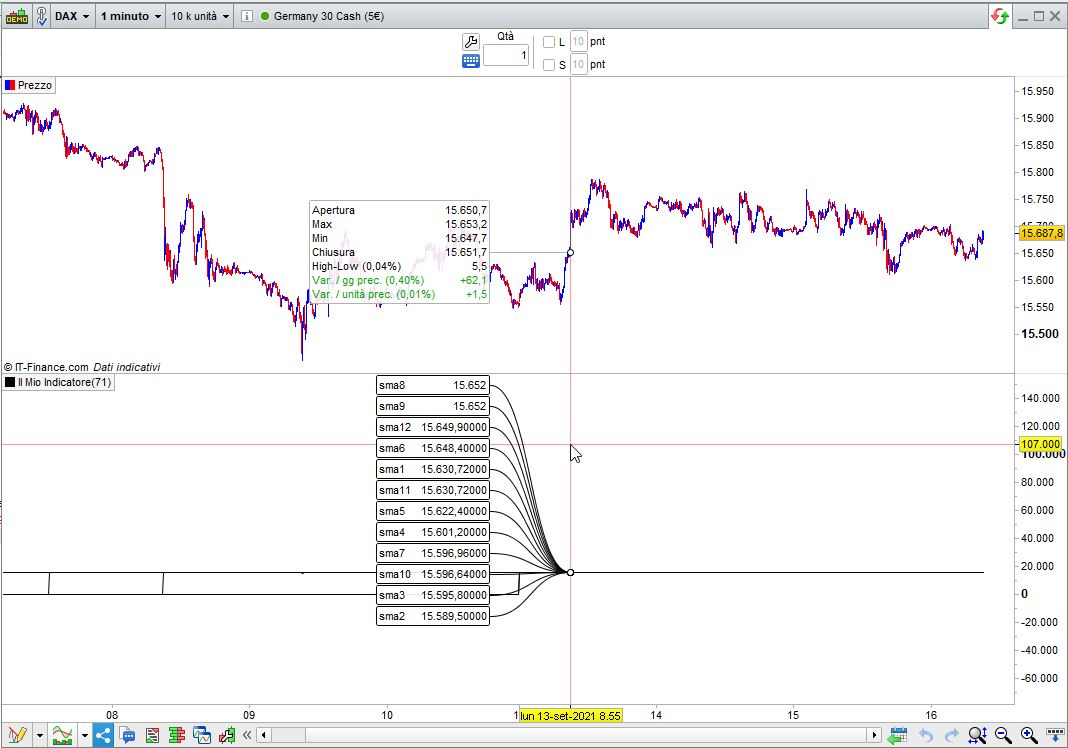
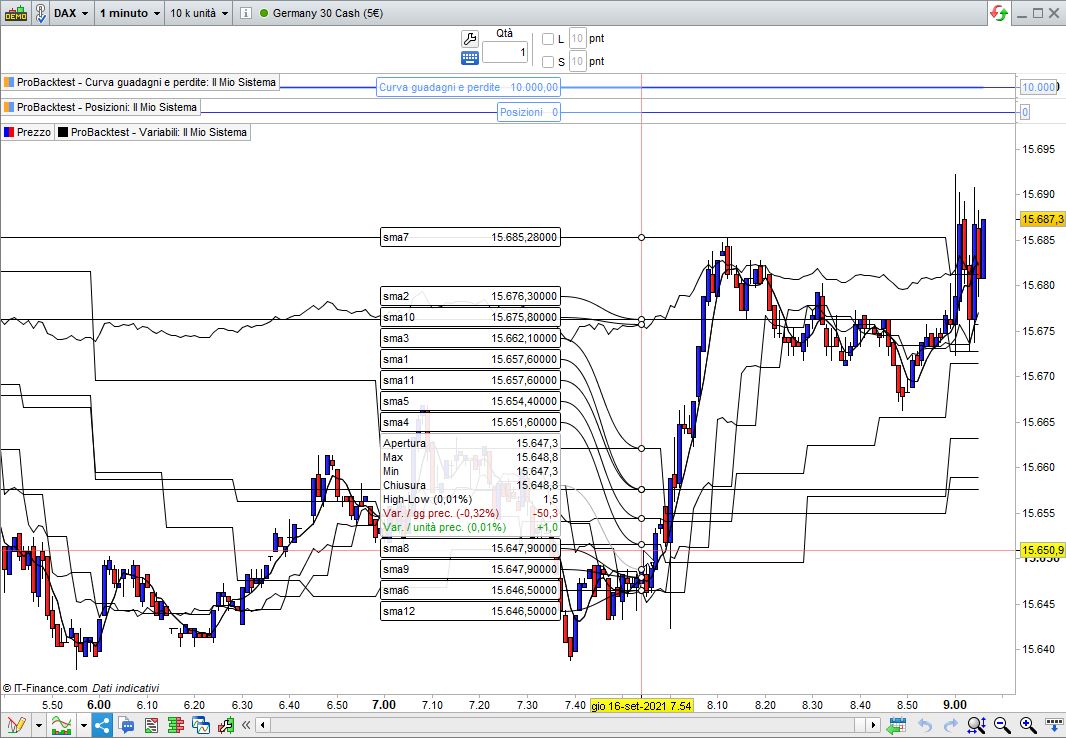
    When MTF was first released for strategies there was a 6-TF limit. But it must have been removed as now I heve tested it for almost 12 (see pic Y).

    This indicator works fine (applied to a 1-minute TF, using at least 10K units, as each daily bar requires roughly 1440 bars * 5-period average), see pic X:

    Timeframe(Daily,UpdateOnClose)
    sma1 = average[5,0](close)
    Timeframe(4h,UpdateOnClose)
    sma2 = average[5,0](close)
    Timeframe(1h,UpdateOnClose)
    sma3 = average[5,0](close)
    Timeframe(30 minute,UpdateOnClose)
    sma4 = average[5,0](close)
    Timeframe(15 minute,UpdateOnClose)
    sma5 = average[5,0](close)
    Timeframe(5 minute,UpdateOnClose)
    sma6 = average[5,0](close)
    Timeframe(8h,UpdateOnClose)
    sma7 = average[5,0](close)
    Timeframe(1 minute,UpdateOnClose)
    sma8 = average[5,0](close)
    Timeframe(default,UpdateOnClose)
    sma9 = average[5,0](close)
    Timeframe(Daily,default)
    sma10 = average[5,0](close)
    Timeframe(Daily,UpdateOnClose)
    sma11 = average[5,0](close)
    Timeframe(5 minute,default)
    sma12 = average[5,0](close)
    return sma1 as "sma1",sma2 as "sma2",sma3 as "sma3",sma4 as "sma4",sma5 as "sma5",sma6 as "sma6",sma7 as "sma7",sma8 as "sma8",sma9 as "sma9",sma10 as "sma10",sma11 as "sma11",sma12 as "sma12"
    #177688 quote
    robertogozzi
    Moderator
    Master

    Bear in mind that you will have to apply your indicator to a chart with the smallest TF among those coded in your indicator AND that ALL the TFs used in your indicator must be a MULTIPLE of the default TF (the one on your chart).

Viewing 15 posts - 61 through 75 (of 165 total)
  • You must be logged in to reply to this topic.

Multi timeframe – MTF indicators for ProRealTime


ProBuilder: Indicators & Custom Tools

New Reply
Author
author-avatar
Nicolas @nicolas Keymaster
Summary

This topic contains 164 replies,
has 53 voices, and was last updated by PeterSt

9 months ago.

Topic Details
Forum: ProBuilder: Indicators & Custom Tools
Language: English
Started: 05/27/2020
Status: Active
Attachments: 49 files
Logo Logo
Loading...