








Multi timeframe – MTF indicators for ProRealTime

Viewing 15 posts - 16 through 30 (of 165 total)
  • Author
    Posts
  • #137347 quote
    zilliq
    Participant
    Master

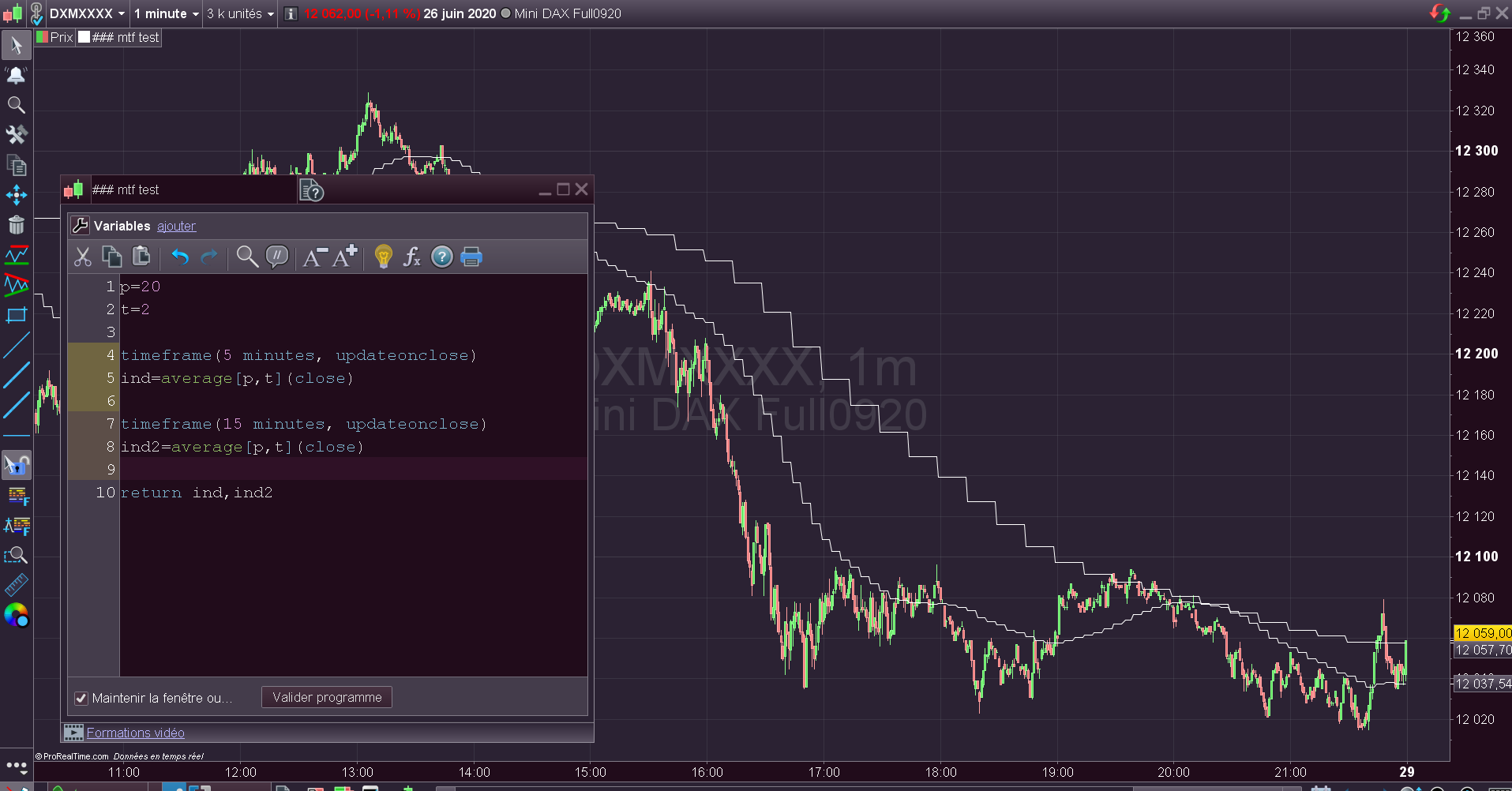
    Seems to be capricious…

    Sometimes it works, sometimes not. You need to update the graph..Some problem with codes, seems to be impossible to add the same indicator with 2 timeframes…

    timeframe(5 minutes, updateonclose)
    ind=average[p,t](close)
    
    return ind
    #137350 quote
    Nicolas
    Keymaster
    Master

    All is working fine for me.

    #137391 quote
    zilliq
    Participant
    Master

    Lucky Guy 😉 (V11.1)

    #137719 quote
    fhornus
    Participant
    Junior

    There is great potential in MTF for ProBuilder, but this functionality still seems to suffer from youthful flaws.

    An indicator using MTF for ProBuilder is very good at processing historical data. But if we want to use it as a dynamic indicator, i.e. for data updated in real time, this indicator runs out of steam quickly, in the sense that the data no longer updates and a past result repeats itself (seconds after seconds, minutes after minutes depending on the time unit used) without updating.

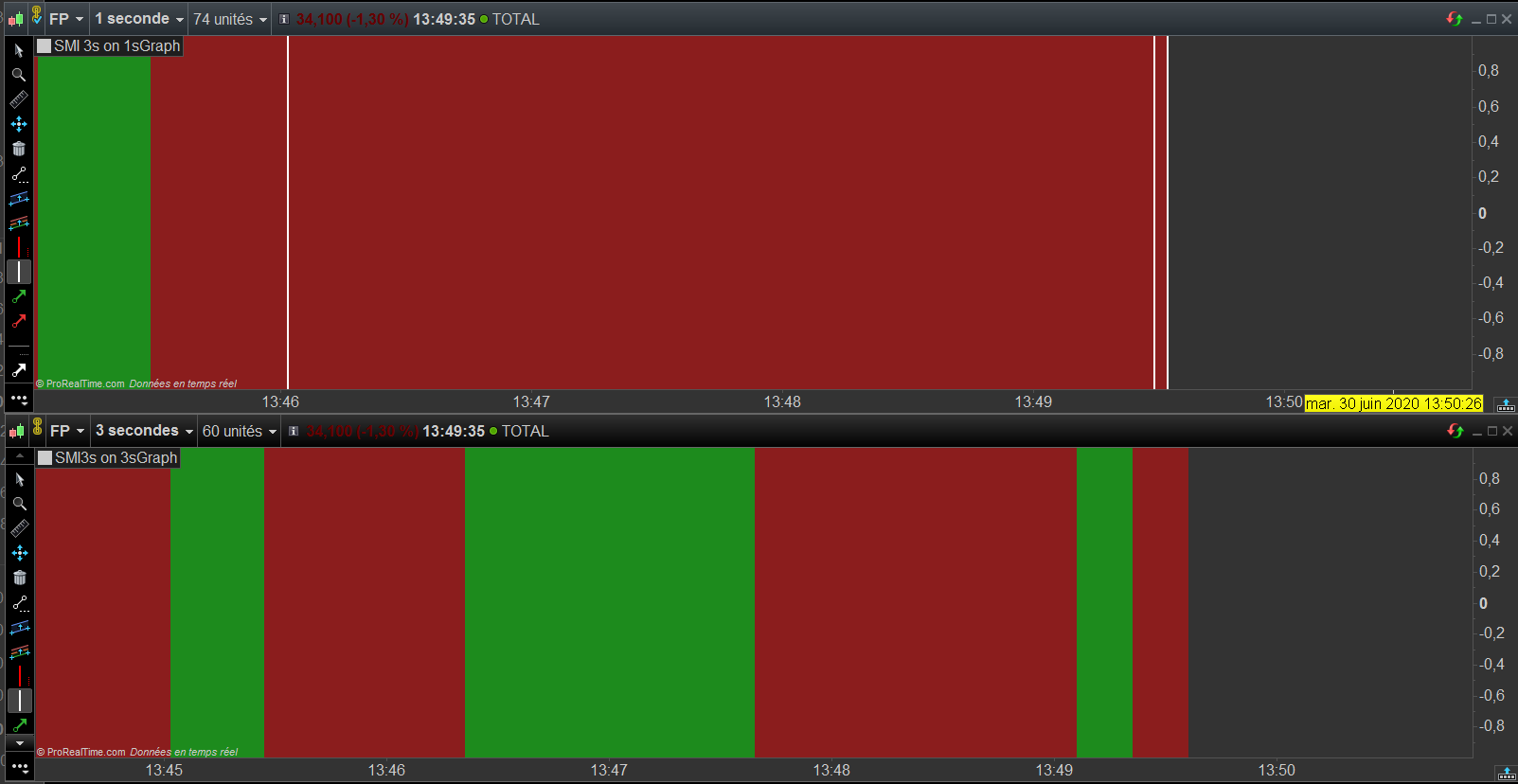
    To illustrate this behavior with a readily available example, let’s take a 3 second SMI on a 1 second chart. The use of the background color will highlight the non-updating of the data.

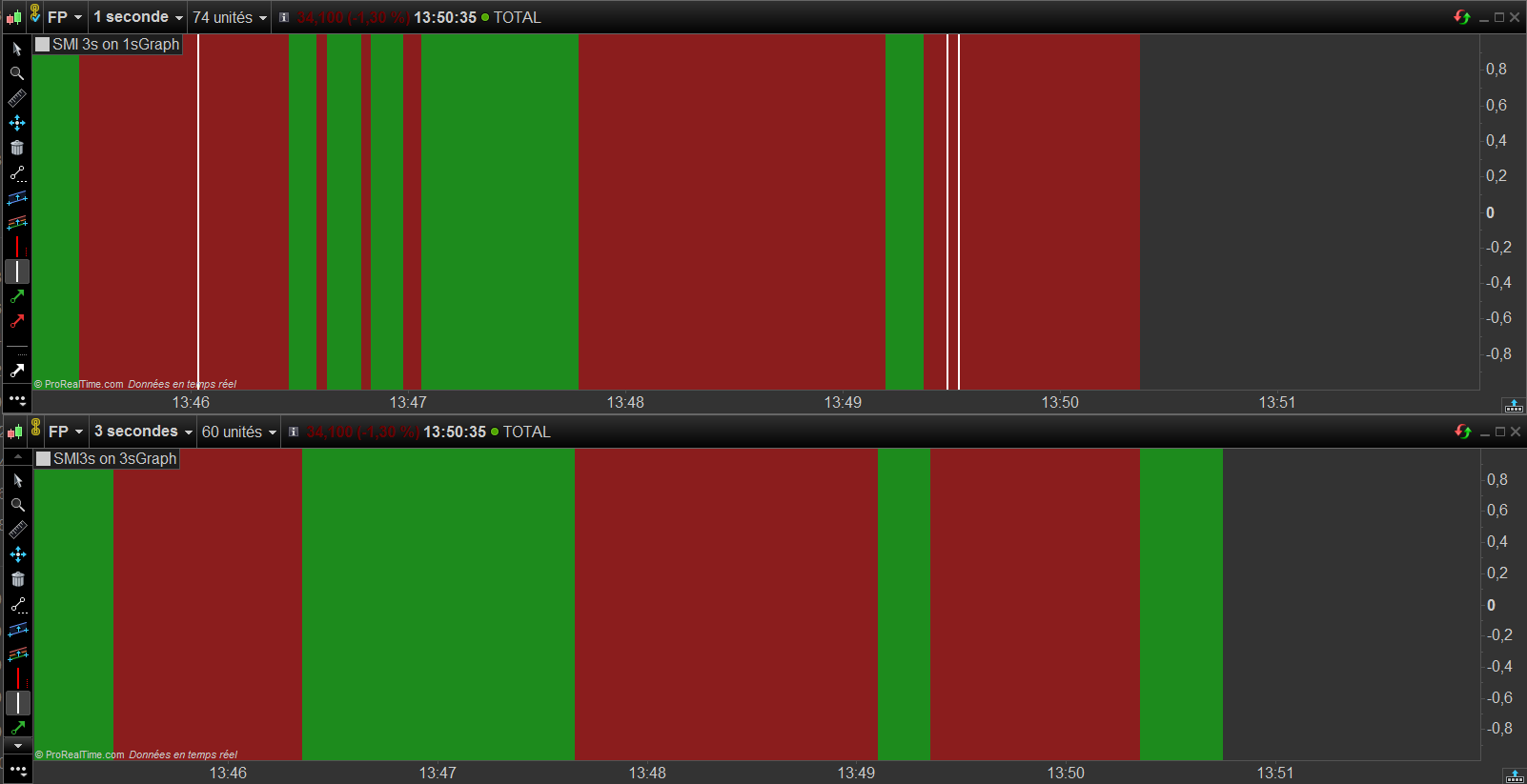
    On both attachments, the top graph -the “test” graph”- shows the SMI 3s on a 1s graph, the bottom graph -the control graph- shows the SMI 3s on a 3s graph.

    First attachment. The white vertical line on the left corresponds to the start of our test (a first refresh of the top graph).
    The double vertical line on the right was placed just before a second manual refresh of the graph. We see a uniform red range between the vertical bars


    The 2nd attachment presents the situation after the second manual refresh of the test graph: we see that the data between the vertical lines has been updated. There is a minor difference between the update and the control graph, this is probably due to some flaw in the code, but the demonstration here concerns the non-updating in real time of the data from a ProBuilder indicator using MTF.

    // code for the "test" graph
    
    timeframe(3 seconds, updateonclose)
    
    smi3s = SMI[14,3,5](close)
    smi3s1 = smi3s[1] 
    
    timeframe(1 second, updateonclose)
    
    if smi3s > smi3s1 then
    backgroundcolor(0,255,0,110)
    else
    backgroundcolor(255,0,0,110)
    endif
    
    return


    // code for the reference graph
    
    smi3s = SMI[14,3,5](close)
    
    if smi3s > smi3s[1] then
    backgroundcolor(0,255,0,110)
    else
    backgroundcolor(255,0,0,110)
    endif
    
    return
    #137729 quote
    Nicolas
    Keymaster
    Master

    Before I investigate more in your code, do you know the difference of how the MTF codes behave with or without the ‘updateonclose’ option?

    #137835 quote
    fhornus
    Participant
    Junior

    Regarding the “mode”, I read your instructions in the Topic “Première approche sur le multi timeframe avec ProRealTime”.

    I tried using updateonclose, default, even no mention of mode with the lowest -default- timeframe. Then I made all the tests that I could imagine to try to isolate the condition of occurrence of the end of the updating of the data, while taking care that the material conditions were “optimal” on my side. The tests were carried out on the ETF “SPY” data, i.e. with a much bigger data flow than with the previous example (FP)

    Either after opening the workspace or refreshing the graph, in all cases, the updating stopped to occur, but this time very randomly : sometimes after 12 seconds, sometimes after more than 4 minutes; sometimes after 2 data updates (change from green to red or vice versa), sometimes after about fifteen updates. In short, I did not manage to isolate a condition of occurrence, or to know if it is a problem of data supply or local. May be have à try if you or someone around you have the time to do it ; I admit it’s rather vague as a symptom.

    #138453 quote
    Malibu1
    Participant
    New

    I have started playing around with probuilder tonight using the mtf’s.

    What I am trying to do is to display a 5 period monthly moving average on a daily chart. It does display but there is a few issues with it. The idea is to give me a longer trend direction so I trade with the larger timeframe.

    1. The indicator displays in its own box instead of in the main window. Not a big thing but was just different to what I expected to happen.
    2. I have coded the indicator to go green on up months and red on down months but it is displaying a daily change instead of the month trend. I am not sure if I can change this to display the monthly instead of the daily.

    Obviously as the time in the month progresses the final reading will change as the price changes. I would have expected a slow changing line (something like a 105 period line) but it is quite jagged. Is the code I am using too simple? If I use the update on close it tends to be a stair type movement. It doesn’t change for the whole month and then it steps dramatically.

    The code that I used:

    timeframe(1 month)
    a = Average [5](close)
    return A

    #138456 quote
    robertogozzi
    Moderator
    Master

    To show it on the price chart you need to click the spanner on the upper left corner of your chart, then select the indicator you want to add.

    To use different colours:

    timeframe(1 month)
    r = 0
    g = 128
    b = 0
    t = 255
    a = Average[5,0](close)
    If a < a[1] then
       r = 255
       g = 0
    Endif
    return a Coloured(r,g,b,t) as “AvgM”
    fhornus thanked this post
    #138458 quote
    Malibu1
    Participant
    New

    Thank you thats exactly what I was after. Perfect.

    #138612 quote
    fhornus
    Participant
    Junior

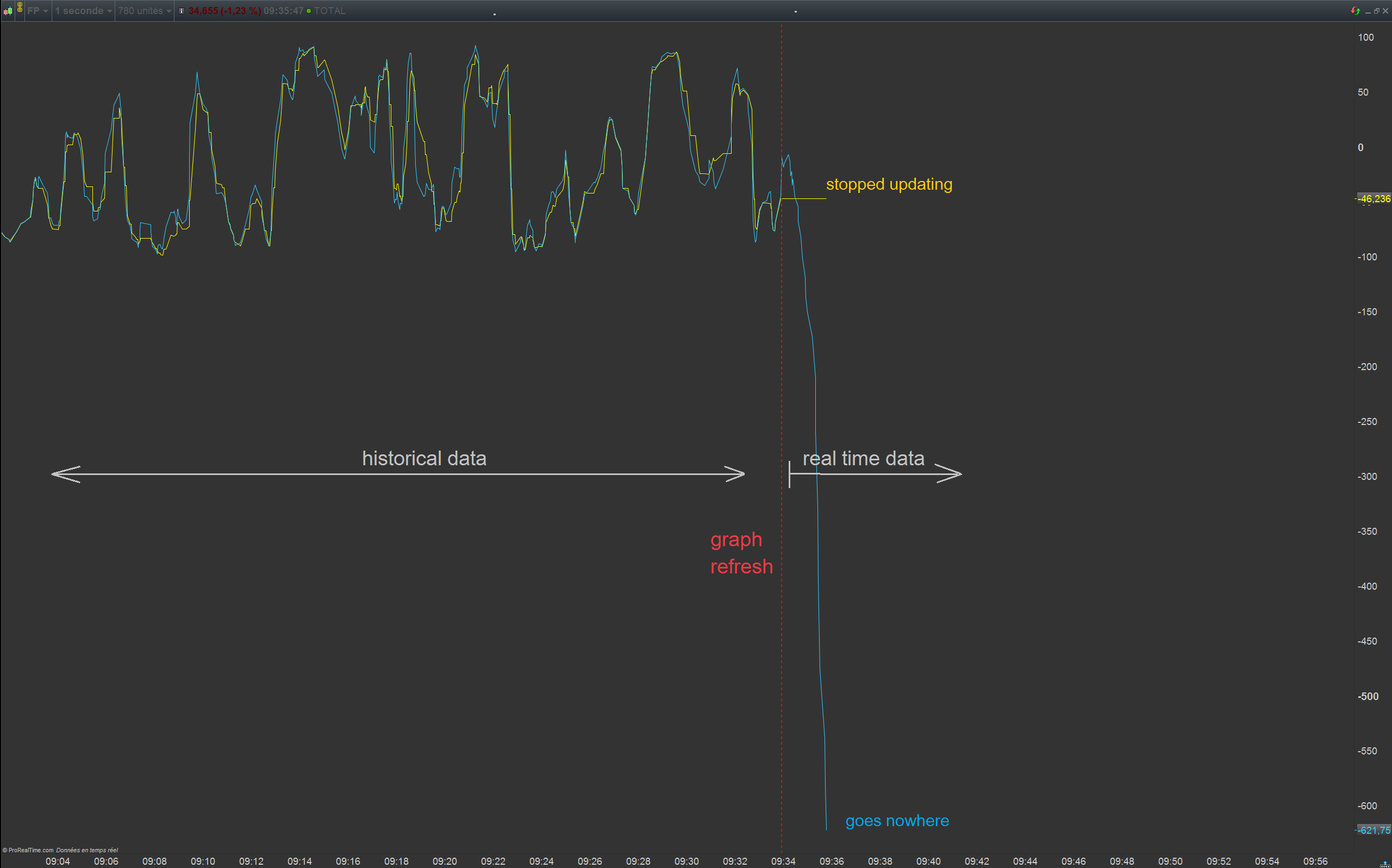
    SMI doesn’t seem to work with MTF

    Any hints to fix the issue ?

    Thanks


    timeframe(2 seconds, updateonclose)
    smi2s = SMI[14,3,5](close)
    
    timeframe(1 second)
    smi1s = SMI[14,3,5](close)
    
    return smi2s coloured(255,255,0), smi1s coloured(51,204,255)
    #138632 quote
    Nicolas
    Keymaster
    Master

    @fhornus

    Would you mind send a technical report for this specific issue please? Seems related to that particular instrument data and not a global problem with SMI. Thank you.

    #138657 quote
    fhornus
    Participant
    Junior

    @Nicolas

    Technical report sent ; many thanks for your assistance.

    #139829 quote
    robdav
    Participant
    Veteran

    Hi

    DEFPARAM CalculateOnLastBars = 200 appears to be ignored when used with multi timeframe code. This may be by design due to the multi timeframe calculations? Just wanted to check.

    Sample code.

    DEFPARAM CalculateOnLastBars = 200
    
    TIMEFRAME(1 Hour)
    
    Test = ExponentialAverage[20](close)
    
    RETURN Test
    

    Thanks

    Rob

    #139835 quote
    Nicolas
    Keymaster
    Master

    Indeed it does not affect any code with a TIMEFRAME instruction, while I don’t see any reason why it does.. I’ll try to know more.

    robdav thanked this post
    #146155 quote
    Malend
    Participant
    Average

    TICK CHARTS?

    What a great news.
    I see only examples for time based charts. Is it also possible to use this for tick charts? And if so, how would that look like?

Viewing 15 posts - 16 through 30 (of 165 total)
  • You must be logged in to reply to this topic.

Multi timeframe – MTF indicators for ProRealTime


ProBuilder: Indicators & Custom Tools

New Reply
Author
author-avatar
Nicolas @nicolas Keymaster
Summary

This topic contains 164 replies,
has 53 voices, and was last updated by PeterSt

9 months ago.

Topic Details
Forum: ProBuilder: Indicators & Custom Tools
Language: English
Started: 05/27/2020
Status: Active
Attachments: 49 files
Logo Logo
Loading...
