LR Channel

Viewing 4 posts - 1 through 4 (of 4 total)
  • Author
    Posts
  • #107892 quote
    Conte Caimano
    Participant
    Master
    //Parameters :
    // Len = 100
    // percent = 0.002
    
    once j=0
    de48=DPO[Len*2](close)
    if de48=de48[1] and de48[1]=de48[2] and de48[2]<>de48[3] then
    flag=1
    endif
    
    n=(Len*2)-4
    p=(n/2)-1
    d100=DPO[n](close)
    moy100=close-d100
    co=(moy100-moy100[1]+(close[p])/n)*n
    if flag=1 and flag[1]=0 then
    test=linearregression[Len](co)
    test1=linearregressionslope[Len](co)
    a=test1
    b=test-test1*Len
    endif
    
    if flag=0 then
    reg=undefined
    upperchan=undefined
    lowerchan=undefined
    else
    j=j+1
    reg=a*j+b
    upperchan = reg + reg*percent
    lowerchan = reg - reg*percent
    endif
    
    RETURN reg as "channel center", upperchan as "upper channel", lowerchan as "lower channel"

    Buongiorno Nicolas,

    sto testando il codice del Regression Channel su un time frame daily ed ho notato che impostando un periodo maggiore di 136 (Len = 137 per esempio) il canale non viene più disegnato sul grafico del prezzo.

    Secondo te dov’è l’errore? è possibile corregere questa disfunzionalità ?

    Grazie mille.

    #107913 quote
    Nicolas
    Keymaster
    Master

    Non dovresti usare quel vecchio codice che usa il futuro del prezzo usando il DPO. C'è un indicatore recente che traccia il canale di regressione lineare nella libreria: Canale di regressione lineare di deviazione standard ed errore standard che è accurato e simile al 100% allo strumento della piattaforma.

    #108139 quote
    Conte Caimano
    Participant
    Master

    Ok grazie  Nicolas.

    Il codice Canale di regressione lineare di deviazione standard ed errore standard disegna sul grafico il canale, è possibile creare un codice screener per trovare i breakout del limite superio e/o inferiore del canale ?

    #108216 quote
    Nicolas
    Keymaster
    Master

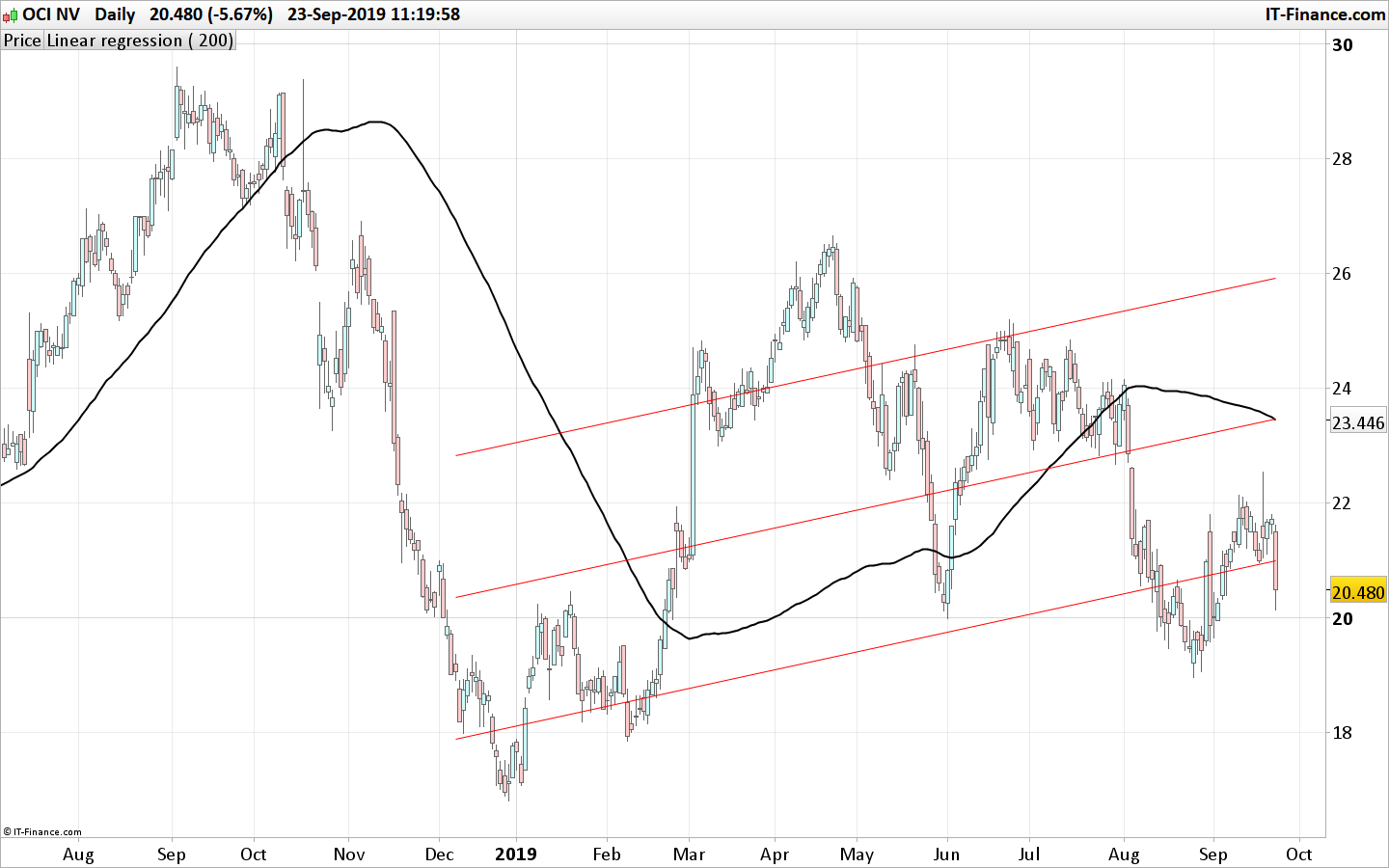
    Perché no, ma non hai bisogno di questo indicatore per quello. Utilizzare una curva di regressione lineare con deviazione in STD o STE e individuare il breakout:

    lookback=200
    NbDeviation=1
    ChannelType=1
    
    lr=linearregression[lookback](close)
    
    //channel
    if ChannelType = 1 then //Standard Deviation
    dat = std[lookback]*NbDeviation
    else
    dat = ste[lookback]*NbDeviation
    endif
    
    breakout = close crosses over lr+dat or close crosses under lr-dat
    
    screener[breakout]
    linear-regression-channel-breakout.png linear-regression-channel-breakout.png
Viewing 4 posts - 1 through 4 (of 4 total)
  • You must be logged in to reply to this topic.

LR Channel


ProBuilder: Indicatori & Strumenti Personalizzati

New Reply
Author
Summary

This topic contains 3 replies,
has 2 voices, and was last updated by Nicolas

6 years, 6 months ago.

Topic Details
Forum: ProBuilder: Indicatori & Strumenti Personalizzati
Language: Italian
Started: 09/18/2019
Status: Active
Attachments: 1 files
Logo Logo
Loading...