the oldest since February
Early yesterday morning I closed ALL trades that had been left open after I received the STOP alert by email (on both my demo accounts, opened with IG Italy and IG Switzerland), and I still keep closing any trade that is opening, as I can’t know which strategy opened it.
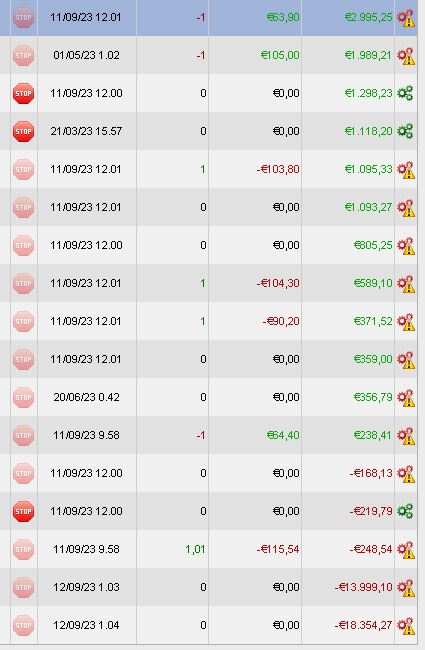
Most strategies are still running (STOP greyed because for all of them a pending stop is reported, with a yellow triangle), but phantom trades are still running (actually they run only on PRT’s servers only as I closed them with IG).
Those reporting losses of many K’s, are actually profitable and their performance was green till yesterday night.
Bad advice : Don’t use Demo at all. Nothing works the same and by my personal guarantee systems are stopped way more often there. It is useless.
The context is sort of : If you need Demo then you don’t trust your backtesting. Or maybe I should say “your Systems” ? 🙂
That’s exactly how it looks to me too.
and I still keep closing any trade that is opening, as I can’t know which strategy opened it.
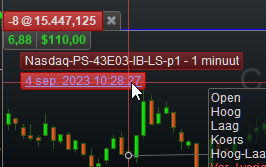
But you can see what I show below ? (hover your mouse over the order label)
The Strategey Name and Version (Date/Time) is all there.
Until the problem is over I don’t what’s going on, so I prefer closing all of them as they open.
I do not understand how it can come new bugs over the years?
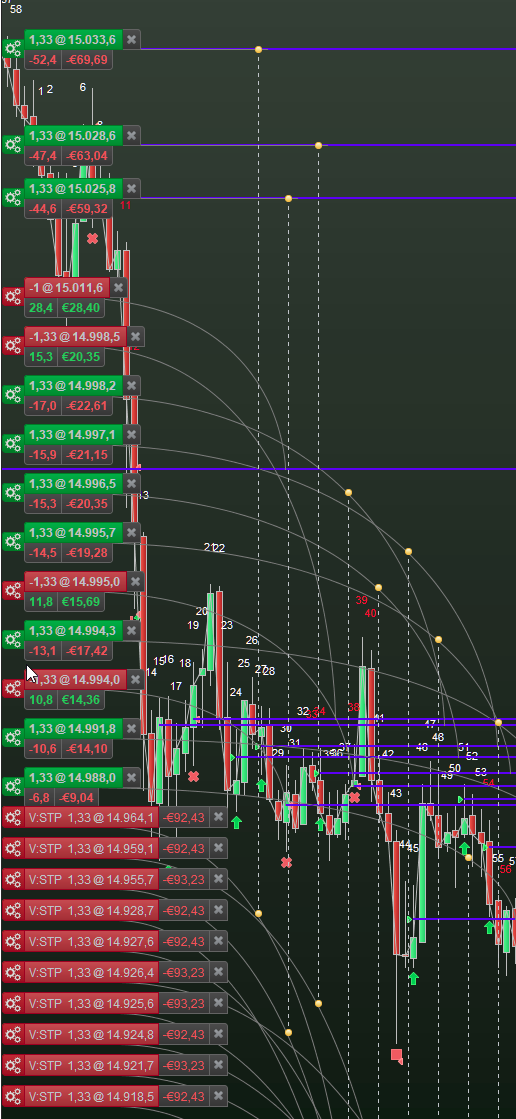
Ha, yes Peter, but we haven’t all got 1300mm high screens, so for most of us the System name is unreadable as the System is covered by Stops and Targets and other Systems Order Labels etc.
I submitted a Suggestion to PRT years ago to arrange for System names to appear indented from the left by an amount which clears the Order Labels (instead of behind the labels) so we can then read the System name when we hover over the Order Label.
This is a scary chat. No problems here with IG in Oz, but now I’m paranoid because I’ve doubled size again last week.
I’ve never used a demo account and only market orders.
It’s bad enough it’s an undecided market, my systems go ballistic with high volatility. Not sure I should sleep!
Hoping you guys get an answer pronto.
I submitted a Suggestion to PRT years ago to arrange for System names to appear indented from the left by an amount which clears the Order Labels (instead of behind the labels) so we can then read the System name when we hover over the Order Label.
All it requires is having the Z order right. When this issue (screenshot below) occurred a few weeks ago, I mentioned – in writing – for the I think 10th time how ridiculous it is that such a thing never gets solved – a thing I would repair in 10 minutes, including testing and probably including version management as well (because automated). Here we go :
SUB LabelsToFron(MyOrderLabel) Handles MouseOver
  MyOrderLabel.MyOrderDataLabel1.ZOrder = 0   // ZOrder to the front.
  MyOrderLabel.MyOrderDataLabel2.ZOrder = 0
  MyOrderLabel.MyOrderDataLabel3.ZOrder = 0
END SUB

SUB LabelsToBack(MyOrderLabel) Handles MouseExit
  MyOrderLabel.MyOrderDataLabel1.ZOrder = 1   // ZOrder to the back.
  MyOrderLabel.MyOrderDataLabel2.ZOrder = 1
  MyOrderLabel.MyOrderDataLabel3.ZOrder = 1
END SUB
I have 7 minutes left for testing and finding that ZOrder possibly needs 1 where it now shows 0 and vise versa, plus giving this to the version managament system.
Indeed, at this moment I would not be able to find from even one order label its underlaying System (Name etc.) because they will show UNDER the Order labels (of the other orders).
For me, the same condition is still.
@Roberto?
What can we do now?
Early evening yeserday, I got 20 Systems back up and running in each of 2 Accounts and this morning all 40 are still running.
Is above not same for you phoentzs?
If No … what problems are you still experiencing?
Nothing has changed for me. There are still plenty of pending orders and the systems are “stopping”. And I can’t do anything. That’s crap.