


Indikator trendline zeichen

Viewing 11 posts - 1 through 11 (of 11 total)
  • Author
    Posts
  • #245646 quote
    elviko
    Participant
    Junior

    Moin zusammen,

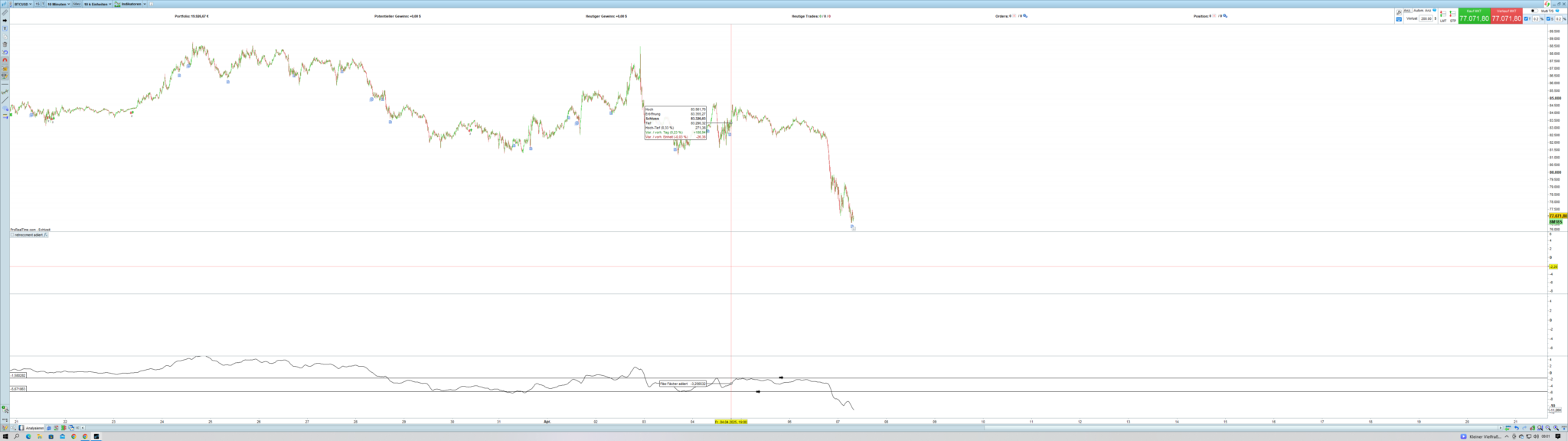
    wie kann ich programmieren, dass eine Trendlinie oder Widerstandslinie im Indikator erkannt und automatisch gezeichnet wird – und diese dann auch im Chart dargestellt wird?

    Screenshot-179.png Screenshot-179.png
    #245668 quote
    Iván González
    Moderator
    Master
    Guten Morgen. Ich empfehle Ihnen, die Suchfunktion des Forums zu nutzen, um Beiträge zu finden, die Ihnen Ideen zur Programmierung des gesuchten Indikators geben. Wenn Sie zum Beispiel nach Trendlinien suchen, finden Sie Beiträge wie diese zwei:
    #245716 quote
    elviko
    Participant
    Junior
    Suche Funktion nichts brauchbares gefunden!!!! die links nicht brauchbar keine Ahnung was ich da machen muss  will ja mein indikatoren nutzen…..
    #245718 quote
    Iván González
    Moderator
    Master
    Sie müssen den Ausdruck drawsegment(x1,y,x2,y2) verwenden. Über die von mir bereitgestellten Links können Sie sich Beispiele zum Zeichnen von Trendlinien ansehen.
    #245729 quote
    elviko
    Participant
    Junior
    sorry verstehe nicht….. ich will mein Indikator nehmen  : Indikator Name (TEST) was muss ich ändern oder Sie verstehen mich nicht oder ich dich nicht….
    #245733 quote
    Iván González
    Moderator
    Master
    Ich glaube, ich verstehe dich nicht ganz … Ohne zu wissen, in welchem Indikator du eine Trendlinie berechnen möchtest, kann ich nicht viel mehr sagen als das, was ich bereits gesagt habe. Ich habe dir die obigen Links als Referenz gegeben, damit du sehen kannst, wie Trendlinien gezeichnet werden, und sie an deinen Code anpassen kannst. Es gibt keine Funktion, die automatisch Trendlinien zeichnet – du musst selbst die Punkte A(x1, y1) und B(x2, y2) finden, um dann die Linie zu zeichnen. Na ja, vielleicht kann dir jemand anderes weiterhelfen.
    #245734 quote
    elviko
    Participant
    Junior
    Puhhh ok danke ich versuchs
    #245735 quote
    JS
    Participant
    Senior

    Hallo,

    Vielleicht ist das ja etwas für Sie…

    Dieser Indikator zeichnet “Support & Resistance”…

    // https://www.prorealcode.com/topic/array-variables-availability-in-prorealtime/
    // (please do not remove the link above for future reference)
    // Example #1: support and resistance example, based on fractals points
    defparam drawonlastbaronly=true
    
    // --- settings
    fractalP = 10
    percent = 0.1
    barlimit = 500
    // --- end of settings
    
    //fractals
    cp=fractalP
    if high[cp] >= highest[(cp)*2+1](high) then //new fractal high found
    $TOPy[lastset($TOPy)+1] = high[cp] //store fractal value
    $TOPx[lastset($TOPx)+1] = barindex[cp] //store fractal barindex
    endif
    
    if low[cp] <= lowest[(cp)*2+1](low)  then //new fractal low found
    $BOTy[lastset($BOTy)+1] = low[cp] //store fractal value
    $BOTx[lastset($BOTx)+1] = barindex[cp] //stire fractal barindex
    endif
    
    if(islastbarupdate and isset($topy[0]) and isset($boty[0])) then
    //check points in a range of X percent
    for i = 0 to lastset($TOPy) do //loop through the tops
    for y = 0 to lastset($TOPy) do //check first top with other tops
    change=abs(($topy[y]-$topy[i])/$topy[i]) //percent range between the 2 tops
    if change<=percent/100 and barindex-$TOPx[y]<barlimit and $topx[i]<>$topx[y] then
    if close>min($topy[y],$topy[i]) then //define the color
    r=0
    g=255
    else
    r=255
    g=0
    endif
    //plot points at each tops
    DRAWPOINT($topx[i],$topy[i],2) COLOURED (r,g,0) BORDERCOLOR (r,g,0)
    DRAWPOINT($topx[y],$topy[y],2) COLOURED (r,g,0) BORDERCOLOR (r,g,0)
    midlevel=($topy[i]+$topy[y])/2
    //display the mid level price
    DRAWTEXT("#midlevel#", barindex+8, midlevel, monospaced, standard, 14)
    //plot the zone
    drawrectangle(min($topx[y],$topx[i]),$topy[y],barindex,$topy[i]) coloured(r,g,50,50) bordercolor(r,g,0)
    endif
    next
    next
    for i = 0 to lastset($BOTy) do //loop through the bottoms
    for y = 0 to lastset($BOTy) do //check first bottom with other bottoms
    change=abs(($boty[y]-$boty[i])/$boty[i]) //percent range between the 2 bottoms
    if change<=percent/100 and barindex-$BOTx[y]<barlimit and $BOTx[i]<>$BOTx[y] then
    if close<max($boty[y],$boty[i]) then //define the color
    r=255
    g=0
    else
    r=0
    g=255
    endif
    DRAWPOINT($botx[i],$boty[i],2) COLOURED (r,g,0) BORDERCOLOR (r,g,0)
    DRAWPOINT($botx[y],$boty[y],2) COLOURED (r,g,0) BORDERCOLOR (r,g,0)
    midlevel=($boty[i]+$boty[y])/2
    DRAWTEXT("#midlevel#", barindex+8, midlevel, monospaced, standard, 14)
    drawrectangle(min($botx[y],$botx[i]),$boty[y],barindex,$boty[i]) coloured(r,g,50,50) bordercolor(r,g,0)
    endif
    next
    next
    endif
    
    return

    Iván González thanked this post
    Scherm­afbeelding-2025-04-08-om-20.20.53.png Scherm­afbeelding-2025-04-08-om-20.20.53.png
    #245738 quote
    elviko
    Participant
    Junior
    Danke für eure Hilfe
    JS thanked this post
    #245757 quote
    elviko
    Participant
    Junior
    Aber wie programmiere ich das mein Indikator Automasiert. Trendlinen Zeichenet  im Indikator…. mein Indikator heisst Beispiel : Test 1   Soll nicht am Chart im Chartbild sondern im indikator… Ein Programmmier beispiel wäre super
    #245952 quote
    elviko
    Participant
    Junior
    ????????
Viewing 11 posts - 1 through 11 (of 11 total)

  • You must be logged in to reply to this topic.

Indikator trendline zeichen


ProBuilder: Indikatoren & Custom Tools

New Reply
Author
author-avatar
elviko @elviko Participant
Summary

This topic contains 10 replies,
has 3 voices, and was last updated by elviko

10 months, 2 weeks ago.

Topic Details
Forum: ProBuilder: Indikatoren & Custom Tools
Language: German
Started: 04/07/2025
Status: Active
Attachments: 2 files
Logo Logo
Loading...


