PRC Pure Price Act. Liquidität-Indikator

Viewing 3 posts - 1 through 3 (of 3 total)
  • Author
    Posts
  • #260466 quote
    HolgerRotter
    Participant
    Average

    Hallo zusammen,

    kann mir jemand helfen?

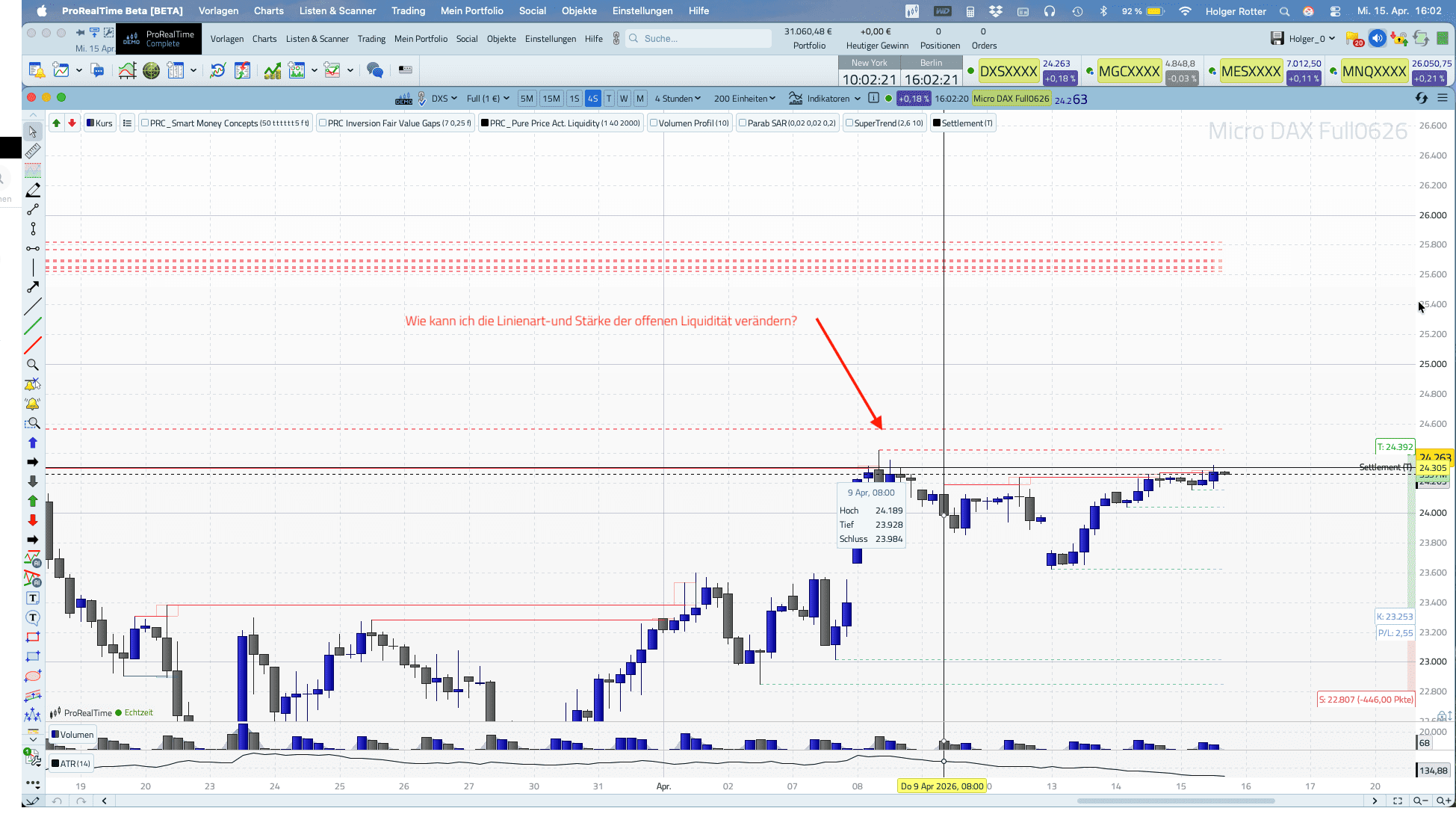
    Ich möchte nur die Linienart der NOCH OFFENEN Liquidität ändern.


    Danke und Gruß

    Holger

    PRC-Pure-Price-Act.-Liquidity.png PRC-Pure-Price-Act.-Liquidity.png
    #262138 quote
    Iván González
    Moderator
    Legend

    Guten Tag. Sie können die Codezeilen 108 und 143 ändern. Sie können Linienart und -stärke anpassen (https://www.prorealcode.com/documentation/style/).


    //---------------------------------------------------//
    //PRC_Pure Price Action Liquidity Sweeps (by LuxAlgo)
    //version = 0
    //23.09.25
    //Iván González @ www.prorealcode.com
    //---------------------------------------------------//
    // --- Configuración (Variables personalizables) --- //
    //---------------------------------------------------//
    // Detección: 1 = Corto Plazo, 2 = Plazo Intermedio, 3 = Largo Plazo
    //profundidad = 1
    // Límite de líneas de liquidez (máximos y mínimos) a mostrar en el gráfico
    //maxLineas = 40
    // Límite de barras para mantener un nivel de pivote activo en el gráfico
    //limiteBarras = 2000
    // Colores (formato RGB: Rojo, Verde, Azul, Opacidad)
    RedAlcista = 8
    GreenAlcista = 153
    BlueAlcista = 129
    AlphaAlcista = 255
    AlphaBarridoAlcista = 80
    RedBajista = 242
    GreenBajista = 54
    BlueBajista = 69
    AlphaBajista = 255
    AlphaBarridoBajista = 80
    //---------------------------------------------------//
    // -------------- Lógica de Pivotes ---------------- //
    //---------------------------------------------------//
    
    IF profundidad = 1 THEN // (Short Term)
       periodoPivote = 5
       offset = 2
    ELSIF profundidad = 2 THEN // (Mid Term)
       periodoPivote = 13
       offset = 6
    ELSE // profundidad = 3 (Long Term)
       periodoPivote = 21
       offset = 10
    ENDIF
    //---------------------------------------------------//
    // ----- Inicialización y Detección de Pivotes ----- //
    //---------------------------------------------------//
    
    ONCE pivHCount = 0
    ONCE pivLCount = 0
    
    ph = 0
    pl = 0
    
    // Detectar pivote de máximo (Pivot High)
    IF high[offset] = HIGHEST[periodoPivote](high) THEN
       ph = high[offset]
    ENDIF
    
    // Detectar pivote de mínimo (Pivot Low)
    IF low[offset] = LOWEST[periodoPivote](low) THEN
       pl = low[offset]
    ENDIF
    
    // Almacenar nuevo pivote de máximo
    IF ph > 0 AND (pivHCount = 0 OR ph  $pivHPrc[max(0,pivHCount - 1)]) THEN
       $pivHPrc[pivHCount] = ph
       $pivHBix[pivHCount] = barindex - offset
       pivHCount = pivHCount + 1
    ENDIF
    
    // Almacenar nuevo pivote de mínimo
    IF pl > 0 AND (pivLCount = 0 OR pl  $pivLPrc[max(0,pivLCount - 1)]) THEN
       $pivLPrc[pivLCount] = pl
       $pivLBix[pivLCount] = barindex - offset
       pivLCount = pivLCount + 1
    ENDIF
    
    //---------------------------------------------------//
    // ------- Lógica de Procesamiento y Dibujo -------- //
    //---------------------------------------------------//
    
    IF ISLASTBARUPDATE THEN
       // --- PROCESAMIENTO DE PIVOTES DE MÁXIMOS (BARRIDOS BAJISTAS)
       lineasDibujadasH = 0
       FOR i = pivHCount - 1 DOWNTO 0
          IF lineasDibujadasH >= maxLineas THEN
             BREAK
          ENDIF
          IF barindex - $pivHBix[i]  $pivHPrc[i] THEN
                   esMitigado = 1
                   BREAK
                ENDIF
                IF high[barindex-j] > $pivHPrc[i] AND close[barindex-j] = maxLineas THEN
             BREAK
          ENDIF
          IF barindex - $pivLBix[i] < limiteBarras THEN
             esMitigado = 0
             esBarrido = 0
             indiceBarrido = -1
             minimoBarrido = 0
             FOR j = $pivLBix[i] + 1 TO barindex
                IF close[barindex-j] < $pivLPrc[i] THEN
                   esMitigado = 1
                   BREAK
                ENDIF
                IF low[barindex-j]  $pivLPrc[i] THEN
                   esBarrido = 1
                   indiceBarrido = j
                   minimoBarrido = low[barindex-j]
                   BREAK
                ENDIF
             NEXT
             IF esMitigado = 0 THEN
                lineasDibujadasL = lineasDibujadasL + 1
                IF esBarrido THEN
                   DRAWSEGMENT($pivLBix[i], $pivLPrc[i], indiceBarrido, $pivLPrc[i]) STYLE(Line, 1) COLOURED(RedAlcista,GreenAlcista,BlueAlcista,AlphaAlcista)
                   DRAWRECTANGLE(indiceBarrido - 1, $pivLPrc[i], indiceBarrido + 1, minimoBarrido) COLOURED(RedAlcista,GreenAlcista,BlueAlcista,AlphaBarridoAlcista)
                ELSE
                   DRAWSEGMENT($pivLBix[i], $pivLPrc[i], barindex, $pivLPrc[i]) STYLE(dottedLine, 1) COLOURED(RedAlcista,GreenAlcista,BlueAlcista,AlphaBarridoAlcista)
                ENDIF
             ENDIF
          ENDIF
       NEXT
    ENDIF
    //---------------------------------------------------//
    RETURN
    
    
    #262142 quote
    HolgerRotter
    Participant
    Average

    Danke für die Info.

    Ich habe das bereits mit ChatGPT gelöst.

Viewing 3 posts - 1 through 3 (of 3 total)

  • You must be logged in to reply to this topic.

PRC Pure Price Act. Liquidität-Indikator


ProBuilder: Indikatoren & Custom Tools

New Reply
Author
Summary

This topic contains 2 replies,
has 2 voices, and was last updated by HolgerRotter
1 day, 5 hours ago.

Topic Details
Forum: ProBuilder: Indikatoren & Custom Tools
Language: German
Started: 04/23/2026
Status: Active
Attachments: 1 files
Logo Logo
Loading...