Indicatore Engulfing su candlestick

Viewing 14 posts - 1 through 14 (of 14 total)
  • Author
    Posts
  • #177108 quote
    davidator
    Participant
    Junior

    Ciao,

    Dopo una ricerca, senza aver trovato ciò che cerco, apro questo post.

    Mi serve un indicatore che mi segnali sulle candele la presenza di un Engulfing. Il pattern è valido se la candela chiude oltre l’intera candela precedente, e non solo il body.

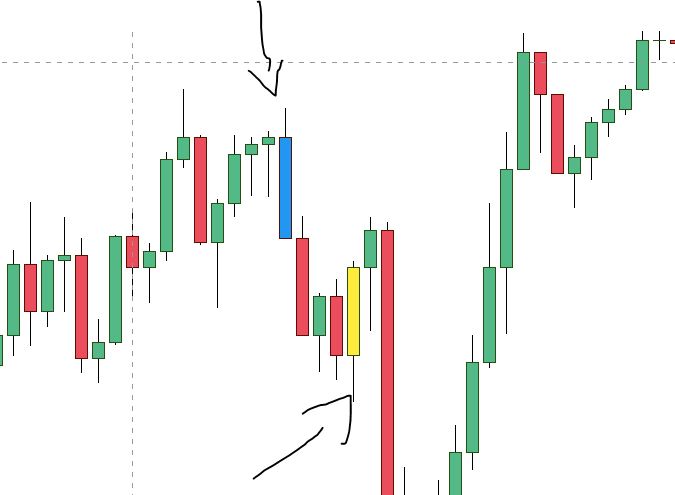
    Allego uno screenshoot di quello che uso su Tradingview.

    Grazie mille

    engulfing.jpg engulfing.jpg
    #177115 quote
    robertogozzi
    Moderator
    Master

    Dove deve aprire?

    #177121 quote
    davidator
    Participant
    Junior

    Che intendi? Il prezzo, a prescindere dall’apertura, deve violare il minimo della candela precedente e chiudere ad un prezzo maggiore del massimo, o viceversa.

    Spero di essere stato chiaro.

    Ti ringrazio in anticipo per l’aiuto

    #177130 quote
    robertogozzi
    Moderator
    Master

    Se deve chiudere ad un prezzo > massimo, deve anche aprire ad un prezzo < al minimo (nel caso di bullish engulfing)? Te lo chiedo perché la definizione standard di ENGULFING prevede che solo i corpi siano presi in considerazione. Ad ogni modo te la faccio con (sempre esempio bullish) apertura < minimo prec. e chiusura > massimo prec:

    Bullish = close > open
    Bearish = close < open
    Engulf  = (max(open,close) > high[1]) AND (min(open,close) < low[1])
    BullEng = Bullish AND Bearish[1] AND Engulf
    BearEng = Bearish AND Bullish[1] AND Engulf
    IF BullEng THEN
       DrawCandle(Open,High,Low,Close) coloured(255,255,0,255) //Giallo
    ELSIF BearEng THEN
       DrawCandle(Open,High,Low,Close) coloured(0,0,255,255)   //Blù
    ENDIF
    RETURN

    Il colore è BLU per quelle ribassiste e GIALLO per quelle rialziste, come nella tua foto.
    Tabella dei colori R,G,B (COLOURED prevede un quarto parametro opzionale che è la trasparenza):
    Tabella dei Colori

    #177132 quote
    davidator
    Participant
    Junior

    Si, la definizione classica prevede solo i corpi.

    Creo l’indicatore usando il codice, provo ad applicarlo al grafico, o al prezzo, ma non succede niente.

    Cosa sbaglio?

    #177140 quote
    robertogozzi
    Moderator
    Master

    Occorre che tu guardi qualche video sul canale di ProRealTime Italia o qui sul forum, sugli indicatori. Sono cose molto emplici, sono video di pochissimi minuti.

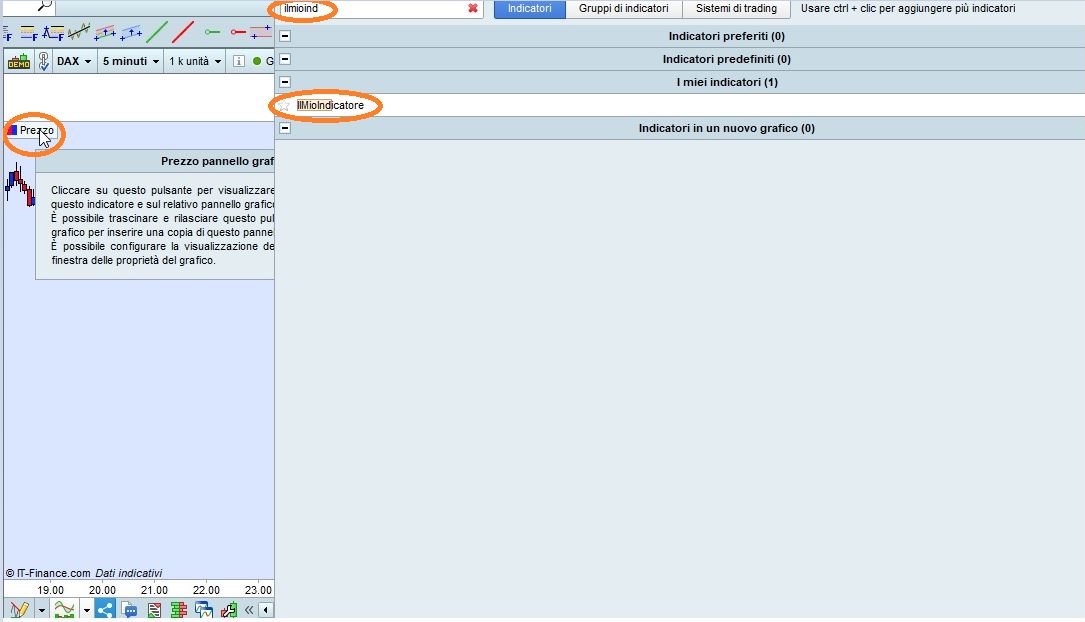
    Ti allego il file ITF (contiene il codice dell’indicatore) che devi importare tra gli indicatori della piattaforma (ProBuilder), dopodiché lo aggiungi SUL prezzo come indicato sulla foto allegata.

    Questi sono i 3 passi necessari (dopo che hai importato il file):

    • clicca sulla voce PREZZO del grafico (poco sotto l’angolo superiore sinistro) e scegli AGGIUNGI INDICATORE
    • indica il nome, nella casella di ricerca in alto (se non lo vedi nell’elenco), in modo che ti compaia
    • clicca sul nome dell’indicatore che hai importato.
    IlMioIndicatore.itf x-4.jpg x-4.jpg
    #177148 quote
    davidator
    Participant
    Junior

    Ho già creato e/o importato diversi indicatori e so come aggiungerli al grafico.

    Seguo esattamente le tue indicazioni, ma quando aggiungo questo indicatore non succede nulla.

    #177151 quote
    robertogozzi
    Moderator
    Master

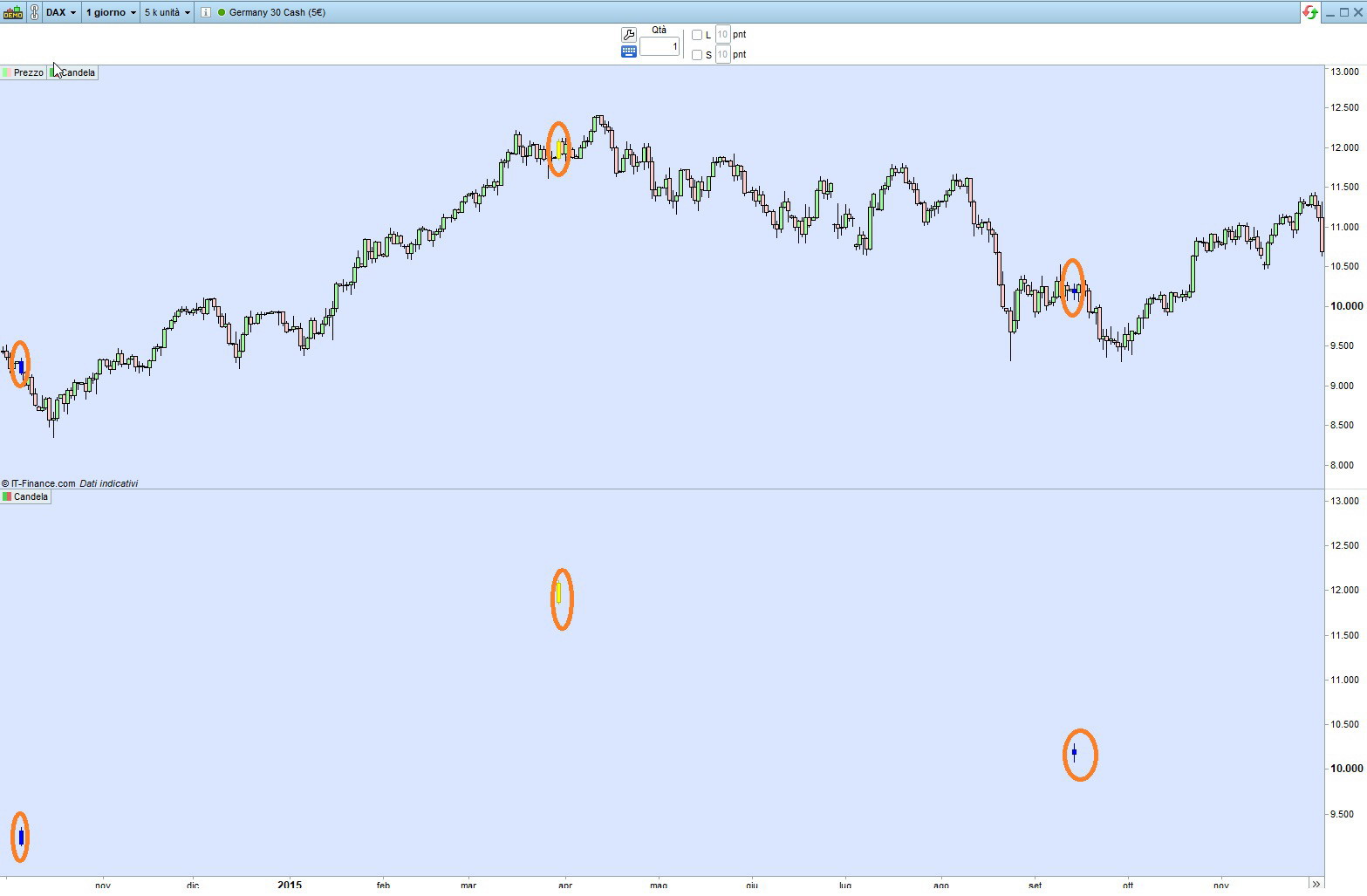
    Non succede niente di particolare, ti colora in GIALLO o BLU’ le candele (poche) che rientrano nella condizione.

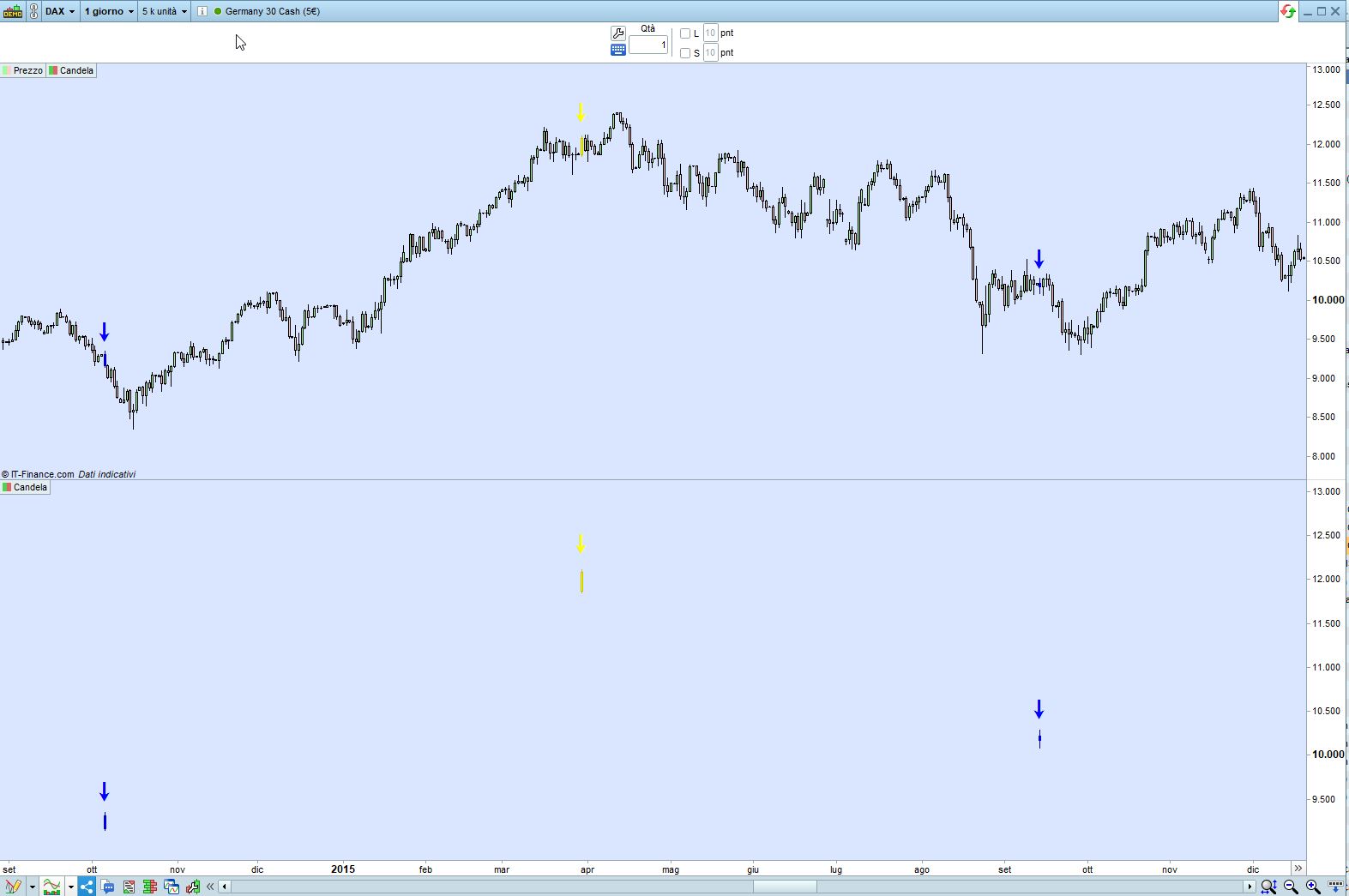
    La foto l’ho fatta al grafico DAX, Daily, e copre il periodo che fa dall’1/10/2014 al 30/11/2015.

    Puoi anche mettere l’indicatore sotto il grafico, in tal caso ti fa vedere solo le candele che rientrano nella condizione. Sul grafico è un pò più difficile, visto che sono poche.

    Questa versione ti stampa anche una freccia sopra la candela (vedi la seconda foto):

    Bullish = close > open
    Bearish = close < open
    Engulf  = (max(open,close) > high[1]) AND (min(open,close) < low[1])
    BullEng = Bullish AND Bearish[1] AND Engulf
    BearEng = Bearish AND Bullish[1] AND Engulf
    IF BullEng THEN
       DrawCandle(Open,High,Low,Close)                  coloured(255,255,0,255) //Giallo
       DrawText("↓",BarIndex,high+range,Dialog,Bold,30) coloured(255,255,0,255)
    ELSIF BearEng THEN
       DrawCandle(Open,High,Low,Close)                  coloured(0,0,255,255)   //Blù
       DrawText("↓",BarIndex,high+range,Dialog,Bold,30) coloured(0,0,255,255)
    ENDIF
    RETURN
    Engulfing-1.jpg Engulfing-1.jpg Engulfing2.jpg Engulfing2.jpg
    #177155 quote
    davidator
    Participant
    Junior

    Si, non mi aspettavo niente di spettacolare, ma che si colorassero le candele 😀

    Credo di aver capito che il codice non rispecchia ciò che ho in mente, probabilmente mi sono spiegato male.

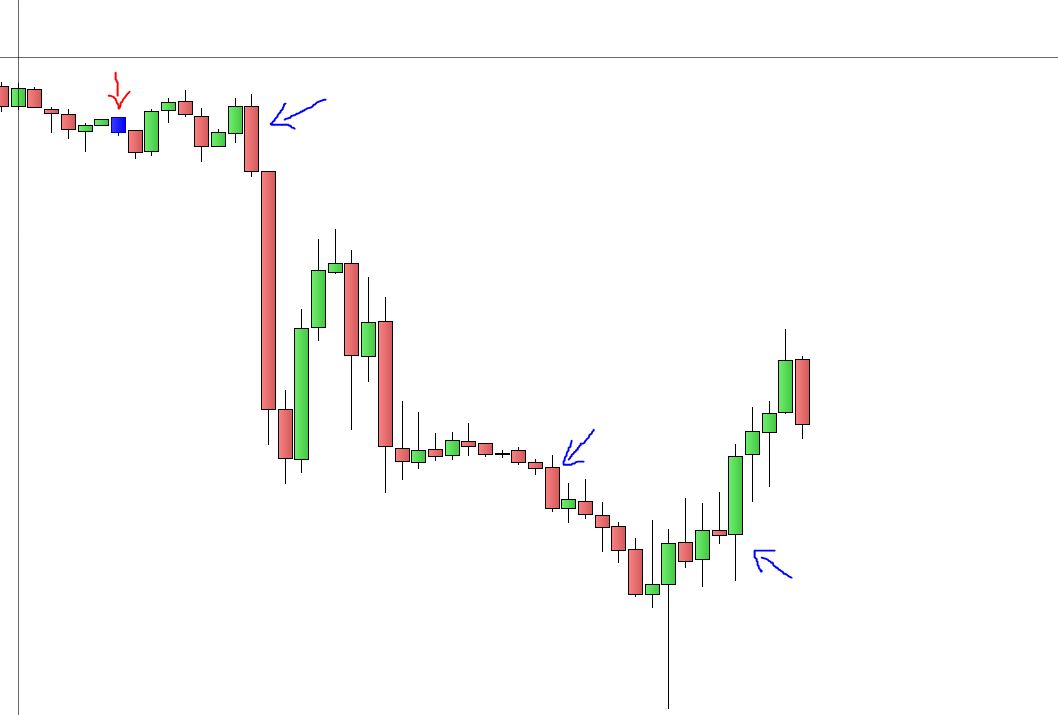
    Ecco uno screenshot in cui vi sono due esempi, che non vengono rilevati dal tuo codice.

    Potrei copiare il codice che uso su Tradingview? E’ possibile convertirlo?


    Grazie!

    engulfing-2.jpg engulfing-2.jpg
    #177163 quote
    robertogozzi
    Moderator
    Master

    Puoi postare il codice, vedo se riesco a capire le condizioni.

    #177175 quote
    davidator
    Participant
    Junior

    Grazie! Eccolo, spero non sia troppo lungo

    ——————————————————————

    study(“Engulfing Look-back Alert”, overlay=true)

    //User Defined Inputs

    //TimeFrame to display engulfing candles on
    isMonthly = iff (input(title=”Display on Monthly TF?”, type=input.bool, defval=true), “M”, na)
    isWeekly = iff (input(title=”Display on Weekly TF?”, type=input.bool, defval=true), “W”, na)
    isDaily = iff (input(title=”Display on Daily TF?”, type=input.bool, defval=true), “D”, na)
    is4H = iff (input(title=”Display on 4H TF?”, type=input.bool, defval=true), “240”, na)
    is1H = iff (input(title=”Display on 1H TF?”, type=input.bool, defval=true), “60”, na)
    is15M = iff (input(title=”Display on 15M TF?”, type=input.bool, defval=true), “15”, na)

    //Display engulfing on current timeframe?
    timeframeEnabled = (timeframe.period==isMonthly or timeframe.period==isWeekly or timeframe.period==isDaily or timeframe.period==is4H or timeframe.period==is1H or timeframe.period==is15M)

    //===============================================
    //BULLISH ENGULFING
    //===============================================

    //# of bars back (left) to compare the Engulfing Candle’s high and low
    bullPeriodLookBackHighs = input(title=”BullEng Highs Look-back period”, minval=1, type=input.integer, defval=1)
    bullPeriodLookBackLows = input(title=”BullEng Lows Look-back period”, minval=1, type=input.integer, defval=1)

    // Calculate highest high comparing 1st historic candle with the look-back period
    bullHiHighs = highest(high, bullPeriodLookBackHighs)[2]

    // Calculate lowest low comparing 1st historic candle with the look-back period
    bullLowLows = lowest(low, bullPeriodLookBackLows)[2]

    //Candle must close above prev candle high AND candle low is lower than the lowest low for the look-back period (bullLowLows) AND candle high is higher than look-back period for the highest high (bullHiHighs)
    isBullishEngulfing() =>
    close[1] > high [2] and low[1] < bullLowLows and high[1] > bullHiHighs

    foundBullish = isBullishEngulfing()

    // Display on chart
    plotshape(foundBullish and timeframeEnabled,title=”BullEng Shape”, style=shape.triangleup, location=location.belowbar, color=#66ff00, text=”BullE”, size=size.auto, offset=-1)
    barcolor(foundBullish and timeframeEnabled? color.yellow : na, title=”BullEng Bar Colour”, offset=-1)

    //===============================================
    //BEARISH ENGULFING
    //===============================================

    //# of bars back (left) to compare the Engulfing Candle’s high and low
    bearPeriodLookBackHighs = input(title=”BearEng Highs Look-back period”, minval=1, type=input.integer, defval=1)
    bearPeriodLookBackLows = input(title=”BearEng Lows Look-back period”, minval=1, type=input.integer, defval=1)

    // Calculate highest high comparing 1st historic candle with the look-back period
    bearHiHighs = highest(high, bearPeriodLookBackHighs)[2]

    // Calculate lowest low comparing 1st historic candle with the look-back period
    bearLowLows = lowest(low, bearPeriodLookBackLows)[2]

    //Candle must close BELOW prev candle low AND candle high is higher than the highest high for the look-back period (bearHiHighs) AND candle low is lower than look-back period for the lowest low (bearLowLows)
    isBearishEngulfing() =>
    close[1] < low[2] and high[1] > bearHiHighs and low[1] < bearLowLows

    foundBearish = isBearishEngulfing()

    //Display on chart
    plotshape(foundBearish and timeframeEnabled, title=”BearEng Shape”, style=shape.triangledown, location=location.abovebar, color=color.red, text=”BearE”, size=size.auto, offset=-1)
    barcolor(foundBearish and timeframeEnabled? color.blue: na, title=”BearEng Bar Colour”, offset=-1)

    //===========================================
    //Display the current time-frame (in minutes) when the alert triggers
    //
    // Function below is courtesy of PineCoders MTF script
    // ————— Converts current “timeframe.multiplier” plus the TF into minutes of type float.
    f_resInMinutes() =>
    _resInMinutes = timeframe.multiplier * (
    timeframe.isseconds ? 1. / 60. :
    timeframe.isminutes ? 1. :
    timeframe.isdaily ? 1440. :
    timeframe.isweekly ? 10080. :
    timeframe.ismonthly ? 43800. : na)

    // Plot value of the marker’s number without disrupting indicator scale. This doesn’t plot anything in
    // CAVEAT: If multiple markers fire simultaneously, only one will be detected.
    markerNo = f_resInMinutes()
    plotchar(markerNo, “PeriodTF”, “”, location.top)

    //===============================================

    // Plot timeframe period in the alert
    alertcondition(foundBullish, title = “Bullish Eng”, message = ‘{{plot(“PeriodTF”)}} min ‘ + “BullEng”)
    alertcondition(foundBearish, title = “Bearish Eng”, message = ‘{{plot(“PeriodTF”)}} min ‘ + “BearEng”)
    alertcondition(open==close, title = “DOJI”, message = ‘{{plot(“PeriodTF”)}} min ‘ + ” Doji”)

    #177193 quote
    robertogozzi
    Moderator
    Master

    Questi sono alcune traduzioni di vari trovati su TradingView.

    Primo (fa riferimento solo ai corpi):

    longengf  = close[1] < open[1]
    shortengf = close[1] > open[1]
    longeng   = close > open[1] and longengf
    shorteng  = close < open[1] and shortengf
    if longeng then
       DrawText("E",BarIndex,high * 1.003,Dialog,Bold,12) coloured(0,128,0,255)
    elsif shorteng then
       DrawText("E",BarIndex,low * 0.997,Dialog,Bold,12) coloured(255,0,0,255)
    endif
    return

    Secondo (fa riferimento solo ai corpi):

    Bullish = close > open
    Bearish = close < open
    Body    = abs(close - open)
    // bullish engulfing
    bull1   = Body > Body[1]
    bull2   = close[1] > open
    bull3   = close > open[1]
    BullEng = Bullish AND Bearish[1] AND bull1 AND bull2 AND bull3
    // bearish engulfing
    bear1   = Body > Body[1]
    bear2   = open[1] >= close
    bear3   = open >= close[1]
    BearEng = Bullish[1] AND Bearish
    //
    if BullEng then
       DrawText("E",BarIndex,high * 1.003,Dialog,Bold,12) coloured(0,128,0,255)
    elsif BearEng then
       DrawText("E",BarIndex,low * 0.997,Dialog,Bold,12) coloured(255,0,0,255)
    endif
    return

    Terzo (fa riferimento solo ai corpi):

    // ENGULFING  (TradingView 3)
    //
    //https://www.tradingview.com/script/YrudGA12-Engulfing-Candle-Indicator/?utm_source=amp-version
    //
    bullishEngulfing = (open <= close[1]) and (open < open[1]) and (close > open[1])
    bearishEngulfing = (open >= close[1]) and (open > open[1]) and (close < open[1])
    if bullishEngulfing then
       DrawText("E",BarIndex,high * 1.003,Dialog,Bold,12) coloured(0,128,0,255)
    elsif bearishEngulfing then
       DrawText("E",BarIndex,low * 0.997,Dialog,Bold,12) coloured(255,0,0,255)
    endif
    return

    Il quarto, quello di cui hai postato il codice, credo sia quello che cerchi. E’ un engulfing molto particolare, basato anche sui periodi passati (per default 1, ma puoi cambiarlo tu con la variabile LookBack):

    // ENGULFING  (TradingView 4)  (Engulfing Look-back Alert)
    //
    //https://www.tradingview.com/script/lfEO7LvU-Engulfing-Look-back-Alert/
    //
    //Engulfing Candle Definition:
    //
    //- Bullish Engulfing: Trade BELOW the prior candle's LOW and CLOSE ABOVE the prior candle's HIGH.
    //  Previous candle can be an up ( bullish ) or a down ( bearish ) candle
    //- Bearish Engulfing: Trade ABOVE the prior candle’s HIGH and CLOSE BELOW the prior candle’s LOW.
    //  Previous candle can be an up ( bullish ) or a down ( bearish ) candle
    //
    //Features:
    //
    //- Set the look-back period for engulfing candle high and low -> default = 1; e.g. Did the bullish
    //  eng candle trade below the lows of the last 3 candles and trade above the highs of the last 4
    //  candles? Set the input values accordingly
    LookBack  = 1                                      //1  lookback period (default)
    bullHiHis = highest[LookBack](high[1])
    bullLoLos = lowest[LookBack](low[1])
    bearHiHis = highest[LookBack](high[1])
    bearLoLos = lowest[LookBack](low[1])
    //===============================================
    //BULLISH ENGULFING
    //===============================================
    //Candle must close above prev candle high AND candle low is lower than the lowest low for the
    //look-back period (bullLowLows) AND candle high is higher than look-back period for the highest
    //high (bullHiHighs)
    BullishEngulfing = (close > high[1]) and (low < bullLoLos) and (high > bullHiHis)
    //
    //===============================================
    //BEARISH ENGULFING
    //===============================================
    //Candle must close BELOW prev candle low AND candle high is higher than the highest high for the
    // look-back period (bearHiHighs) AND candle low is lower than look-back period for the lowest low
    // (bearLowLows)
    BearishEngulfing = (close < low[1]) and (high > bearHiHis) and (low < bearLoLos)
    //
    IF BullishEngulfing THEN
       DrawCandle(Open,High,Low,Close)                  coloured(255,255,0,255) //Giallo
       //DrawText("↓",BarIndex,high+range,Dialog,Bold,30) coloured(255,255,0,255)
    ELSIF BearishEngulfing THEN
       DrawCandle(Open,High,Low,Close)                  coloured(0,0,255,255)   //Blù
       //DrawText("↓",BarIndex,high+range,Dialog,Bold,30) coloured(0,0,255,255)
    ENDIF
    return

    Se vuoi stampare anche le frecce basta che togli i commenti dalle righe dove c’è l’istruzione DrawText.

    #177196 quote
    davidator
    Participant
    Junior

    Il quarto codice, quello che interessa a me, funziona perfettamente. Grazie ancora del supporto.

    Non so se questo è il posto giusto per chiedere, è possibile settare un allarme che mi avvisi ogni volta che l’engulfing si presenti?

    #177202 quote
    robertogozzi
    Moderator
    Master

    Un indicatore non può emettere suoni o altri avvisi se non stampare qualcosa sul grafico, una freccia, un certo colore o una frase.

    Però si può trasformare l’indicatore in  uno screener che puoi vedere nel supporto ProScreener https://www.prorealcode.com/topic/unusual-engulfing-screener/

    Giovanni Puricelli thanked this post
Viewing 14 posts - 1 through 14 (of 14 total)
  • You must be logged in to reply to this topic.

Indicatore Engulfing su candlestick


ProBuilder: Indicatori & Strumenti Personalizzati

New Reply
Author
author-avatar
davidator @davidator Participant
Summary

This topic contains 13 replies,
has 2 voices, and was last updated by robertogozzi
4 years, 6 months ago.

Topic Details
Forum: ProBuilder: Indicatori & Strumenti Personalizzati
Language: Italian
Started: 09/09/2021
Status: Active
Attachments: 6 files
Logo Logo
Loading...