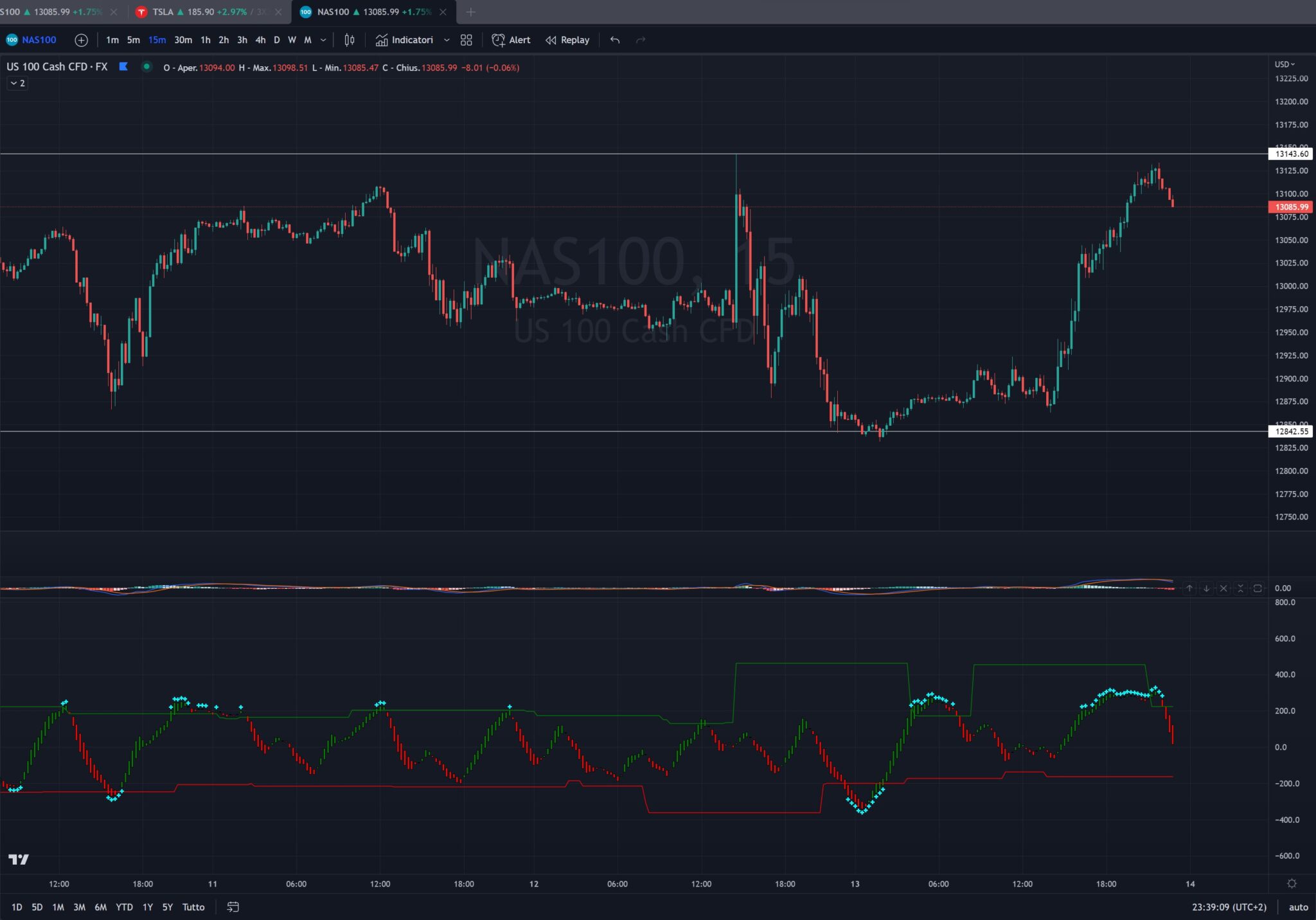
Hi i tried to translate an indicator from Pinescript to ProBuilder, I think i mixed up something :p anyone wants to help?
Here the original code in pinescript
study("Matrix Series",shorttitle="MS",precision=1)
Smoother=input(5)
nn = Smoother
//--Sup/Res Detail
SupResPeriod = input(50)
SupResPercentage =input(100)
PricePeriod = input(16)
ob = input(200,title="Overbought")
os = input(-200,title="Oversold")
OBOS= input(type=bool,defval=false,title="Show OB/OS")
dynamic=input(true,title="Dynamic zones")
ys1 = ( high + low + close * 2 ) / 4
rk3 = ema( ys1, nn )
rk4 = stdev(ys1, nn)
rk5 = (ys1 - rk3 ) * 200 / rk4
rk6 = ema( rk5, nn )
up = ema(rk6, nn )
down = ema( up, nn )
Oo = iff( up < down, up, down )
Hh = Oo
Ll = iff( up < down, down, up )
Cc = Ll
vcolor= Oo > Cc ? red : up > down? green:red

plotcandle(Oo,Hh,Ll,Cc,color=vcolor)


//-------S/R Zones------
Lookback = SupResPeriod
PerCent = SupResPercentage
Pds = PricePeriod

C3 = cci(close,Pds )

Osc = C3
Value1 = Osc
Value2 = highest( Value1, Lookback )
Value3 = lowest( Value1, Lookback )
Value4 = Value2 - Value3
Value5 = Value4 * ( PerCent / 100 )
ResistanceLine = Value3 + Value5
SupportLine = Value2 - Value5
plot(dynamic?ResistanceLine:na,color=green,transp=0)
plot(dynamic?SupportLine:na,color=red,transp=0)

//--Overbought/Oversold/Warning Detail
UPshape = up > ob and up>down ? highest(up,1) + 20:up > ob and up<down?highest(down,1) + 20:na
DOWNshape = down < os and up>down ? lowest(down,1) - 20:down < os and up<down?lowest(up,1) - 20 :na
plot(UPshape,style=cross,color=aqua,linewidth=2,transp=0)
plot(DOWNshape,style=cross,color=aqua,linewidth=2,transp=0)
x1=OBOS?ob:false
x2=OBOS?os:false
hline(x1)
hline(x2)
//http://www.wisestocktrader.com/indicators/2739-flower-indicator
and here my translation :p
// Conversion from Pine Script

Smoother = 5
nn = easier

// Details Sup/Res
SupResPeriod = 50
SupResPercentage = 100
PricePeriod = 16
ob = 200
os = -200
OBOS = 0
dynamic = 1
ys1 = (high + low + close * 2) / 4
rk3 = ExponentialAverage[nn](ys1)
rk4 = std[nn](ys1)
rk5 = (ys1 - rk3) * 200 / rk4
rk6 = ExponentialAverage[nn](rk5)
su = ExponentialAverage[nn](rk6)
down = ExponentialAverage[nn](on)

If up < down then
Oo = on
Ll = down
elsif up > down then
Oo = below
Ll = on
endif
Hh = Oo
Cc = Ll


// Support and resistance zones
Lookback = SupResPeriod
Percentage = SupResPercentage
Pds = PricePeriod

C3 = CCI[PricePeriod](close)

Osc = C3
Value1 = Osc
Value2 = highest[Lookback](Value1)
Value3 = Lowest[Lookback](Value1)
Value4 = Value2 - Value3
Value5 = Value4 * (percentage / 100)
ResistanceLine = value 3 + value 5
SupportLine = Value2 - Value5

If up > ob E up > down then
UPshape = Maximum[1](up) + 20
elsif up > ob and up < down then
UPshape = highest[1](down) + 20
other
UPforma = -1
endif

If down < os And up > down then
DOWNforma = lowest[1](down) - 20
elsif down < os And up < down then
DOWNforma = lowest[1](up) - 20
other
DOWNform = -1
endif

If OBOS then
x1 = ob
other
x1 = -1
endif

If OBOS then
x2 = os
other
x2 = -1
endif


// Draw support and resistance lines if 'dynamic' is true
IF dynamic THEN
DRAWLINE(barindex, ResistanceLine, barindex, ResistanceLine) COLOURED(0, 255, 0)
DRAWLINE(barindex, SupportLine, barindex, SupportLine) COLOURED(255, 0, 0)
ENDIF

// Draw ob/os lines if 'OBOS' is true
IF OBOS THEN
DRAWLINE(barindex, x1, barindex, x1) COLOURED(0, 0, 0, 50)
DRAWLINE(barindex, x2, barindex, x2) COLOURED(0, 0, 0, 50)
ENDIF

// Draw an "X" above the overbought zone if 'UPshape' is different from -1
IF UPshape <> -1 THEN
DRAWTEXT("X", barindex[1], UPshape) COLOURED(0, 255, 255, 0) // Add barindex[1] to correctly position the "X"
ENDIF

// Draw an "X" under the oversold if 'DOWNshape' is different from -1
IF DOWNshape <> -1 THEN
DRAWTEXT("X", barindex[1], DOWNshape) COLOURED(0, 255, 255, 0) // Add barindex[1] to correctly position the "X"
ENDIF
// Use this row to return candles and color
RETURN Oo AS "Oo", Hh AS "Hh", Ll AS "Ll", Cc AS "Cc"