


HMA bi coloured – how to do it

Viewing 4 posts - 1 through 4 (of 4 total)

  • Author
    Posts
  • #28713 quote
    mastromastro
    Participant
    New

    Hi guys,
    sorry to bother you again, but as I said in my previous topic (that was the very first one), I am an absolute beginner ….
    I am currently using the Hull Moving Average indicator that I coded after the code which is available in the prorealcode library.
    The code is like this

    Period=20
    inner = 2*weightedaverage[ round(  Period/2  )  ](close)-weightedaverage[Period](close)
    
    HMA=weightedaverage[ round(  sqrt(Period)  ) ](  inner  )
    
    return HMA COLOURED(255,255,255) as "Hull Moving Average"


    as you can see, the line will be visible in the screen as a “white line”, regardless its own trend ..
    It would he nice and helpful if the line could be colored in green, when the HMA is indicating a trend up, while colored in red when indicating a trend down.
    Can you plese help me showing me how to modify the script so that the line shows up green or red according to the trend going on ?

    Thanks again for your help !
    Bye

    #28715 quote
    mastromastro
    Participant
    New

    Hoops … it seems I have made a mess when formatting the topic ….Sorry.
    However I think you can tell the question out of the code :-)))
    Ciao

    #28779 quote
    NicolasNicolas
    Keymaster
    Legend

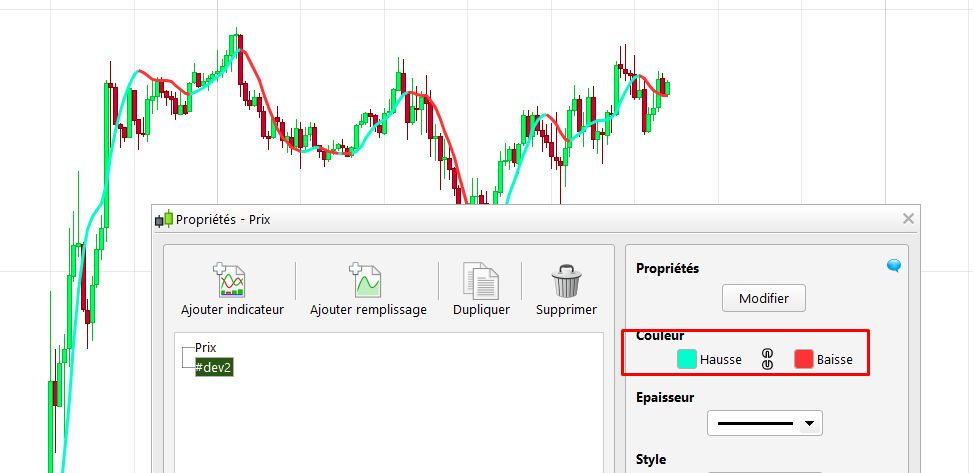
    Firstly, remove the coloured function in the code:

    return HMA as "Hull Moving Average"

    Then you only need to change the color of the HMA according to its slope (up/down), in the indicator parameters window (attached screenshot).

    hma-slope-change-colour.png hma-slope-change-colour.png
    #28793 quote
    mastromastro
    Participant
    New

    Ciao Nicolas,
    that’s simply great !!!! Thank you so much
    The more I get accustomed to ProRealTime, the more I like it and this is also because of your kind help !

    Have a nice day,

    Mario

Viewing 4 posts - 1 through 4 (of 4 total)
  • You must be logged in to reply to this topic.

ProRealAI ProRealAI New

Stuck on this ProBuilder code?

Describe what this topic is trying to build, in plain English, and ProRealAI writes the ProRealTime™ indicator, screener or system for you.

Available in 7 languages
Try ProRealAI

HMA bi coloured – how to do it


ProBuilder: Indicators & Custom Tools

New Reply
Author
author-avatar
mastro @mastro Participant
Summary

This topic contains 3 replies,
has 2 voices, and was last updated by mastromastro

9 years, 6 months ago.

Topic Details
Forum: ProBuilder: Indicators & Custom Tools
Language: English
Started: 03/15/2017
Status: Active
Attachments: No files
ProRealCode ProRealCode
Loading...

