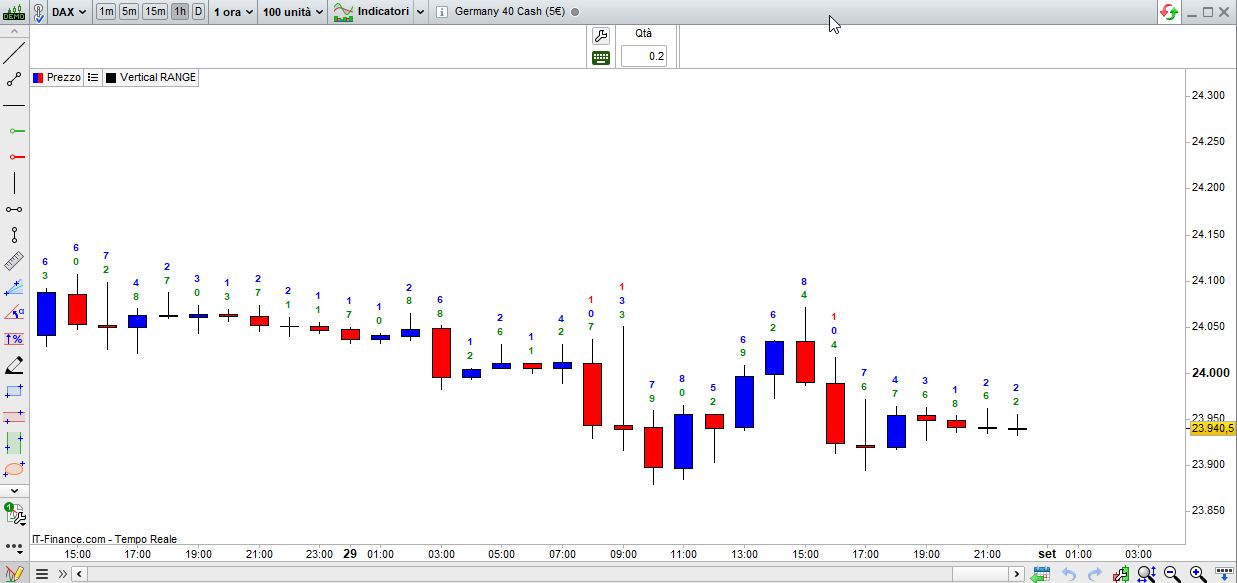
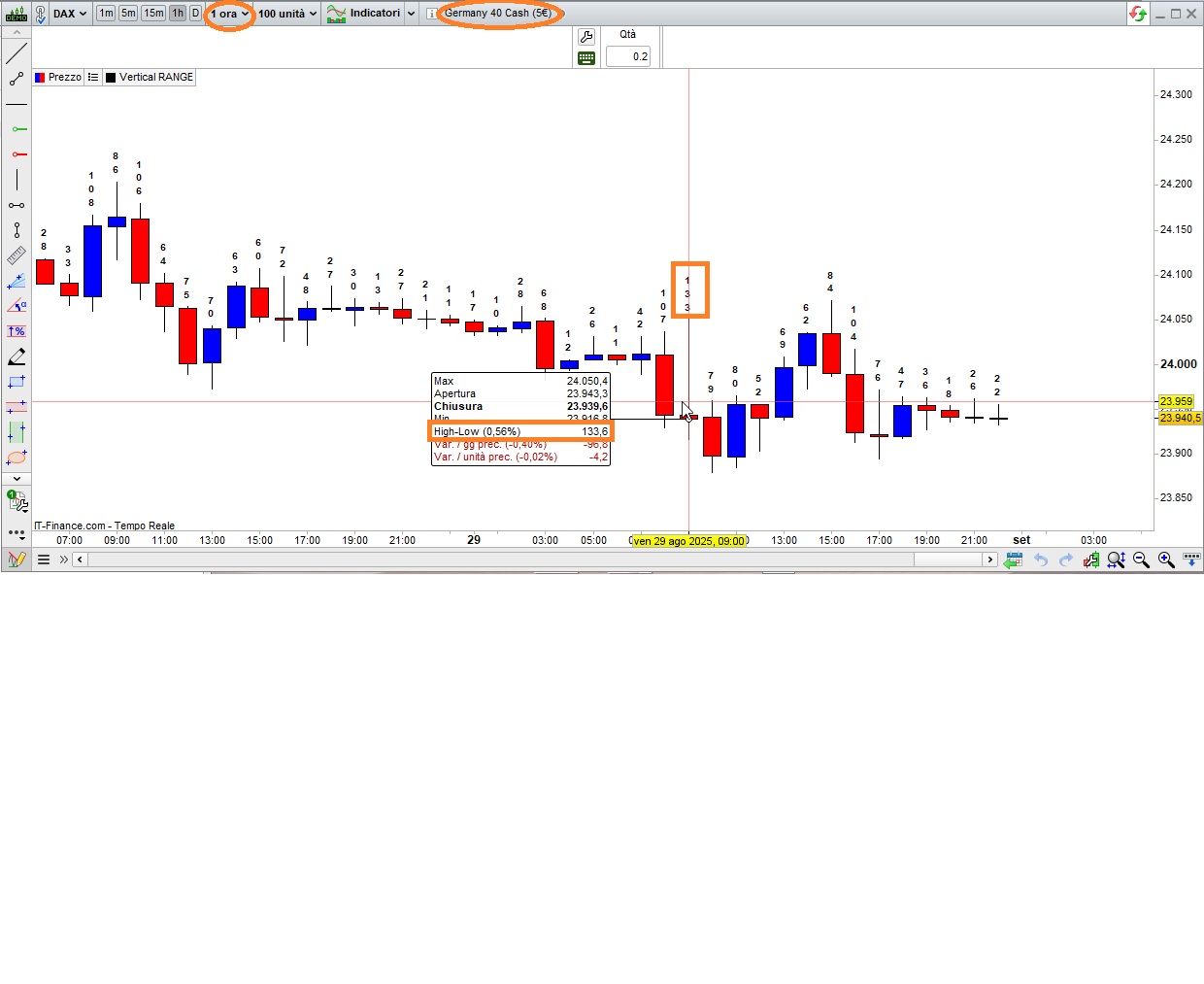
High-low difference displayed above candle

Viewing 5 posts - 1 through 5 (of 5 total)

  • Author
    Posts
  • #250218 quote
    segie
    Participant
    Senior

    Hi,

    Please help with an indicator showing the High-low difference value displayed just above the relevant candle.

    Shown vertically not horizontally.

    Text size to be the with of the candle. Trying to prevent lapping of text

    Regards,
    Segie

    #250220 quote
    robertogozzi
    Moderator
    Master

    There you go:

    //DEFPARAM DrawOnLastBarOnly = true
    thisRANGE = range / PipSize
    Offset    = 40*PipSize
    range1    = floor(thisRANGE / 1000,0)
    thisRANGE = thisRANGE mod 1000
    range2    = floor(thisRANGE / 100,0)
    thisRANGE = thisRANGE mod 100
    range3    = floor(thisRANGE / 10,0)
    range4    = thisRANGE mod 10
    IF range1 > 0 THEN
       DrawText("#range1#",BarIndex,high + Offset*2.0,dialog,bold,10)
    ENDIF
    IF range2 > 0 OR (range2 = 0 and range1 > 0) THEN
       DrawText("#range2#",BarIndex,high + Offset*1.5,dialog,bold,10)
    ENDIF
    IF range3 > 0 OR (range3 = 0 and (range2 + range1 > 0)) THEN
       DrawText("#range3#",BarIndex,high + Offset*1.0,dialog,bold,10)
    ENDIF
    DrawText("#range4#",BarIndex,high + Offset*0.5,dialog,bold,10)
    RETURN

    this will plot the range (high – low) with NO decimal point, above each candle. To plot it only on the last candle, uncomment line 1.

    Line 3 is the value to space the lines from each orther, this is for DAXm, 1-hour TF; on DAX, Daily TF, 100 seems more appropriate. So you will have to adjust it yourself.

    segie thanked this post
    #250222 quote
    robertogozzi
    Moderator
    Master

    With this version you can easily change the character size (default is 10) and the colour for each digit (transparency included):

    //DEFPARAM DrawOnLastBarOnly = true
    CharSize  = 10   // size of characters (digits)
    t         = 255  // Transparency (or Alpha)
    thisRANGE = range / PipSize
    Offset    = 30*PipSize
    range1    = floor(thisRANGE / 1000,0)
    thisRANGE = thisRANGE mod 1000
    range2    = floor(thisRANGE / 100,0)
    thisRANGE = thisRANGE mod 100
    range3    = floor(thisRANGE / 10,0)
    range4    = thisRANGE mod 10
    IF range1 > 0 THEN
       DrawText("#range1#",BarIndex,high + Offset*2.0,dialog,bold,CharSize) coloured("Black",t)
    ENDIF
    IF range2 > 0 OR (range2 = 0 and range1 > 0) THEN
       DrawText("#range2#",BarIndex,high + Offset*1.5,dialog,bold,CharSize) coloured("Red",t)
    ENDIF
    IF range3 > 0 OR (range3 = 0 and (range2 + range1 > 0)) THEN
       DrawText("#range3#",BarIndex,high + Offset*1.0,dialog,bold,CharSize) coloured("Blue",t)
    ENDIF
    DrawText("#range4#",BarIndex,high + Offset*0.5,dialog,bold,CharSize)    coloured("Green",t)
    RETURN
    Iván González and segie thanked this post
    #250287 quote
    segie
    Participant
    Senior

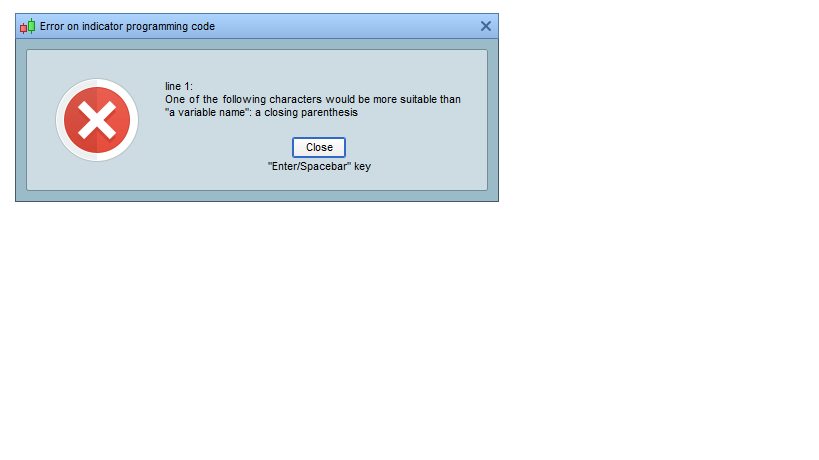
    Please see attached error

    #250306 quote
    robertogozzi
    Moderator
    Master

    Import the ITF file (or try again doing Copy & Paste).

    segie thanked this post
Viewing 5 posts - 1 through 5 (of 5 total)
  • You must be logged in to reply to this topic.

High-low difference displayed above candle


ProBuilder: Indicators & Custom Tools

New Reply
Author
author-avatar
segie @segie Participant
Summary

This topic contains 4 replies,
has 2 voices, and was last updated by robertogozzi
5 months ago.

Topic Details
Forum: ProBuilder: Indicators & Custom Tools
Language: English
Started: 08/31/2025
Status: Active
Attachments: 5 files
Logo Logo
Loading...