







Help for graphical indicators development version 10.3

Viewing 15 posts - 16 through 30 (of 42 total)
  • Author
    Posts
  • #29335 quote
    Stevie B
    Participant
    New

    Sorry for the misunderstanding , but in the example screen shot the arrow and the circle are drawn by hand on the 1 hour chart , and  they show up on the 5 mins …

    My question is :

    Can a segment drawn using the code shown running on the 1 hour chart show through on lower time frames , in the same way it can manually…

    I assume it cannot be done ?

    Thanks

    #29353 quote
    Nicolas
    Keymaster
    Master

    No it cannot be done by code. A graphical object drawn by code is an indicator, it will only show up on the chart where it is attached to. Hope I’m clear this time 🙂

    #29361 quote
    Stevie B
    Participant
    New

    Yes, understand now.. Thanks for clarifying this for me.

    #29503 quote
    Elsborgtrading
    Participant
    Veteran

    Hi Nicolas, in addition to my pending post in the Indicator section, I have a problem I hope you can help me with- because after two days I have given up. I discovered that the DRAWSEGMENT is not updating Live, but stops the moment you put on the indicator, I suspect it’s the same problem with the drawrectangle(?) though I haven’t been able to live test the drawrectangle between 8 and 9 am.  I also change the code a bit from the pending post- I think we need to solve this issue first before releasing the indicator post. Also the stop time is not correct. if time 135000 the yesterdays draw of the segment stops at 220000?

    Cheers Kasper


    defparam drawonlastbaronly = false
    once upper=0
    once lower=0
    
    starttime = 080000
    endtime = 090000
    
    If Time = endtime then
    upper=highest[12](high)
    lower=lowest[12](low)
    dif=round(abs((lower-upper)*pipsize*pointvalue))
    //bars=barindex
    DRAWTEXT("#dif# pips", barindex-6, upper+10,SansSerif,bold, 16)
    DRAWARROWDOWN (barindex-6,upper+5)
    DRAWARROWup (barindex-6,upper+15)
    DRAWTEXT("#upper#", barindex-6, upper,SansSerif,bold, 16)
    DRAWTEXT("#lower#", barindex-6, lower,SansSerif,bold, 16)
    endif
    //if time >=080500 and Time <=090000 then
    ////backgroundcolor(0,255,255)
    //DRAWRECTANGLE(barindex-6,upper,barindex-6,lower) COLOURED(0,255,0)
    //endif
    if time >=090000 and Time <=135000 then
    count=count+1
    DRAWsegment(barindex,upper,barindex+count,upper)coloured(0,0,0)
    DRAWsegment(barindex,lower,barindex+count,lower)coloured(0,0,0)
    else
    count=0
    endif


    if intradaybarindex=0 then
    hh = 0
    ll = 0
    alreadydrawn = 0
    endif
    
    if time=starttime then
    startbar=barindex
    endif
    
    if time=endtime then
    endbar=barindex
    endif
    
    if time>=starttime and time<=endtime then
    if high>hh then
    hh = high
    endif
    if low<ll or ll=0 then
    ll = low
    endif
    endif
    
    if time>endtime and alreadydrawn=0 then
    drawrectangle(startbar,hh,endbar,ll) coloured(0,255,255)
    alreadydrawn=1
    endif


    RETURN
    
    #29505 quote
    Nicolas
    Keymaster
    Master

    Kasper,

    It may not be a good hint, but at lines 25 and 26 you are drawing segment from now (barindex) to future bars that still don’t exist (barindex+count) and it’s not possible to draw at the right of the price chart (in the future)..

    #29507 quote
    JC_Bywan
    Moderator
    Master

    To replace the impossibility to draw segment to the right of current live candle, the only way I could program a work around this in my codes was to add an “if” statement at the following candle, checking when there should have been a piece of “future” segment from previous candle, and draw it from there “to the left”, effectively still updating the segment as history develops, but with the future bits appearing “one candle late in time, but at the right place”. A bit heavy, but worth it in case the segment is really important to you.

    #29508 quote
    Elsborgtrading
    Participant
    Veteran

    Okay, I can understand that we cannot draw on barindex in the future, but it should be possible to draw the line as we go along- until 22 pm

    #29509 quote
    Elsborgtrading
    Participant
    Veteran

    hahaha- turned out to be a good hint 😀 😀

    Can you dismiss the pending post? I want to make a new one with the new code


    DRAWsegment(barindex-count,upper,barindex,upper)coloured(0,0,0)
    DRAWsegment(barindex-count,lower,barindex,lower)coloured(0,0,0)
    #29513 quote
    Nicolas
    Keymaster
    Master

    Yes Kasper, don’t worry about the first post that will go to trash bin 🙂

    #31458 quote
    balance
    Participant
    Junior

    hi nicholas,


    Could you please help me?

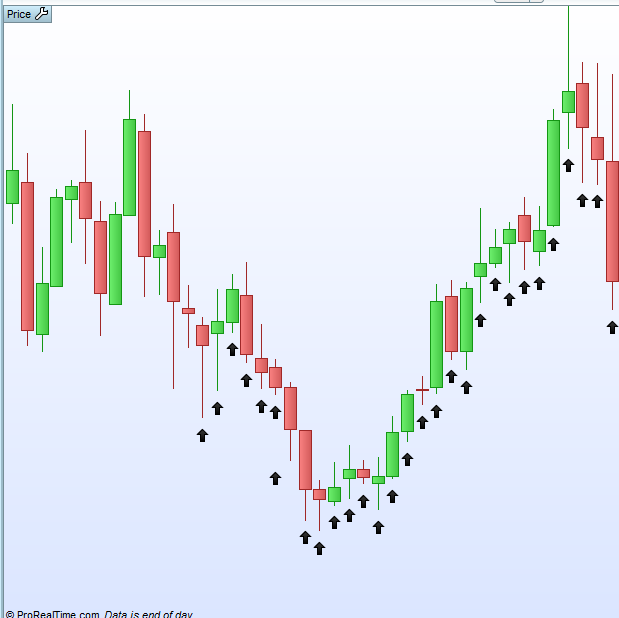
    I try to write a code that will be done – an upward arrow – wherever the price closes above the high of the previous candle.
    That is, in fact, it will signify any “break-in” of the price.

    The code is attached.
    The result was not for what to attach …
    The software has drawn me some kind of unclear line on the graph …

    I thank you very much for your help.
    great day.
    Chaim.


    for variable = 1 to barindex do
    
    if close[variable] > high[variable-1] then
    
    drawarrowup(barindex,low-0.2)
    
    endif 
    
    
    next
    
    
    return  


    #31468 quote
    balance
    Participant
    Junior

    Hello again, Nicholas.
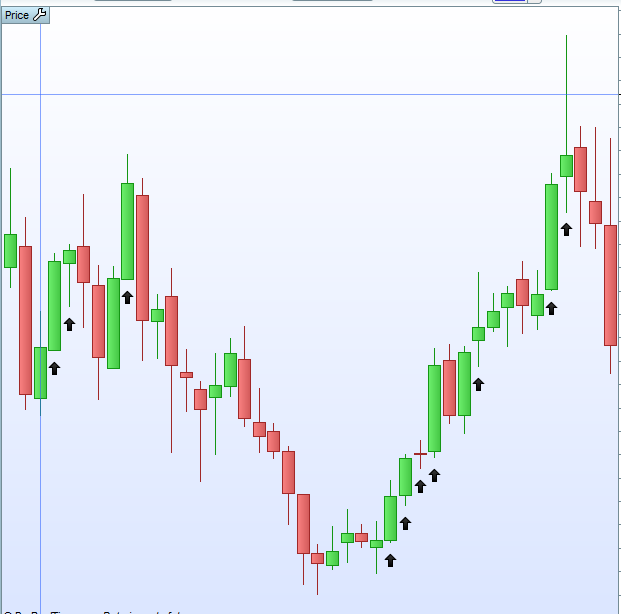
    I got a result with arrows, attached.
    But the condition I am asking is not related to the outcome.

    I would be very grateful if you could take a look at the code I added in the previous post.
    And write to me why it does not work.

    Thank you very much in advance for your help.


    for variable = 1 to barindex do
    
    if close[variable] > high[variable-1] then
    
    drawarrowup (barindex,low-0.5)
    
    endif


    next
    
    
    return  


    #31534 quote
    Nicolas
    Keymaster
    Master

    Why do you want to make a loop? (FYI, drawn objects can’t be erased, even with a loop through the whole bars like you did).

    if close > high[1] then
     drawarrowup (barindex,low-0.5)
    endif
    #31535 quote
    balance
    Participant
    Junior

    Thanks Nicholas.
    This is progress for me.
    But the point is that I want only the candle of the breakthrough to be marked and not the candles after it that continue the way up.
    Even if they meet the condition

    #31539 quote
    Nicolas
    Keymaster
    Master

    Ok but you need first to define the first breakthrough. Because your code is doing what it is supposed to 🙂

    #31540 quote
    balance
    Participant
    Junior

    Sorry for the question but,
    I have a plan for an indicator that my question is only part of.
    Is there a possibility to ask you to do this for me – for a fee of course?

Viewing 15 posts - 16 through 30 (of 42 total)
  • You must be logged in to reply to this topic.

Help for graphical indicators development version 10.3


ProBuilder: Indicators & Custom Tools

New Reply
Author
author-avatar
Nicolas @nicolas Keymaster
Summary

This topic contains 41 replies,
has 13 voices, and was last updated by dan55

6 years, 11 months ago.

Topic Details
Forum: ProBuilder: Indicators & Custom Tools
Language: English
Started: 04/18/2016
Status: Active
Attachments: 8 files
Logo Logo
Loading...
