FOR … NEXT

Viewing 8 posts - 1 through 8 (of 8 total)

  • Author
    Posts
  • #253214 quote
    Bernard13Bernard13
    Participant
    Senior

    Bonjour
    J’ai du mal à comprendre le fonctionnement de NEXT

    Tous les xPi et yPi ont déjà été définis dans l’algo par:
    //—– Peak storage
    $xP[PeakCount]= PeakBar
    $yP[PeakCount]= PeakVal )
    //
    ……….
    //—– Calculations between the first peak and the nth
    FOR j = 2 TO PeakCount
    xPI = $xP[j]
    yPI = $yP[j]
    PeakSlope = ROUND((yPI – yP1) / (xPI – xP1),2)
    DrawSegment(BarIndex[xPI], yPI, BarIndex[xP1], yP1) Coloured(“Orange”) Style(Line,2)
    xP2= $xP[2]
    yP2= $yP[2]
    NEXT
    DrawRay(BarIndex[xP2], yP2, BarIndex[xP1], yP1) Coloured(“Red”) Style(Line,2)

    et le Rayon s’affiche correctement sur le graph. (Les segments aussi)

    Si je code
    ………
    DrawSegment(BarIndex[xPI], yPI, BarIndex[xP1], yP1) Coloured(“Orange”) Style(Line,2)
    NEXT
    xP2= $xP[2]
    yP2= $yP[2]
    DrawRay(BarIndex[xP2], yP2, BarIndex[xP1], yP1) Coloured(“Red”) Style(Line,2)

    J’obtiens le message d’erreur “Paramètres de type entier positif attendu avec BarIndex[xP2]”
    Pourquoi  xP2 n’est-il plus défini en dehors de la boucle ?

    Merci d’avance. Cordialement.

    #253221 quote
    LaMailleLaMaille
    Participant
    Junior

    Ajoutes : if PeakCount >= 2 then // avant la boucle For … Next

    Iván González and robertogozzi thanked this post
    #253243 quote
    Bernard13Bernard13
    Participant
    Senior

    Merci @LaMaille de ta contribution qui soulève la remarque suivante:
    Intuitivement j’avais découvert
    IF PeakCount > 1 THEN
    xP1 = $xP[1]
    yP1= $yP[1]
    ENDIF
    pour initialiser mon point de référence, ça me marchait pas autrement.
    Ta solution fonctionne parfaitement, mais mieux, çà marche aussi avec 1 !
    Donc après des tests je m’aperçois que pour récupérer  n  éléments d’un tableau complètement calculé, il est quand nécessaire de tester    IF  PeakCount > n-1   THEN
    Cela me parait étrange.
    Qu’en pensez-vous ?

    #253252 quote
    LaMailleLaMaille
    Participant
    Junior

    e code a besoin de remplir le tableau avant de pouvoir l’exploiter/le lire… Cette condition (if PeakCount >= 2 then) évite de tester/lire des cases du tableau qui ne sont pas encore remplies… Cette condition, c’est comme si tu dis au code : Tant que la case 2 du tableau n’est pas rempli => ne fais rien.

    #253253 quote
    Bernard13Bernard13
    Participant
    Senior

    Parfaite explication, merci infiniment !
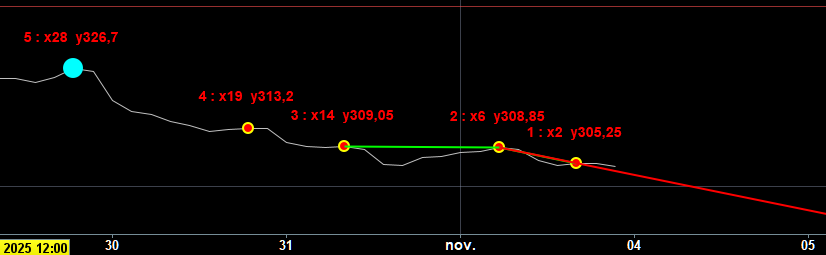
    Ci-dessous la preuve par le test !  🙂

    #253257 quote
    Bernard13Bernard13
    Participant
    Senior

    J’avais tapé le bouton ci-dessous “Select File” et le fichier PNG était pris,  puis “Submit”
    Il ne s’est pas téléchargé, savez-vous pourquoi ?

    #253259 quote
    GraHalGraHal
    Participant
    Master

    La taille du fichier est-elle supérieure à 3 Mo ?

    Réessayer quand même ?

    Bernard13 thanked this post
    #253260 quote
    Bernard13Bernard13
    Participant
    Senior

    Bonjour,
    C’était une petite capture d’écran de 16Ko sur mon disque, en PNG, je refais la manip …

    Test-Peaks-Capture-decran-2025-11-03-223132.png Test-Peaks-Capture-decran-2025-11-03-223132.png
Viewing 8 posts - 1 through 8 (of 8 total)

  • You must be logged in to reply to this topic.

ProRealAI ProRealAI New

Stuck on this ProBuilder code?

Describe what this topic is trying to build, in plain English, and ProRealAI writes the ProRealTime™ indicator, screener or system for you.

Available in 7 languages
Try ProRealAI

FOR … NEXT


ProBuilder : Indicateurs & Outils Personnalisés

New Reply
Author
author-avatar
Bernard13 @bernard13 Participant
Summary

This topic contains 7 replies,
has 3 voices, and was last updated by Bernard13Bernard13
10 months, 2 weeks ago.

Topic Details
Forum: ProBuilder : Indicateurs & Outils Personnalisés
Language: French
Started: 11/03/2025
Status: Active
Attachments: 1 files
ProRealCode ProRealCode
Loading...