Ecart pour Point Pivot H1

Viewing 4 posts - 1 through 4 (of 4 total)

  • Author
    Posts
  • #89700 quote
    TekTonikTekTonik
    Participant
    Average

    Bonjour,

    J’ai adapté le code donné dans fibonacci-pivots-points-4-hours-daily-weekly-monthly pour calculer le point pivot en H1 :

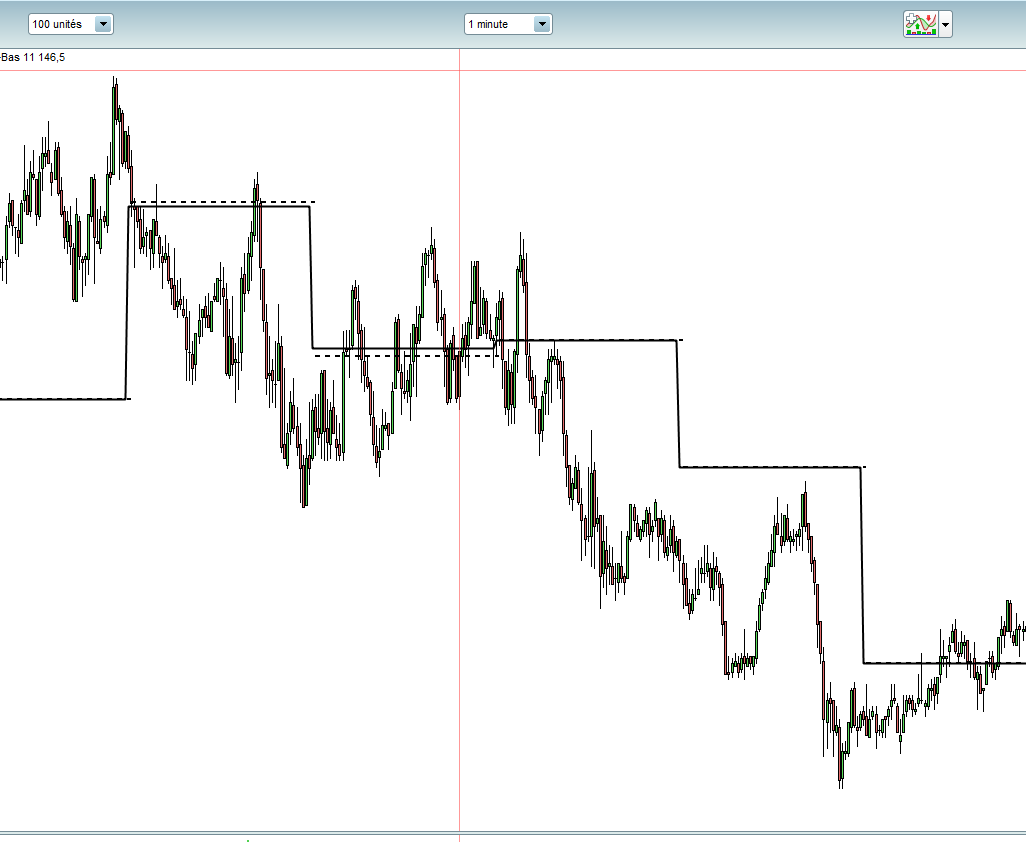
    J’ai un écart sur certaines heures par rapport au point pivot  H1 natif de PRT, voir screenshot, je ne comprend pas pourquoi auriez vous une idée ?
    tiret pour l’indicateur de PRT PP H1. ligne pour mon indicateur

    Merci pour vos retours

    voici mon code :

    chours = hour=0 or hour=1 or hour=2 or hour=3 or hour=4 or hour=5 or hour=6 or hour=7 or hour=8 or hour=9 or hour=10 or hour=11 or hour=12 or hour=13 or hour=14 or hour=15 or hour=16 or hour=17 or hour=18 or hour=19 or hour=20 or hour=21 or hour=21 or hour=22 or hour=23
    if minute=0 and chours then
    hhigh = Highest[BarIndex - lastHourBarIndex](High)[1]
    llow = Lowest[BarIndex - lastHourBarIndex](Low)[1]
    cclose = close[0]
    lastHourBarIndex = BarIndex[0]
    endif
    
    PP = (hhigh+llow+cclose)/3.0


    PP-H1.png PP-H1.png
    #89725 quote
    fifi743fifi743
    Participant
    Master

    bonjour,

    essais

    if chours <> hour then
    
    chours = hour
    hhigh = Highest[BarIndex – lastHourBarIndex](High)[1]
    llow = Lowest[BarIndex – lastHourBarIndex](Low)[1]
    cclose = close[0]
    lastHourBarIndex = BarIndex[0]
    endif
    et enleve la ligne 1
    cordialement
    #132992 quote
    TekTonikTekTonik
    Participant
    Average

    Bonjour,

    Solution finalement postée par Nicolas quelque part dans le forum :


    ///////////////////////////////////////////////////////////
    // Pivot Horaire
    if openhour <>openhour[1] then
    pphLastHigh = pphHigh
    pphLastLow = pphLow
    pphLastClose = close[1]
    pphHigh = High
    pphLow = Low
    pphOpen = open
    else
    pphHigh = Max(pphHigh, High)
    pphLow = Min(pphLow, Low)
    endif
    H1PP = (pphLastHigh + pphLastLow + pphLastClose) / 3
    H1R1 = 2*H1PP - pphLastLow
    H1S1 = 2*H1PP - pphLastHigh
    H1R2 = H1PP + (pphLastHigh - pphLastLow)
    H1S2 = H1PP - (pphLastHigh - pphLastLow)
    H1R3 = H1R1 + (pphLastHigh - pphLastLow)
    H1S3 = H1S1 - (pphLastHigh - pphLastLow)
    #133518 quote
    CholiverCholiver
    Participant
    Veteran

    Bonsoir à toi,
    Je ne sais pas comment tu fais pour avoir un résultat avec le code proposé ci dessus, mais chez moi il n’y a que des messages d’erreurs.
    Par exemple : “La variable suivante n’est pas utilisée dans le programme : pphopen”
    même chose pour : h1r2 – h1s2 -h1r3 –  h1s3
    Comment ferais-tu obtenir un résultat utilisable ?
    A suivre… 🙂

Viewing 4 posts - 1 through 4 (of 4 total)
  • You must be logged in to reply to this topic.

ProRealAI ProRealAI New

Stuck on this ProBuilder code?

Describe what this topic is trying to build, in plain English, and ProRealAI writes the ProRealTime™ indicator, screener or system for you.

Available in 7 languages
Try ProRealAI

Ecart pour Point Pivot H1


ProBuilder : Indicateurs & Outils Personnalisés

New Reply
Author
author-avatar
TekTonik @tektonik Participant
Summary

This topic contains 3 replies,
has 3 voices, and was last updated by CholiverCholiver

6 years, 3 months ago.

Topic Details
Forum: ProBuilder : Indicateurs & Outils Personnalisés
Language: French
Started: 01/26/2019
Status: Active
Attachments: 1 files
ProRealCode ProRealCode
Loading...