


Draw vertical line on each Minute with DrawOnLastBarOnly = true

Viewing 3 posts - 1 through 3 (of 3 total)
  • Author
    Posts
  • #216911 quote
    PeterStPeterSt
    Participant
    Master

    This is a question which I only have because it intrigues me. Without a solution I will survive.

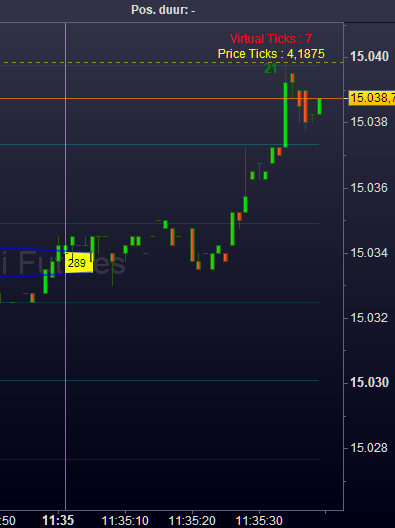
    Suppose I have a TimeFrame of 1 minute. I need DefParam DrawOnLastBar = true for various reasons. Now, what would be a sample code which draws a line on each minute mark which line will stay throughout the progress of the chart ?

    I am as far as having the vertical line persistent for the last minute, that line disappearing if the new minute begins and the new line is drawn. I won’t even show the hoopla-code I have for it, because what I am doing is all stupid tweaking only to get that.

    I must be missing the point completely because something simple like this should be … well, simple.

    Thanks !

    image_2023-06-28_113624846.png image_2023-06-28_113624846.png
    #216943 quote
    robertogozzirobertogozzi
    Moderator
    Legend

    You can use arrays. This indicator will always plot the last 10 vertical lines, each new bar:

    DEFPARAM DrawOnLastBarOnly = true
    MaxLines = 10                                                 //plot the last 10 lines
    // initializations of the array
    IF BarIndex = 0 THEN
       FOR i = 1 TO MaxLines
          $myLine[i] = 0
       NEXT
    ENDIF
    myDrawingConditions = (summation[3](close > close[1]) = 3)    //or whatever conditions you need to set
    // each time a new line has to be plotted, the oldest one must be dropped
    IF myDrawingConditions THEN
       FOR i = 2 TO MaxLines
          $myLine[i - 1] = $myLine[i]
       NEXT
       $myLine[MaxLines] = BarIndex
    ENDIF
    IF $myLine[MaxLines] <> 0 THEN
       FOR i = 1 TO MaxLines
          IF $myLine[i] <> 0 THEN
            DrawVLine($myLine[i]) coloured("Fuchsia",255) style(DottedLine,2)
          ENDIF
       NEXT
    ENDIF
    RETURN
    PeterSt thanked this post
    #216952 quote
    PeterStPeterSt
    Participant
    Master

    Thanks a lot, Roberto. Works beautifully.

    myDrawingConditions = minute <> minute[1]

    Although I got the hang now, I would still advise PRT to make something for this so people would understand intuitively.  It could be as easy as

    DrawSetting = 0   // 0 = DrawOnLastBarOnly = false.
    DrawVLine(BarIndex) coloured("Fuchsia",255) style(DottedLine,2,DrawSetting)   // DrawSetting is new option on the Style clause.
    image_2023-06-29_050551538.png image_2023-06-29_050551538.png
Viewing 3 posts - 1 through 3 (of 3 total)
  • You must be logged in to reply to this topic.

ProRealAI ProRealAI New

Stuck on this ProBuilder code?

Describe what this topic is trying to build, in plain English, and ProRealAI writes the ProRealTime™ indicator, screener or system for you.

Available in 7 languages
Try ProRealAI

Draw vertical line on each Minute with DrawOnLastBarOnly = true


ProBuilder: Indicators & Custom Tools

New Reply
Author
author-avatar
PeterSt @peterst Participant
Summary

This topic contains 2 replies,
has 2 voices, and was last updated by PeterStPeterSt

3 years, 2 months ago.

Topic Details
Forum: ProBuilder: Indicators & Custom Tools
Language: English
Started: 06/28/2023
Status: Active
Attachments: 2 files
ProRealCode ProRealCode
Loading...


