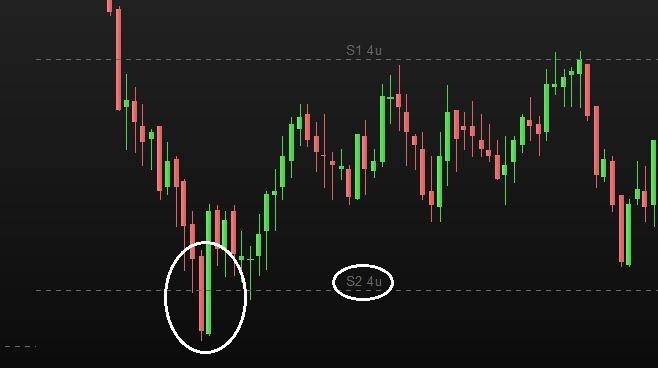
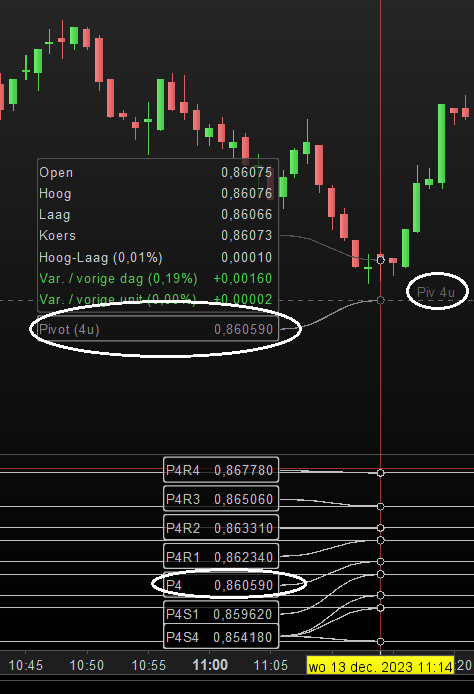
I am working on creating a strategy in which a candle passes through the lines of a 4-hour pivot. The formulas of the pivots correspond to IG Markets, so the values of the pivots correspond to the standard indicator in pro real time.
The script below does not work during testing. It gives random results, but not when the lines go through a pivot. What am I overlooking here? In the attachment there is another image to explain the situation.
Timeframe(4 hours)
// Formula Pivots H4
P4 = (high + low + close)/3
P4R1 = (2*P4) - low
P4R2 = P4 + high - low
P4R3 = high + 2*(P4-low)
P4R4 = P4R3 + (high - low)
P4S1 = (2*P4) - high
P4S2 = P4 - (high - low)
P4S3 = low - 2*(high - P4)
P4S4 = P4S3 - (high - low)
Timeframe(default)
Timeframe (1 minute)
c1= high[1] > P4 AND low[1] < P4
c2= (high[1] > P4R1 AND low[1] < P4R1) OR (high[1] > P4R2 AND low[1] < P4R2) OR (high[1] > P4R3 AND low[1] < P4R3) OR (high[1] > P4R4 AND low[1] < P4R4)
c3= (high[1] > P4S1 AND low[1] < P4S1) OR (high[1] > P4S2 AND low[1] < P4S2) OR (high[1] > P4S3 AND low[1] < P4S3) OR (high[1] > P4S4 AND low[1] < P4S4)
IF c1 OR c2 OR c3 THEN
signal = 1
screener [ signal > 0 ] sort by signal as "TEST"
ENDIF
JSParticipant
Veteran
Hi @Robin81
Remove “TimeFrame(Default)” in line 14
A “screener” instruction in an “If… Then” isn’t going to work:
If C1 or C2 or C3 then
Signal=1
EndIf
Screener[Signal=1]
@JS,
I adjusted it, but to no avail. It still gives random notifications.
It seems like he doesn’t want to take over the value of the pivot?
JSParticipant
Veteran
Try using High and Low instead of High[1] and Low[1]
@JS,
Just did it, but unfortunately without success. I chose [1] so that it looks at the recently closed candle. Unfortunately that’s not the problem. In any case, thanks for your thoughts.
If I place the pivots as a ‘separate indicator’ under the graph, you see that the values of the outcome are equal to the standard pivot in PRT. So the formulas for all pivot values 4 hours are correct. Only detecting when a candle is closed on the line has not been possible so far 🙁
JSParticipant
Veteran
Hi,
Try using:
c1= high > P4[1] AND low < P4[1]
(change also for c2 and c3)
@JS,
Do you know the reason why you use P4[1] instead of P4? Your idea was the right way, looks like it works! I am very curious about the explanation…. I will continue testing in the coming days.
Thanks for your quick response, great!
JSParticipant
Veteran
Hi Robin,
It’s great that it worked.
For example, suppose you use a current price (Close) to check whether the price is higher or lower than the same current price (Close), then you understand that this is not going to work.
The solution is to use the previous price (Close[1]) and check it with the current price…
Close>Close[1] or in this case High>P4[1]
Hi @Robin81
A “screener” instruction in an “If… Then” isn’t going to work:
Not correct. You can use a SCREENER command in an IF statement.
JSParticipant
Veteran
That’s right, that was already clear and was not the problem…