


CRSI screener code

Viewing 7 posts - 1 through 7 (of 7 total)
  • Author
    Posts
  • #214221 quote
    sam00075sam00075
    Participant
    Junior

    Hello the community, hope you’re doing well.

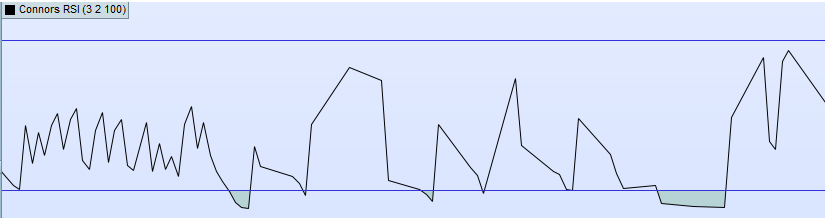
    i need your help to make a screener that detects when Connor’s RSI is green in the bottom, by experience that indicates that price hit its low and a technical bounce follows.

    I tried create it in Prorealtime software, but the result is not good.

    Can you please help with the code manually ?

    Thanks

    (i’m using default CRSI settings, didn’t change them)

    crsi.jpg crsi.jpg
    #214230 quote
    JSJS
    Participant
    Master

    Hi,

    When you use this code for the Connors RSI, you can use this screener…

    (OverSold level = 10)

    PeriodRSI = 3
    PeriodStreak = 2
    PeriodROC = 100
    
    Once DownBar=0
    Once UpBar=0
    Once UpDownBars=0
    
    //Part 1 : Calculate RSI
    MyRSI=RSI[PeriodRSI](close)
     
    //Part 2 : Determine Streak Values and calculate a RSI over it
    if barindex > 0 then
    if close > close[1] then
    UpBar=UpBar+1
    DownBar=0
    elsif close < close[1] then
    DownBar=DownBar-1
    UpBar=0
    else
    DownBar=0
    UpBar=0
    endif
    UpDownBars = UpBar + DownBar
    endif
     
    MyRSILenght=RSI[PeriodStreak](UpDownBars)
    
    //Part 3 : Determine PercentRank by comparing current percentage change to 100(PeriodROC) earlier 1-candle percentage changes
    TodayROC = ROC[1](close)
    
    EventTeller = 0
    for i=0 to (PeriodROC-1) do
    Earlier1DayROC = ROC[1](close[1+i])
    if Earlier1DayROC < TodayROC THEN
    //Count how many times an earlier 1 candle ROC was smaller then today's
    EventTeller = EventTeller + 1
    endif
    next
    
    PercentRank = (EventTeller / PeriodROC) * 100
    
    //Part 4 : Calculate ConnersRSI
    ConnorsRSI=(MyRSI+MyRSILenght+PercentRank )/3
     
    C1=ConnorsRSI<10
    
    Screener[C1](C1 as "OverSold<10")
    
    sam00075 thanked this post
    #214241 quote
    sam00075sam00075
    Participant
    Junior
    Thank you JS, it works like a wonder. Is there a way to add a high volume condition into it ? Like :
    Screener Break Out with high volume
    #214242 quote
    JSJS
    Participant
    Master

    Hi,

    Since it is a kind of “breakout” I would use this for the volume:

    C2=Volume>Average[10](Volume)

    PeriodRSI = 3
    PeriodStreak = 2
    PeriodROC = 100
    
    Once DownBar=0
    Once UpBar=0
    Once UpDownBars=0
    
    //Part 1 : Calculate RSI
    MyRSI=RSI[PeriodRSI](close)
     
    //Part 2 : Determine Streak Values and calculate a RSI over it
    if barindex > 0 then
    if close > close[1] then
    UpBar=UpBar+1
    DownBar=0
    elsif close < close[1] then
    DownBar=DownBar-1
    UpBar=0
    else
    DownBar=0
    UpBar=0
    endif
    UpDownBars = UpBar + DownBar
    endif
     
    MyRSILenght=RSI[PeriodStreak](UpDownBars)
    
    //Part 3 : Determine PercentRank by comparing current percentage change to 100(PeriodROC) earlier 1-candle percentage changes
    TodayROC = ROC[1](close)
    
    EventTeller = 0
    for i=0 to (PeriodROC-1) do
    Earlier1DayROC = ROC[1](close[1+i])
    if Earlier1DayROC < TodayROC THEN
    //Count how many times an earlier 1 candle ROC was smaller then today's
    EventTeller = EventTeller + 1
    endif
    next
    
    PercentRank = (EventTeller / PeriodROC) * 100
    
    //Part 4 : Calculate ConnersRSI
    ConnorsRSI=(MyRSI+MyRSILenght+PercentRank )/3
     
    C1=ConnorsRSI<10
    
    //Part 5 : Volume breakout
    C2=Volume>Average[10](Volume)
    
    Screener[C1 and C2](C1 as "OverSold<10 + Volume")

    sam00075 thanked this post
    #214243 quote
    sam00075sam00075
    Participant
    Junior
    Thank you a lot. it works nicely. Just is it normal to see this message ? you have more than one screener instruction in your code, please edit it accordingly to use multiple criteria sorting.
    #214244 quote
    JSJS
    Participant
    Master

    Hi,

    If you are using version 12 of PRT, maybe “multiple criteria sorting” is a new feature in V12…

    #214245 quote
    sam00075sam00075
    Participant
    Junior
    Yes, that’s probably the reason. Thanks again for your reactivity.
    JS thanked this post
Viewing 7 posts - 1 through 7 (of 7 total)

  • You must be logged in to reply to this topic.

ProRealAI ProRealAI New

Stuck on this ProBuilder code?

Describe what this topic is trying to build, in plain English, and ProRealAI writes the ProRealTime™ indicator, screener or system for you.

Available in 7 languages
Try ProRealAI

CRSI screener code


ProScreener: Market Scanners & Detection

New Reply
Author
author-avatar
sam00075 @sam00075 Participant
Summary

This topic contains 6 replies,
has 2 voices, and was last updated by sam00075sam00075

3 years, 4 months ago.

Topic Details
Forum: ProScreener: Market Scanners & Detection
Language: English
Started: 05/06/2023
Status: Active
Attachments: 1 files
ProRealCode ProRealCode
Loading...

