


CRSI screener code

Viewing 7 posts - 1 through 7 (of 7 total)
  • Author
    Posts
  • #214221 quote
    sam00075
    Participant
    New

    Hello the community, hope you’re doing well.

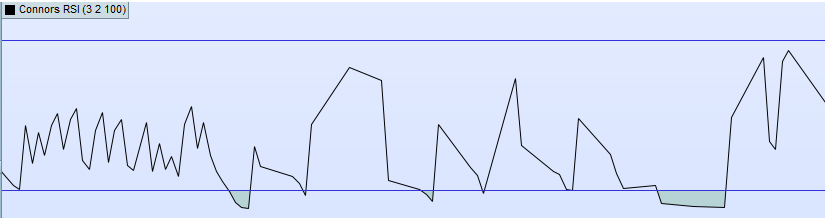
    i need your help to make a screener that detects when Connor’s RSI is green in the bottom, by experience that indicates that price hit its low and a technical bounce follows.

    I tried create it in Prorealtime software, but the result is not good.

    Can you please help with the code manually ?

    Thanks

    (i’m using default CRSI settings, didn’t change them)

    crsi.jpg crsi.jpg
    #214230 quote
    JS
    Participant
    Senior

    Hi,

    When you use this code for the Connors RSI, you can use this screener…

    (OverSold level = 10)

    PeriodRSI = 3
    PeriodStreak = 2
    PeriodROC = 100
    
    Once DownBar=0
    Once UpBar=0
    Once UpDownBars=0
    
    //Part 1 : Calculate RSI
    MyRSI=RSI[PeriodRSI](close)
     
    //Part 2 : Determine Streak Values and calculate a RSI over it
    if barindex > 0 then
    if close > close[1] then
    UpBar=UpBar+1
    DownBar=0
    elsif close < close[1] then
    DownBar=DownBar-1
    UpBar=0
    else
    DownBar=0
    UpBar=0
    endif
    UpDownBars = UpBar + DownBar
    endif
     
    MyRSILenght=RSI[PeriodStreak](UpDownBars)
    
    //Part 3 : Determine PercentRank by comparing current percentage change to 100(PeriodROC) earlier 1-candle percentage changes
    TodayROC = ROC[1](close)
    
    EventTeller = 0
    for i=0 to (PeriodROC-1) do
    Earlier1DayROC = ROC[1](close[1+i])
    if Earlier1DayROC < TodayROC THEN
    //Count how many times an earlier 1 candle ROC was smaller then today's
    EventTeller = EventTeller + 1
    endif
    next
    
    PercentRank = (EventTeller / PeriodROC) * 100
    
    //Part 4 : Calculate ConnersRSI
    ConnorsRSI=(MyRSI+MyRSILenght+PercentRank )/3
     
    C1=ConnorsRSI<10
    
    Screener[C1](C1 as "OverSold<10")
    
    sam00075 thanked this post
    #214241 quote
    sam00075
    Participant
    New
    Thank you JS, it works like a wonder. Is there a way to add a high volume condition into it ? Like :
    Screener Break Out with high volume
    #214242 quote
    JS
    Participant
    Senior

    Hi,

    Since it is a kind of “breakout” I would use this for the volume:

    C2=Volume>Average[10](Volume)

    PeriodRSI = 3
    PeriodStreak = 2
    PeriodROC = 100
    
    Once DownBar=0
    Once UpBar=0
    Once UpDownBars=0
    
    //Part 1 : Calculate RSI
    MyRSI=RSI[PeriodRSI](close)
     
    //Part 2 : Determine Streak Values and calculate a RSI over it
    if barindex > 0 then
    if close > close[1] then
    UpBar=UpBar+1
    DownBar=0
    elsif close < close[1] then
    DownBar=DownBar-1
    UpBar=0
    else
    DownBar=0
    UpBar=0
    endif
    UpDownBars = UpBar + DownBar
    endif
     
    MyRSILenght=RSI[PeriodStreak](UpDownBars)
    
    //Part 3 : Determine PercentRank by comparing current percentage change to 100(PeriodROC) earlier 1-candle percentage changes
    TodayROC = ROC[1](close)
    
    EventTeller = 0
    for i=0 to (PeriodROC-1) do
    Earlier1DayROC = ROC[1](close[1+i])
    if Earlier1DayROC < TodayROC THEN
    //Count how many times an earlier 1 candle ROC was smaller then today's
    EventTeller = EventTeller + 1
    endif
    next
    
    PercentRank = (EventTeller / PeriodROC) * 100
    
    //Part 4 : Calculate ConnersRSI
    ConnorsRSI=(MyRSI+MyRSILenght+PercentRank )/3
     
    C1=ConnorsRSI<10
    
    //Part 5 : Volume breakout
    C2=Volume>Average[10](Volume)
    
    Screener[C1 and C2](C1 as "OverSold<10 + Volume")

    sam00075 thanked this post
    #214243 quote
    sam00075
    Participant
    New
    Thank you a lot. it works nicely. Just is it normal to see this message ? you have more than one screener instruction in your code, please edit it accordingly to use multiple criteria sorting.
    #214244 quote
    JS
    Participant
    Senior

    Hi,

    If you are using version 12 of PRT, maybe “multiple criteria sorting” is a new feature in V12…

    #214245 quote
    sam00075
    Participant
    New
    Yes, that’s probably the reason. Thanks again for your reactivity.
    JS thanked this post
Viewing 7 posts - 1 through 7 (of 7 total)

  • You must be logged in to reply to this topic.

CRSI screener code


ProScreener: Market Scanners & Detection

New Reply
Author
author-avatar
sam00075 @sam00075 Participant
Summary

This topic contains 6 replies,
has 2 voices, and was last updated by sam00075

2 years, 10 months ago.

Topic Details
Forum: ProScreener: Market Scanners & Detection
Language: English
Started: 05/06/2023
Status: Active
Attachments: 1 files
Logo Logo
Loading...
