Create Screener based on angle of Standard deviation Channel

Viewing 6 posts - 1 through 6 (of 6 total)

  • Author
    Posts
  • #180409 quote
    RubberToe
    Participant
    Average

    I use this SD channel indicator from the library and it’s very good:

    Standard Deviation & Standard Error Linear Regression Channel

    I would like to be able to calculate the angle of the SD (like the Gann Line object), and then use that in a Screener, and maybe display it on the charts too.  Is this possible?  thx

    #180432 quote
    RubberToe
    Participant
    Average

    This is the code for the SD channel.  Can I extract the start and end points of the SD  for a defined period? (say 120 periods on 1mn timeframe)   A slope will be good enough if I can’t do angle and start and end point would give me that.

    /PRC_Std and Ste LinRegChannel | indicator
    //Standard Deviation and Standard Error
    //Linear Regression Channel
    //12.03.2019
    //Nicolas @ http://www.prorealcode.com
    //Sharing ProRealTime knowledge

    defparam drawonlastbaronly=true
    defparam calculateonlastbars=1000
    // — settings
    //lookback= 200 //channel period
    //ChannelType = 1 //1= Standard Deviation ; 2= Standard Erro
    //NbDeviation = 1 //Deviation multiplier
    //colorRed = 255
    //colorGreen = 255
    //colorBlue = 0
    // — end of settings

    sumx = 0
    sumy = 0
    sumxy = 0
    sumx2 = 0

    for cmpt = lookback downto 0 do
    tmpx = cmpt
    tmpy = close[cmpt]
    sumy = sumy+tmpy
    sumx = sumx+tmpx
    sumx2 = sumx2 + (tmpx*tmpx)
    sumxy = sumxy + (tmpy*tmpx)
    next

    n = lookback+1

    if (sumx2 = sumx * sumx) then // protection to avoid infinite values
    b = sumxy – sumx * sumy
    else
    b = (n * sumxy – sumx * sumy) / (n * sumx2 – sumx * sumx)
    endif
    a = (sumy – b * sumx) / n

    drawsegment(barindex[lookback],a[1]+b[1]*lookback,barindex,a[1]+b[1]*0) coloured(colorRed,colorGreen,colorBlue)style(dottedline,1)

    //channel
    if ChannelType = 1 then //Standard Deviation
    dat = std[lookback]*NbDeviation
    else
    dat = ste[lookback]*NbDeviation
    endif
    drawsegment(barindex[lookback],(a[1]+b[1]*lookback)+dat[1],barindex,a[1]+b[1]*0+dat[1]) coloured(colorRed,colorGreen,colorBlue)style(line,1)
    drawsegment(barindex[lookback],(a[1]+b[1]*lookback)-dat[1],barindex,a[1]+b[1]*0-dat[1]) coloured(colorRed,colorGreen,colorBlue)style(line,1)

    return

    #180457 quote
    Nicolas
    Keymaster
    Master

    It’s a basic linear regression slope, you can get it with LINEARREGRESSIONSLOPE instruction.

    RubberToe thanked this post
    #181166 quote
    RubberToe
    Participant
    Average

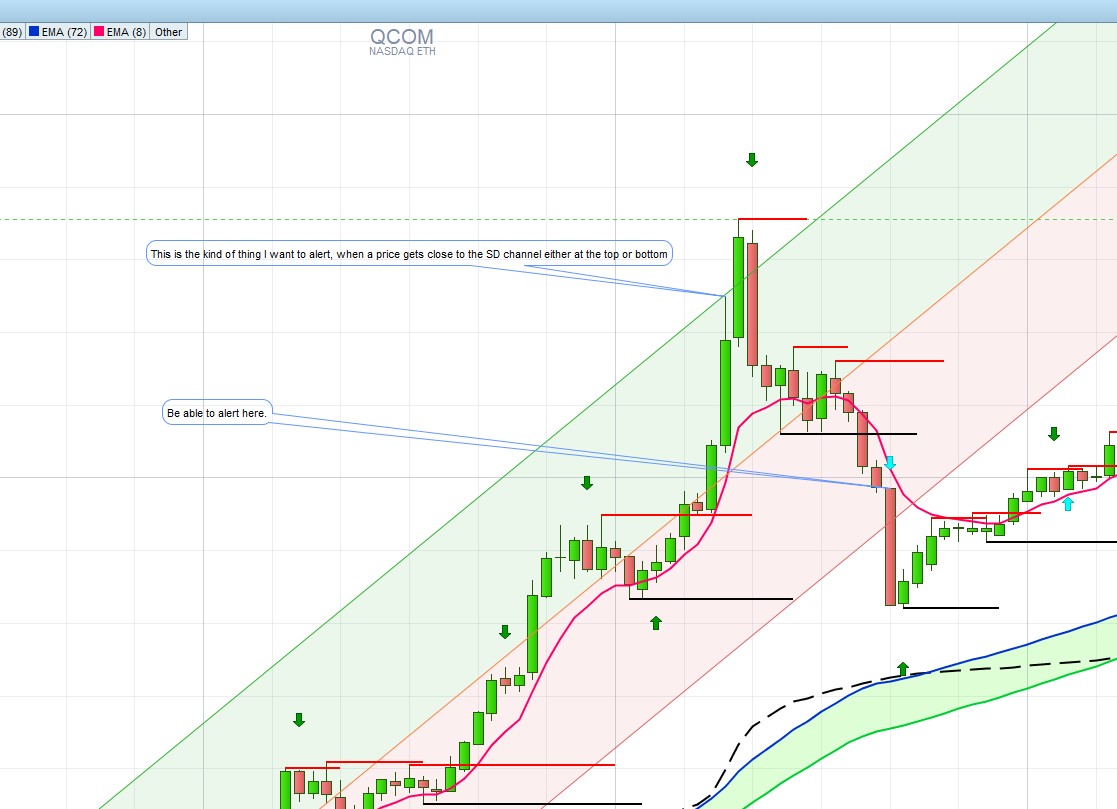
    So that does an OK job of putting things on my radar, but it would be better if I could do something more advanced.  What I need is the calculation price for the upper an lower SD channel at any point in time, so that I can then create a formula where my price has come within say 1% of that SD channel, similar to how people use Bollinger Band percentages.  Can I calculate that SD channel value for use in a formula?

    SD-Channel.jpg SD-Channel.jpg
    #181242 quote
    RubberToe
    Participant
    Average

    Another workaround I’ve been looking at is using Bollinger Bands, but I need ‘Least Squares’  calculation as with the indicator options….

    #181312 quote
    RubberToe
    Participant
    Average
    timeframe(1mn)
    
    il = ((LinearRegressionSlope[120](close))/close)*10000
    
    bollup = EndPointAverage[120](close) + (2 * STD[120](close))
    bolldn = EndPointAverage[120](close) - (2 * STD[120](close))
    
    if close crosses over bollup and il >1 then
    go = 1
    else
    go = 0
    endif
    
    
    if close crosses under bolldn and il <-1 then
    go = -1
    endif
    
    
    timeframe(daily)
    adv = average[5](volume)
    w1 = adv > 300000
    w2 = MedianPrice >2
    w3 = summation[1](volume)>50000
    
    timeframe(1mn)
    
    if  go<>0 and w1 and w2 and w3 then
    screener (il as "x")
    endif
    

    So this is my first attempt, but w3 seems not to be working right, and in my screener column the volume shows only small values like snapshots….

    Also the 10000 multiplier is just to get a number easier to deal with for my mind.

Viewing 6 posts - 1 through 6 (of 6 total)
  • You must be logged in to reply to this topic.

Create Screener based on angle of Standard deviation Channel


ProScreener: Market Scanners & Detection

New Reply
Author
author-avatar
RubberToe @rubbertoe Participant
Summary

This topic contains 5 replies,
has 2 voices, and was last updated by RubberToe
4 years, 4 months ago.

Topic Details
Forum: ProScreener: Market Scanners & Detection
Language: English
Started: 10/26/2021
Status: Active
Attachments: 1 files
Logo Logo
Loading...