Changing TMA Slope indicator by Nicolas to appear on candle sticks!!

Viewing 15 posts - 1 through 15 (of 22 total)
  • Author
    Posts
  • #87631 quote
    crolakstrading
    Participant
    Senior

    Regarding TMA Slope indicator by Nicolas!!

    https://www.prorealcode.com/prorealtime-indicators/tma-slope/

    Think this indicator will work amazingly on candlesticks itself.. So I was wondering rather than using it as a separate indicator if we can make the indicator work on candlesticks itself would be great!! ie: when indicator change colours.. candles go green, dark green, red, dark red and purple and blue etc..!!

    Just have a kind request if anyone can make this possible??

    Thank you in advance

    R

    #88141 quote
    Nicolas
    Keymaster
    Master

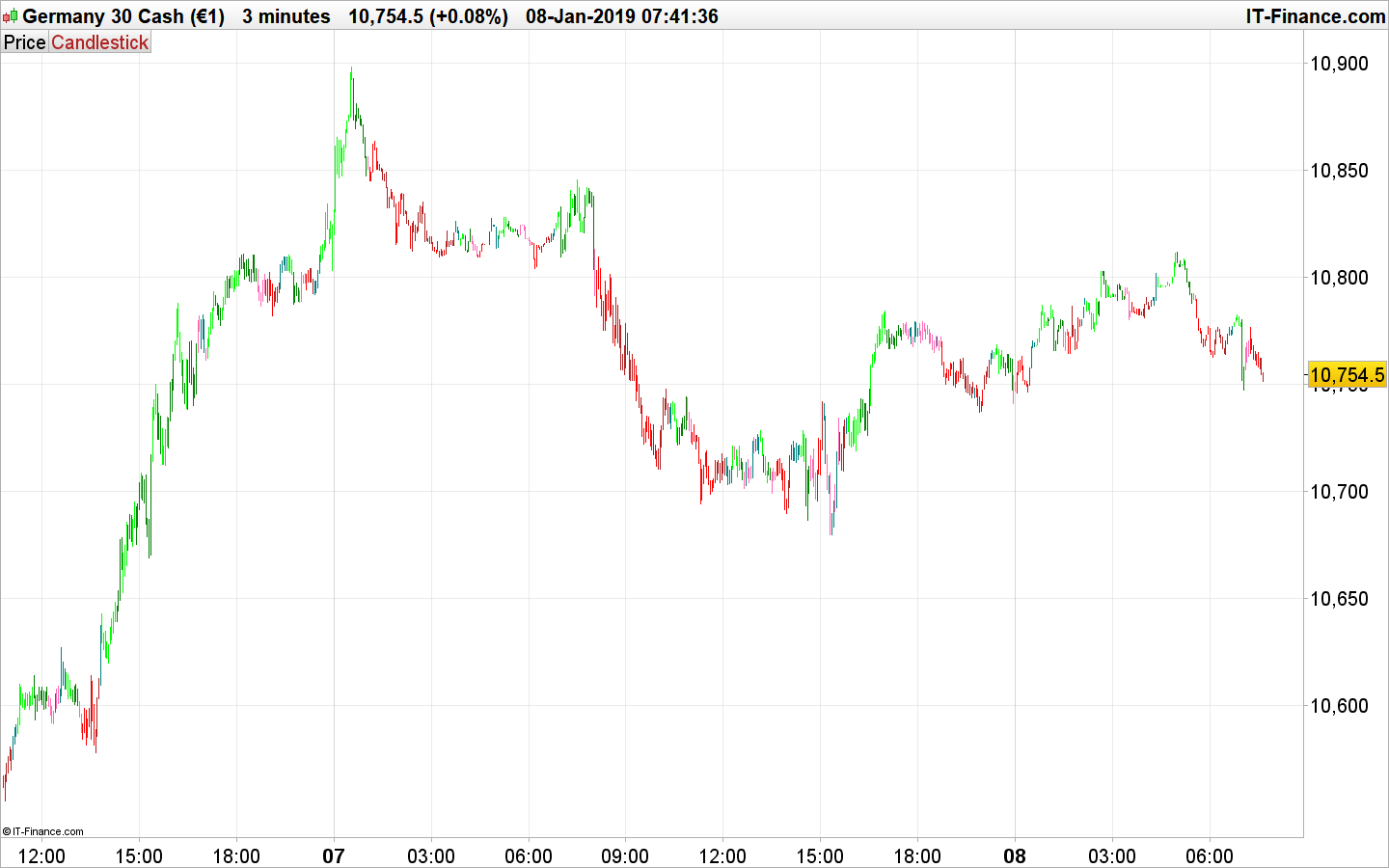
    This modified version below color the candlesticks depending of the slope of the TMA.

    //PRC_TMA Slope Norm | indicator
    //31.10.2017
    //Nicolas @ www.prorealcode.com
    //Sharing ProRealTime knowledge
    //translated from MT4 code
    
    
    // --- settings
    eintPeriod = 20
    edblHigh1 = 0.04
    edblLow1 = -0.04
    atrPeriod = 100
    // --- end of settings
    
    atr = AverageTrueRange[atrPeriod](close)
    
    dblTma = TriangularAverage[eintPeriod](close)
    
    if barindex>eintPeriod then
    dblPrev = dblTma[1]
    gadblSlope = ( dblTma - dblPrev ) / atr
    
    if ( gadblSlope[0] > edblHigh1 ) then
    if(gadblSlope[0] < gadblSlope[1]) then
    drawcandle(open,high,low,close)coloured(0,128,0)
    
    else
    drawcandle(open,high,low,close)coloured(0,255,0)
    
    endif
    elsif ( gadblSlope[0] < edblLow1 ) then
    if(gadblSlope[0] < gadblSlope[1]) then
    drawcandle(open,high,low,close)coloured(255,0,0)
    
    else
    drawcandle(open,high,low,close)coloured(178,34,34)
    
    endif
    else
    if(gadblSlope[0] < gadblSlope[1]) then
    drawcandle(open,high,low,close)coloured(255,105,180)
    
    else
    drawcandle(open,high,low,close)coloured(0,128,128)
    
    endif
    endif
    endif
    
    return
    TMA-slope-on-candlesticks-with-colours.png TMA-slope-on-candlesticks-with-colours.png
    #88197 quote
    crolakstrading
    Participant
    Senior

    Hi Nicolas,
    This is brilliant.. Thank you very very much!
    I have tried to add variables to this but it doesn’t seem to work for some reason.. Please will you be able to check this to see what’s wrong?

    PRC_TMA-Slope-Candlesticks.itf
    #88222 quote
    Nicolas
    Keymaster
    Master

    If you want to add the settings as extern ones, you must delete or comment the ones in the code between lines 9 to 12. Delete these lines or add REM (or //) before them.

    #88265 quote
    crolakstrading
    Participant
    Senior

    Thanks again Nicolas.. Managed to get it right!!

    Is there anyway to add up to identify open and close price? ie: if a down candle – candle close below open price to go very darker darker colour – according to this it will go green on an up trend but on that trend down candle to go darker green and if a down trend to go other way around??
    #88296 quote
    Nicolas
    Keymaster
    Master
    ok but then it does nothing to deal with the TMA “slope” anymore? How do you identify the current trend?
    #88319 quote
    crolakstrading
    Participant
    Senior
    Hi Nicolas, what i mean by the trend is.. according to the original indicator ”“Buy Only” or “Sell only” to identify the open and close price in the candles.. ie: if its Buy only now all candles will go green and can’t find the open and the close price so if its “Buy Only” price close below open price to go darker green or any other way to find the open and close price?? Sorry if i’m making it complicated…
    #88324 quote
    Nicolas
    Keymaster
    Master
    Well, this is a new version, candlesticks are coloured depending of if they are bullish/bearish and with a condition made of the slope above or below the High1 and Low1 levels. They are grey when ranging.
    // --- settings
    eintPeriod = 20
    edblHigh1 = 0.04
    edblLow1 = -0.04
    atrPeriod = 100
    // --- end of settings
    
    atr = AverageTrueRange[atrPeriod](close)
    
    dblTma = TriangularAverage[eintPeriod](close)
    
    if barindex>eintPeriod then
    dblPrev = dblTma[1]
    gadblSlope = ( dblTma - dblPrev ) / atr
    
    //BUY ONLY 
    if ( gadblSlope[0] > edblHigh1 ) then
    if(close < open) then
    drawcandle(open,high,low,close)coloured(0,128,0)
    
    else
    drawcandle(open,high,low,close)coloured(0,255,0)
    
    endif
    //SELL ONLY
    elsif ( gadblSlope[0] < edblLow1 ) then
    if(close < open) then
    drawcandle(open,high,low,close)coloured(255,0,0)
    
    else
    drawcandle(open,high,low,close)coloured(178,34,34)
    
    endif
    else
    //if(gadblSlope[0] < gadblSlope[1]) then
    //drawcandle(open,high,low,close)coloured(255,105,180)
    //
    //else
    drawcandle(open,high,low,close)coloured(128,128,128)
    
    //endif
    endif
    endif
    
    return
    crolakstrading thanked this post
    #88502 quote
    crolakstrading
    Participant
    Senior
    This is great.. thank you Nicolas!!
    #89008 quote
    crolakstrading
    Participant
    Senior
     
    endif
    else
    if(gadblSlope[0] < gadblSlope[1]) then
    if(close < open) then
    drawcandle(open,high,low,close)coloured(32,178,170)
    else
    drawcandle(open,high,low,close)coloured(199,,21,133)
    else
    
    drawcandle(open,high,low,close)coloured(240,128,128)
     else
    drawcandle(open,high,low,close)coloured(25,25,112)
    endif
    endif
    endif
    
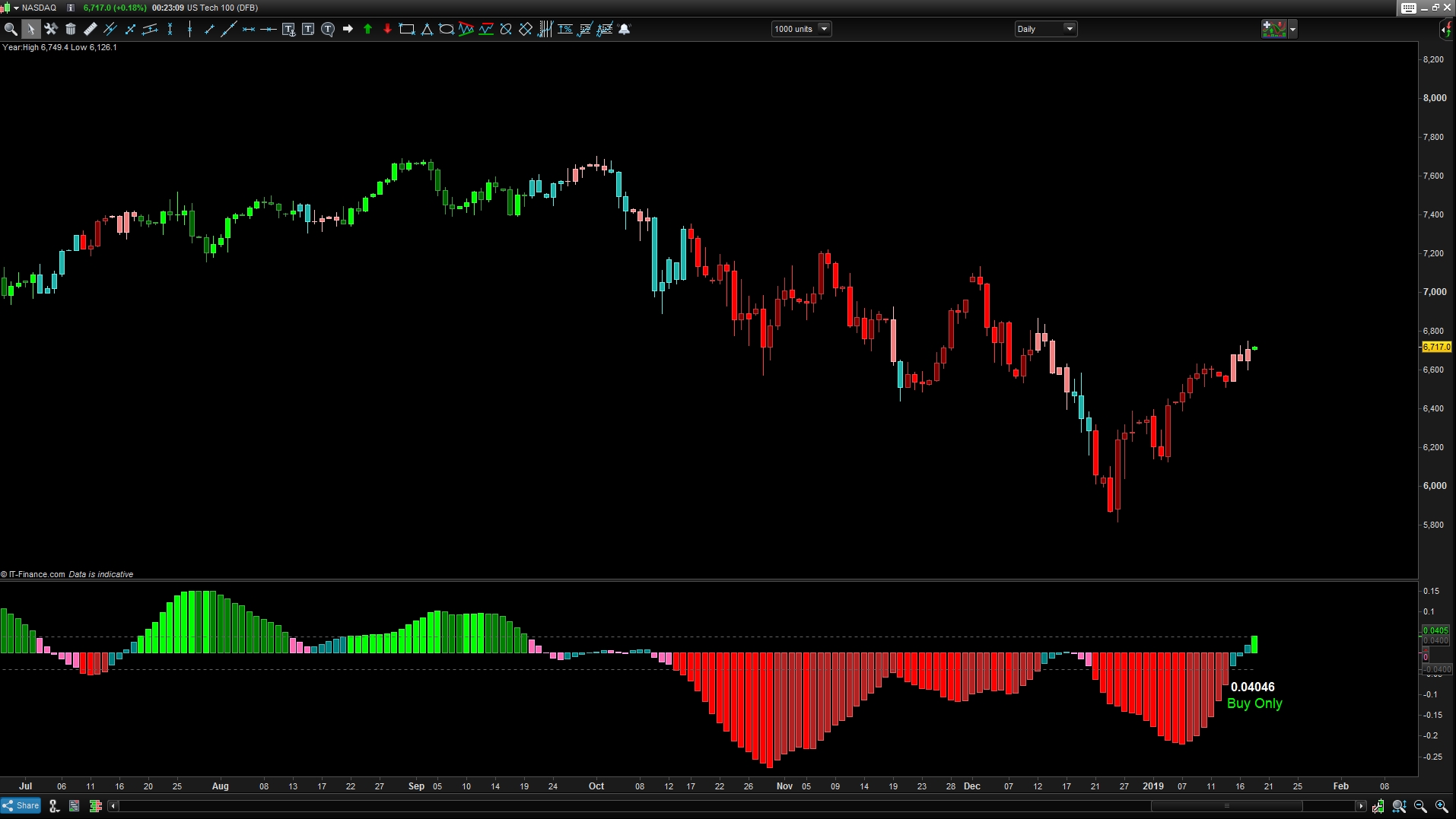
    Hi Nicolas, I have managed to change the last two colour into pick and blue according to the original indicator instead of all white!! is there a way to make it dark pick and dark blue.. just to identify the close open price.. exactly like you did to buy only and sell only!!! sorry I’m asking loads here… this is the last thing i’m asking… i cant get this right and 🙁 try to add up but getting an error!!
    Capture_2019_01_18_00_23_08_985.jpg Capture_2019_01_18_00_23_08_985.jpg
    #89397 quote
    crolakstrading
    Participant
    Senior
    ???
    #89400 quote
    robertogozzi
    Moderator
    Master
    #89413 quote
    Nicolas
    Keymaster
    Master
    !!!
    crolakstrading thanked this post
    #89483 quote
    crolakstrading
    Participant
    Senior
    // --- settings
    eintPeriod = 33
    edblHigh1 = 0.04
    edblLow1 = -0.04
    atrPeriod = 14
    // --- end of settings
     
    atr = AverageTrueRange[atrPeriod](close)
     
    dblTma = TriangularAverage[eintPeriod](close)
     
    if barindex>eintPeriod then
    dblPrev = dblTma[1]
    gadblSlope = ( dblTma - dblPrev ) / atr
     
    //BUY ONLY
    if ( gadblSlope[0] > edblHigh1 ) then
    if(close < open) then
    drawcandle(open,high,low,close)coloured(0,128,0)
     
    else
    drawcandle(open,high,low,close)coloured(0,255,0)
     
    endif
    //SELL ONLY
    elsif ( gadblSlope[0] < edblLow1 ) then
    if(close < open) then
    drawcandle(open,high,low,close)coloured(255,0,0)
     
    else
    drawcandle(open,high,low,close)coloured(178,34,34)
     
    endif
    else
    if(gadblSlope[0] < gadblSlope[1]) then
    if(close < open) then
    drawcandle(open,high,low,close)coloured(255,105,180)
    else
    drawcandle(open,high,low,close)coloured(128,0,128)
    
    endif 
    if(gadblSlope[0] > gadblSlope[1]) then
    if(close < open) then
    drawcandle(open,high,low,close)coloured(32,178,170)
     else
    drawcandle(open,high,low,close)coloured(0,0,205)
    endif
    endif
    endif
     
    return
    Hi it just the last area that i’m trying to make… Pick colour to go dark pink if close above open price Blue to go dark blue if close below open price. if(gadblSlope[0] < gadblSlope[1]) then if(close < open) then drawcandle(open,high,low,close)coloured(255,105,180) else drawcandle(open,high,low,close)coloured(128,0,128) endif if(gadblSlope[0] > gadblSlope[1]) then if(close < open) then drawcandle(open,high,low,close)coloured(32,178,170) else drawcandle(open,high,low,close)coloured(0,0,205)
    #89847 quote
    crolakstrading
    Participant
    Senior
    ??
Viewing 15 posts - 1 through 15 (of 22 total)
  • You must be logged in to reply to this topic.

Changing TMA Slope indicator by Nicolas to appear on candle sticks!!


ProBuilder: Indicators & Custom Tools

New Reply
Author
Summary

This topic contains 21 replies,
has 3 voices, and was last updated by crolakstrading
7 years ago.

Topic Details
Forum: ProBuilder: Indicators & Custom Tools
Language: English
Started: 12/25/2018
Status: Active
Attachments: 4 files
Logo Logo
Loading...