To avoid displaying dates as real numbers (i.e. 20M for 20190405) with DRAWTEXT, I suggest adding special character % (or whatever one is available) to embed date variables, so that
DRAWTEXT("#MyDate#",barindex) //Displayed incorrectly as a real number
becomes
DRAWTEXT("%MyDate%",barindex) //displayed as a date (even without slashes in between)
The current barindex ignores any gaps in trading and only counts actual candles. It would be nice if there was a second index that counted just based on the time passed. So on a 1 minute chart for example every time a new minute opened the index increased by one without there having to be any actual price movement in that minute. When producing averages based on time and when trying to project calculations forward the gaps in barindex can result in the wrong results and this second index would give us a choice of indexes to use. Maybe call it TIMEINDEX?
Anybody seen any feedback (or better still results) that suggestions for improvements posted in this Topic are acted on or considered and dismissed by PRT Dev Teams?
If a PRT Rep clicked the Thanks button then this would show us that suggestions are at least read by PRT?
I post my suggestions for improvement via the blue Suggestions Box under the photo on the link below.
I feel a bit less like I have wasted my time when I get the email back to say that the idea has been forward to the PRT Techies for consideration.
vhttps://www.prorealtime.com/en/contact
It’s a pity, maybe they’re not much interested in this kind of communication.
It will be interesting to see how many of the suggestions have found their way into the new v11 final release. That should give us some sort of answer as to whether anyone is actually reading these posts and acting on them. Then again they might be reading them and just think all our ideas are rubbish so v11 might not actually tell us anything!
At least the request for 3D charts has found its way into v11.
Hello,
To be honest, I have been pretty disappointed by the V11, which is more about cosmetic than new useful tools.
So I’m posting here two ideas that have certainly been already posted:
- On the order ticket that you revamped for V11, I would appreciate to have the option to AUTOMATICALLY increase my stop at breakeven once a predefined “target” has been reached. Once partial closure would be available, the way most traders actually trade is to have 3 different profit target, so the idea is to be able to easily set TP1/TP2/TP3, close 1/3 of the position each time a TP is reached, and move the stop to breakeven once TP1 has been reached. A way to do that would be very appreciated
- I like the alert feature, and also the possibility to link an alert to an order. What would be much more useful however is the possibility to manage an EXISTING position with the alert+order feature. So I want to open a position manually, but close it if a set of rules are met, so that my weak psychology doesn’t f…me up;)
In the hope that someone from PRT dev team read this post
Is this now the Topic for suggestions ALSO for V11 or is the other Topic now for V11??
I manual stop my Systems a lot lately when I see market structure as a superior indication to where price is going than is in my coded strategy. I have to say it is working very well for me for the last 2 – 3 months.
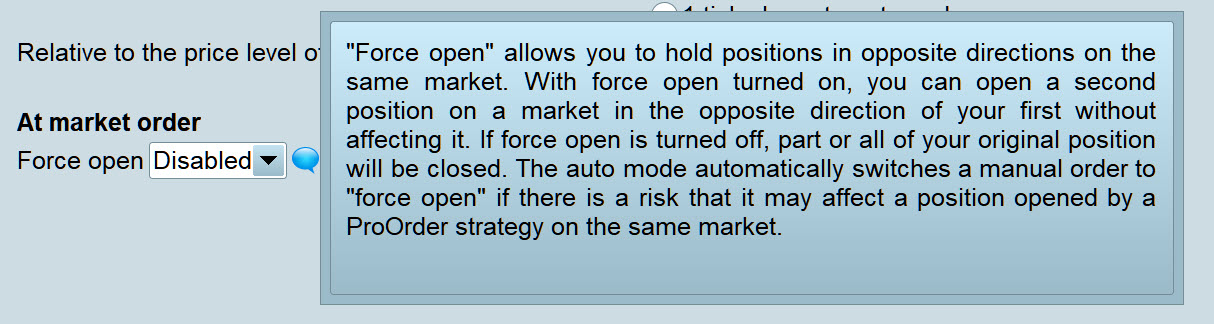
Anyway, I just tried something … I had open an Auto Short and I had Force Open Disabled and I set a Limit order below the Short. I expected the manual limit order to close the Auto Short … as I had Force Open disabled … else what does Disabled mean??.
Auto Short trade stayed open and a manual Long trade was opened when I did above.
If I close Systems via IG platform then the performance does not get logged onto the System under Detailed Report for either Auto-Trading or Manual trading (but strangely may appear under overall Gain?).
So I would like Force Open – Disabled to work as it states it does / should in the tool tip on the PRT Platform attached.
Any thoughts or comments anyone before I send to PRT?
Am I missing something somewhere?? 🙂
I suggest extending the validity of pending orders, set to 1 bar by default, with:
DEFPARAM PENDINGVALIDITY=n
“n” is the desired number of bars. 0 means default value is applicable.
The value set with the above DEFPARAM can be overridden by VALIDITY instruction when a pending order is placed:
BUY 1 CONTRACT AT low LIMIT VALIDITY 5
to set a temporary validity, just for this pending order only, of 5 bars, while keeping default or DEFPARAM value for all other pending orders.
Validity could also be extended until a condition is true:
BUY 1 CONTRACT AT low LIMIT VALIDITY UNTIL close CROSSES UNDER MyAvg
BUY 1 CONTRACT AT low LIMIT VALIDITY UNTIL IntraDayBarIndex = 0
I just sent below to PRT direct via the Contact Form
https://www.prorealtime.com/en/contact?suggestion=1
Option box for user to tick to show Manual Trades only or AutoTrades only.
2 Charts can then be unlinked and show Manual Trades on one Chart and Auto Trades on the other Chart.
On the order ticket that you revamped for V11, I would appreciate to have the option to AUTOMATICALLY increase my stop at breakeven once a predefined “target” has been reached. Once partial closure would be available, the way most traders actually trade is to have 3 different profit target, so the idea is to be able to easily set TP1/TP2/TP3, close 1/3 of the position each time a TP is reached, and move the stop to breakeven once TP1 has been reached. A way to do that would be very appreciated
+1
This would be totally awesome!
Following the discussion here:
Evaluation of the systems performance
I think that it would be great if we could calculate a result in our strategies (call it MyResult for example) and then have that result shown in the optimisation report table when we back test the strategy. We could then sort the report based on that result. This would allow us to include our own personal strategy quality calculations within the strategy and then analyse the results based on them. We could then create any strategy quality index that we wish such as gain/loss ratio divided by draw down or gain per £1 stake or average % gain per year or any other number of different quality scores within our strategies.
Today I was testing longer time frame ‘investment’ ideas in ProOrder but the results were meaningless because the current state of any still open positions is not shown in the back test report. So if a position has been open for a few months and is in massive profit it is not included in the results. In short time frame fast trading this is acceptable but it makes any analysis of longer time frame investment ideas hopeless if the actual current true position if I sold today is not shown. I made a work around by checking the date and placing a sell order if it was the yesterday but perhaps it would be better to give users the option to have the last trade in a back test closed at the latest price or not. Not everyone is trading the five minute chart!
Suggestion also sent to PRT via here:
https://www.prorealtime.com/en/contact
I would like to being able to IDentify pending orders so I can retrieve that info at any moment, both for current and closed ones.
I suggest adding ID to assign a user defined number to any pending order placed, such as:
BUY AT highest[10](high] + 1 * pipsize LIMIT ID MyLongNumber
I suggest adding the keywords
PENDINGLONG(n)
PENDINGSHORT(n)
to return the ID of the Nth pending order placed (0=current order in place, 1=1st most recent closed pending order, 2=2nd most recent closed pending order,….) so that it can be used to be assigned to a variable or used in logical expressions:
IF PendingLong(1) = MyNumber THEN
 .
 .
ENDIF
When used with n=0 it should return 0 for no pending orders of that type:
IF PendingShort(0) = 0 AND PendingLong(0) = 0 THEN
 .
 .       //no pending orders active
 .
ENDIF
This addition would even be more useful if combined with my previous suggestion of PENDINGVALIDITY at
https://www.prorealcode.com/topic/centralization-of-queries-and-suggestions-on-prorealtime/page/18/#post-101231.
I suggest adding some date math with keywords SECOND, MINUTE, HOUR, DAY, WEEK, MONTH and YEAR.
Examples:
IF Today >= (20194027 + 5 MONTH) THEN...
IF OpenDayOfWeek[Today - 40 DAY] THEN...
IF Dhigh(Today - 2 YEAR) < high THEN....
I also suggest adding the keywords MONTHFIRST(n) and MONTHLAST(n) to know the 1st (easy done, though) and last day of the Nth month to be used in expressions:
MyStartBar = barindex[MonthFirst(2)]
MyEndBar   = barindex[MonthLast(0)]  //if MonthLast(0) exceeds Today, then the current one should be returned
addition of keywords WEEKFIRST(n) and WEEKLAST(n) could also help.
I suggest the addition of a FIXED exit from trades when no user condition to exit them is met in the meantime, such as:
BUY 1 Contract AT MARKET EXITTRADE after n BARS    //n=1 through.....
BUY 1 Contract AT MARKET EXITTRADE ON Date >= (Today + 1 WEEK) AND Time > 170000
it should be added for pending orders, as well.
edited:
BUY 1 Contract AT MARKET EXITTRADE ON IntraDayBarIndex = 0
BUY 1 Contract AT MARKET EXITTRADE ON/BEFORE SessionCloseDaily/SessionCloseWeekly //see separate suggestions for these two keywords