Carver Hybrid ProOrder Code

Viewing 15 posts - 31 through 45 (of 45 total)
  • Author
    Posts
  • #117126 quote
    Francesco
    Participant
    Veteran

    Those looks great @grahal i’ll test them tomorrow! Maybe trying to diversify on some assetts.

    @nonetheless
    your test is without tick by tick right?

    GraHal thanked this post
    #117128 quote
    nonetheless
    Participant
    Master

    Yes, it’s a nonsense. Refuses to run tick by tick.

    #117144 quote
    fifi743
    Participant
    Master
    //set Breakout
    MA= CALL"Carver 1"[exponentialaverage[10](close)]
    LongBO = CALL"Carver 1"[close >0.01 and close >  MA]
    ShortBO= CALL"Carver 1"[close <-0.01 and close < MA]
    Hello, There is an error on line 39 AND 40 the price cannot be less than 0. I would rather have written
    //set Breakout
    MA= CALL"Carver 1"
    LongBO = MA >0.01
    ShortBO= MA <-0.01
    n=21
    
    a = highest[n](high[0])
    b = lowest[n](low[0])
    c = (a+b)/2
    
    scaledprice = (close-c)/(a-b)
    //zero =0
    return scaledprice as "scaled price"


    GraHal and Francesco thanked this post
    #117146 quote
    GraHal
    Participant
    Master

    There is an error on line 39 AND 40 the price cannot be less than 0. I

    I did think same at first, but then convinced myself ( 🙁 ) that – as it was calling the Carver 1 on that same line of code – that Close refers to the Close of Carver 1??

    But as ‘Close’ is a PRT Reserved Term then I guess you are correct??  How has such an error got perpetuated by us all on this Topic??

    No wonder we found it difficult to understand how it was all working?? 🙂

    #117150 quote
    Francesco
    Participant
    Veteran

    @grahal your two versions does not perform so well on 200K.

    The 15 min version goes in bankrupt, and the 1h version is only optimized in the last years. Earlier, the curve is almost completely flat.

    GraHal thanked this post
    #117151 quote
    GraHal
    Participant
    Master

    Earlier, the curve is almost completely flat.

    That’s good and also understandable and maybe is a sign of potential?

    I do not have 200k bars and so it would be good if you could optimise over 200k bars please?

    All the variable values are set up in the optimiser and if you optimise 1 variable at a time it will run real quick so not a big onerous / time consuming task.

    Thank You

    #117152 quote
    Francesco
    Participant
    Veteran

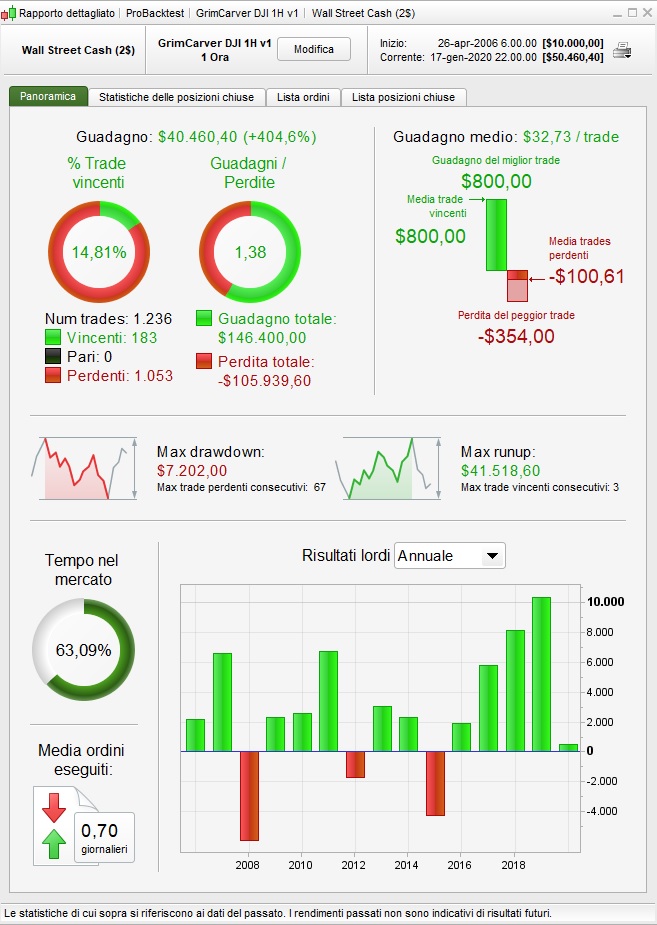
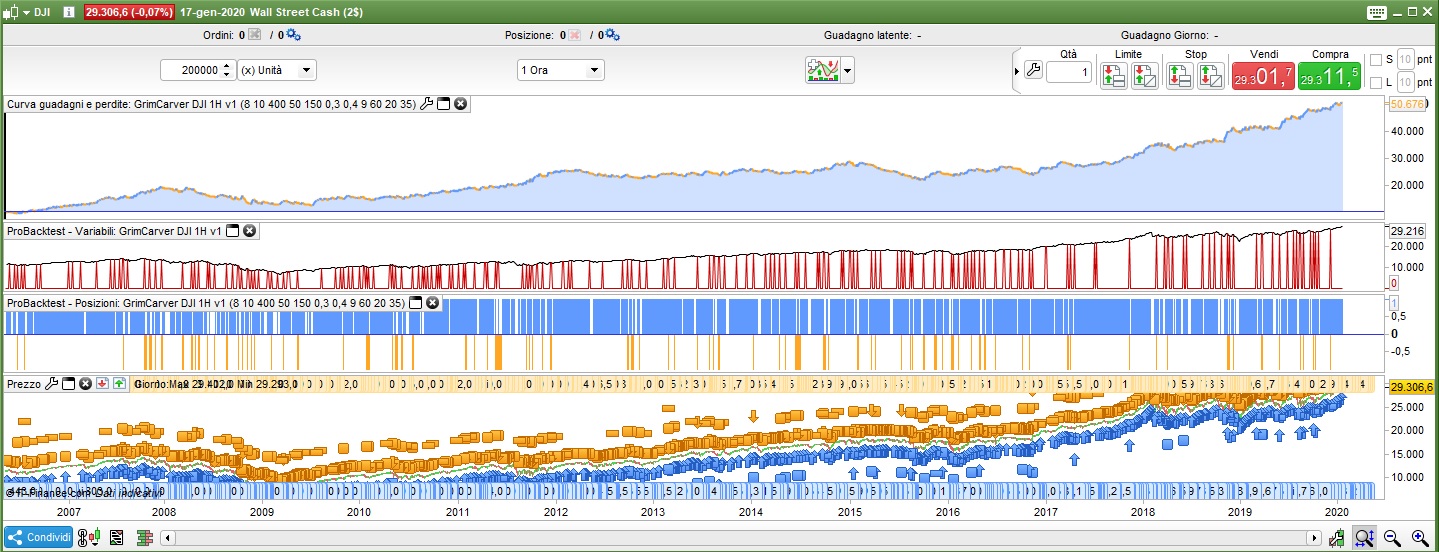
    Here’s the results of the optimization on 200k

    1.jpg 1.jpg 2.jpg 2.jpg
    #117159 quote
    GraHal
    Participant
    Master

    Hey thanks for your work @Francesco

    Could be worse … at least it stays above the water line / zero level over 200k bars.

    Also it makes 40k over a period when buy and hold would have made 20k (DJI up from 10K to 30K)

    Are you able to share the .itf file please then we will have the variable settings.

    But if it’s a mither, it’s okay anyway as we can see the settings on your equity curve and these can easily fitted into a duplicate of my version here

    https://www.prorealcode.com/topic/carver-hybrid-proorder-code/page/2/#post-117116

    Thank You 🙂

    #117161 quote
    Francesco
    Participant
    Veteran

    Here you have it 🙂

    GraHal thanked this post
    GrimCarver-DJI-1H-v1-edit.itf
    #117168 quote
    auvergnat
    Participant
    Veteran

    Thks for your idea. Somebody understand why this working with high stock like BRK.A or AM but not with stock price low like BRK.B or FR for example ? I read the code but…

    #117269 quote
    grimweasel47
    Participant
    Senior

    There is an error on line 39 AND 40 the price cannot be less than 0. I

    I did think same at first, but then convinced myself ( 🙁 ) that – as it was calling the Carver 1 on that same line of code – that Close refers to the Close of Carver 1??

    But as ‘Close’ is a PRT Reserved Term then I guess you are correct?? How has such an error got perpetuated by us all on this Topic??

    No wonder we found it difficult to understand how it was all working?? 🙂

    Hi GraHal

    The  intention was that indeed, so that when the indicator was ‘called’ the ‘close’ was meant to pertain to the indicator value being above/below 0! What this shows really is that price is above/below the ‘n’ highest /lowest candles average line.

    Is there a better way of calling the indicator then and ensuring that long >0 and short <0?

    Thanks all.

    Grim

    #117274 quote
    grimweasel47
    Participant
    Senior

    Here’s the results of the optimization on 200k

    Thanks Francesco

    I note the results from the system cratered in 2008/09. I was thinking about how the scaled price is calculated. It takes the average of the n highest and lowest candles over the ‘n’ period. If volatility increases (as it did back then with huge whipsaws on the way down) then the price above/below the SP average and moving averages could be pretty meaningless; ergo, could a volatility filter be added or optimized that either stops trading during highly volatile periods OR reduces the bet size down?

    I know the market guys I use have a ‘risk range’ for their ETFs etc that looks like a Bollinger Band for a high (sell) and low(buy) price – but isn’t. What their risk range takes into account is the 3 major variables, being Price, Volume and Volatility.  Their argument is that by traders’ using Price alone (90% of technical traders) that they are missing out on including two other important factors, ie volume and volatility. So you identify the ‘trend’ either using MAs or HH, HLs etc and then trade with the trend using the risk ranges to both enter and exit trades. I’m leaning towards the volatility element maybe coming from implied volatility in the options market- so I guess out of scope for ProRealTime!

    I have tried, and so far failed, to come up with an indicator that wraps around price, that takes these 3 variables into account, but I’m keen to develop one here if anyone has any ideas – that way it could be added here.

    GraHal thanked this post
    #117365 quote
    GraHal
    Participant
    Master

    ‘close’ was meant to pertain to the indicator value being above/below 0!

    It must be as above else the strategy wouldn’t have given meaningful results if Close only refers to full normal Price Close??

    What their risk range takes into account is the 3 major variables, being Price, Volume and Volatility.

    Surely an Indicator must exist already?  Money Flow Index (MFI) uses Price and Volume, can we add volatility in some way?

    What about a SMA of MFI together with X standard deviation for inner and outer bands so as to make MFI perform like a Bollinger band?

    We could do with one of our resident coding wizards spotting this to help us?

    #117366 quote
    GraHal
    Participant
    Master

    I have tried, and so far failed, to come up with an indicator that wraps around price, that takes these 3 variables into account,

    What about keeping it simple and using two Indicators, combine them maybe … MFI for Price and Volume and one of the many in the Library showing Volatility, for example …

    https://www.prorealcode.com/prorealtime-indicators/directional-volatility/

    #117792 quote
    grimweasel47
    Participant
    Senior

    Hi GraHal

    Apologies for tardy response as I have been away for  week!

    Yes, I agree something around that sounds good. I receive daily updates from the provider with a high and low for the risk ranges, so we could model something and if it comes close enough then I think it might be good.  The issue comes with FX volumes not being centralised and maybe the issue of dark pool volumes not being reported for stocks maybe?


    GraHal thanked this post
Viewing 15 posts - 31 through 45 (of 45 total)
  • You must be logged in to reply to this topic.

Carver Hybrid ProOrder Code


ProOrder: Automated Strategies & Backtesting

New Reply
Author
Summary

This topic contains 44 replies,
has 11 voices, and was last updated by grimweasel47
6 years, 1 month ago.

Topic Details
Forum: ProOrder: Automated Strategies & Backtesting
Language: English
Started: 01/13/2020
Status: Active
Attachments: 17 files
Logo Logo
Loading...