ProRealCode - Trading & Coding with ProRealTime™
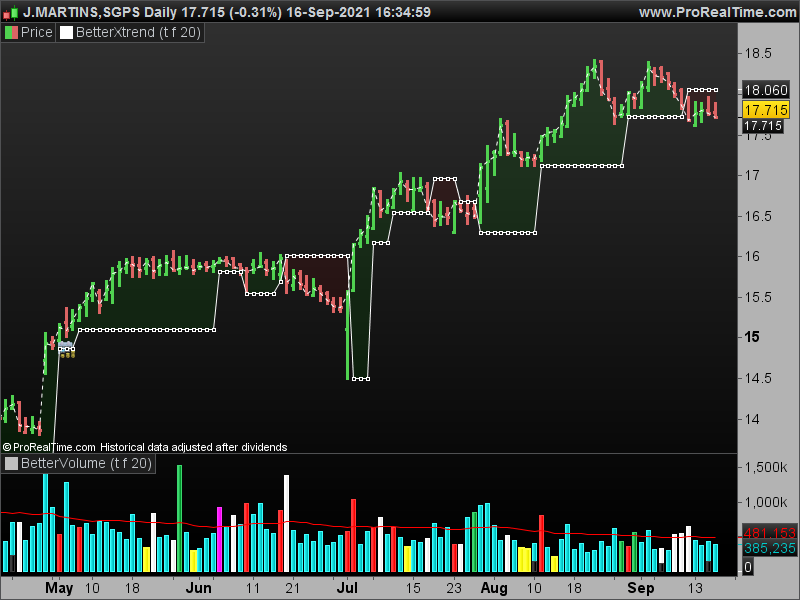
There it is !
//@version=3
study(title="Better X-Trend / Volume",shorttitle="BXT/BV", overlay=true)
//Better Volume Indicator no tickvolume
//Better Volume Indicator
//http://emini-watch.com/the-better-x-trend-indicator/4408/
//http://emini-watch.com/free-stuff/volume-indicator/
enablebarcolors=input(false,title="Enable bar colors")
enablebaricons=input(true,title="Enable bar icons")
enabletrainline=input(false,title="Enable bar Trainline")
lowvol=input(true,title="show low volume")
climaxup=input(false,title="show climax up")
climaxdown=input(false,title="show climax down")
churn=input(true,title="show churn")
climaxchurn=input(false,title="show climax churn")
use2bars=input(true,title="use 2 bars")
lookback=input(20, type=integer, minval=1, maxval=100,title="look back bars")
range = high-low+0.000000001 // this way avoiding zero in the denominators
range2= (highest(high,2)-lowest(low,2))+0.000000001
value1=na
value1:= close > open and range != 0 ? (range/(2*range+open-close))*volume : value1
value1:= close < open and range != 0 ? ((range+close-open)/(2*range+close-open))*volume: value1
value1:= close == open ? 0.5*volume:value1 //value1 is up volume
value2 = volume-value1 //value2 is down volume
//using only one bar
value3 = abs(value1+value2)
value4 = value1*range
value5 = (value1-value2)*range
value6 = value2*range
value7 = (value2-value1)*range
value8 = value1/range
value9 = (value1-value2)/range
value10 = value2/range
value11 = (value2-value1)/range
value12 = value3/range
// Using two bars
value13 = use2bars?( value3+value3[1]):na
value14 = use2bars?(value1+value1[1])*range2:na
value15 = use2bars?(value1+value1[1]-value2-value2[1])*range2:na
value16 = use2bars?(value2+value2[1])*range2:na
value17 = use2bars?(value2+value2[1]-value1-value1[1])*range2:na
value18 = use2bars ? (value1+value1[1])/range2:na
value19 = use2bars ? (value1+value1[1]-value2-value2[1])/range2:na
value20 = use2bars ? (value2+value2[1])/range2:na
value21 = use2bars ? (value2+value2[1]-value1-value1[1])/range2:na
value22 = use2bars ? value13/range2:na
// one bar conditions
condition1 = value3 == lowest(value3,lookback)
condition2 = value4 == highest(value4,lookback) and close > open
condition3 = value5 == highest(value5,lookback) and close > open
condition4 = value6 == highest(value6,lookback) and close < open
condition5 = value7 == highest(value7,lookback) and close < open
condition6 = value8 == lowest(value8,lookback) and close < open
condition7 = value9 == lowest(value9,lookback) and close < open
condition8 = value10 == lowest(value10,lookback) and close > open
condition9 = value11 == lowest(value11,lookback) and close > open
condition10 = value12 == highest(value12,lookback)
// two bar conditions
condition11 = use2bars and value13 == lowest(value13,lookback)
condition12 = use2bars and value14 == highest(value14,lookback) and close > open and close[1] > open[1]
condition13 = use2bars and value15 == highest(value15,lookback) and close > open and close[1] > open[1]
condition14 = use2bars and value16 == highest(value16,lookback) and close < open and close[1] < open[1]
condition15 = use2bars and value17 == highest(value17,lookback) and close < open and close[1] < open[1]
condition16 = use2bars and value18 == lowest(value18,lookback) and close < open and close[1] < open[1]
condition17 = use2bars and value19 == lowest(value19,lookback) and close < open and close[1] < open[1]
condition18 = use2bars and value20 == lowest(value20,lookback) and close > open and close[1] > open[1]
condition19 = use2bars and value21 == lowest(value21,lookback) and close > open and close[1] > open[1]
condition20 = use2bars and value22 == highest(value22,lookback)
//Classifying the bars using one bar conditions, or using both one bar and two bar conditions simultaneosly if "use2bars" button selected.
lowvolume = (condition1 or condition11)
climaxupvolume = (condition2 or condition3 or condition8 or condition9 or condition12 or condition13 or condition18 or condition19)
climaxdownvolume = (condition4 or condition5 or condition6 or condition7 or condition14 or condition15 or condition16 or condition17)
churnvolume = (condition10 or condition20)
climaxchurnvolume = (condition10 or condition20) and (condition2 or condition3 or condition4 or condition5 or condition6 or condition7 or condition8 or condition9 or condition12 or condition13 or condition14 or condition15 or condition16 or condition17 or condition18 or condition19)
val=climaxchurn and climaxchurnvolume? 1 : lowvol and lowvolume? 2:climaxup and climaxupvolume?3:climaxdown and climaxdownvolume?4:churn and churnvolume?5:6
bcolor=climaxchurn and climaxchurnvolume? purple : lowvol and lowvolume? orange:climaxup and climaxupvolume?red:climaxdown and climaxdownvolume?black:churn and churnvolume?blue:green
plotshape(enablebaricons==true and val==1 ? 1:na,location=location.abovebar, title="Climax Churn", style=shape.diamond, color=purple)
plotshape(enablebaricons==true and val==2 ? 1:na,location=location.belowbar, title="Low Volume", style=shape.circle, color=orange)
plotshape(enablebaricons==true and val==3 ? 1:na,location=location.belowbar, title="Climax Up volume", style=shape.triangleup, color=red)
plotshape(enablebaricons==true and val==4 ? 1:na,location=location.abovebar, title="Climax Down volume", style=shape.triangledown, color=black)
plotshape(enablebaricons==true and val==5 ? 1:na,location=location.abovebar, title="Churn", style=shape.square, color=blue)
barcolor(enablebarcolors ? bcolor : na)
trend=1
supplyline=high
supportline=low
trend:=barstate.isfirst?1:close>nz(supplyline[1])?1:close<nz(supportline[1])?-1:nz(trend[1])
supplyline:= trend==1?
climaxdownvolume?
highest(2)
:
high>supplyline[1]?
high
:
supplyline[1]
:
climaxdownvolume?
highest(2)
:
supplyline[1]
supportline:= trend==-1?
climaxupvolume?
lowest(2)
:
low<supportline[1]?
low
:
supportline[1]
:
climaxupvolume?
lowest(2)
:
supportline[1]
trailing=trend==1?supportline:supplyline
plot(enabletrainline?trailing:na,title="trailline",color=trend==1?red:black,linewidth=1,transp=60)
Now the real problem begins. I don’t know how to post. First time.
I had some troubles in colouring the trail, so I made a colorzone instead.
// Better Volume Indicator
// Original idea by emini-watch.com
// Source : http://emini-watch.com/free-stuff/volume-indicator/ AND http://emini-watch.com/category/volume-indicator/
//
// Rewrite for ProRealTime / ChartNet / CMC by Dutchy, march 2009
// Code is provided as public domain, no warranty.
// You can find Dutchy on following fora
// http://www.aktienboard.com/forum/f29/prorealtime-cmc-script-programmierung-t94783/
// http://www.pro-at.com/forums-bourse/sujet-Forums-Partenaires-Forum-ProRealTime-92.html
// Peace
//
// Better Volume Indicator - Summary
// ClimaxUp (Red) : Top, Start Up Trend, Down Trend Continue
// ClimaxDown (White): Bottom, Up Trend Continue, Start Down Trend
// LowVolume (Yellow): Bottom, Top, Up Trend Continue
// Churn (Green): Bottom, Top, Down Trend Continue
// ClimaxChurn (Magenta): Top, Down Trend Continue
// Parameter: History = Boolean
// Parameter: Use2Bars = Boolean
// Parameter: Lookback = 20
ONCE Condition1 = 0
ONCE Condition2 = 0
ONCE Condition3 = 0
ONCE Condition4 = 0
ONCE Condition5 = 0
ONCE Condition6 = 0
ONCE Condition7 = 0
ONCE Condition8 = 0
ONCE Condition9 = 0
ONCE Condition10 = 0
ONCE Condition11 = 0
ONCE Condition12 = 0
ONCE Condition13 = 0
ONCE Condition14 = 0
ONCE Condition15 = 0
ONCE Condition16 = 0
ONCE Condition17 = 0
ONCE Condition18 = 0
ONCE Condition19 = 0
ONCE Condition20 = 0
ONCE trend=1
ONCE supplyline=high
ONCE supportline=low
VolValue = Volume
LowVolValue = VolValue
ClimaxUpValue = VolValue
ClimaxDownValue = VolValue
ChurnValue = VolValue
ClimaxChurnValue = VolValue
StopVolValue = VolValue
TrampolineValue = VolValue
AVVolume = Average[Lookback*2](VolValue)
IF History = 0 THEN
BI = 400
ELSIF History = 1 THEN
BI = Lookback
ENDIF
IF BARINDEX > BI AND Volume <> 0 THEN
// *********************************************************************************************
IF Close > Open THEN
Value1 = Volume * (Range / (2 * Range + Open - Close))
ELSIF Close < Open THEN
Value1= Volume * ((Range + Close - Open) / (2 * Range + Close - Open))
ENDIF
IF Close = Open THEN
Value1 = 0.5 * Volume
ENDIF
Value2 = Volume - Value1
Value3 = Value1 + Value2
Value4 = Value1 * Range
Value5 = (Value1 - Value2) * Range
Value6 = Value2 * Range
Value7 = (Value2 - Value1) * Range
IF Range <> 0 THEN
Value8 = Value1 / Range
Value9 = (Value1 - Value2) / Range
Value10 = Value2 / Range
Value11 = (Value2 - Value1) / Range
Value12 = Value3 / Range
ENDIF
Value13 = Value3 +Value3[1]
Value14 = (Value1+Value1[1]) * (Highest[2](High) - Lowest[2](Low))
Value15 = (Value1+Value1[1] - Value2 - Value2[1]) * (Highest[2](High) - Lowest[2](Low))
Value16 = (Value2 + Value2[1]) * (Highest[2](High) - Lowest[2](Low))
Value17 = (Value2 + Value2[1] - Value1 - Value1[1]) * (Highest[2](High) - Lowest[2](Low))
IF Highest[2](High) <> Lowest[2](Low) THEN
Value18 = (Value1 + Value1[1]) / (Highest[2](High) - Lowest[2](Low))
ENDIF
Value19 = (Value1 + Value1[1] - Value2 - Value2[1]) / (Highest[2](High) - Lowest[2](Low))
Value20 = (Value2 + Value2[1]) / (Highest[2](High) - Lowest[2](Low))
Value21 = (Value2 + Value2[1] - Value1 - Value1[1]) / (Highest[2](High) - Lowest[2](Low))
Value22 = Value13 / (Highest[2](High) - Lowest[2](Low))
IF Use2Bars = 0 THEN
Condition1 = Value3 = Lowest[Lookback](Value3)
Condition2 = Value4 = Highest[Lookback](Value4) AND Close > Open
Condition3 = Value5 = Highest[Lookback](Value5) AND Close > Open
Condition4 = Value6 = Highest[Lookback](Value6) AND Close < Open
Condition5 = Value7 = Highest[Lookback](Value7) AND Close < Open
Condition6 = Value8 = Lowest[Lookback](Value8) AND Close < Open
Condition7 = Value9 = Lowest[Lookback](Value9) AND Close < Open
Condition8 = Value10 = Lowest[Lookback](Value10) AND Close > Open
Condition9 = Value11 = Lowest[Lookback](Value11) AND Close > Open
Condition10 = Value12 = Highest[Lookback](Value12)
ELSIF Use2Bars = 1 THEN
Condition11 = Value13 = Lowest[Lookback](Value13)
Condition12 = Value14 = Highest[Lookback](Value14) AND Close > Open AND Close[1] > Open[1]
Condition13 = Value15 = Highest[Lookback](Value15) AND Close > Open AND Close[1] > Open[1]
Condition14 = Value16 = Highest[Lookback](Value16) AND Close < Open AND Close[1] < Open[1]
Condition15 = Value17 = Highest[Lookback](Value17) AND Close < Open AND Close[1] < Open[1]
Condition16 = Value18 = Lowest[Lookback](Value18) AND Close < Open AND Close[1] < Open[1]
Condition17 = Value19 = Lowest[Lookback](Value19) AND Close < Open AND Close[1] < Open[1]
Condition18 = Value20 = Lowest[Lookback](Value20) AND Close > Open AND Close[1] > Open[1]
Condition19 = Value21 = Lowest[Lookback](Value21) AND Close > Open AND Close[1] > Open[1]
Condition20 = Value22 = Highest[Lookback](Value22)
ENDIF
// *********************************************************************************************
IF (Condition1 or Condition11) THEN // Yellow
LowVol = LowVolValue
ELSE
LowVol = 0
ENDIF
IF (Condition2 or Condition3 or Condition8 or Condition9 or Condition12 or Condition13 or Condition18 or Condition19) THEN // Red
ClimaxUp = ClimaxUpValue
IF LowVol <> 0 THEN
ClimaxUp = ClimaxUpValue / 2
ENDIF
ELSE
ClimaxUp = 0
ENDIF
IF (Condition4 or Condition5 or Condition6 or Condition7 or Condition14 or Condition15 or Condition16 or Condition17) THEN // White
ClimaxDown = ClimaxDownValue
IF LowVol <> 0 OR ClimaxUp <> 0 THEN
ClimaxDown = ClimaxDownValue
ENDIF
ELSE
ClimaxDown = 0
ENDIF
IF (Condition10 or Condition20) THEN // Green
Churn = ChurnValue
IF LowVol <> 0 OR ClimaxUp <> 0 OR ClimaxDown <> 0 THEN
Churn = ChurnValue / 2
ENDIF
ELSE
Churn = 0
ENDIF
//IF (Condition10 or Condition20) AND (Condition2 or Condition3 or Condition4 or Condition5 or Condition6 or Condition7 or Condition8 or Condition9 or Condition12 or Condition13 or Condition14 or Condition15 or Condition16 or Condition17 or Condition18 or Condition19) THEN
IF Churn <> 0 AND (ClimaxUp <> 0 OR ClimaxDown <> 0) THEN // Magenta
ClimaxChurn = ClimaxChurnValue
ELSE
ClimaxChurn = 0
ENDIF
//StopVolume
LocalClosingPosition = 1 - (High - Close) / (High - Low)
IF Volume > Volume[1] AND Range < Range[1] AND ((High > High[1] AND LocalClosingPosition < 0.4) OR (Low < Low[1] AND LocalClosingPosition > 0.6)) THEN
StopVol = StopVolValue * 1 / 3 // HigherVolume & LowerRange @ HigherHigh or LowerLow - DBlue
ELSE
StopVol = 0
ENDIF
//Trampoline
FOR i = 1 TO 2 // Close together
IF ((ClimaxChurn[i] > 0 OR ClimaxUp[i] > 0) AND (ClimaxChurn > 0 OR ClimaxUp > 0)) AND ((Close[i] > Open[i] AND Close < Open) OR (Close[i] < Open[i] AND Close > Open)) THEN
Trampoline = TrampolineValue * 1 / 4
BREAK
ELSE
Trampoline = 0
ENDIF
NEXT
trend=1
supplyline=high
supportline=low
//trend:=barstate.isfirst?1:close>nz(supplyline[1])?1:close<nz(supportline[1])?-1:nz(trend[1])
if close>supplyline[1] then
trend=1
else
if close< supportline[1] then
trend=-1
else
trend=trend[1]
endif
endif
if trend=1 then
if ClimaxDown<>0 then
supplyline= highest[2](high)
else
if high>supplyline[1] then
supplyline=high
else
supplyline=supplyline[1]
endif
endif
else
if ClimaxDown<>0 then
supplyline= highest[2](high)
else
supplyline=supplyline[1]
endif
endif
//supplyline:= trend==1?climaxdownvolume?highest(2): high>supplyline[1]? high: supplyline[1]: climaxdownvolume? highest(2):supplyline[1]
if trend=-1 then
if ClimaxUp<>0 then
supportline= lowest[2](low)
else
if low<supportline[1] then
supportline=low
else
supportline=supportline[1]
endif
endif
else
if ClimaxUp<>0 then
supportline= lowest[2](low)
else
supportline=supportline[1]
endif
endif
//supportline:= trend==-1?
// climaxupvolume?
// lowest(2)
// :
// low<supportline[1]?
// low
// :
// supportline[1]
// :
// climaxupvolume?
// lowest(2)
// :
// supportline[1]
if trend=1 then
trail=supportline
else
trail=supplyline
endif
//trailinging=trend==1?supportline:supplyline
//plot(enabletrainline?trailing:na,title="trailline",color=trend==1?red:black,linewidth=1,transp=60)
ENDIF
//RETURN Volume COLOURED (0, 200, 200) AS "Volume (LBlue)", LowVol COLOURED (255, 255, 0) AS "LowVol (Yellow Histo): Bottom & Top & UpTrend Cont",ClimaxUp COLOURED (255, 0, 0) AS "Climax Up (Red Histo): Start UpTrend & Top & DownTrend Cont", ClimaxDown COLOURED (255, 255, 255) AS "ClimaxDown (White Histo): Bottom & UpTrend Cont & Start Down Trend" , Churn COLOURED (0, 155, 50) AS "Churn = HighVol@LowRange (Green Histo): Bottom & Top & Down Trend Cont",ClimaxChurn COLOURED (255, 0, 255) AS "ClimaxChurn (Magenta Histo): Top & DownTrend Cont: Brearish", Trampoline COLOURED (0, 0, 255) AS "Trampoline (DBlue Histo): Reversal", StopVol COLOURED (0, 0, 0) AS "StopVol (Black Histo): Profit Taking", AVVolume COLOURED (255, 0, 0) AS "AVVolume (Red Line)"
return trail as "trail", close as "close"
//@version=3
study(title=”Better X-Trend / Volume”,shorttitle=”BXT/BV”, overlay=true)
//Better Volume Indicator no tickvolume
//EasyLanguage Code Version 19 August 2012 Copyright http://www.Emini-Watch.com All rights reserved
//Better Volume Indicator
//http://emini-watch.com/the-better-x-trend-indicator/4408/
//http://emini-watch.com/free-stuff/volume-indicator/
enablebarcolors=input(false,title=”Enable bar colors”)
enablebaricons=input(true,title=”Enable bar icons”)
enabletrainline=input(false,title=”Enable bar Trainline”)
lowvol=input(true,title=”show low volume”)
climaxup=input(false,title=”show climax up”)
climaxdown=input(false,title=”show climax down”)
churn=input(true,title=”show churn”)
climaxchurn=input(false,title=”show climax churn”)
use2bars=input(true,title=”use 2 bars”)
lookback=input(20, type=integer, minval=1, maxval=100,title=”look back bars”)
range = high-low+0.000000001 // this way avoiding zero in the denominators
range2= (highest(high,2)-lowest(low,2))+0.000000001
value1=na
value1:= close > open and range != 0 ? (range/(2*range+open-close))*volume : value1
value1:= close < open and range != 0 ? ((range+close-open)/(2*range+close-open))*volume: value1
value1:= close == open ? 0.5*volume:value1 //value1 is up volume
value2 = volume-value1 //value2 is down volume
//using only one bar
value3 = abs(value1+value2)
value4 = value1*range
value5 = (value1-value2)*range
value6 = value2*range
value7 = (value2-value1)*range
value8 = value1/range
value9 = (value1-value2)/range
value10 = value2/range
value11 = (value2-value1)/range
value12 = value3/range
// Using two bars
value13 = use2bars?( value3+value3[1]):na
value14 = use2bars?(value1+value1[1])*range2:na
value15 = use2bars?(value1+value1[1]-value2-value2[1])*range2:na
value16 = use2bars?(value2+value2[1])*range2:na
value17 = use2bars?(value2+value2[1]-value1-value1[1])*range2:na
value18 = use2bars ? (value1+value1[1])/range2:na
value19 = use2bars ? (value1+value1[1]-value2-value2[1])/range2:na
value20 = use2bars ? (value2+value2[1])/range2:na
value21 = use2bars ? (value2+value2[1]-value1-value1[1])/range2:na
value22 = use2bars ? value13/range2:na
// one bar conditions
condition1 = value3 == lowest(value3,lookback)
condition2 = value4 == highest(value4,lookback) and close > open
condition3 = value5 == highest(value5,lookback) and close > open
condition4 = value6 == highest(value6,lookback) and close < open
condition5 = value7 == highest(value7,lookback) and close < open
condition6 = value8 == lowest(value8,lookback) and close < open
condition7 = value9 == lowest(value9,lookback) and close < open
condition8 = value10 == lowest(value10,lookback) and close > open
condition9 = value11 == lowest(value11,lookback) and close > open
condition10 = value12 == highest(value12,lookback)
// two bar conditions
condition11 = use2bars and value13 == lowest(value13,lookback)
condition12 = use2bars and value14 == highest(value14,lookback) and close > open and close[1] > open[1]
condition13 = use2bars and value15 == highest(value15,lookback) and close > open and close[1] > open[1]
condition14 = use2bars and value16 == highest(value16,lookback) and close < open and close[1] < open[1]
condition15 = use2bars and value17 == highest(value17,lookback) and close < open and close[1] < open[1]
condition16 = use2bars and value18 == lowest(value18,lookback) and close < open and close[1] < open[1]
condition17 = use2bars and value19 == lowest(value19,lookback) and close < open and close[1] < open[1]
condition18 = use2bars and value20 == lowest(value20,lookback) and close > open and close[1] > open[1]
condition19 = use2bars and value21 == lowest(value21,lookback) and close > open and close[1] > open[1]
condition20 = use2bars and value22 == highest(value22,lookback)
//Classifying the bars using one bar conditions, or using both one bar and two bar conditions simultaneosly if “use2bars” button selected.
lowvolume = (condition1 or condition11)
climaxupvolume = (condition2 or condition3 or condition8 or condition9 or condition12 or condition13 or condition18 or condition19)
climaxdownvolume = (condition4 or condition5 or condition6 or condition7 or condition14 or condition15 or condition16 or condition17)
churnvolume = (condition10 or condition20)
climaxchurnvolume = (condition10 or condition20) and (condition2 or condition3 or condition4 or condition5 or condition6 or condition7 or condition8 or condition9 or condition12 or condition13 or condition14 or condition15 or condition16 or condition17 or condition18 or condition19)
val=climaxchurn and climaxchurnvolume? 1 : lowvol and lowvolume? 2:climaxup and climaxupvolume?3:climaxdown and climaxdownvolume?4:churn and churnvolume?5:6
bcolor=climaxchurn and climaxchurnvolume? purple : lowvol and lowvolume? orange:climaxup and climaxupvolume?red:climaxdown and climaxdownvolume?black:churn and churnvolume?blue:green
plotshape(enablebaricons==true and val==1 ? 1:na,location=location.abovebar, title=”Climax Churn”, style=shape.diamond, color=purple)
plotshape(enablebaricons==true and val==2 ? 1:na,location=location.belowbar, title=”Low Volume”, style=shape.circle, color=orange)
plotshape(enablebaricons==true and val==3 ? 1:na,location=location.belowbar, title=”Climax Up volume”, style=shape.triangleup, color=red)
plotshape(enablebaricons==true and val==4 ? 1:na,location=location.abovebar, title=”Climax Down volume”, style=shape.triangledown, color=black)
plotshape(enablebaricons==true and val==5 ? 1:na,location=location.abovebar, title=”Churn”, style=shape.square, color=blue)
barcolor(enablebarcolors ? bcolor : na)
trend=1
supplyline=high
supportline=low
trend:=barstate.isfirst?1:close>nz(supplyline[1])?1:close<nz(supportline[1])?-1:nz(trend[1])
supplyline:= trend==1?
climaxdownvolume?
highest(2)
:
high>supplyline[1]?
high
:
supplyline[1]
:
climaxdownvolume?
highest(2)
:
supplyline[1]
supportline:= trend==-1?
climaxupvolume?
lowest(2)
:
low<supportline[1]?
low
:
supportline[1]
:
climaxupvolume?
lowest(2)
:
supportline[1]
trailing=trend==1?supportline:supplyline
plot(enabletrainline?trailing:na,title=”trailline”,color=trend==1?red:black,linewidth=1,transp=60)

why did you post this code, what’s different in it?
Better X Trend Indicator NT 7/8 conversion to Prorealtime
This topic contains 18 replies,
has 4 voices, and was last updated by
robertogozzi
4 years, 4 months ago.
| Forum: | ProBuilder: Indicators & Custom Tools |
| Language: | English |
| Started: | 10/05/2017 |
| Status: | Active |
| Attachments: | 8 files |
The information collected on this form is stored in a computer file by ProRealCode to create and access your ProRealCode profile. This data is kept in a secure database for the duration of the member's membership. They will be kept as long as you use our services and will be automatically deleted after 3 years of inactivity. Your personal data is used to create your private profile on ProRealCode. This data is maintained by SAS ProRealCode, 407 rue Freycinet, 59151 Arleux, France. If you subscribe to our newsletters, your email address is provided to our service provider "MailChimp" located in the United States, with whom we have signed a confidentiality agreement. This company is also compliant with the EU/Swiss Privacy Shield, and the GDPR. For any request for correction or deletion concerning your data, you can directly contact the ProRealCode team by email at privacy@prorealcode.com If you would like to lodge a complaint regarding the use of your personal data, you can contact your data protection supervisory authority.