


Backtest to Screener

Viewing 4 posts - 1 through 4 (of 4 total)

  • Author
    Posts
  • #150923 quote
    assafnassafn
    Participant
    Average

    Hello everybody

    I have a Backtest code that I want to adapt to the screener. I tried a lot of ways without success.

    appreciate any help

    cass1.itf
    #150933 quote
    robertogozzirobertogozzi
    Moderator
    Legend

    Always post also your code, besides the ITF file, so we don’t have to install it to help you, unless your code is 300+ lines!

    There you go:

    c1 = rsi[40]crosses under 35
    Y=VOLUME>10000 AND CLOSE>0
    IF c1  AND Y THEN
       Flag = 1
    Endif
    MyRSI = rsi[9](Close)
    Signal = 0
    RsiMin = MyRSI > MyRSI[1] and MyRSI[1] < MyRSI[2] and MyRSI[1] < 30
    if RsiMin then
       RSIMin1 = MyRSI[1]
       Low1 = Low[1]
       for I = 3 to  80
          if RSIMin[I] then
             RSIMin2 = MyRSI[I + 1]
             Low2 = Low[I + 1]
             If flag=1 and Low1 < Low2 and RSIMin1 > RSIMin2 then
                flag=2
             elsif flag=2 and close>high[1] and close>open then
                Signal = 1
                Flag = 0
             endif
             break
          endif
       next
    endif
    SCREENER[Signal]

    It ws a matter of removing instrucions not supported by ProScreener and set a SIGNAL in place of entering a trade.

    #150940 quote
    assafnassafn
    Participant
    Average
    Thank you robertogozzi,
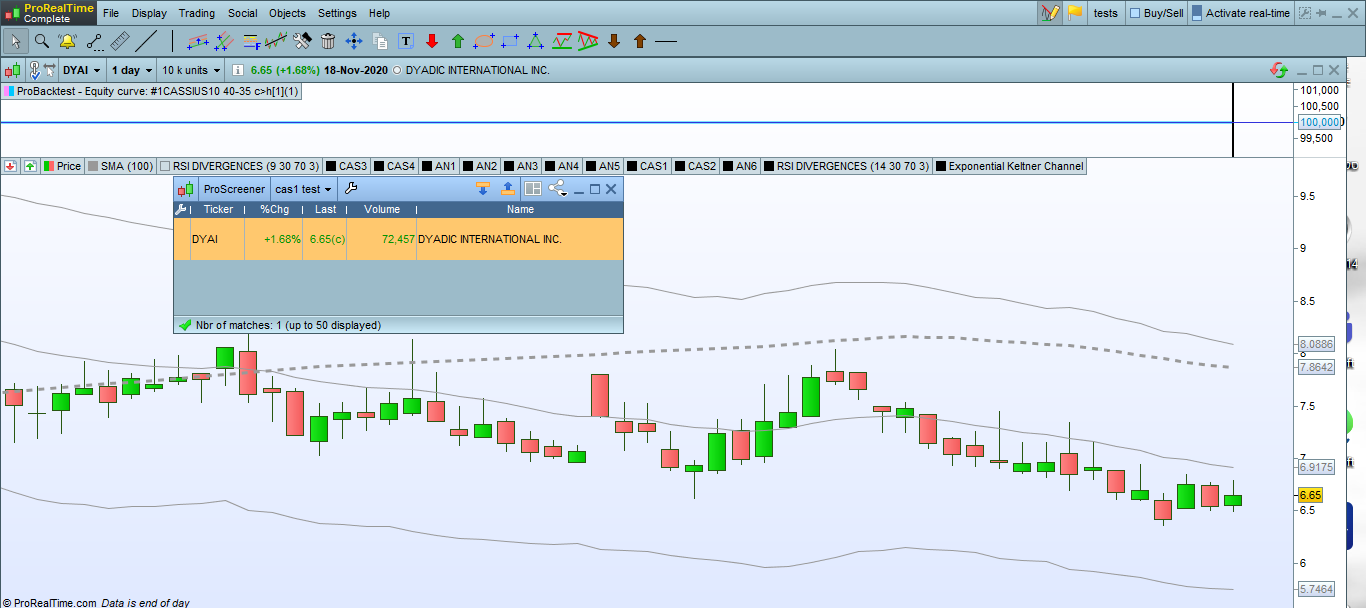
    I changed the code so it will show results for two days ago:

    SCREENER[Signal[2]]

    If the screener shows results for 2 days ago – the Backtest should show a buy signal from yesterday.

    Unfortunately there is no buy signal yesterday (attached screenshot)

    Any ideas?

    1.png 1.png
    #150956 quote
    robertogozzirobertogozzi
    Moderator
    Legend

    I also experienced that issue.

    In backtesting, Flag is NEVER > 1, and Signal is ALWAYS 0.

    I have no clue to why that happens.

    You should report it to ProRealTime. Open a ticket pressing the key combination Ctrl+M from the platform.

    Share any reply you may receive. Thank yoo šŸ™‚

    assafn thanked this post
Viewing 4 posts - 1 through 4 (of 4 total)
  • You must be logged in to reply to this topic.

ProRealAI ProRealAI New

Stuck on this ProBuilder code?

Describe what this topic is trying to build, in plain English, and ProRealAI writes the ProRealTimeā„¢ indicator, screener or system for you.

Available in 7 languages
Try ProRealAI

Backtest to Screener


ProScreener: Market Scanners & Detection

New Reply
Author
author-avatar
assafn @assafn Participant
Summary

This topic contains 3 replies,
has 2 voices, and was last updated by robertogozzirobertogozzi
5 years, 10 months ago.

Topic Details
Forum: ProScreener: Market Scanners & Detection
Language: English
Started: 11/19/2020
Status: Active
Attachments: 2 files
ProRealCode ProRealCode
Loading...

