Aggiungere segnale buy e sell a indicatore PRC_Pivot Point Supertrend

Viewing 5 posts - 1 through 5 (of 5 total)
  • Author
    Posts
  • #214043 quote
    Msport71
    Participant
    Junior

    Buongiorno,

    chiedo cortese aiuto per integrare l’indicatore PRC  Pivot Point Supertrend (2-3-10) con segnali Buy e Sell.

    https://www.prorealcode.com/prorealtime-indicators/pivot-point-supertrend/

    Sono riuscito con l’indicatore Supertrend (presumo di defaul di PRT) ma non riesco con nessuna delle sintassi proposte dal software e ricevo segnalazione di errore.

    Pobabilmente devo usare la funzione Call , ma non mi è chiara la sintassi esatta.

    Grazie e mille.


    P.s. Di seguito la sintassi che riesco a utilizzare con l’indicatore Supertrend.

    MyLongConditions = close CROSSES OVER Supertrend[3,10]
    MyShortConditions = close CROSSES UNDER Supertrend[3,10]
    IF MyShortConditions THEN
    DrawText(“Sell”,barIndex, high + range*2,serif,bold,15) coloured(255,0,0,255)
    ELSIF MyLongConditions THEN
    DrawText(“Buy”,barIndex, low – range*2,serif,bold,15) coloured(0,128,0,135)
    ENDIF
    RETURN

    #214046 quote
    robertogozzi
    Moderator
    Master

    Non puoi mettere BUY/SELL in un indicatore, ma in una strategia.

    Gli indicatori NON possono acquistare o vendere.

    #214054 quote
    Msport71
    Participant
    Junior

    Probabilmente mi sono spiegato male.

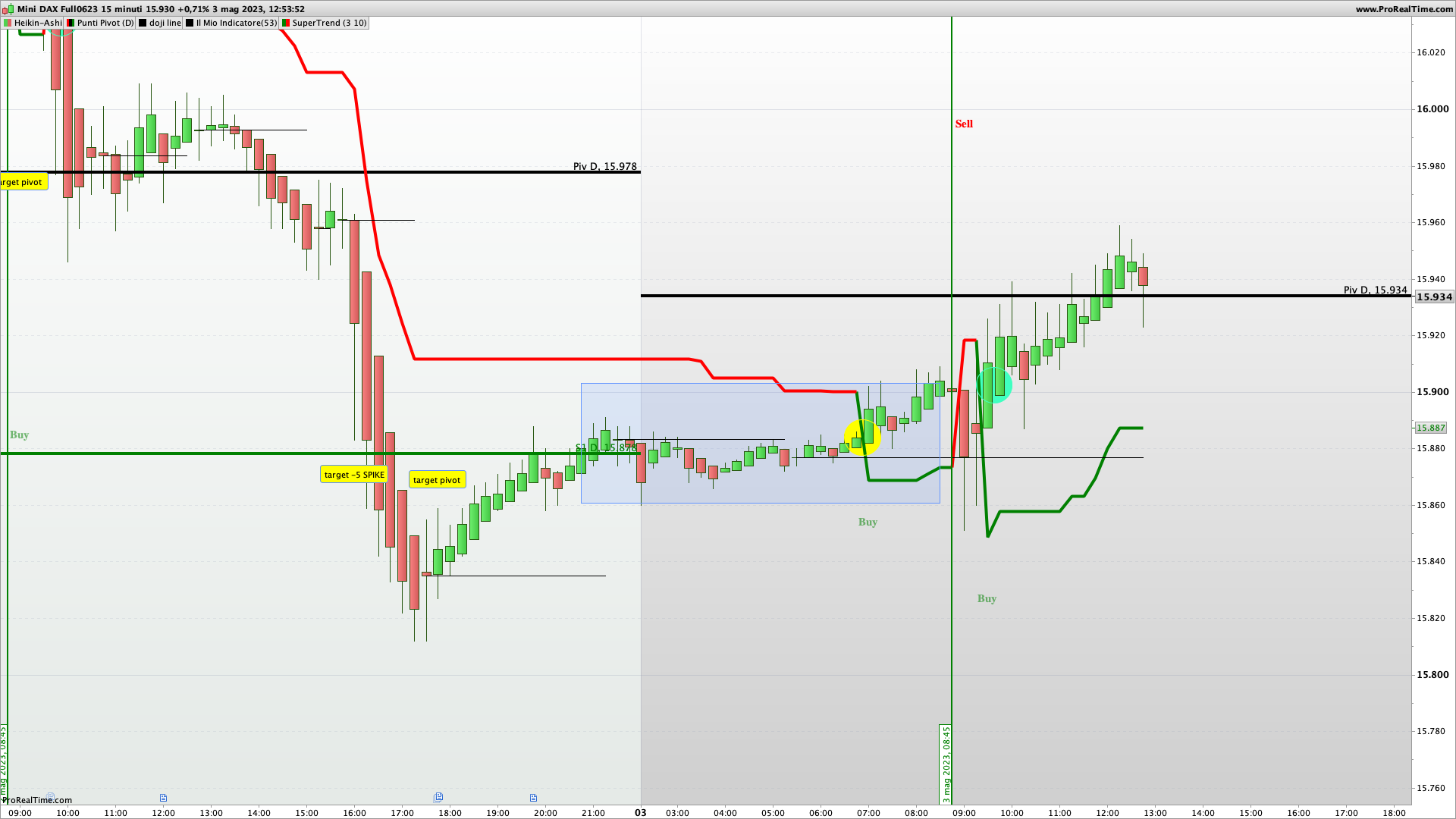
    Allego screenshot dove il grafico mi evidenzia in maniera testuale con le parole buy e sell i cross del prezzo rispetto all’indicatore Supertrend.

    Vorrei ottenere lo stesso sostituendo l’indicatore Supertrend con il Pivot Supertrend…


    Grazie

    DXMXXXX-15-minuti.png DXMXXXX-15-minuti.png
    #214074 quote
    robertogozzi
    Moderator
    Master

    Adesso è chiaro, ho aggiunto le tue righe, modificate, alla fine del codice, immediatamente prima di RETURN:

    //PRC_Pivot Point Supertrend | indicator
    //30.06.2020
    //Nicolas @ www.prorealcode.com
    //Sharing ProRealTime knowledge
    //converted from pinescript
    
    // -- settings
    prd = 2 //Pivot Point Period
    Factor = 3 //ATR Factor
    Pd = 10 //ATR Period
    showpivot = 0 // Show Pivot Points (1 = true ; 0 =false)
    showcl = 0 //Show PP Center Line (1 = true ; 0 =false)
    showsr = 0 //Show Support/Resistance (1 = true ; 0 =false)
    // --- end of settings
    
    atr = averagetruerange[14]
    if high[prd] >= highest[(prd)*2+1](high) then
    ph = high[prd]
    if showpivot then
    drawtext("H",barindex[prd],ph+atr/2,dialog,standard,20) coloured(255,0,0)
    endif
    lastpp = ph
    endif
    
    if low[prd] <= lowest[(prd)*2+1](low)  then
    pl = low[prd]
    if showpivot then
    drawtext("L",barindex[prd],pl-atr/2,dialog,standard,20) coloured(0,255,0)
    endif
    lastpp = pl
    endif
    
    if lastpp<>lastpp[1] then
    if center=0 then
    center = lastpp
    else
    center = (center * 2 + lastpp) / 3
    endif
    
    endif
    Up = center - (Factor * averagetruerange[Pd])
    Dn = center + (Factor * averagetruerange[Pd])
    
    Trend = 0
    if close[1] > TUp[1] then
    TuP = max(Up, TUp[1])
    else
    TuP= Up
    endif
    if close[1] < TDown[1] then
    TDown= min(Dn, TDown[1])
    else
    TDown= Dn
    endif
    if close > TDown[1] then
    trend = 1
    elsif close < TUp[1] then
    trend = -1
    else
    trend = Trend[1]
    endif
    
    once trend=1
    if Trend = 1 then
    trailingsl =  TUp
    r=0
    g=255
    else
    trailingsl = TDown
    r=255
    g=0
    endif
    
    if showcl then
    alpha=255
    if center<medianprice then
    clr=0
    clb=255
    else
    clr=255
    clb=0
    endif
    endif
    
    sr = undefined
    if showsr then
    sr = lastpp
    if lastpp=ph then
    srr=255
    srg=0
    else
    srr=0
    srg=255
    endif
    endif
    
    MyLongConditions = close CROSSES OVER trailingsl
    MyShortConditions = close CROSSES UNDER trailingsl
    IF MyShortConditions THEN
    DrawText("Sell",barIndex, trailingsl + range,serif,bold,15) coloured(255,0,0,255)
    ELSIF MyLongConditions THEN
    DrawText("Buy",barIndex, trailingsl - range,serif,bold,15) coloured(0,128,0,135)
    ENDIF
    
    return trailingsl coloured(r,g,0) style(line,2) as "Supertrend pivot point", center coloured(clr,0,clb,alpha) as "early exit", sr coloured(srr,srg,0) style(point,2) as "support / resistance"
    #214079 quote
    Msport71
    Participant
    Junior

    Perfetto,

    grazie e mille!

Viewing 5 posts - 1 through 5 (of 5 total)
  • You must be logged in to reply to this topic.

Aggiungere segnale buy e sell a indicatore PRC_Pivot Point Supertrend


ProBuilder: Indicatori & Strumenti Personalizzati

New Reply
Author
author-avatar
Msport71 @carlo-pasca Participant
Summary

This topic contains 4 replies,
has 2 voices, and was last updated by Msport71
2 years, 10 months ago.

Topic Details
Forum: ProBuilder: Indicatori & Strumenti Personalizzati
Language: Italian
Started: 05/03/2023
Status: Active
Attachments: 1 files
Logo Logo
Loading...