Aggiungere colonne indicatori a proscreener

Viewing 2 posts - 1 through 2 (of 2 total)

  • Author
    Posts
  • #249056 quote
    MaoRai54MaoRai54
    Participant
    Master

    Buongiorno,

    ho sempre tralasciato di usare proscreener ma ora comincio a capirne le possibilità.  Solo che non lo so usare.

    Vorrei aggiungere delle colonne con valori di altri indicatori alla tabella dei risultati proscreener ma non so come fare.

    Ad esempio, nel PRTband screener vorrei anche avere la colonna dell’RSI.

    Come faccio ad aggiungerla?

    Grazie in anticipo

    #249060 quote
    Iván GonzálezIván González
    Moderator
    Legend

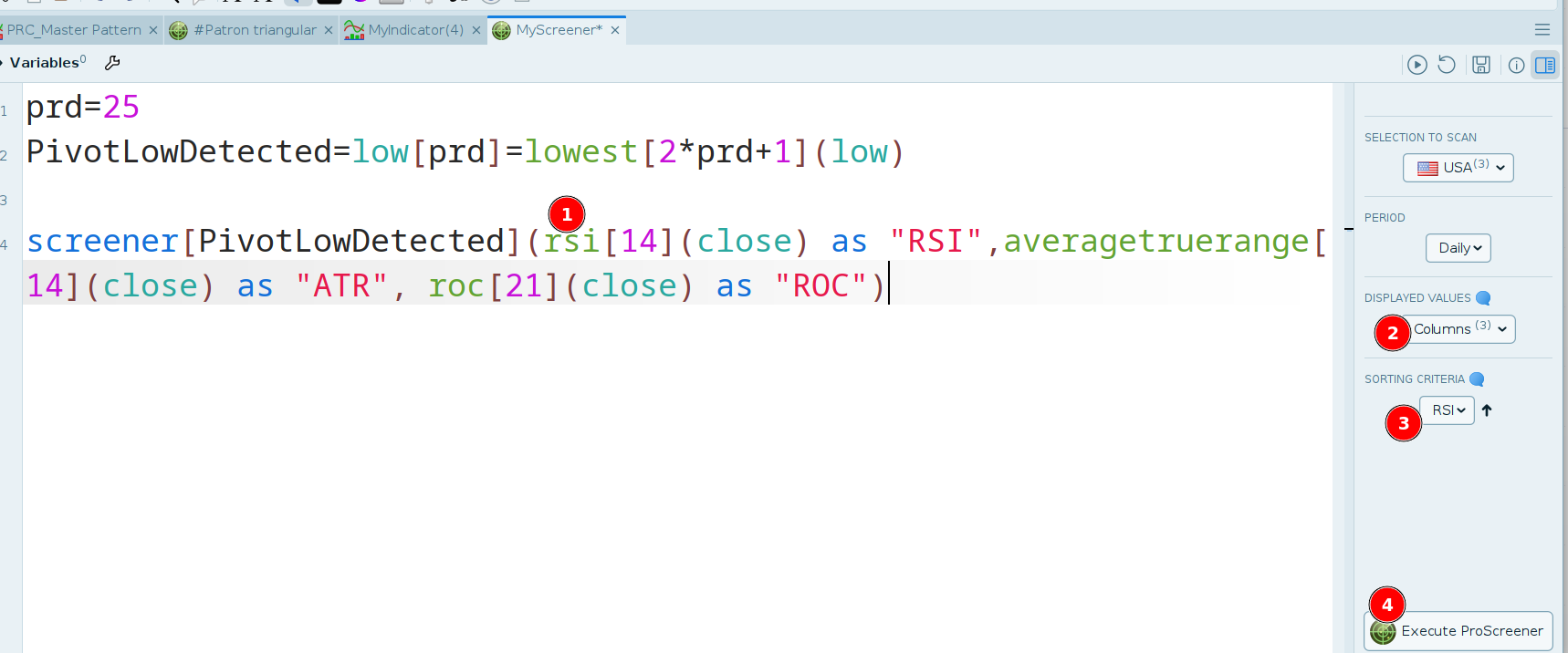
    Ciao! Puoi aggiungere le variabili dopo le parentesi.
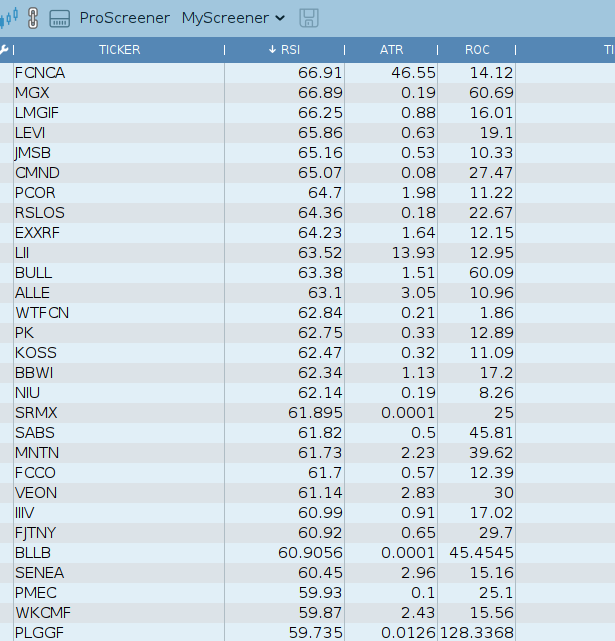
    Guarda, in questo codice mostriamo 3 colonne: RSI, ATR e ROC.
    Devi selezionare nel menu dello screener quali colonne visualizzare e il criterio di ordinamento.

    prd=25
    PivotLowDetected=low[prd]=lowest[2*prd+1](low)
    
    screener[PivotLowDetected](rsi[14](close) as "RSI",averagetruerange[14](close) as "ATR", roc[21](close) as "ROC")
    MaoRai54 and robertogozzi thanked this post
    2025-07-23_15-25.png 2025-07-23_15-25.png 2025-07-23_15-24.png 2025-07-23_15-24.png
Viewing 2 posts - 1 through 2 (of 2 total)
  • You must be logged in to reply to this topic.

ProRealAI ProRealAI New

Stuck on this ProBuilder code?

Describe what this topic is trying to build, in plain English, and ProRealAI writes the ProRealTime™ indicator, screener or system for you.

Available in 7 languages
Try ProRealAI

Aggiungere colonne indicatori a proscreener


ProScreener: Scansione Mercati & Screener

New Reply
Author
author-avatar
MaoRai54 @maorai Participant
Summary

This topic contains 1 reply,
has 2 voices, and was last updated by Iván GonzálezIván González

1 year, 1 month ago.

Topic Details
Forum: ProScreener: Scansione Mercati & Screener
Language: Italian
Started: 07/23/2025
Status: Active
Attachments: 2 files
ProRealCode ProRealCode
Loading...