prorealcode-logo prorealcode-logo prorealcode-logo prorealcode-logo
Services & Features
Home Your trading starting point
Forums Discuss, share, learn.
Groups Connect with traders
Online Courses Student progress
Codes Library Download free indicators, strategies, screeners & more
Help Center Trading & Coding
Knowledge base hub
ProRealBlocks Create trading strategies without coding!
ProRealQuant Strategies generator for ProRealTime™
Code Snippets Hundreds of reusable trading codes & tools

Expert Services

Programming Services Code solutions tailored
Private consulting
Marketplace Best Trading Tools for ProRealTime™
ProRealCode - Trading & Coding with ProRealTime™
The ProRealTime™ community on the web! Officially sharing ProRealTime knowledge to Worldwide users since 2015!
Need Assistance?
Follow our form easy steps to get help
Get Help
Forums
All Forums
English Forum
Forum Français
Forum Italiano
Foro Español
Deutsch forum
Need Assistance?
Follow our form easy steps to get help
Get Help
Help
ProRealTime™ Knowledge Center
ProBuilder Programming
Code Snippets
Videos
Tutorials
FAQs
Search
Contact
Need Assistance?
Follow our form easy steps to get help
Get Help
Recently Searched:

No recent search

Use the above field to search the website.
Light
Dark
System
user
Logo
Sign in or Register
Help center
Language English
English
French
Spanish
German
Italian
Get Started

Hourly Average plotted in Higher timeframe

  • Forums
  • ProRealTime English Forum
  • ProBuilder: Indicators & Custom Tools
  • Hourly Average plotted in Higher timeframe
Viewing 15 posts - 1 through 15 (of 29 total)
1 2 →
  • Author
    Posts
  • 05/14/2019 at 10:27 AM #98446 quote
    marcara
    Participant
    Average

    Hi,


    I am trying to plot the 200 moving average of the hourly chart in higher timeframes; 4 hours chart for instance.

    I have tried grapfhonprice as suggested in the example 2, but it is nt working; it claims:

    https://www.prorealcode.com/documentation/graphonprice/


    timeframe(4 hours)
    mm7h4=average[7]
    mm20h4=average[20]
    mm50h4=average[50]
    boluph4=BollingerUp[20](close)
    boldnh4=BollingerDown[20](close)
     
    timeframe(1 hour)
    mm7h1=average[7]
    mm20h1=average[20]
    mm50h1=average[50]
    boluph1=BollingerUp[20](close)
    boldnh1=BollingerDown[20](close)
     
    timeframe(default)
    a = 0
    if a>0 then
     buy at market
    endif
     
    // --- PLOT MTF INDICATORS ON PRICE CHART
    //4 hours indis
    graphonprice mm7h4 coloured(200,200,0)
    graphonprice mm20h4 coloured(200,200,0)
    graphonprice mm50h4 coloured(200,200,0)
    graphonprice boluph4 coloured(200,200,0)
    graphonprice boldnh4 coloured(200,200,0)
    //1 hour indis
    graphonprice mm7h1 coloured(0,200,0)
    graphonprice mm20h1 coloured(0,200,0)
    graphonprice mm50h1 coloured(0,200,0)
    graphonprice boluph1 coloured(0,200,0)
    graphonprice boldnh1 coloured(0,200,0)
    //etc.


    Thanks in advance for your help

    05/14/2019 at 10:39 AM #98447 quote
    robertogozzi
    Moderator
    Master

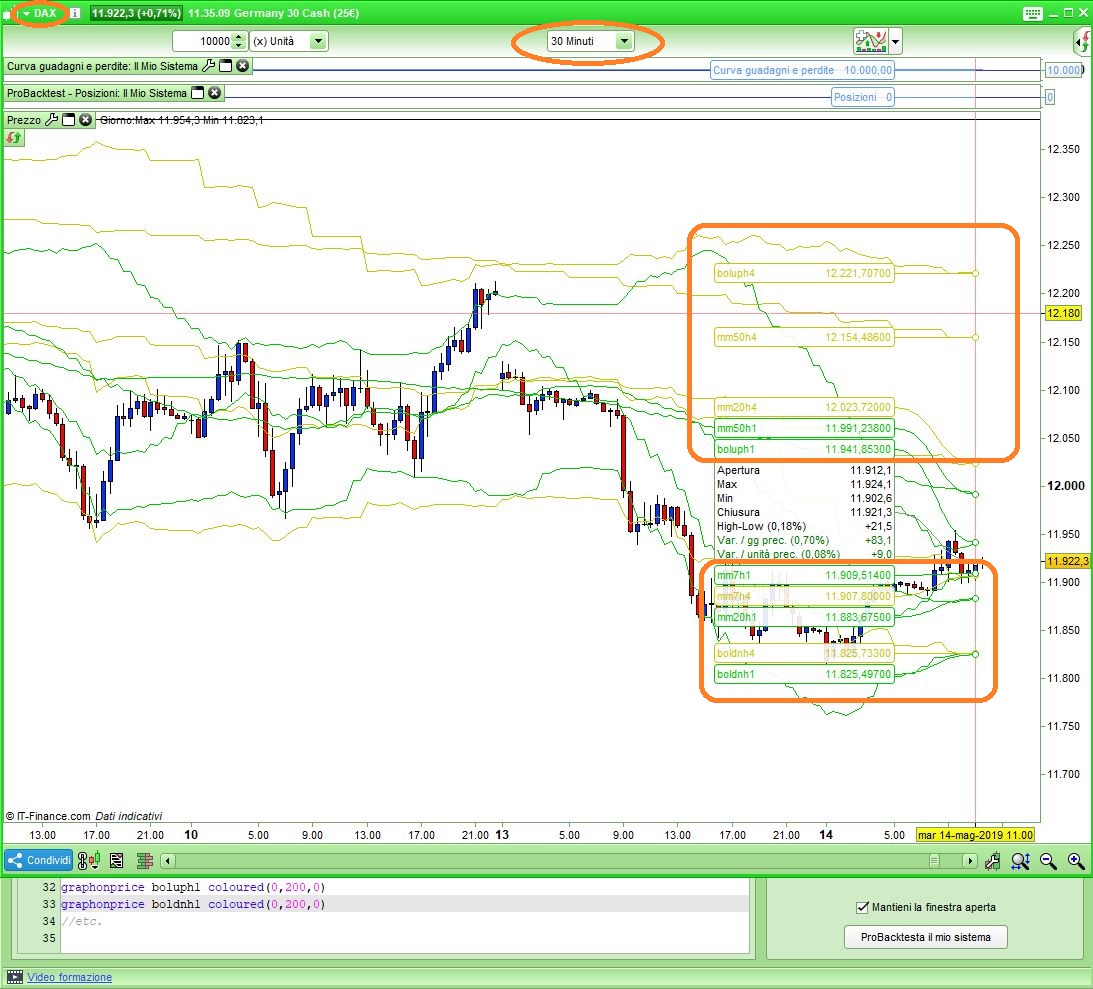
    It looks like it’s working fine on DAX, 30-minute TF.

    x-5.jpg x-5.jpg
    05/14/2019 at 11:12 AM #98450 quote
    marcara
    Participant
    Average

    Thanks Roberto,


    Yoou are right, It wors fine in 30 minutes also and also in 1 hour timeframe  but you get an error in 4 hours timeframe and daily timeframe.


    Thanks n advance

    05/14/2019 at 12:03 PM #98459 quote
    Nicolas
    Keymaster
    Master

    What is the error you get in these timeframes please?

    05/14/2019 at 12:33 PM #98464 quote
    marcara
    Participant
    Average

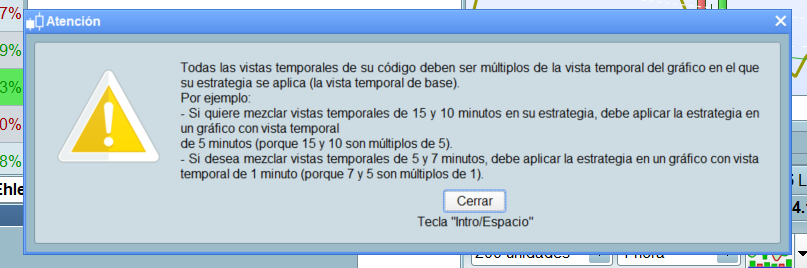
    Attached you hace the error. Thanks

    Screenshot_error.png Screenshot_error.png
    05/14/2019 at 1:11 PM #98474 quote
    Nicolas
    Keymaster
    Master

    You get this error because you have to launch the strategy on the lowest timeframe declared by your TIMEFRAME instruction.

    05/14/2019 at 1:14 PM #98477 quote
    robertogozzi
    Moderator
    Master

    It’s because you use timeframes that are not multiple of the lowest one, that on the chart.

    If you use, say, a 20-minute TF on the chart, then you cannot refer TF’s like 30 minutes in your code.

    What TF’s did you use?

    05/14/2019 at 2:56 PM #98486 quote
    marcara
    Participant
    Average

    Thansks

    I have just copied the example 2 that it claims:

    4 hours and 1 hour indicators plotted on the current chart.


    I is wotking in 30 minutes and 1 hour chart but it is not working in 4 hours and daily chart.


    I would like to plot the 200 hourly average in four hours chart and daily charts. What I should change?


    Many thanks


    05/14/2019 at 3:27 PM #98488 quote
    robertogozzi
    Moderator
    Master

    As it has already been said, MTF requires the lowest TF on the chart!

    So, in this case you can use it on any TF <= 1 hour provided 1 hours and 4 houra are multiples. You cannot launch it from a 17-minute TF, because 1 hour (60 minutes) and 4 hours (240 minutes) are NOT multiple of 17.

    You CANNOT use it on any TF higher than 1 hour, since this is the lowest TF you use in your strategy.

    By the way, what use it a 1-hour and 4-hour MA on a Daily TF? It’s fine the other way round.

    marcara thanked this post
    05/15/2019 at 4:54 AM #98518 quote
    marcara
    Participant
    Average

    Thank you very much.

    Now I understood perfectly the issue.

    An yes, I would like to plot the SMA200 hourly in a 4 hours chart.

    Is it possible?


    Thanks

    05/15/2019 at 6:53 AM #98519 quote
    robertogozzi
    Moderator
    Master

    I am not sure you understood the issue, you CANNOT use a higher TF as default.

    You can plot a 4h TF’s indicators on a 1h TF, not the other way round!

    Moreover, what use would be doing the other way round?

    05/15/2019 at 9:41 AM #98534 quote
    marcara
    Participant
    Average

    Yes I understood.


    And I would like the hourly plotted in the 4 hours chart because the hourly average is an important level.

    05/15/2019 at 10:12 AM #98540 quote
    robertogozzi
    Moderator
    Master

    It is impossible to do, but in case you could do that, every 4 hours you would like to plot a 1-hor MA, which hour would you like to be plotted, out of for? That of the first hour, the second hour, the third or the last hour?

    If you are in front of your 4-hour chart and you plot on it the 1-h MA from 2 hours before, does that make sense.

    The other way round is true, if you are taking a glance at your 1-hour chart you may want to also plot the 4-hour MA to see what the price and indicators on higher TF are doing.

    05/17/2019 at 4:05 AM #98667 quote
    marcara
    Participant
    Average

    I woud like to plot the 1 hour average as it is in the 1 hour graph.


    I found in another post another solution for the RSI that I do not know if  it can be changed to apply to the simple average, thanks for your help.


    //higher timeframe minutes count
    //HigherTFminutes = 60
    
    //current timeframe minutes count
    //CurrentTFminutes = 5
    
    //RSI period to display
    //RSIperiod = 14
    
    if hour<>hour[1] then
    c = close
    endif
    
    currentRSI = RSI[RSIperiod](close)
    
    factor = ROUND(HigherTFminutes/CurrentTFminutes)
    
    
    MTFRSI = RSI[RSIperiod*factor](c)
    
    
    RETURN currentRSI as "current TF RSI", MTFRSI as "higher TF RSI"
    05/17/2019 at 7:20 AM #98672 quote
    robertogozzi
    Moderator
    Master

    Just open the 1-hour chart, then add a moving average.

    Have you found difficulties in trying?

  • Author
    Posts
Viewing 15 posts - 1 through 15 (of 29 total)
1 2 →
  • You must be logged in to reply to this topic.
Login your account

Hourly Average plotted in Higher timeframe


ProBuilder: Indicators & Custom Tools

New Reply
Author
author-avatar
marcara @marcara Participant
Summary

This topic contains 28 replies,
has 5 voices, and was last updated by marcara
6 years, 8 months ago.

Topic Details
Forum: ProBuilder: Indicators & Custom Tools
Language: English
Started: 05/14/2019
Status: Active
Attachments: 3 files
Logo Logo
Loading...

Sign In

Your ProRealCode Account
LogoSign in with Google
Or with Username or Email
Forgot Password?
Not a Member yet? Sign up

About personal data collected

The information collected on this form is stored in a computer file by ProRealCode to create and access your ProRealCode profile. This data is kept in a secure database for the duration of the member's membership. They will be kept as long as you use our services and will be automatically deleted after 3 years of inactivity. Your personal data is used to create your private profile on ProRealCode. This data is maintained by SAS ProRealCode, 407 rue Freycinet, 59151 Arleux, France. If you subscribe to our newsletters, your email address is provided to our service provider "MailChimp" located in the United States, with whom we have signed a confidentiality agreement. This company is also compliant with the EU/Swiss Privacy Shield, and the GDPR. For any request for correction or deletion concerning your data, you can directly contact the ProRealCode team by email at privacy@prorealcode.com If you would like to lodge a complaint regarding the use of your personal data, you can contact your data protection supervisory authority.

Get Assistance

Assistance Type

Your Need

Proposed Solutions

Choose Assistance Type

Your choice will define the different steps of the wizard. If your demand is not listed, please contact us directly. Contact Page.

Your Need

Make a choice to define the next steps of the wizard.

Programming Help

Please find below the list of available solutions. If you don't find your solution, please contact us directly. Contact Page.

Download Codes

Please find below the list of available solutions. If you don't find your solution, please contact us directly. Contact Page.

Trading Help

Please find below the list of available solutions. If you don't find your solution, please contact us directly. Contact Page.

ProRealTime Information

Please find below the list of available solutions. If you don't find your solution, please contact us directly. Contact Page.

Account Assistance

Please find below the list of available solutions. If you don't find your solution, please contact us directly. Contact Page.

Paid Programming Help

Please find below the list of available solutions. If you don't find your solution, please contact us directly. Contact Page.

Do you like cookies? 🍪 We use cookies to ensure you get the best experience on our website. (Learn more)
©2026 ProRealCode - Trading & Coding with ProRealTime™
  • About
  • Contact
  • Terms & Conditions
  • Privacy Policy
  • Moderation Rules