







ProRealTime v11 is coming soon

Viewing 15 posts - 76 through 90 (of 271 total)
  • Author
    Posts
  • #92006 quote
    Nicolas
    Keymaster
    Master

    I made a video in English, hope you will like it! 😉

    [youtube]https://youtu.be/bz4pn2XDSJ4[/youtube]

    Andyswede, fifi743, Gianluca, Holy Grail and denmar thanked this post
    #92016 quote
    JL1640
    Blocked
    Average

    good job

    thank you

    #92017 quote
    JL1640
    Blocked
    Average

    Will the all windows move at one mouse drag will still allow for multi screen operations ?

    #92019 quote
    JL1640
    Blocked
    Average

    Could the indicator’s parameters (e.g. 20 for a moving average daily) attached to the instrument instead of being attached to the window/workspace?

    Then when changing the instrument in a given window the indicator’s parameter are changed accordingly

    #92042 quote
    Nicolas
    Keymaster
    Master

    The indicator parameter is attached to the indicator you load it to.

    #92044 quote
    Nicolas
    Keymaster
    Master

    Vidéo de présentation en français (french video):

    [youtube]https://youtu.be/G5SZfUMk8IY[/youtube]

    #92057 quote
    Nicolas
    Keymaster
    Master

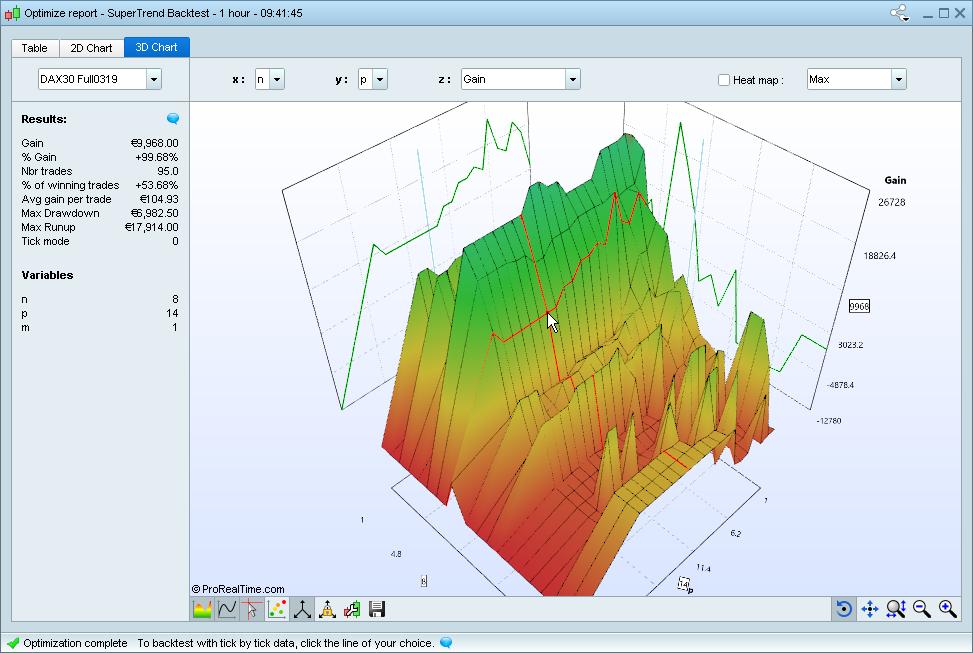
    Optimization – 3D chart of backtests results

    In the 3D chart, the X and Y axis show variables used in the backtest. The Z-axis can show things like gain, drawdown or runup. Place your cursor on a point to show the details on the left.

    [attachment file=”optimization 3d chart prorealtime v11.jpg”]

    #92265 quote
    Nicolas
    Keymaster
    Master

    ProBuilder engine performance improved

    The ProBuilder engine performance has been significantly improved (especially when using instructions to “call” personal indicators within other programs).

    [attachment file=”call indicators prorealtime version 11.png”]

    JC_Bywan and GraHal thanked this post
    #92268 quote
    Nicolas
    Keymaster
    Master

    New “Instrument database”

    The new “Instrument database” window allows you to display complete lists of instruments sorted by type, exchange, activity sector and market capitalization.

    #92282 quote
    stefou102
    Participant
    Veteran

    This is a great feature, even better if we would be able to use the sector, the type, the exchange etc in the ProScreener in order to filter out unrelevant results…??

    GraHal thanked this post
    #92382 quote
    Nicolas
    Keymaster
    Master

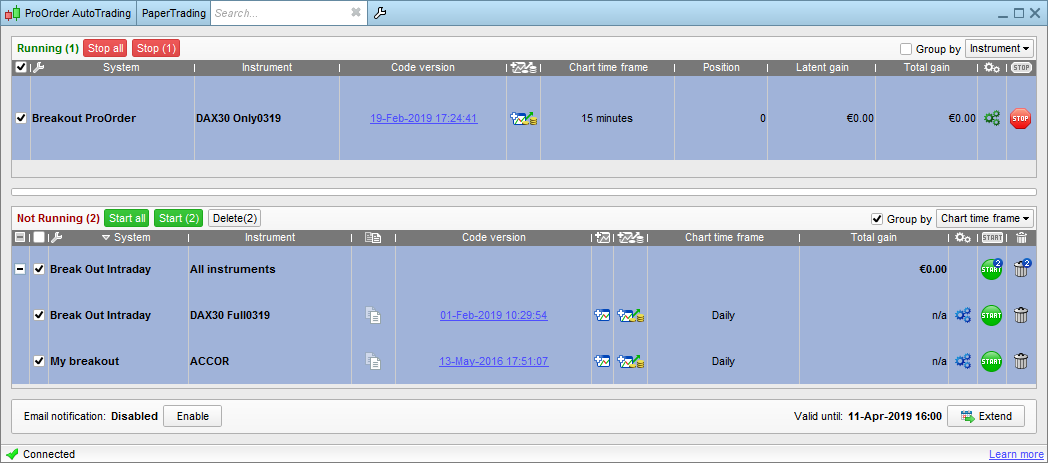
    Strategy center redesigned

    The strategy center for automatic trading has been redesigned to add several features: grouping & sorting, start & stop multiple strategies at once…

    [attachment file=”strategies center prorealtime v11.png”]

    GraHal thanked this post
    #92406 quote
    GraHal
    Participant
    Master

    redesigned to add several features: grouping & sorting, start & stop multiple strategies at once…

    Now it really is getting exciting! 🙂

    #92439 quote
    Vonasi
    Moderator
    Master

    Now it really is getting exciting!

    He had me excited at 3D optimization charts!

    #92441 quote
    Nicolas
    Keymaster
    Master

    @GraHal Yes I know that you were waiting for that 😉

    GraHal thanked this post
    #92626 quote
    Nicolas
    Keymaster
    Master

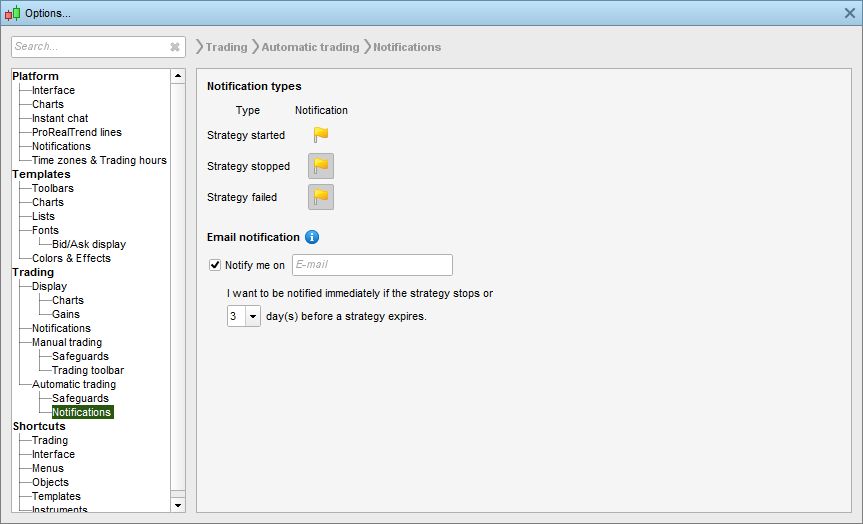
    Email alerts for strategies

    You can set email alerts when your strategies stop or are going to expire soon.

    [attachment file=”email notifications prorealtime v11.png”]

Viewing 15 posts - 76 through 90 (of 271 total)
  • You must be logged in to reply to this topic.

ProRealTime v11 is coming soon


Platform Support: Charts, Data & Broker Setup

New Reply
Author
author-avatar
Nicolas @nicolas Keymaster
Summary

This topic contains 270 replies,
has 60 voices, and was last updated by jmf125

5 years, 1 month ago.

Topic Details
Forum: Platform Support: Charts, Data & Broker Setup
Language: English
Started: 01/23/2019
Status: Active
Attachments: 56 files
Logo Logo
Loading...
