Hello,
I was inspired with this topic :
Monthly High Low Close Indicator
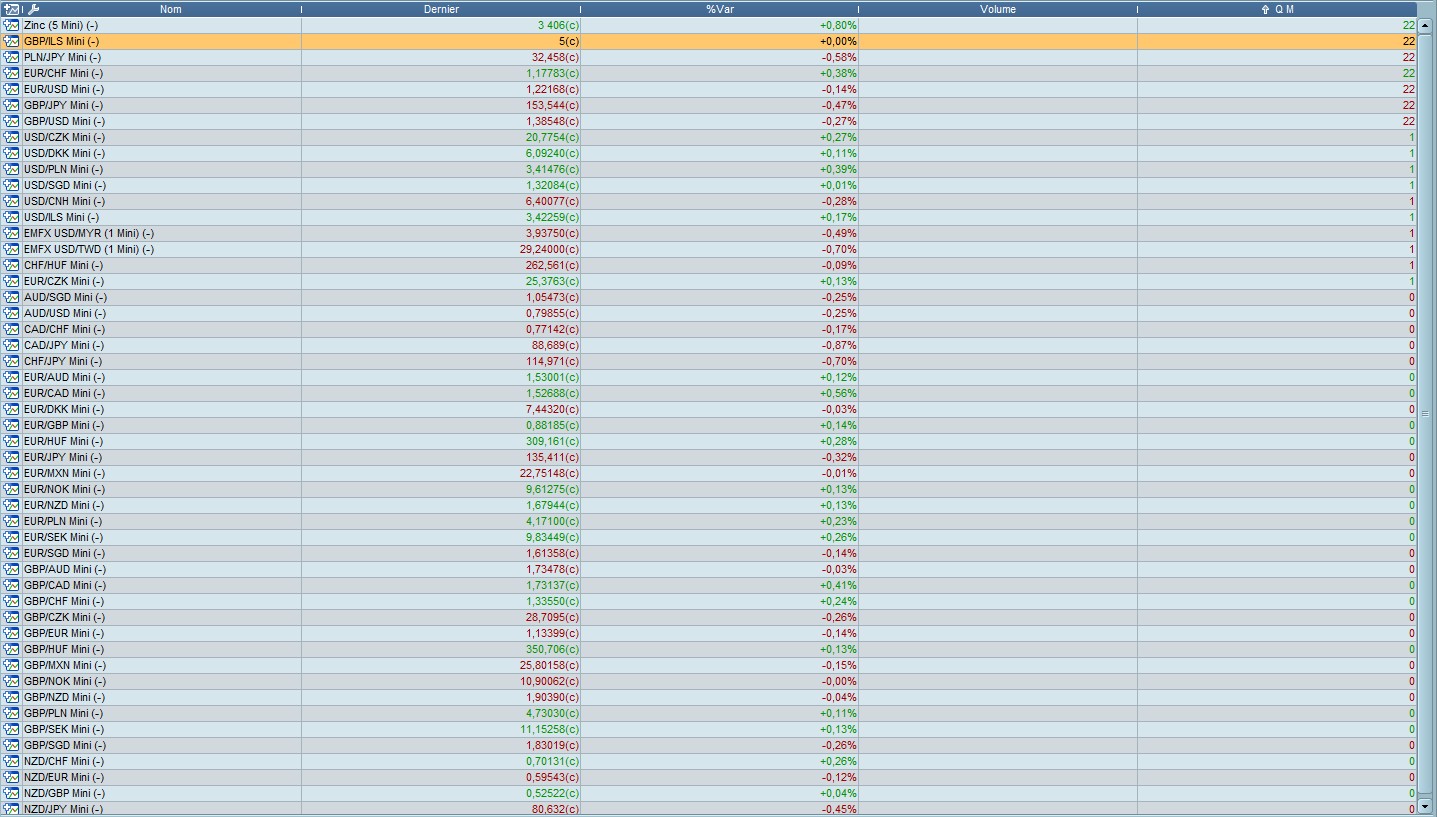
and try to improve the screener on 2sd page. The purpose is to have a 2 digits number in the result column : first number is trimestrial tendency ans 2sd number is monthly tendency. 22 is above trim high and Monthly high (N-1), 21 is above trim high and below monthly low, 01 between trim high and low and below monthly low, etc …
Instead of adding numbers, Iwould like to have them print in the result column because 0+1 = 1 (and not 01) 0+0 = 0
Moreover, it seems that it’s working only for extreme (22,0 or 1) but not for mixed (21,11,12, …)
Any idéa to help me fix that ?
Here is the code :
timeframe(daily)

//previous monthly high/low
if Month < Month[1] then
Mhi = Highest[BarIndex - lastMonthBarIndex](DHigh(1))
Mlo = Lowest[BarIndex - lastMonthBarIndex](DLow(1))
lastMonthBarIndex = BarIndex
endif

// previous quartly high/low
trimH = max(trimH,high)
trimL = min(trimL,low)
if month < month[1] then
//Mhi=trimH
//Mlo=trimL
if month = 4 or month = 7 or month = 10 or month = 1 then
Qhi = trimH
Qlo = trimL
trimL = close*100
trimH = 0
endif
endif

if close > Qhi then
q = 20
endif
if close < Qlo then
q = 10
endif
if close < Qhi and close > Qlo then
q = 0
endif

//m=0
if close > Mhi then
m = 2
endif
if close < Mlo then
m = 1
endif
if close < Mhi and close > Mlo then
m = 0
endif
t = q + m

SCREENER (t as "Q M")
To write code, please use the <> “insert PRT code” button. Thanks.
Screener conditions must be under brackets and not parenthesis.
Screener conditions must be under brackets and not parenthesis.
Thanks for your answer.
There is no conditions for that screener, (t as “Q M”) is only the indication how to display results.
And my question is how to display result as 2 numbers and not an addition.
Thanks
Sorry.. did not understand your question the first time.
10+1 should return 11 obviously. If it doesn’t, there must something wrong in your code or in the quarterly calculation. Did you try to return the variables and to compare it with an indicator?
Thanks, I will check that tonignt
Hello,
It seems to works all right except that sometimes the calculation is wrong. but I think it’s only a reference problem.
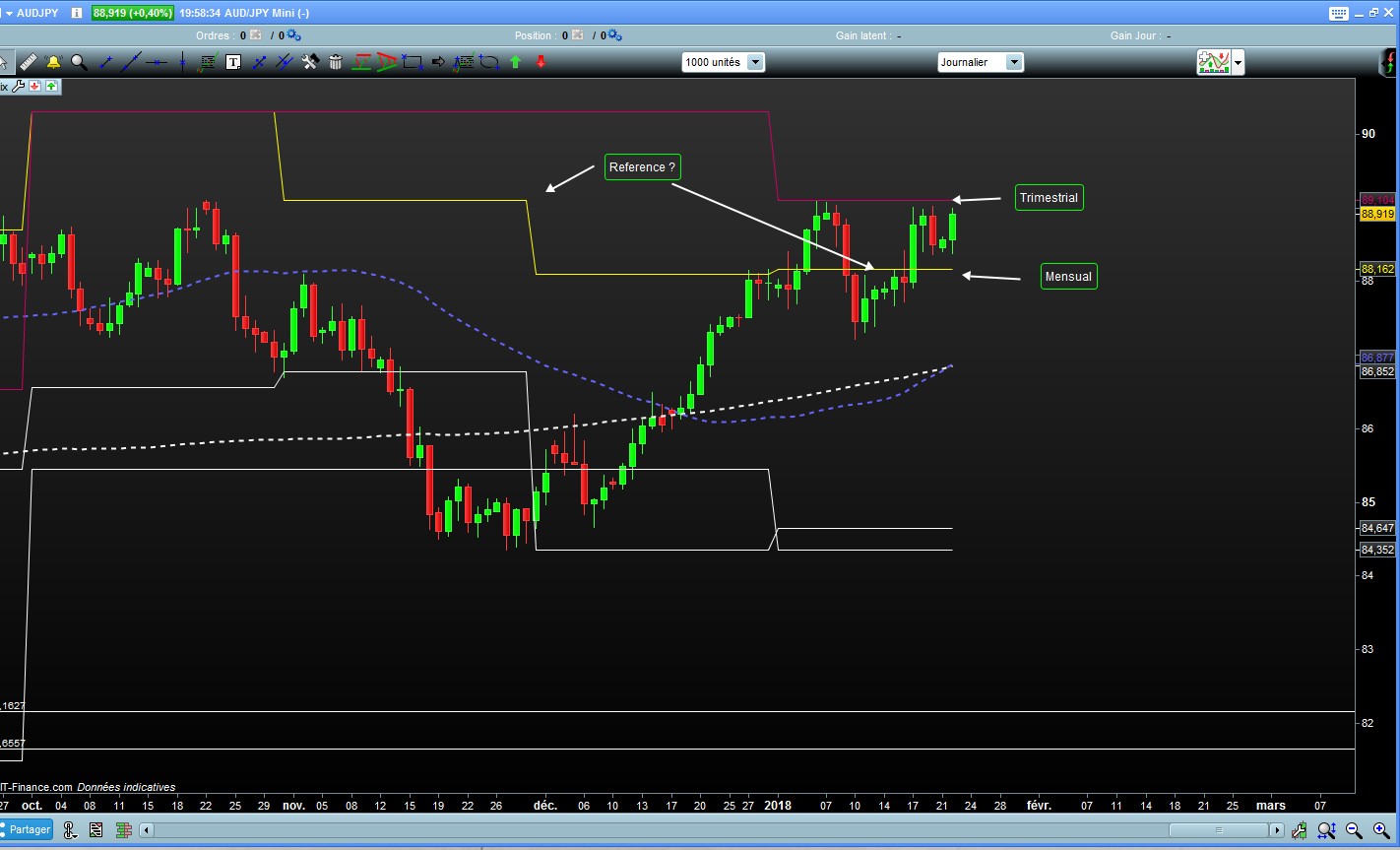
It returns that prices are between High and Low, even if we are above last trimester or month high. We can see on Audjpy graph joined that price is under October’s high and program considers that we are under monthly high. I would like to consider only last month or last trimester’s high for calculation.
Is that possible ? I put the code below.
Thanks a lot for your help.
timeframe(daily)

//previous monthly high/low
if Month < Month[1] then
Mhi = Highest[BarIndex - lastMonthBarIndex](DHigh(1))
Mlo = Lowest[BarIndex - lastMonthBarIndex](DLow(1))
lastMonthBarIndex = BarIndex
endif

// previous quartly high/low
trimH = max(trimH,high)
trimL = min(trimL,low)
if month < month[1] then
//Mhi=trimH
//Mlo=trimL
if month = 4 or month = 7 or month = 10 or month = 1 then
Qhi = trimH
Qlo = trimL
trimL = close*100
trimH = 0
endif
endif

if close > Qhi  then
q = 20
endif
if close < Qlo  then
q =0
endif
if close < Qhi and close > Qlo then
q =10
endif

//m=0
if close > Mhi then
m = 2
endif
if close < Mlo then
m = 0
endif
if close < Mhi and close > Mlo then
m = 1
endif
t = q + m

SCREENER ( t as "QM")
There is something wrong at line 4, month can only be inferior to month[1] one time per year, in January. You should code it like this:
if Month <> Month[1] then
I modified that because there is no result returned with <>
Indeed it’s working ok for trimestrial but do not refer to last month’s high for monthly. Probably for the reason you said, but I don’t understand why no result are returned.
I think I fixed it, here is the code:
//previous monthly high/low
if Month <> Month[1] then
Mhi = Highest[max(1,BarIndex - lastMonthBarIndex)](High[1])
Mlo = Lowest[max(1,BarIndex - lastMonthBarIndex)](Low[1])
lastMonthBarIndex = BarIndex
endif

// previous quartly high/low
trimH = max(trimH,high)
trimL = min(trimL,low)
if month <> month[1] then
//Mhi=trimH
//Mlo=trimL
if month = 4 or month = 7 or month = 10 or month = 1 then
Qhi = trimH
Qlo = trimL
trimL = close*100
trimH = 0
endif
endif

if qhi>0 and qlo>0 then
if close > Qhi  then
q = 20
endif
if close < Qlo  then
q =0
endif
if close < Qhi and close > Qlo then
q =10
endif
endif

if mhi>0 and mlo>0 then
if close > Mhi then
m = 2
endif
if close < Mlo then
m = 0
endif
if close < Mhi and close > Mlo then
m = 1
endif
t = q + m
endif

SCREENER ( t as "QM")
The problem came from a wrong period for the look of Highest high and the Lowest low, no error was fired by ProScreener for it, but I think it was caused by a period set to 0 at the first run of the code.
GREAT ! It works perfectly ! Thanks a lot, I would never find that !
I’m really graceful for the help you provide to all of us.
Hello,
I’m back with a similar problem I had with monthly return.
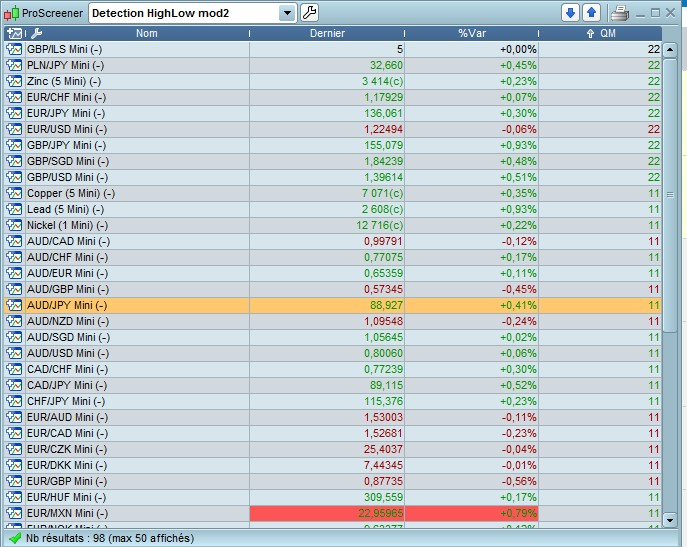
I want to had Weekly classification in the screener, and sometimes it returns the right number and sometimes not.
I suppose that it’s because it doesn’t reffer to last week but older week.
Again the line “if month < month[1] then” is probably wrong but if I use <> the screener doesn’t return anything.
Any idéa to fix that ?
I will add Daily after that.
Thanks a lot for your help
once Whi=undefined
once Wlo=undefined

dailyHigh= DHigh(1)
dailyLow= DLow(1)

//Calcul le +Haut Weekly de la semaine passée
If DayOfWeek < DayOfWeek[1] then
Whi = Highest[BarIndex - lastWeekBarIndex](dailyHigh)
Wlo = Lowest[BarIndex - lastWeekBarIndex](dailyLow)
lastWeekBarIndex = BarIndex
endif

//previous monthly high/low
if Month <> Month[1] then
Mhi = Highest[max(1,BarIndex - lastMonthBarIndex)](High[1])
Mlo = Lowest[max(1,BarIndex - lastMonthBarIndex)](Low[1])
lastMonthBarIndex = BarIndex
endif

// previous quartly high/low
trimH = max(trimH,high)
trimL = min(trimL,low)
if month <> month[1] then
//Mhi=trimH
//Mlo=trimL
if month = 4 or month = 7 or month = 10 or month = 1 then
Qhi = trimH
Qlo = trimL
trimL = close*100
trimH = 0
endif
endif


if qhi>0 and qlo>0 then
if close > Qhi  then
q = 200
endif
if close < Qlo  then
q =0
endif
if close < Qhi and close > Qlo then
q =100
endif
endif

if mhi>0 and mlo>0 then
if close > Mhi then
m = 20
endif
if close < Mlo then
m = 0
endif
if close < Mhi and close > Mlo then
m = 10
endif
t = q + m + w
endif

if Whi>0 and Wlo>0 then
if close > Whi  then
w = 2
endif
if close < Wlo  then
w =0
endif
if close < Whi and close > Wlo then
w =1
endif
endif

SCREENER ( t as "QM")