It is mildly irritating that if you are writing for example an indicator and you accidentally include something that is impossible to calculate {Trend = (BarIndex-(BarIndex+1)) for example} that when you run the indicator it does not load and gives you an error message. Then you have to click on the down arrow at the chart top, select indicators, type in the name of your strategy and then select it and then click modify to regain access to the strategy. Yes I know I can click ‘Keep Window Open’ but I don’t always remember to. It would be nice if at least a blank chart loaded so you had the spanner to use to regain quick access to the code in just two clicks.
‘Keep Window Open” should be ticked by default.
Sorry Vonasi, my mistake. It isn’t on my PRT as well.
I wanted to write that ‘Keep Window Open” should be ticked by default as a built-in option from factory.
Ah the written word confuses again!
I actually prefer that it isn’t ticked by default so that when I run a strategy or indicator the coding window disappears and I have a clear view of the chart/indicator window. Just two clicks on spanner and ‘modify’ gets me back to the code….. unless that is I made a mistake in the code then it is the epic journey back via the list of strategies/indicators. Sometimes it can take a few trial and error attempts to get the code right and doing the epic journey after every test can be very tiresome… until I remember to click the ‘Keep Window Open’ button that is.
Ah the written word confuses again! I actually prefer that it isn’t ticked by default so that when I run a strategy or indicator the coding window disappears and I have a clear view of the chart/indicator window. Just two clicks on spanner and ‘modify’ gets me back to the code….. unless that is I made a mistake in the code then it is the epic journey back via the list of strategies/indicators. Sometimes it can take a few trial and error attempts to get the code right and doing the epic journey after every test can be very tiresome… until I remember to click the ‘Keep Window Open’ button that is.
PRT could simply save the last settings when exiting the platform and restore them later when restarting it (maybe this has already been suggested/requested). It could be an option to set/unset with all the other options.
A mask identified by “?” characters should be allowed for, say, dates & times, so we can check only some narrow ranges:
IF time = 092?00 THEN... //092000 through 092900 would all be valid times
Of course this would be even more beneficial referred to strings when they will be (hopefully) available.
 AVT
AVTParticipant
Senior
@vonasi
When I write some code and choose “keep coding window open” (or not) and I exit PRT completely (by clicking the X in the main menu) then also the coding window open/close is saved. So next time I start PRT I have the same option as I had when I left.
Some indication from IT Finance that this ever growing list of requests are being monitored and/or acknowledge/reply/update/give us some clue that someone who can do something about them is actually looking at these posts
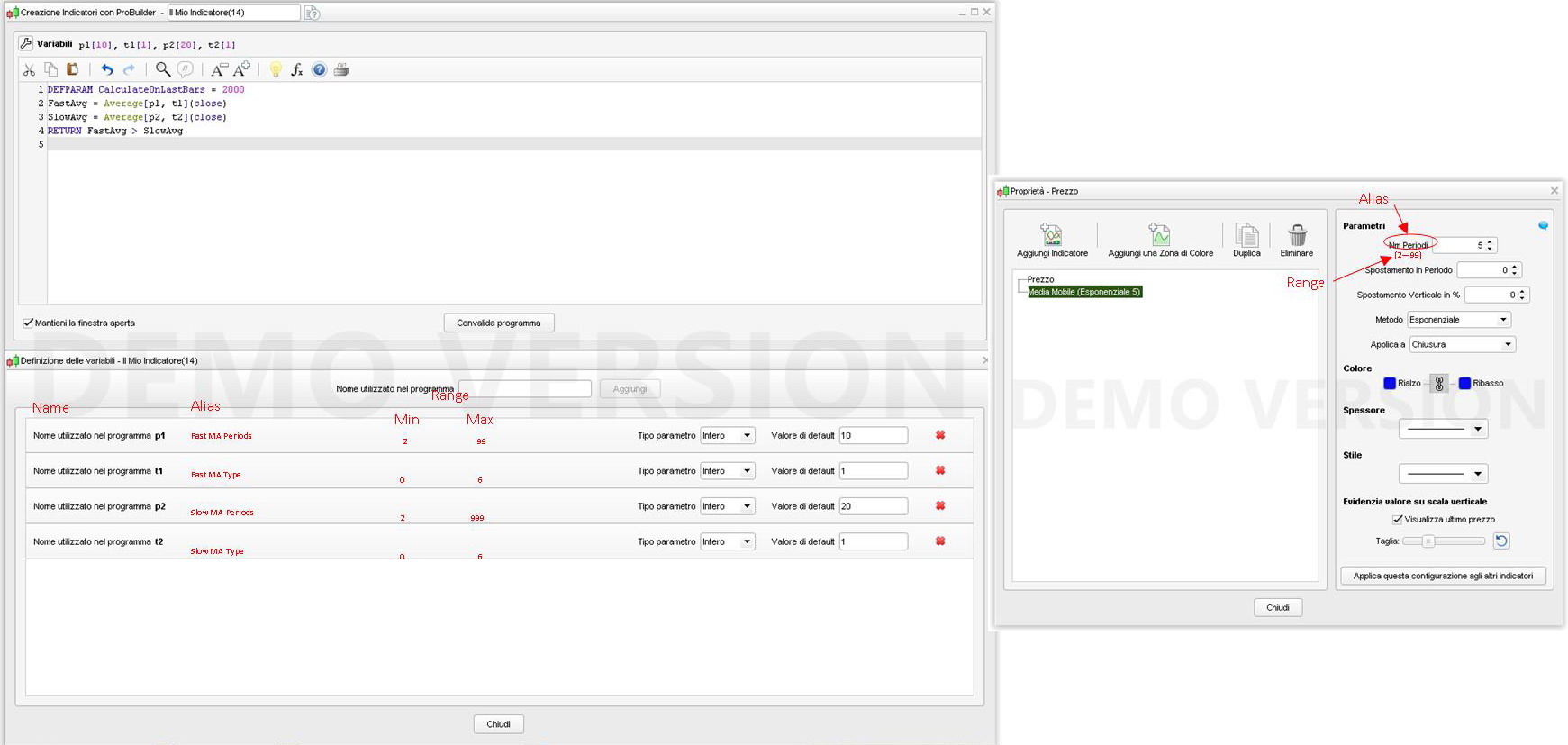
In addition to request #47, I suggest the following additions.
That the box to declare variable be changed to allow also:
- aliases to be shown in properties, for the user, instead of variable names
- range of data (min & max)
That the property box used by the user to add an indicator to a chart:
- displays the alias instead of the name of the variable
- displays (and accepts) only range values
As from attached pic.
I am suggesting:
modification of Max()/Min()
—————————-
Min(a,b,…)/Min(a,b,…) to allow unlimited (well, say 10, maybe 20, ….) values/variables to be compared to avoid nesting them too deeply like:
x = max(a,max(b,max(c,d)))
This modification won’t affect exixting code!
addition of iff(condition,return_value_when_true,return_value_when_false)
——————————————————————————
single line IF expression returning a value that can be evaluated or assignd to a variable (examples):
x = iff(close > open,true,false)                         //returns true or false
x = iff(close > open,1,2)                                //returns 1 or 2 (or whatever else)
x = iff(close > open,close[1]<open[1],close[1]>open[1])  //returns 1 (true) when a candle follows an opposite candle, 0 (false) otherwise
x = iff(highest[10](range) > 20 * pipsize,true,false)    //returns 1 when the highest range in the last 10 bars is > 20 pips
It would be nice if when starting ProRealTime the startup splash screen did not stay for so long or was not always on top – as it stops users from doing other things like reading web pages while they wait for PRT to start fully.
I would like to make the following suggestions:
1. Display Account Balance
2. Systems performance all in one window instead of clicking on one by one. I currently record each system in excel which is quite time consuming
3. Display system name on the chart where entry and exit arrows are.
4. Back test the whole portfolio in one all linked to account balance to give projected returns/max DD etc for the entire portfolio
5. Test for correlation between systems
6. Heat map for variables when back testing
Why not connect with pro-realtime a tool like StrategyQuant and Quant Analyser?
Or better build a new package for PRT for create strategies