I would like to see a backup function so one can make a backup of all strategies and indicators on the PRT-server. It is very tiring to have to export every file on its own.
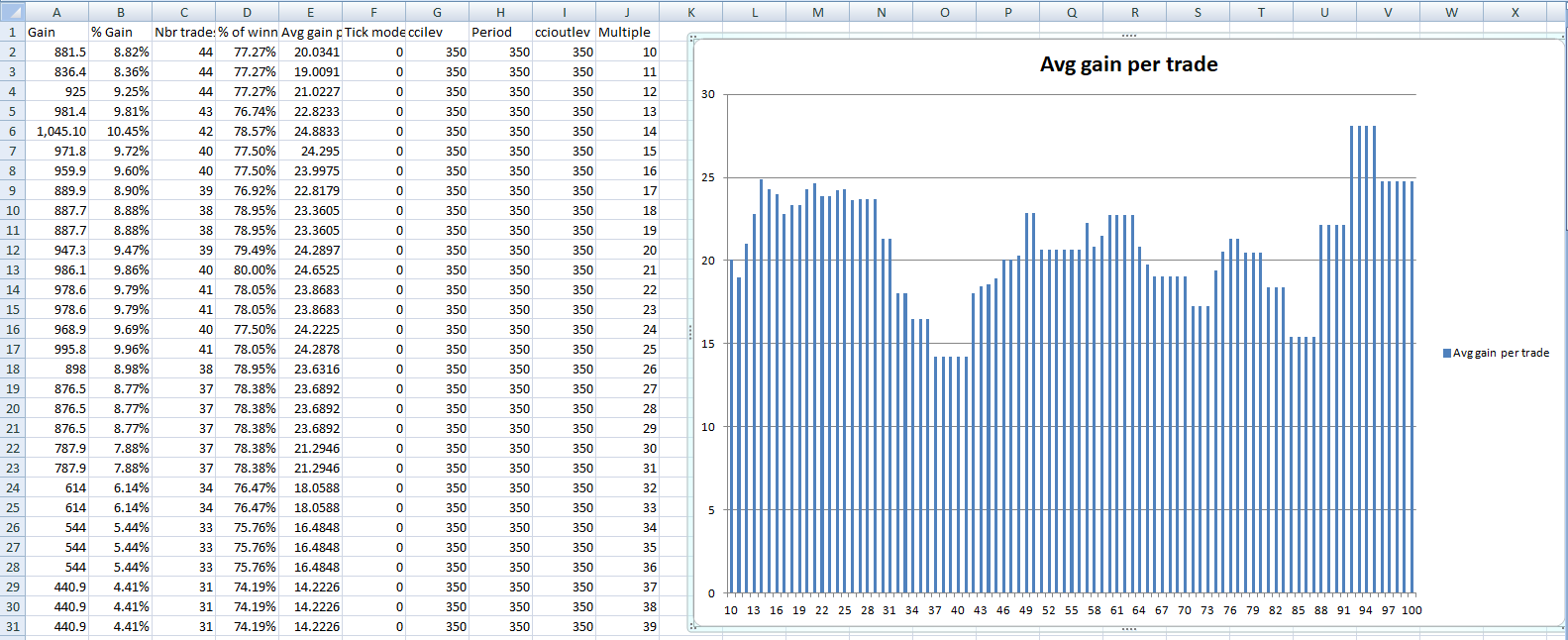
I would like the possibility of creating graphs of results from backtests so as to easily see what effect a variable has across a range so as to be able to easily pick a mid figure to prevent over optimization. I have attached an image of what I do in Excel but it would be great to do similar in PRT as doing it in Excel in one extra level of faff!
The ability to scan using Monthly & Weekly & Daily timeframes together.
Currently we have only Weekly & Daily.
Thank you in advance.
 Jan
JanParticipant
Veteran
First of all : a healthy and prosperous New Year 2018 !!
As far as I know, it is not possible to export the ProRealTime backtesting trade results to Excel. (tab Orders list and tab Closed positions list)
It is even not possible to select all trade results by hand scrolling over the lines.
[I want to use the trade results for further analysis in Excel, for example for a Monte Carlo analysis]
Can downloading trade results be made possible ? Or do I miss something ?
Thanks for your support in advance, JanWd
You already can drag and drop any lists from the platform in excel or other external softwares. It includes backtests results. Just select the first line, hold on the left mouse button and release it into a new excel sheet.
JanParticipant
Veteran
Thanks for your request. I have (exactly) the same request: be able to populate from the Detailed Report of each Back-test at least the Orders List and Closed Positions list with all data into Excel with a button, for further analysis.
Have a healty and prosporous New Year 2018 !
JanParticipant
Veteran
Nicolas,
thank you very much for your fast answer !
A happy and prosperous New Year 2018 !
Jan
 AVT
AVTParticipant
Senior
@Nicolas
In the documentation/indicators I wonder whether
Chandle should be
Chande. Also the calculation description is really confusing – at least for me. Thanks for your attention.
Chandle is the right keyword, I don’t know why it has been named like this. I changed the typo in the indicator’s description.
AVTParticipant
Senior
I created this one:
Chandle1 = Chandle[20](Close)
RETURN Chandle1 AS "Chandle1"
and compared it to 2 other ones:
PRTs Chande Momentum Oszillator and my MT CMO, period and price identical. Result: it is up to the last digit completely the same. That’s why came to that conclusion and additional this one here referring to the naming :
https://www.investopedia.com/terms/c/chandemomentumoscillator.asp
I hope you get what I mean. Happy New Year.
AVTParticipant
Senior
Pour la dernière page je reçois un:
502 Bad Gateway (nginx), donc j’ai essayer ma réponse ici.
J’ai écrit ca:
Chandle1 = Chandle[20](Close)
RETURN Chandle1 AS "Chandle1"
J’ai comparé le résultat avec:
- PRT Momentum Oszillator(20,close)
- MT4 CMO(20,0)
Résultat: tout complètement identiques, c’est pourquoi j’ai pensé que nous avons la Chande Ozillateur ici.
Link extern:
https://mahifx.com/mfxtrade/indicators/chande-momentum-oscillator
When there are many positions open from different strategies on a chart all with their own stop and limit instructions it is impossible to see which strategy they apply to as if you hover over the details at the left of the chart the name tag appears underneath any other tags and so is unreadable. It would be great if these name tags were always on top.
Inventor is / was Tushar Chande so no need to change Nicolas as Chande is correct (not Chandle) unless I’m missing something?
Hi
Vonasi I sympathise and I put a suggestion to PRT nearly 12 months ago on this ‘same big annoyance’ you refer to in
#57337 .
I suggested that the respective Strategy name be set to the right of Stop Level (not below as now) so it can be seen! As usual – ‘black hole scenario’ – I cannot even refer to a list of my own ideas submitted. I even used the PRT Suggestions form on the PRT website.
I’ve got loads of improvements / ideas (as I’m sure you and others have also) but it is very demoralising spending time typing out ideas for seemingly nothing to happen?
GraHal
Hi Vonasi I sympathise and I put a suggestion to PRT nearly 12 months ago on this ‘same big annoyance’ you refer to in #57337 . I suggested that the respective Strategy name be set to the right of Stop Level (not below as now) so it can be seen! As usual – ‘black hole scenario’ – I cannot even refer to a list of my own ideas submitted. I even used the PRT Suggestions form on the PRT website. I’ve got loads of improvements / ideas (as I’m sure you and others have also) but it is very demoralising spending time typing out ideas for seemingly nothing to happen? GraHal
To try and fail is better than to have never tried!