






Ribbon Trend indicator
Introduction
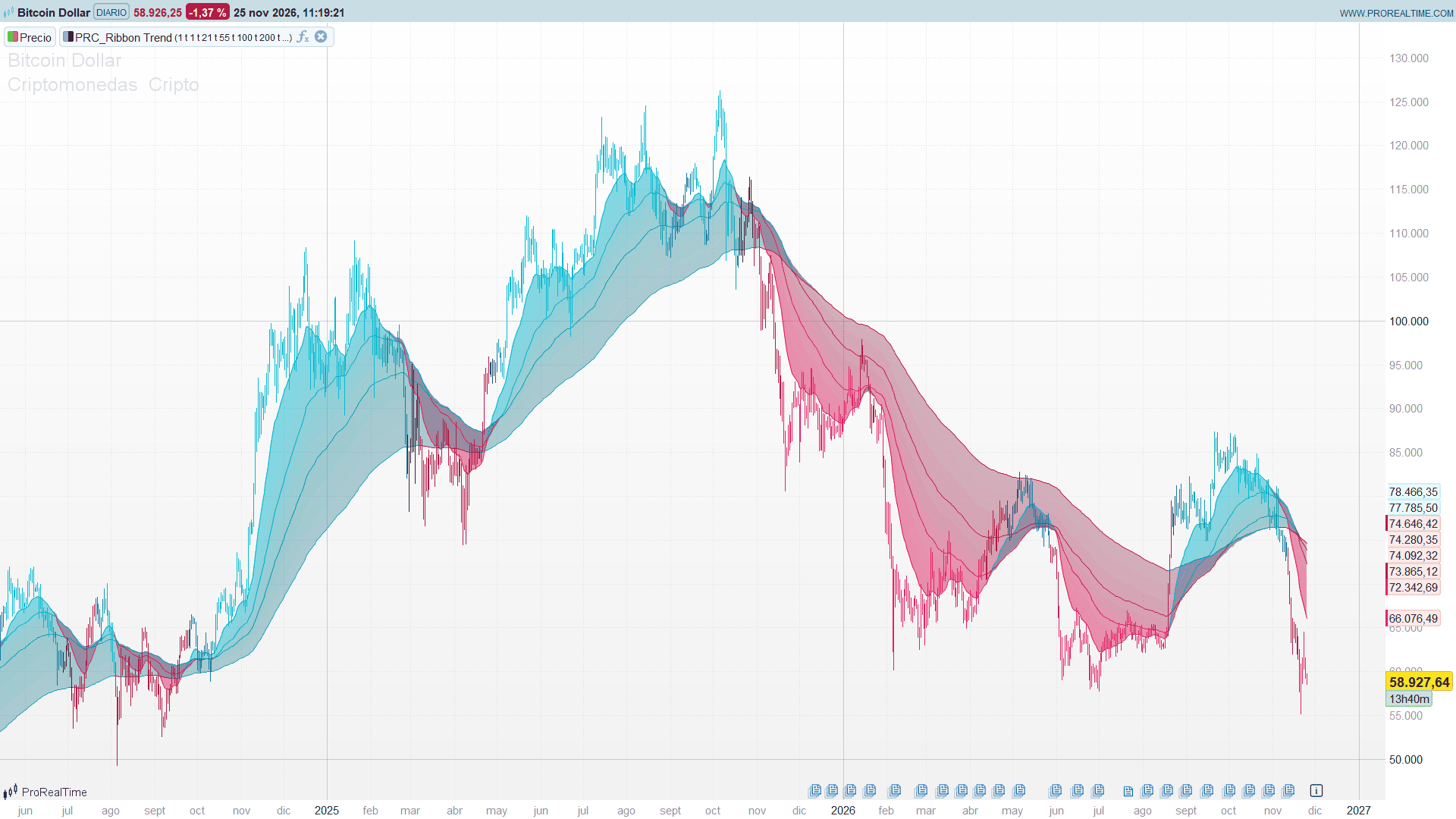
Most traders keep a handful of moving averages on the chart and read the trend from their order. Ribbon Trend by Y.Algo turns that habit into a single picture. It plots four moving averages (21, 55, 100 and 200 by default), fills the space between them with a ribbon of ten EMAs split into nine layers, and colours every candle by how many of those layers agree. When the short end of the ribbon is clearly bullish the candles are bright; when the picture is mixed they fade towards the darker shades.
An optional Vegas channel (EMA 144/169 and EMA 576/676) adds the two classic long-term tunnels on top.
Theory Behind the Indicator
The ribbon is built from ten exponential moving averages. Its edges sit on the four periods of the main averages, and two extra nodes are placed inside each segment at one third and two thirds of the way between periods (with the defaults: 21, 32, 44, 55, 70, 85, 100, 133, 167 and 200). Each of the nine bands between two neighbouring nodes is bullish when the shorter EMA is above the longer one and bearish otherwise.
Each band is coloured from a seven-step palette at a fixed position along it, so the inner bands are bright and the outer ones darker, and every band is a little more transparent than the one before it.
The candle colour comes from a weighted vote of the nine bands. The three short bands weigh 3, the three middle bands 2 and the three long bands 1, for a total of 18. Above 9 the candle is bullish (on an exact tie the shortest band decides). The stronger the winning side, the brighter the shade: a candle where every band agrees takes the first colour of the palette, a narrow majority takes one of the darkest.
The four averages are coloured with the same logic: each one is bullish when it is above the next longer average, and the longest one follows its own slope.
Key Features at a Glance
- Four moving averages of any type available in ProRealTime (simple, exponential, weighted, Hull…), each with its own switch and period.
- A ten-node EMA ribbon in nine layers with a continuous gradient and fading outer layers.
- Candles coloured by a weighted vote of the ribbon, brighter when the short-term trend is clear.
- Vegas channel 144/169, 576/676 or both, with a fill that follows the direction of each tunnel.
- Three colour themes: Classic Warm, Neon Cool and Custom.
How to Read the Indicator
- A bright candle with the ribbon fully in one colour means the short, medium and long segments agree: a trending market.
- Candles turning darker while the ribbon keeps its colour mean the short end is losing strength: the first sign of a pause or pullback.
- Mixed band colours (bullish inner layers inside a bearish outer ribbon, or the reverse) mark a transition: the short end has turned but the longer trend has not followed yet.
- The colour of each average tells whether it sits above the next longer one, so a full stack of bullish lines is the classic bullish order of moving averages.
- With the Vegas channel on, price holding above a rising 144/169 tunnel is the usual reading of a healthy uptrend; the 576/676 tunnel works as the long-term reference.
Practical Applications
- Trend filter: only take long setups while the candles are in the bullish palette and the ribbon is bullish beyond its middle bands.
- Pullback entries: in an established trend, watch for price reaching the ribbon or one of the averages while the outer layers keep their colour.
- Regime change: the first bars where the inner layers flip against a still-coloured outer ribbon point to the turn early.
- Alerts: the averages and the Vegas lines are returned as series, so a ProRealTime alert such as “price crosses MA 1” can be created on any of them.
Indicator Configuration
- colorTheme (default 0): 0 Classic Warm, 1 Neon Cool, 2 Custom (uses the colours of the CUSTOM COLOURS block at the top of the code).
- showAllMA (default 1): shows or hides the four averages at once; the individual switches are kept.
- maType (default 1, exponential): moving average type shared by the four averages and by the ribbon, so the ribbon edges always sit on the lines. Declared as a variable of type “MA type”, it shows a drop-down list in the settings window (simple, exponential, weighted, Wilder, triangular, end point, time series, Hull, zero lag).
- showMA1 … showMA4 (default 1) and maLen1 … maLen4 (defaults 21, 55, 100, 200): switch and period of each average. The ribbon nodes follow these periods.
- showRibbon (default 1): the nine-layer ribbon.
- showCandles (default 1): gradient candles. Hide the chart’s own candles in the chart settings so they do not show underneath.
- rbTransp (default 50): transparency of the innermost layer, from 0 to 100; the outer layers add their own fade on top.
- vegasMode (default 0): 0 off, 1 the 144/169 channel, 2 the 576/676 channel, 3 both.
- vgFillTransp (default 80): transparency of the channel fill.
The value of every average and Vegas line is shown on the price scale in the colour of its line.
The Code
//---------------------------------------------------------------
// PRC_Ribbon Trend
// version = 0
// 25.11.2026
// Iván González @ www.prorealcode.com
// Author: Trader_Yunis (Y.Algo)
// Sharing ProRealTime knowledge
//--------------------------------------------------------------------//
//=== INPUTS ===
//--------------------------------------------------------------------//
colorTheme = 0       // 0 = Classic Warm, 1 = Neon Cool, 2 = Custom (colours of the CUSTOM COLOURS block)
// --- Moving averages ---
showAllMA = 1        // 1 = show the four moving averages (the individual switches are kept)
maType = 1           // MA type shared by the four lines and the ribbon: 0 Simple, 1 Exponential, 2 Weighted, 3 Wilder,
                     // 4 Triangular, 5 End Point, 6 Time Series, 7 Hull, 8 Zero Lag (declare it as "MA type" to get the selector)
showMA1 = 1
maLen1 = 21
showMA2 = 1
maLen2 = 55
showMA3 = 1
maLen3 = 100
showMA4 = 1
maLen4 = 200
// --- MA ribbon ---
showRibbon = 1       // ribbon edges follow the four MAs, two extra nodes of the same MA type inside each segment
showCandles = 1      // gradient candles, brighter when the short-term trend is clear (hide the chart's own candles)
rbTransp = 50        // transparency of the innermost layer (0-100); the outer layers fade automatically
// --- Vegas channel ---
vegasMode = 0        // 0 = Off, 1 = 144 / 169, 2 = 576 / 676, 3 = Both
vgFillTransp = 80    // channel fill transparency (0-100, higher = more transparent)
//--------------------------------------------------------------------//
//=== CUSTOM COLOURS (only with colorTheme = 2; ONCE = read on the first bar only) ===
//--------------------------------------------------------------------//
ONCE cMa1R = 255
ONCE cMa1G = 213
ONCE cMa1B = 79
ONCE cMa2R = 255
ONCE cMa2G = 167
ONCE cMa2B = 38
ONCE cMa3R = 158
ONCE cMa3G = 158
ONCE cMa3B = 158
ONCE cMa4R = 158
ONCE cMa4G = 158
ONCE cMa4B = 158
ONCE cBu1R = 85
ONCE cBu1G = 117
ONCE cBu1B = 113
ONCE cBu2R = 77
ONCE cBu2G = 106
ONCE cBu2B = 102
ONCE cBu3R = 68
ONCE cBu3G = 94
ONCE cBu3B = 91
ONCE cBu4R = 60
ONCE cBu4G = 83
ONCE cBu4B = 80
ONCE cBu5R = 52
ONCE cBu5G = 72
ONCE cBu5B = 70
ONCE cBu6R = 43
ONCE cBu6G = 60
ONCE cBu6B = 59
ONCE cBu7R = 35
ONCE cBu7G = 49
ONCE cBu7B = 48
ONCE cBe1R = 212
ONCE cBe1G = 154
ONCE cBe1B = 137
ONCE cBe2R = 190
ONCE cBe2G = 138
ONCE cBe2B = 123
ONCE cBe3R = 169
ONCE cBe3G = 122
ONCE cBe3B = 108
ONCE cBe4R = 148
ONCE cBe4G = 106
ONCE cBe4B = 94
ONCE cBe5R = 126
ONCE cBe5G = 90
ONCE cBe5B = 80
ONCE cBe6R = 104
ONCE cBe6G = 74
ONCE cBe6B = 65
ONCE cBe7R = 83
ONCE cBe7G = 58
ONCE cBe7B = 51
ONCE cVgBuR = 85
ONCE cVgBuG = 117
ONCE cVgBuB = 113
ONCE cVgBeR = 212
ONCE cVgBeG = 154
ONCE cVgBeB = 137
//--------------------------------------------------------------------//
//=== THEME PALETTE (computed once, on the first bar) ===
// Layer 1 (brightest) to layer 7 (darkest) for each side, in arrays. Colours
// never change from bar to bar, so they are set on bar 0 only: scalars keep
// their value on later bars and arrays are never reset.
//--------------------------------------------------------------------//
IF barindex = 0 THEN
   IF colorTheme = 2 THEN
      $buR[1] = cBu1R
      $buG[1] = cBu1G
      $buB[1] = cBu1B
      $buR[2] = cBu2R
      $buG[2] = cBu2G
      $buB[2] = cBu2B
      $buR[3] = cBu3R
      $buG[3] = cBu3G
      $buB[3] = cBu3B
      $buR[4] = cBu4R
      $buG[4] = cBu4G
      $buB[4] = cBu4B
      $buR[5] = cBu5R
      $buG[5] = cBu5G
      $buB[5] = cBu5B
      $buR[6] = cBu6R
      $buG[6] = cBu6G
      $buB[6] = cBu6B
      $buR[7] = cBu7R
      $buG[7] = cBu7G
      $buB[7] = cBu7B
      $beR[1] = cBe1R
      $beG[1] = cBe1G
      $beB[1] = cBe1B
      $beR[2] = cBe2R
      $beG[2] = cBe2G
      $beB[2] = cBe2B
      $beR[3] = cBe3R
      $beG[3] = cBe3G
      $beB[3] = cBe3B
      $beR[4] = cBe4R
      $beG[4] = cBe4G
      $beB[4] = cBe4B
      $beR[5] = cBe5R
      $beG[5] = cBe5G
      $beB[5] = cBe5B
      $beR[6] = cBe6R
      $beG[6] = cBe6G
      $beB[6] = cBe6B
      $beR[7] = cBe7R
      $beG[7] = cBe7G
      $beB[7] = cBe7B
      vgBuR = cVgBuR
      vgBuG = cVgBuG
      vgBuB = cVgBuB
      vgBeR = cVgBeR
      vgBeG = cVgBeG
      vgBeB = cVgBeB
   ELSIF colorTheme = 1 THEN
      $buR[1] = 0
      $buG[1] = 188
      $buB[1] = 212
      $buR[2] = 0
      $buG[2] = 173
      $buB[2] = 195
      $buR[3] = 0
      $buG[3] = 157
      $buB[3] = 178
      $buR[4] = 0
      $buG[4] = 142
      $buB[4] = 160
      $buR[5] = 0
      $buG[5] = 127
      $buB[5] = 143
      $buR[6] = 0
      $buG[6] = 111
      $buB[6] = 126
      $buR[7] = 0
      $buG[7] = 96
      $buB[7] = 109
      $beR[1] = 233
      $beG[1] = 30
      $beB[1] = 99
      $beR[2] = 214
      $beG[2] = 28
      $beB[2] = 91
      $beR[3] = 195
      $beG[3] = 26
      $beB[3] = 83
      $beR[4] = 176
      $beG[4] = 24
      $beB[4] = 75
      $beR[5] = 157
      $beG[5] = 22
      $beB[5] = 67
      $beR[6] = 138
      $beG[6] = 20
      $beB[6] = 59
      $beR[7] = 119
      $beG[7] = 18
      $beB[7] = 51
      vgBuR = 0
      vgBuG = 188
      vgBuB = 212
      vgBeR = 233
      vgBeG = 30
      vgBeB = 99
   ELSE
      $buR[1] = 85
      $buG[1] = 117
      $buB[1] = 113
      $buR[2] = 77
      $buG[2] = 106
      $buB[2] = 102
      $buR[3] = 68
      $buG[3] = 94
      $buB[3] = 91
      $buR[4] = 60
      $buG[4] = 83
      $buB[4] = 80
      $buR[5] = 52
      $buG[5] = 72
      $buB[5] = 70
      $buR[6] = 43
      $buG[6] = 60
      $buB[6] = 59
      $buR[7] = 35
      $buG[7] = 49
      $buB[7] = 48
      $beR[1] = 212
      $beG[1] = 154
      $beB[1] = 137
      $beR[2] = 190
      $beG[2] = 138
      $beB[2] = 123
      $beR[3] = 169
      $beG[3] = 122
      $beB[3] = 108
      $beR[4] = 148
      $beG[4] = 106
      $beB[4] = 94
      $beR[5] = 126
      $beG[5] = 90
      $beB[5] = 80
      $beR[6] = 104
      $beG[6] = 74
      $beB[6] = 65
      $beR[7] = 83
      $beG[7] = 58
      $beB[7] = 51
      vgBuR = 85
      vgBuG = 117
      vgBuB = 113
      vgBeR = 212
      vgBeG = 154
      vgBeB = 137
   ENDIF
   // Ribbon layer colours: layer k sits at position (2k+1)/3 of the 7-colour
   // gradient and fades by (2k+1)*10/9 points of transparency
   FOR lyr = 0 TO 8 DO
      gPos = round((2 * lyr + 1) / 3 * 10000) / 10000
      gLo = min(floor(gPos), 5)
      gFr = gPos - gLo
      gA = gLo + 1
      gB = gLo + 2
      $lyBuR[lyr] = round($buR[gA] + ($buR[gB] - $buR[gA]) * gFr)
      $lyBuG[lyr] = round($buG[gA] + ($buG[gB] - $buG[gA]) * gFr)
      $lyBuB[lyr] = round($buB[gA] + ($buB[gB] - $buB[gA]) * gFr)
      $lyBeR[lyr] = round($beR[gA] + ($beR[gB] - $beR[gA]) * gFr)
      $lyBeG[lyr] = round($beG[gA] + ($beG[gB] - $beG[gA]) * gFr)
      $lyBeB[lyr] = round($beB[gA] + ($beB[gB] - $beB[gA]) * gFr)
      $lyA[lyr] = round((100 - min(100, rbTransp + round((2 * lyr + 1) * 1000 / 9) / 100)) * 2.55) * showRibbon
   NEXT
ENDIF

sMA1 = showAllMA AND showMA1
sMA2 = showAllMA AND showMA2
sMA3 = showAllMA AND showMA3
sMA4 = showAllMA AND showMA4
//--------------------------------------------------------------------//
//=== MOVING AVERAGES ===
//--------------------------------------------------------------------//
ma1 = average[maLen1, maType](close)
ma2 = average[maLen2, maType](close)
ma3 = average[maLen3, maType](close)
ma4 = average[maLen4, maType](close)

// Theme colour: bull when the line is above the next longer MA; the longest one uses its own slope
IF ma1 >= ma2 THEN
   m1R = $buR[1]
   m1G = $buG[1]
   m1B = $buB[1]
ELSE
   m1R = $beR[1]
   m1G = $beG[1]
   m1B = $beB[1]
ENDIF
IF ma2 >= ma3 THEN
   m2R = $buR[2]
   m2G = $buG[2]
   m2B = $buB[2]
ELSE
   m2R = $beR[2]
   m2G = $beG[2]
   m2B = $beB[2]
ENDIF
IF ma3 >= ma4 THEN
   m3R = $buR[3]
   m3G = $buG[3]
   m3B = $buB[3]
ELSE
   m3R = $beR[3]
   m3G = $beG[3]
   m3B = $beB[3]
ENDIF
ma4Prev = ma4
IF barindex > 0 THEN
   ma4Prev = ma4[1]
ENDIF
IF ma4 >= ma4Prev THEN
   m4R = $buR[3]
   m4G = $buG[3]
   m4B = $buB[3]
ELSE
   m4R = $beR[3]
   m4G = $beG[3]
   m4B = $beB[3]
ENDIF
IF colorTheme = 2 THEN
   m1R = cMa1R
   m1G = cMa1G
   m1B = cMa1B
   m2R = cMa2R
   m2G = cMa2G
   m2B = cMa2B
   m3R = cMa3R
   m3G = cMa3G
   m3B = cMa3B
   m4R = cMa4R
   m4G = cMa4G
   m4B = cMa4B
ENDIF
//--------------------------------------------------------------------//
//=== RIBBON NODES ===
// Edges on the four MA periods, two extra nodes in each segment, same MA type as the lines
//--------------------------------------------------------------------//
rbL1 = max(1, round(maLen1 + (maLen2 - maLen1) / 3))
rbL2 = max(1, round(maLen1 + (maLen2 - maLen1) * 2 / 3))
rbL4 = max(1, round(maLen2 + (maLen3 - maLen2) / 3))
rbL5 = max(1, round(maLen2 + (maLen3 - maLen2) * 2 / 3))
rbL7 = max(1, round(maLen3 + (maLen4 - maLen3) / 3))
rbL8 = max(1, round(maLen3 + (maLen4 - maLen3) * 2 / 3))
rbE0 = ma1
rbE1 = average[rbL1, maType](close)
rbE2 = average[rbL2, maType](close)
rbE3 = ma2
rbE4 = average[rbL4, maType](close)
rbE5 = average[rbL5, maType](close)
rbE6 = ma3
rbE7 = average[rbL7, maType](close)
rbE8 = average[rbL8, maType](close)
rbE9 = ma4

rbBd0 = rbE0 >= rbE1
rbBd1 = rbE1 >= rbE2
rbBd2 = rbE2 >= rbE3
rbBd3 = rbE3 >= rbE4
rbBd4 = rbE4 >= rbE5
rbBd5 = rbE5 >= rbE6
rbBd6 = rbE6 >= rbE7
rbBd7 = rbE7 >= rbE8
rbBd8 = rbE8 >= rbE9
//--------------------------------------------------------------------//
//=== GRADIENT CANDLES ===
// Shorter segments weigh more; the higher the dominance, the brighter the colour
//--------------------------------------------------------------------//
rbBullW = 3 * rbBd0 + 3 * rbBd1 + 3 * rbBd2 + 2 * rbBd3 + 2 * rbBd4 + 2 * rbBd5 + rbBd6 + rbBd7 + rbBd8
rbIsBull = 0
IF rbBullW > 9 OR (rbBullW = 9 AND rbBd0) THEN
   rbIsBull = 1
ENDIF
IF rbIsBull = 1 THEN
   rbDomW = rbBullW
ELSE
   rbDomW = 18 - rbBullW
ENDIF
rbLvl = min(7, 1 + floor((18 - rbDomW) * 7 / 10))
IF rbIsBull = 1 THEN
   cdR = $buR[rbLvl]
   cdG = $buG[rbLvl]
   cdB = $buB[rbLvl]
ELSE
   cdR = $beR[rbLvl]
   cdG = $beG[rbLvl]
   cdB = $beB[rbLvl]
ENDIF
IF showCandles THEN
   DRAWCANDLE(open, high, low, close) COLOURED(cdR, cdG, cdB) BORDERCOLOR(cdR, cdG, cdB)
ENDIF
//--------------------------------------------------------------------//
//=== RIBBON LAYERS ===
// Each layer: bull or bear by its shorter node against its longer node; the
// colours were precomputed on the first bar (THEME PALETTE block).
//--------------------------------------------------------------------//
IF rbBd0 THEN
   b0R = $lyBuR[0]
   b0G = $lyBuG[0]
   b0B = $lyBuB[0]
ELSE
   b0R = $lyBeR[0]
   b0G = $lyBeG[0]
   b0B = $lyBeB[0]
ENDIF
b0A = $lyA[0]
IF rbBd1 THEN
   b1R = $lyBuR[1]
   b1G = $lyBuG[1]
   b1B = $lyBuB[1]
ELSE
   b1R = $lyBeR[1]
   b1G = $lyBeG[1]
   b1B = $lyBeB[1]
ENDIF
b1A = $lyA[1]
IF rbBd2 THEN
   b2R = $lyBuR[2]
   b2G = $lyBuG[2]
   b2B = $lyBuB[2]
ELSE
   b2R = $lyBeR[2]
   b2G = $lyBeG[2]
   b2B = $lyBeB[2]
ENDIF
b2A = $lyA[2]
IF rbBd3 THEN
   b3R = $lyBuR[3]
   b3G = $lyBuG[3]
   b3B = $lyBuB[3]
ELSE
   b3R = $lyBeR[3]
   b3G = $lyBeG[3]
   b3B = $lyBeB[3]
ENDIF
b3A = $lyA[3]
IF rbBd4 THEN
   b4R = $lyBuR[4]
   b4G = $lyBuG[4]
   b4B = $lyBuB[4]
ELSE
   b4R = $lyBeR[4]
   b4G = $lyBeG[4]
   b4B = $lyBeB[4]
ENDIF
b4A = $lyA[4]
IF rbBd5 THEN
   b5R = $lyBuR[5]
   b5G = $lyBuG[5]
   b5B = $lyBuB[5]
ELSE
   b5R = $lyBeR[5]
   b5G = $lyBeG[5]
   b5B = $lyBeB[5]
ENDIF
b5A = $lyA[5]
IF rbBd6 THEN
   b6R = $lyBuR[6]
   b6G = $lyBuG[6]
   b6B = $lyBuB[6]
ELSE
   b6R = $lyBeR[6]
   b6G = $lyBeG[6]
   b6B = $lyBeB[6]
ENDIF
b6A = $lyA[6]
IF rbBd7 THEN
   b7R = $lyBuR[7]
   b7G = $lyBuG[7]
   b7B = $lyBuB[7]
ELSE
   b7R = $lyBeR[7]
   b7G = $lyBeG[7]
   b7B = $lyBeB[7]
ENDIF
b7A = $lyA[7]
IF rbBd8 THEN
   b8R = $lyBuR[8]
   b8G = $lyBuG[8]
   b8B = $lyBuB[8]
ELSE
   b8R = $lyBeR[8]
   b8G = $lyBeG[8]
   b8B = $lyBeB[8]
ENDIF
b8A = $lyA[8]
COLORBETWEEN(rbE0, rbE1, b0R, b0G, b0B, b0A)
COLORBETWEEN(rbE1, rbE2, b1R, b1G, b1B, b1A)
COLORBETWEEN(rbE2, rbE3, b2R, b2G, b2B, b2A)
COLORBETWEEN(rbE3, rbE4, b3R, b3G, b3B, b3A)
COLORBETWEEN(rbE4, rbE5, b4R, b4G, b4B, b4A)
COLORBETWEEN(rbE5, rbE6, b5R, b5G, b5B, b5A)
COLORBETWEEN(rbE6, rbE7, b6R, b6G, b6B, b6A)
COLORBETWEEN(rbE7, rbE8, b7R, b7G, b7B, b7A)
COLORBETWEEN(rbE8, rbE9, b8R, b8G, b8B, b8A)
//--------------------------------------------------------------------//
//=== VEGAS CHANNEL ===
//--------------------------------------------------------------------//
vsF = average[144, 1](close)
vsS = average[169, 1](close)
vlF = average[576, 1](close)
vlS = average[676, 1](close)
showVgS = vegasMode = 1 OR vegasMode = 3
showVgL = vegasMode = 2 OR vegasMode = 3
IF vsF >= vsS THEN
   vsR = vgBuR
   vsG = vgBuG
   vsB = vgBuB
ELSE
   vsR = vgBeR
   vsG = vgBeG
   vsB = vgBeB
ENDIF
IF vlF >= vlS THEN
   vlR = vgBuR
   vlG = vgBuG
   vlB = vgBuB
ELSE
   vlR = vgBeR
   vlG = vgBeG
   vlB = vgBeB
ENDIF
vgFillA = round((100 - vgFillTransp) * 2.55)
// Lines at 30% transparency; hidden ones are switched off with the alpha
// channel so they never drag a flat segment across the chart
vsA = 179 * showVgS
vlA = 179 * showVgL
COLORBETWEEN(vsF, vsS, vsR, vsG, vsB, vgFillA * showVgS)
COLORBETWEEN(vlF, vlS, vlR, vlG, vlB, vgFillA * showVgL)
//--------------------------------------------------------------------//
//=== LINE VISIBILITY ===
// Each MA starts once it has its full period, like the source
//--------------------------------------------------------------------//
a1 = 255 * sMA1 * (barindex >= maLen1 - 1)
a2 = 255 * sMA2 * (barindex >= maLen2 - 1)
a3 = 255 * sMA3 * (barindex >= maLen3 - 1)
a4 = 255 * sMA4 * (barindex >= maLen4 - 1)

RETURN ma1 COLOURED(m1R, m1G, m1B, a1) STYLE(line, 1) AS "MA 1", ma2 COLOURED(m2R, m2G, m2B, a2) STYLE(line, 1) AS "MA 2", ma3 COLOURED(m3R, m3G, m3B, a3) STYLE(line, 1) AS "MA 3", ma4 COLOURED(m4R, m4G, m4B, a4) STYLE(line, 1) AS "MA 4", vsF COLOURED(vsR, vsG, vsB, vsA) STYLE(line, 1) AS "Vegas 144", vsS COLOURED(vsR, vsG, vsB, vsA) STYLE(line, 1) AS "Vegas 169", vlF COLOURED(vlR, vlG, vlB, vlA) STYLE(line, 1) AS "Vegas 576", vlS COLOURED(vlR, vlG, vlB, vlA) STYLE(line, 1) AS "Vegas 676"
Original author: Trader_Yunis (Y.Algo), shared as an open-source script.