Heatmap VWAP Profile
Introduction
An anchored VWAP tells you the average price paid by the market since a given bar. Its standard deviation bands tell you how far price usually travels around that average. A volume profile tells you at which prices the volume was actually traded. Most charts show these three things with three different tools, and the trader has to put them together.
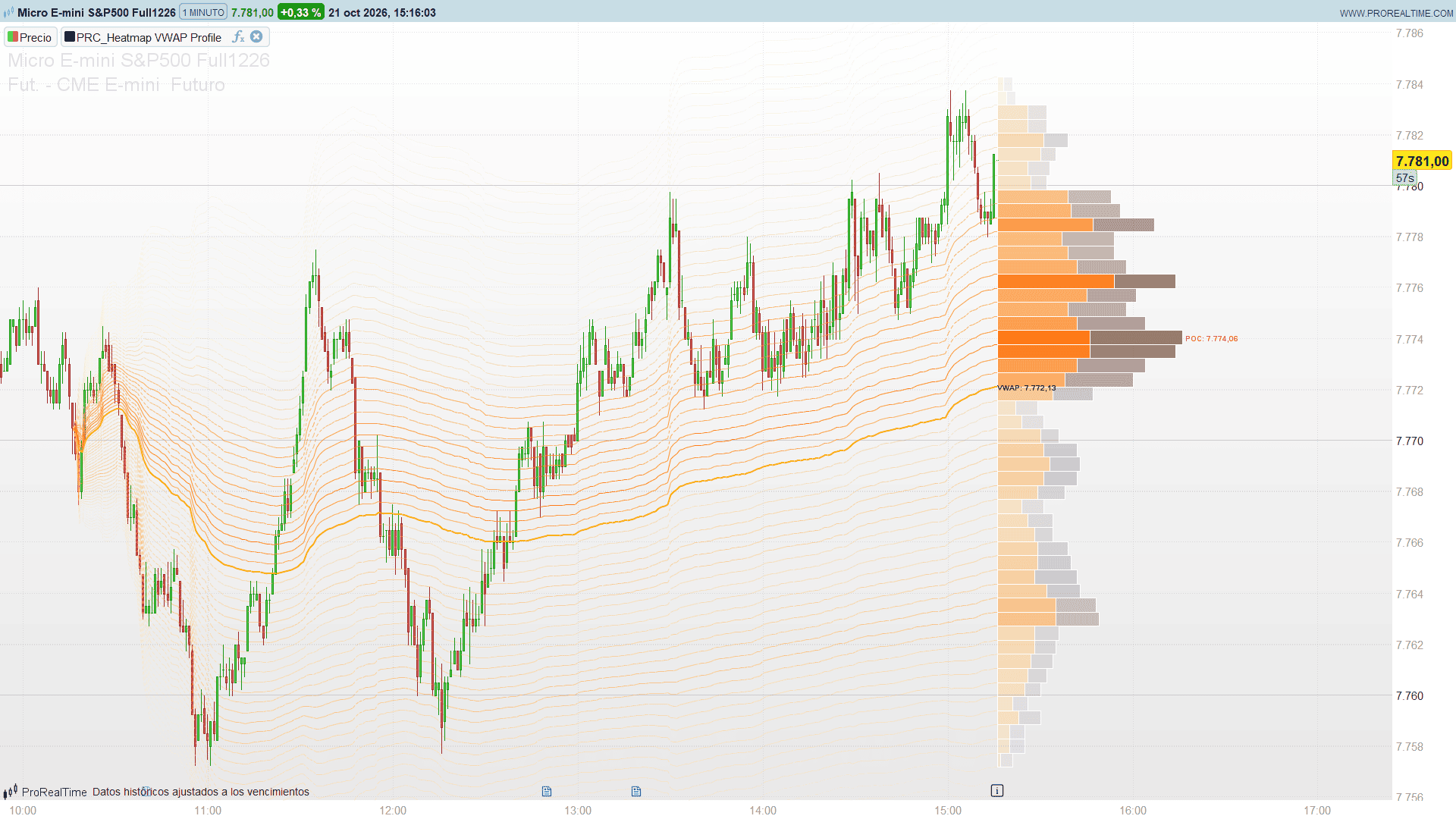
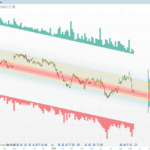
Heatmap VWAP Profile by ChartPrime draws them as a single picture. From an anchor a fixed number of bars back, it plots the anchored VWAP and a fan of 71 deviation bands, from -3 to +3 standard deviations. Each band is coloured by the volume that the profile holds at its level: faint where little volume traded, deep orange where most of it did. On the right of the last bar, the volume profile of the same range shows the same information as horizontal bars, split into up and down volume, with labels for the top and bottom of the range, the VWAP and the point of control.
Theory Behind the Indicator
Anchored VWAP. The anchor is the bar that lies a fixed number of bars before the last bar (300 by default). From that bar onwards the indicator accumulates the typical price, (high + low + close) / 3, weighted by volume:
- VWAP = sum(typical price x volume) / sum(volume)
- Variance = sum(typical price² x volume) / sum(volume) – VWAP²
- Standard deviation σ = square root of the variance (0 if the variance is not positive)
Both are computed for every bar since the anchor, so the VWAP line and the bands follow the market bar by bar. On the anchor bar σ is zero, which is why all the bands start from a single point and open like a fan as volume and dispersion build up.
Deviation bands. The range from -3σ to +3σ is cut into 70 equal steps, which gives 71 band lines (VWAP – 3σ, VWAP – 3σ + 6σ/70, … up to VWAP + 3σ). With an even number of rows the middle band is the VWAP itself.
Volume profile. On the last bar, the same range (VWAP ± 3σ of the last bar) is split into 70 rows. Each of the 300 bars after the anchor shares its volume equally among the rows its high-low range covers; a bar partly outside the range puts all its volume in the rows it does cover, and a bar completely outside does not count. The volume goes to the up side when the bar closed at or above its open, and to the down side otherwise. The row with the most volume is the point of control (POC).
The heatmap. Each band line separates two rows of the profile. Its colour, its opacity and its style come from the average volume of those two rows relative to the largest row: from a soft, almost transparent gold for low volume to a vivid, almost solid orange for the highest volume, and a solid line instead of a dotted one when the volume is above 75% of the maximum. The profile rows use the same scale: soft gold to deep orange for up volume, soft tan to burnt bronze for down volume.
Key Features at a Glance
- Anchored VWAP from a fixed number of bars back, recalculated with every new bar.
- 71 standard deviation bands (±3σ in 70 steps by default) drawn as a volume heatmap.
- Solid lines on the high-volume nodes, dotted lines elsewhere.
- Volume profile of the same range, split into up and down volume, with width, colour and opacity by volume.
- Labels for the top of the range (+3σ), the VWAP, the point of control and the bottom of the range (-3σ).
How to Read the Indicator
- Bright, solid bands are the price levels where most of the volume of the period traded, measured in standard deviations from the VWAP. Price tends to slow down, rotate or find support and resistance there.
- Faint, dotted bands are low-volume zones: the market went through them quickly and tends to do it again.
- The shape of the fan shows how dispersion evolved: bands that open quickly mean volatile trading right after the anchor; bands that stay tight mean the market kept close to its average price.
- The position of price inside the fan: beyond ±2σ price is far from the volume-weighted average of the period; near the outer bands (TOP and BOT) it is at an extreme of the range.
- POC vs VWAP: when the point of control sits above the VWAP, more volume traded in the upper part of the range, and the other way round. A large gap between them shows a skewed distribution.
Practical Applications
- Mean reversion: price at the outer bands with a faint, low-volume zone between it and the VWAP can travel back fast towards the bright bands.
- Support and resistance: the bright bands and the POC are natural levels for entries, stops and targets.
- Trend context: in a clean trend price rides above (or below) the VWAP and the bright bands move with it; repeated crosses of the VWAP point to a balanced market.
- Breakouts: a move out of a bright band into a faint zone often extends until the next bright band.
Indicator Configuration
- anchorBars (default 300, 1 to 500): number of bars back from the last bar where the VWAP is anchored. The profile uses the bars after the anchor.
- showBands (default 1): 1 shows the heatmap bands, 0 hides them.
- maxStdevMult (default 3.0, minimum 0.5): outer range of the bands and of the profile, in standard deviations.
- showVP (default 1): 1 shows the volume profile.
- vpRows (default 70, 2 to 100): number of profile rows, and of bands minus one.
- vpWidth (default 60, minimum 10): width of the largest profile row, in bars.
- showLabels (default 1): 1 shows the TOP, VWAP, POC and BOT labels.
- lblOff (default 10): the label text is centred this many bars to the right of its point.
- minTransp (default 10): transparency of the highest volume, 0 = solid.
- maxTransp (default 85): transparency of the lowest volume, 100 = invisible.
- bandStep (default 1): bars per band segment. With 1 every bar is joined; 2 or 3 draws the same bands with fewer segments if the chart gets slow.
- bgR, bgG, bgB (default 255, 255, 255): background colour of your chart. It is used for the thin border between the profile rows; set it to your background colour on a dark theme.
The chart needs at least anchorBars + 1 bars loaded; with fewer bars the anchor is the first bar of the chart. The indicator needs volume: on instruments without volume nothing is drawn.
The Code
//---------------------------------------------------------------
//PRC_Heatmap VWAP Profile
//version = 0
//21.10.2026
//Iván González @ www.prorealcode.com
//Author: ChartPrime
//Sharing ProRealTime knowledge
//--------------------------------------------------------------------//
defparam drawonlastbaronly = true

// ===================== INPUTS =====================
anchorBars = 300      // anchor: bars back from the last bar (1 to 500)
showBands = 1         // 1 = show the dynamic standard deviation bands (heatmap lines)
maxStdevMult = 3.0    // outer range of the bands and of the profile, in standard deviations (min 0.5)

showVP = 1            // 1 = show the volume profile
vpRows = 70           // volume profile rows / number of bands (2 to 100)
vpWidth = 60          // maximum width of the volume profile, in bars (min 10)

showLabels = 1        // 1 = show the price labels (TOP, VWAP, POC, BOT)
lblOff = 10           // label text centred this many bars to the right of its anchor point

minTransp = 10        // transparency of the highest volume (0 = solid)
maxTransp = 85        // transparency of the lowest volume (100 = invisible)

bandStep = 1          // bars per band segment: 1 = every bar; raise it to 2 or 3 if the chart gets slow

// Chart background colour: thin border between the profile rows
bgR = 255
bgG = 255
bgB = 255

// ===================== CALCULATIONS =====================
aBars = max(1, min(500, round(anchorBars)))
kMult = max(0.5, maxStdevMult)
nRows = max(2, min(100, round(vpRows)))
wid = max(10, round(vpWidth))
minT = max(0, min(100, minTransp))
maxT = max(0, min(100, maxTransp))
bStep = max(1, round(bandStep))

IF islastbarupdate THEN
   // The anchor bar is aOff bars back from the last bar
   aOff = min(aBars, barindex)

   // 1. Anchored VWAP and its volume-weighted standard deviation, bar by bar since the anchor
   cumPV = 0
   cumVol = 0
   cumPV2 = 0
   jFirst = -1
   FOR j = aOff DOWNTO 0 DO
      tp = (high[j] + low[j] + close[j]) / 3
      vj = volume[j]
      cumPV = cumPV + tp * vj
      cumVol = cumVol + vj
      cumPV2 = cumPV2 + tp * tp * vj
      IF cumVol > 0 THEN
         vw = cumPV / cumVol
         vr = cumPV2 / cumVol - vw * vw
         IF vr > 0 THEN
            sd = sqrt(vr)
         ELSE
            sd = 0
         ENDIF
         $vw[j] = vw
         $sd[j] = sd
         IF jFirst < 0 THEN
            jFirst = j
         ENDIF
      ENDIF
   NEXT

   // No volume since the anchor: no VWAP and nothing to draw
   IF jFirst >= 0 THEN
      vwNow = $vw[0]
      sdNow = $sd[0]
      hiPrice = vwNow + kMult * sdNow
      loPrice = vwNow - kMult * sdNow

      // 2. Volume profile between -k and +k standard deviations, split into up and down volume
      FOR r = 0 TO nRows - 1 DO
         $upV[r] = 0
         $dnV[r] = 0
         $totV[r] = 0
      NEXT
      maxVol = 0
      pocRow = 0
      IF hiPrice > loPrice THEN
         rowSize = (hiPrice - loPrice) / nRows
         // The bars after the anchor (the anchor bar itself only on a short chart)
         nI = min(aBars - 1, aOff)
         FOR i = 0 TO nI DO
            rowLo = max(0, floor((low[i] - loPrice) / rowSize))
            rowHi = min(nRows - 1, floor((high[i] - loPrice) / rowSize))
            IF rowHi >= rowLo THEN
               // A bar partly outside the range puts all its volume in the rows it covers
               volPerRow = volume[i] / (rowHi - rowLo + 1)
               IF close[i] >= open[i] THEN
                  FOR r = rowLo TO rowHi DO
                     $upV[r] = $upV[r] + volPerRow
                  NEXT
               ELSE
                  FOR r = rowLo TO rowHi DO
                     $dnV[r] = $dnV[r] + volPerRow
                  NEXT
               ENDIF
            ENDIF
         NEXT
         // Point of control: the row with the most volume (the lowest one on a tie)
         FOR r = 0 TO nRows - 1 DO
            tot = $upV[r] + $dnV[r]
            $totV[r] = tot
            IF tot > maxVol THEN
               maxVol = tot
               pocRow = r
            ENDIF
         NEXT
      ENDIF

      // 3. Anchored VWAP line
      IF jFirst > 0 THEN
         FOR j = jFirst DOWNTO 1 DO
            DRAWSEGMENT(barindex - j, $vw[j], barindex - j + 1, $vw[j - 1]) COLOURED(255, 179, 0, 255) STYLE(line, 2)
         NEXT
      ENDIF

      // 4. Volume profile to the right of the last bar: up volume, then down volume
      IF showVP = 1 AND maxVol > 0 AND hiPrice > loPrice THEN
         xLeft = barindex
         FOR r = 0 TO nRows - 1 DO
            tot = $totV[r]
            IF tot > 0 THEN
               rowLow = loPrice + r * rowSize
               rowHigh = rowLow + rowSize
               upW = round(wid * $upV[r] / maxVol)
               dnW = round(wid * $dnV[r] / maxVol)
               ratio = tot / maxVol
               trp = round(maxT - ratio * (maxT - minT))
               alphaV = round(255 * (100 - trp) / 100)
               // Colour gradient by volume: soft gold to deep orange (up), soft tan to bronze (down)
               uR = 255
               uG = round(224 + (109 - 224) * ratio)
               uB = round(130 + (0 - 130) * ratio)
               dR = round(215 + (141 - 215) * ratio)
               dG = round(204 + (110 - 204) * ratio)
               dB = round(200 + (99 - 200) * ratio)
               IF upW > 0 THEN
                  DRAWRECTANGLE(xLeft, rowHigh, xLeft + upW, rowLow) COLOURED(bgR, bgG, bgB, 255) FILLCOLOR(uR, uG, uB, alphaV)
               ENDIF
               IF dnW > 0 THEN
                  DRAWRECTANGLE(xLeft + upW, rowHigh, xLeft + upW + dnW, rowLow) COLOURED(bgR, bgG, bgB, 255) FILLCOLOR(dR, dG, dB, alphaV)
               ENDIF
            ENDIF
         NEXT
      ENDIF

      // 5. Heatmap bands: one line per row boundary, coloured by the volume of the rows it separates
      IF showBands = 1 AND jFirst > 0 THEN
         stepStd = 2 * kMult / nRows
         // At most 100 band lines are kept: with 100 rows the first band (-k) is not shown
         firstBand = max(0, nRows - 99)
         FOR r = firstBand TO nRows DO
            lineVol = 0
            IF maxVol > 0 THEN
               IF r = 0 THEN
                  lineVol = $totV[0]
               ELSIF r = nRows THEN
                  lineVol = $totV[nRows - 1]
               ELSE
                  lineVol = ($totV[r - 1] + $totV[r]) / 2
               ENDIF
               binRatio = lineVol / maxVol
            ELSE
               binRatio = 0
            ENDIF
            trp = round(maxT - binRatio * (maxT - minT))
            alphaV = round(255 * (100 - trp) / 100)
            uR = 255
            uG = round(224 + (109 - 224) * binRatio)
            uB = round(130 + (0 - 130) * binRatio)
            mult = -kMult + r * stepStd
            jA = jFirst
            yA = $vw[jA] + mult * $sd[jA]
            WHILE jA > 0 DO
               jB = max(0, jA - bStep)
               yB = $vw[jB] + mult * $sd[jB]
               // Solid line on the high volume nodes, dotted elsewhere
               IF binRatio > 0.75 THEN
                  DRAWSEGMENT(barindex - jA, yA, barindex - jB, yB) COLOURED(uR, uG, uB, alphaV) STYLE(line, 1)
               ELSE
                  DRAWSEGMENT(barindex - jA, yA, barindex - jB, yB) COLOURED(uR, uG, uB, alphaV) STYLE(dottedline, 1)
               ENDIF
               jA = jB
               yA = yB
            WEND
         NEXT
      ENDIF

      // 6. Price labels (TOP, VWAP, POC, BOT)
      IF showLabels = 1 AND hiPrice > loPrice THEN
         pocPrice = loPrice + (pocRow + 0.5) * rowSize
         labelX = barindex + lblOff
         kTxt = round(kMult * 10) / 10
         hiTxt = round(hiPrice * 100) / 100
         vwTxt = round(vwNow * 100) / 100
         pocTxt = round(pocPrice * 100) / 100
         loTxt = round(loPrice * 100) / 100
         DRAWTEXT("TOP (+#kTxt#σ): #hiTxt#", labelX, hiPrice, SansSerif, Bold, 10) COLOURED(255, 109, 0, 255)
         DRAWTEXT("VWAP: #vwTxt#", labelX, vwNow, SansSerif, Bold, 10) COLOURED(0, 0, 0, 255)
         DRAWTEXT("POC: #pocTxt#", labelX + wid, pocPrice, SansSerif, Bold, 10) COLOURED(255, 61, 0, 255)
         DRAWTEXT("BOT (-#kTxt#σ): #loTxt#", labelX, loPrice, SansSerif, Bold, 10) COLOURED(0, 0, 0, 255)
      ENDIF
   ENDIF
ENDIF

RETURN
![[SMC] Clean Liquidity Heatmap](https://www.prorealcode.com/wp-content/uploads/2026/03/TSLA-Diario-3-150x150.png)