







Pivot Points (Daily)
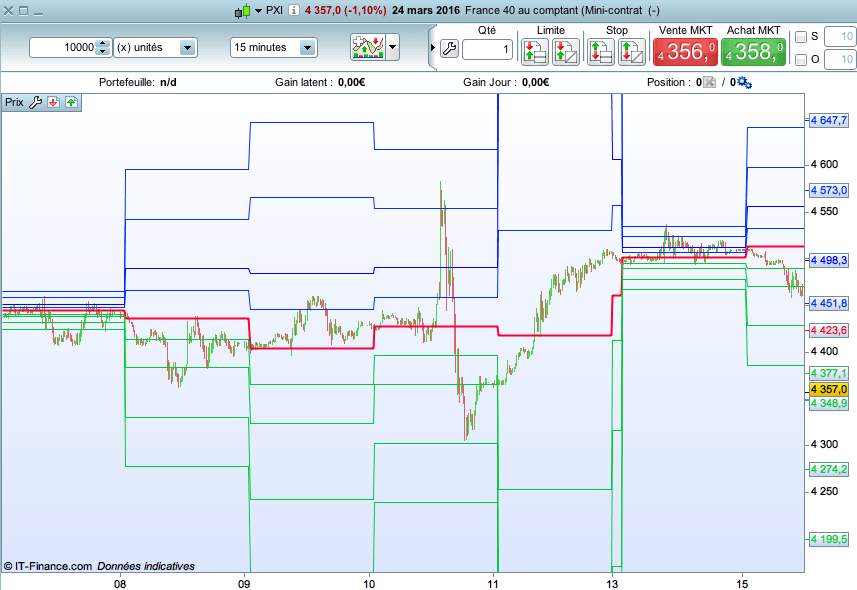
Hi all,
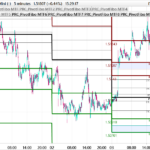
This is the code for classical Pivot Points (daily).
It is very simple, and can be very useful to backtest some strategies.
By the way, if you know an efficient one, tell me and I can backtest and improve it.
I haven’t found it yet.
And for the Monday, pivot points are based on the calculation of SUNDAY, so it is wrong.
I will soon fix this issue
Greetings,
Marc
Ht = DHigh(1)
Bs = DLow(1)
C = DClose(1)


Pivot = (Ht + Bs + C) / 3
Res4 = Pivot + ((Ht - Bs)*3)
Res3 = Pivot + ((Ht - Bs)*2)
Res2 = Pivot + Ht - Bs
Res1 = (2 * Pivot) - Bs
Sup1 = (2 * Pivot) - Ht
Sup2 = Pivot - (Ht - Bs)
Sup3 = Pivot - ((Ht - Bs)*2)
Sup4 = Pivot - ((Ht - Bs)*3)


return Pivot as "Point Pivot", Res1 as "R1", Res2 as "R2", Res3 as "R3", Res4 as "R4", Sup1 as "S1", Sup2 as "S2", Sup3 as "S3", Sup4 as "S4"
NB :
I can’t set “H =”… or “R2 = “… so I did write “Ht” and “Res2”.
Comments
You must be logged in to post a comment.



There is a mistake in S3 and R3 (and S4 and R4...)... if I am not mistaken. I personnaly consider : Pivot = (H + B + C) / 3 S1 = (2 x Pivot) - H S2 = Pivot - (H - B) S3 = B - 2x (H - Pivot) S4 = B - 3x (H - Pivot) R1 = (2 x Pivot) - B R2 = Pivot + (H - B) R3 = H + 2x (Pivot - B) R4 = H + 3x (Pivot - B)


Is there any way to:
- change style of indicator, e.g. solid lines to dotted lines
- display the label of the line, e.g. S3


There is a trick to avoid the failure of the wrong signal on monday :
a1=OpenDayOfWeek
b1=DHigh(1)
b2=DHigh(2)
c1=DLow(1)
c2=DLow(2)
d1=DClose(1)
d2=DClose(2)
IF a1=1 THEN
b1=b2
c1=c2
d1=d2
ELSE
b1=b1
c1=c1
d1=d1
ENDIF

H1 = b1//High
L1 = c1//Low
C = d1//Close

Pivot = (H1 + L1 + C) / 3
You can do the same procedure to calculate the resistances and supports.
Yes, you are right Nicolas

"Set target profit" is the target in PIPS
You should write :
sell at target limit
exitshort at target limit
Regards,
Hello Doctrading,
I'm currently building a strategy that sets the daily Pivot point as target. I´ve though run in to some problems. My code doesn't exit trades at the pivd and i can't find the reason why.
Here is my target code;
ttarget = ((DHigh(1) + DLow(1) + DClose(1))/3)

set target profit ttarget
What am i doing wrong? I would appreciate your help.
is it possible to add Mid pivot points (midR1 and MidS1)?