



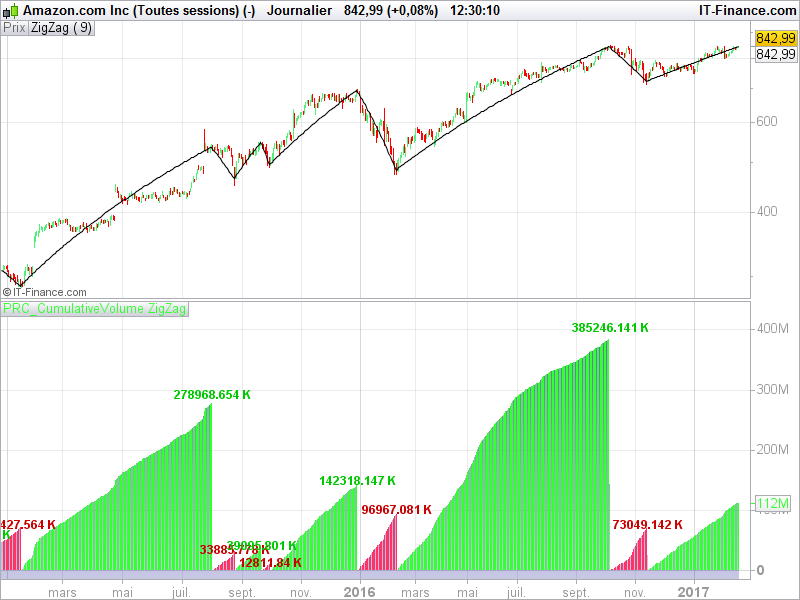



ZigZag with cumulative volume

Viewing 15 posts - 1 through 15 (of 49 total)
  • Author
    Posts
  • #24650 quote
    RomanPL
    Participant
    New

    Hi,


    Below is the AFL Code (Amibroker) which I would like to adopt for PRT Charts

    The indicator simply calculate and histogram the cumulative volume of each zig-zag turn.


    I would greatly appreciate the help here.

    I am a long-time client of IG Markets


    function SumSince2( condition, array )

    {

    CumA = Cum( array );

    return CumA – ValueWhen( condition, CumA ) + ValueWhen( condition, array ) ;

    }


    //Plot( Close, “Close”, colorDefault );

    Plot( Zig(Close,9), “Zig”, colorBlue, styleThick);


    // count bars since last peak or trough

    pkb = PeakBars( Close, 9 );

    trb = TroughBars( Close, 9 );


    // identify peaks

    pk = pkb == 1;

    tr = trb == 1;


    // define Plot color

    color = IIf( Ref(pkb < trb,-1), colorRed, colorGreen );


    // calculate cumulated volume

    cumVolume = SumSince2( pk OR tr, Volume);

    Plot( cumVolume, “cumulated Volume”, color, styleHistogram | styleOwnScale, 2 );


    dist = ATR(10);

    for( i = 0; i < BarCount-1; i++ )

    {

    if( tr[ i+1 ] ) PlotText( NumToStr(CumVolume[ i ]/1000,1,1) +”k”, i, L[ i ] – dist[i], colorRed );

    if( pk[ i+1 ] ) PlotText( NumToStr(CumVolume[ i ]/1000,1,1) +”k”, i, L[ i ] + dist[i], colorgreen );

    }

    #24696 quote
    Nicolas
    Keymaster
    Master

    Do you have any screenshots of how it should be displayed please? Amibroker and prorealtime don’t share the same graphical capabilities, so I’d like to know how you want it to give you the desired information (cumulative volume) before coding it. Thanks in advance!

    #24771 quote
    RomanPL
    Participant
    New

    Hi Nicolas,

    Thanks for your quick replay.

    Attached file with the screen shot

    #25286 quote
    Nicolas
    Keymaster
    Master

    Here is a simple code to make the same thing than MetaStock. The code you submitted use built-in instructions of MetaStock, so I think I have correctly recode it, please make your own tests and give feedbacks!

    zz = ZigZag[9](close)
    
    peak = zz<zz[1] and zz[1]>zz[2]
    tough = zz>zz[1] and zz[1]<zz[2]
    
    cumV = cumV[1]+volume
    
    if peak then
    text = cumV/1000
    drawtext("#text#K",barindex,cumV+(cumV/20),Dialog,Bold,12) coloured(0,200,0)
    cumV = 0
    color = -1
    elsif tough then 
    text = cumV/1000
    drawtext("#text#K",barindex,cumV+(cumV/20),Dialog,Bold,12) coloured(200,0,0)
    cumV = 0
    color = 1
    endif
    
    return cumV coloured by color

    You’ll find attached a sample screenshot of what we get on chart. I did not add the ZigZag lines on the Volumes, is it necessary? or do you want it too? If it’s ok, I certainly add this in the prorealtime code library.

    mamio thanked this post
    #25294 quote
    mamio
    Participant
    Veteran

    You are always of great help Nicolas, Thank you!

    The indicator work only on daily charts. Do you think it is possible to have it for lower timeframes, too?

    #25310 quote
    Nicolas
    Keymaster
    Master

    It should work on any timeframe. Of course you need instruments with Volumes. The [9] in the first line of code is 9% percent of variation to draw a new zigzag point, so it should be modified for intraday timeframe.

    mamio and boro76 thanked this post
    #25390 quote
    boro76
    Participant
    New

    I’ve been looking for this – thanks for your time & effort

    #25395 quote
    Nicolas
    Keymaster
    Master

    This indicator seems of interest of many people! How do you use it exactly? Many thanks.

    #25400 quote
    RomanPL
    Participant
    New

    Hi Nicolas,

    Thanks for your quick respond.

    I’m trying to set up this indicator but it comes up with

    error on lines: 10, 15, 20

    I’m using PRT version   v10.2-1.8.0_45

    Best regards

    #25407 quote
    Nicolas
    Keymaster
    Master

    Because you’re still with 10.2 and drawing text on charts were not possible with this version.

    Just remove lines 9,10,14 and 15 and it should be OK. Please confirm.

    #25408 quote
    RomanPL
    Participant
    New

    If you believe that volume is important than this indicator is very helpful.

    The theory is based on R Wyckoff  works and refined by D Weis.

    In the nutshell cumulative volume helps to asses the strength of the ZigZag section which

    is difficult to measure if you looking at the individual volume bars only.

    Your Amazon chart shows exactly the power of this indicator!

    #25409 quote
    RomanPL
    Participant
    New

    Yes it works thanks.

    It does not change colour on UP/Down moves but this not a problem

    I’ve add Variable to zz function so it is easy to adjust sensitivity of ZigZag

    #25410 quote
    RomanPL
    Participant
    New

    One more question,

    the cumulative volume count is missing first volume after the top turn

    and first volume after the trough

    #25422 quote
    Sofitech
    Participant
    Master

    Just a question abuot this indicator. Is it possible to create different value for red cumulative volume and green cumulative volume ?

    #25424 quote
    Nicolas
    Keymaster
    Master

    It does not change colour on UP/Down moves but this not a problem

    You have to modify yourself the Up/Down (Positive/Negative) colors of the histogram in the indicator window.

    the cumulative volume count is missing first volume after the top turn

    Right, it’s fixed in this new version of the code:

    zz = ZigZag[9](close)
    
    peak = zz<zz[1] and zz[1]>zz[2]
    tough = zz>zz[1] and zz[1]<zz[2]
    
    cumV = cumV+volume
    
    if peak then
    text = cumV/1000
    drawtext("#text#K",barindex,cumV+(cumV/20),Dialog,Bold,12) coloured(0,200,0)
    cumV = Volume
    color = -1
    elsif tough then
    text = cumV/1000
    drawtext("#text#K",barindex,cumV+(cumV/20),Dialog,Bold,12) coloured(200,0,0)
    cumV = Volume
    color = 1
    endif
    
    return cumV coloured by color
Viewing 15 posts - 1 through 15 (of 49 total)
  • You must be logged in to reply to this topic.

ZigZag with cumulative volume


ProBuilder: Indicators & Custom Tools

New Reply
Author
author-avatar
RomanPL @romanpl Participant
Summary

This topic contains 48 replies,
has 3 voices, and was last updated by Nicolas

3 years, 7 months ago.

Topic Details
Forum: ProBuilder: Indicators & Custom Tools
Language: English
Started: 02/10/2017
Status: Active
Attachments: 10 files
Logo Logo
Loading...
