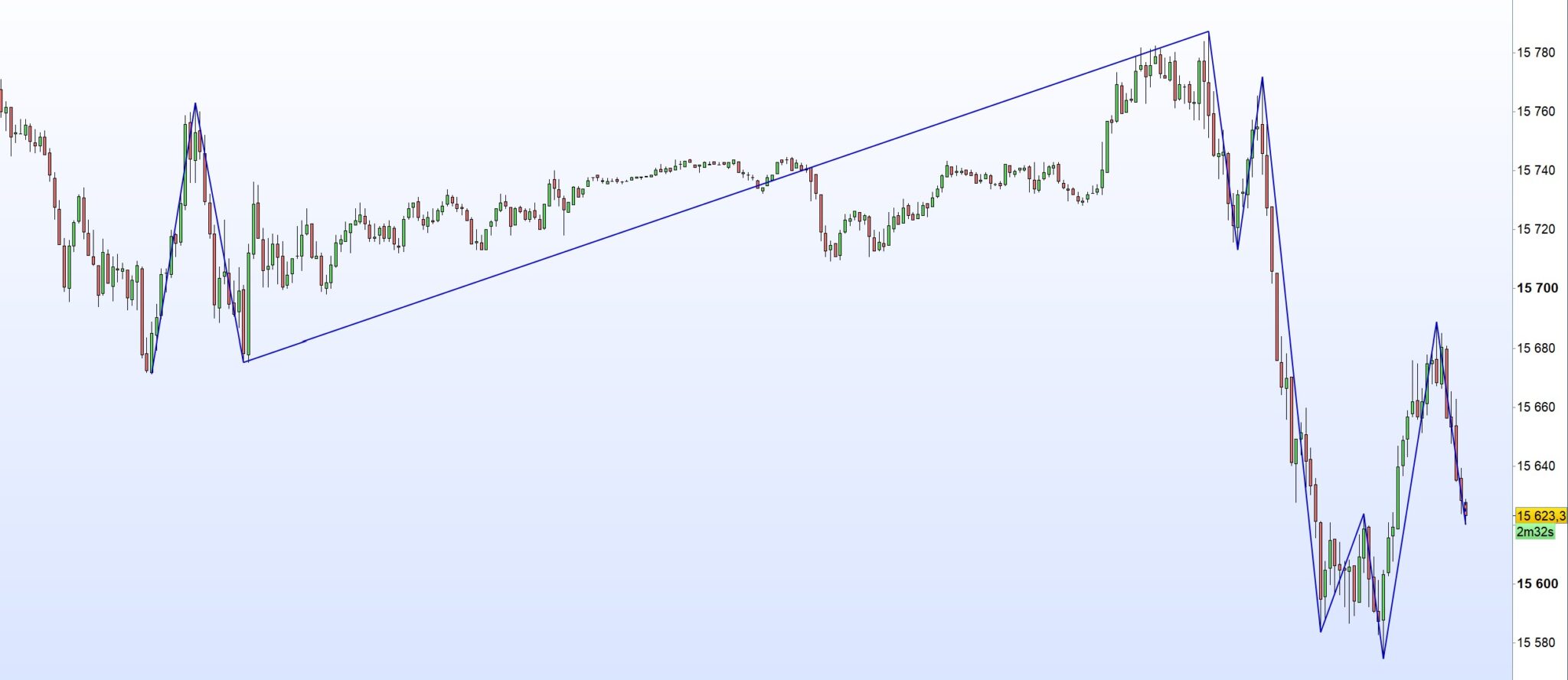
ZigZag Indicator using Highs and Lows

Viewing 8 posts - 1 through 8 (of 8 total)

  • Author
    Posts
  • #220309 quote
    nils_k
    Participant
    New

    Dear Nicolas, Dear Members of the Forum,

    I want to code a ZigZag Indicator that uses highs and lows instead of just the close (as the one included in the Platform does) as a reference point.

    I have found some great code for making a ZigZag Indicator (https://www.prorealcode.com/prorealtime-indicators/zigzag-indicator/), but it also uses the close instead of the high for peaks and the low for troughs. Although there is a suggestion of how to incorporate highs/lows in the comments, the version suggested there seems to hardcode the segments to be drawn instead of using arrays, thus limiting the segments that can be drawn. Has anybody got an idea of how the code linked above could be rewritten to use highs/lows instead of the close (or alternatively, how the code in the comments https://www.prorealcode.com/prorealtime-indicators/zigzag-indicator/#comment-12840 could be rewritten to make it possible to adjust the numbers of segments drawn freely)?

    Thank you so much for helping me.


    Regards, Nils

    Avi_P thanked this post
    #220316 quote
    JS
    Participant
    Senior

    Hi Nils,

    Have you tried the high and low ZigZag code…?

    You can use this code to set how many points (k*ATR) or what percentage (%) should be between the tops and bottoms…

    #220317 quote
    JS
    Participant
    Senior
    DEFPARAM DRAWONLASTBARONLY=TRUE
    //Variabili:
    Punti=3 * averagetruerange[200] //Pips
    Percentuale=0.25 //%
    Tipo=0 //0=pips; 1=perc
    
    //VarY=CustomClose //close,tpicalprice, etc
    
    //inizializzo primo punto come TOP
    once LastPoint = 1
    once TX0 = barindex
    once TY0 = close
    
    //Tipo ZZ in Punti o Percentuale
    If Tipo=0 then //ZZ in punti
    DeltaY=Punti//*pipsize
    elsif tipo=1 then //ZZ in %
    DeltaY=Percentuale/100*Dclose(1)//usato Dclose come rif. per stabilità del valore
    endif
    
    //ZZ in fase 1
    if LastPoint=1 then //ultimo punto era un massimo
    if high>=TY0 then // aggiorno il punto di max e rimango in LastPoint=1
    TY0=high
    TX0=barindex
    elsif low<=TY0-DeltaY then //primo punto definitivo low
    rem for i=PI downto 0 do //shift memoria punti precedenti
    LX4=LX3
    LY4=LY3
    LX3=LX2
    LY3=LY2
    LX2=LX1
    LY2=LY1
    LX1=LX0
    LY1=LY0
    
    LY0=low
    LX0=barindex
    LastPoint=-1
    endif
    endif
    
    //ZZ in fase -1
    if LastPoint=-1 then //ultimo punto era un minimo
    if low<=LY0 then // aggiorno il punto di min e rimango in LastPoint=-1
    LY0=low
    LX0=barindex
    elsif high>=LY0+DeltaY then //primo punto definitivo top
    TX4=TX3
    TY4=TY3
    TX3=TX2
    TY3=TY2
    TX2=TX1
    TY2=TY1
    TX1=TX0
    TY1=TY0
    
    TY0=high
    TX0=barindex
    LastPoint=1
    endif
    endif
    
    //—GRAFICA—
    If lastpoint=1 then
    drawsegment (barindex,high,TX0,TY0) style (dottedline,2) COLOURED (0,0,200) //segmento in progress
    drawsegment (TX0,TY0,LX0,LY0) style (line,2) COLOURED (0,0,200) //segmenti definitivi
    drawsegment (LX0,LY0,TX1,TY1) style (line,2) COLOURED (0,0,200)
    drawsegment (TX1,TY1,LX1,LY1) style (line,2) COLOURED (0,0,200)
    drawsegment (LX1,LY1,TX2,TY2) style (line,2) COLOURED (0,0,200)
    drawsegment (TX2,TY2,LX2,LY2) style (line,2) COLOURED (0,0,200)
    drawsegment (LX2,LY2,TX3,TY3) style (line,2) COLOURED (0,0,200)
    drawsegment (TX3,TY3,LX3,LY3) style (line,2) COLOURED (0,0,200)
    drawsegment (LX3,LY3,TX4,TY4) style (line,2) COLOURED (0,0,200)
    drawsegment (TX4,TY4,LX4,LY4) style (line,2) COLOURED (0,0,200)
    endif
    If lastpoint=-1 then
    drawsegment (barindex,low,LX0,LY0) style (dottedline,2) COLOURED (0,200,0) //segmento in progress
    drawsegment (LX0,LY0,TX0,TY0) style (line,2) COLOURED (0,0,200) //segmenti definitivi
    drawsegment (TX0,TY0,LX1,LY1) style (line,2) COLOURED (0,0,200)
    drawsegment (LX1,LY1,TX1,TY1) style (line,2) COLOURED (0,0,200)
    drawsegment (TX1,TY1,LX2,LY2) style (line,2) COLOURED (0,0,200)
    drawsegment (LX2,LY2,TX2,TY2) style (line,2) COLOURED (0,0,200)
    drawsegment (TX2,TY2,LX3,LY3) style (line,2) COLOURED (0,0,200)
    drawsegment (LX3,LY3,TX3,TY3) style (line,2) COLOURED (0,0,200)
    drawsegment (TX3,TY3,LX4,LY4) style (line,2) COLOURED (0,0,200)
    drawsegment (LX4,LY4,TX4,TY4) style (line,2) COLOURED (0,0,200)
    endif
    
    return
    
    Avi_P thanked this post
    #220321 quote
    nils_k
    Participant
    New
    Dear JS, thank you for replying. I have tried the ZigZag Code that you reposted here. The problem that I have is that it draws only 10 Segments, as this is what is hardcoded below line 64. What I want is the possibility to dynamically adjust the amount of segments coded like it can be done with the indicator I linked above (https://www.prorealcode.com/prorealtime-indicators/zigzag-indicator/) just with highs and lows instead of just the close. Regards, Nils
    #220323 quote
    JS
    Participant
    Senior

    Hi Nils,

    I understand what you want, I don’t think it’s that simple…

    Job for the real experts… 🙂
    #220324 quote
    nils_k
    Participant
    New
    Yes, I’m hoping for Nicolas, Roberto, or Vonasi, et al. 🙂
    #220573 quote
    LaMaille
    Participant
    Junior
    Here’s the same ZigZag Indicator (https://www.prorealcode.com/prorealtime-indicators/zigzag-indicator/), with the high and lows instead of close.
    //17/12/2022 - T.F. - ZigZag code with Array
    //Sharing ProRealCode
    
    DEFPARAM DRAWONLASTBARONLY=TRUE
    //Variables:
    //Points=20    //Pips
    //Perc=0.25    //%
    //Type=0       //0=pips; 1=perc
    //Segments=10  //n. segments up/dw to show
    
    
    PI=max(0,(Segments-1)) //points top/low back to store
    VarY=CustomClose //close,tpicalprice, etc
    
    //inizializzo primo punto come TOP
    once LastPoint = 1
    once $TX[0]    = barindex
    once $TY[0]    = High
    
    //Tipo ZZ in Punti o Percentuale
    If Type=0 then //ZZ in pips
    DeltaY=max(2*pipsize,Points*pipsize)
    elsif Type=1 then //ZZ in %
    DeltaY=max(0.001,Perc/100*Dclose(1)*pipsize) //Dclose used as ref.
    endif
    
    //ZZ in fase 1
    if LastPoint=1 then //lastpoint was a top
    if High>$TY[0] then //update last top and stay in LastPoint=1
    $TY[0]=High
    $TX[0]=barindex
    elsif Low<=($TY[0]-DeltaY) then //first point in low
    for i=PI downto 0 do //shift memory previous points
    $LX[i+1]=$LX[i]
    $LY[i+1]=$LY[i]
    next
    $LY[0]=Low //store new low and change lastpoint
    $LX[0]=barindex
    LastPoint=-1
    endif
    endif
    
    //ZZ in fase -1
    if LastPoint=-1 then //lastpoint was a low
    if Low<$LY[0] then //update last low and stay in LastPoint=-1
    $LY[0]=Low
    $LX[0]=barindex
    elsif High>=($LY[0]+DeltaY) then //first point in top
    for i=PI downto 0 do  //shift memory previous points
    $TX[i+1]=$TX[i]
    $TY[i+1]=$TY[i]
    next
    $TY[0]=High //store new top and change lastpoint
    $TX[0]=barindex
    LastPoint=1
    endif
    endif
    
    //---GRAPH---
    If LastPoint=1 then
    drawsegment (barindex,Low,$TX[0],$TY[0]) style (dottedline,2) COLOURED (0,0,200) //segment in progress
    for i=0 to PI do //final segments
    drawsegment ($TX[i],$TY[i],$LX[i],$LY[i]) style (line,2) COLOURED (0,0,200)
    drawsegment ($LX[i],$LY[i],$TX[i+1],$TY[i+1]) style (line,2) COLOURED (0,0,200)
    next
    endif
    If LastPoint=-1 then
    drawsegment (barindex,High,$LX[0],$LY[0]) style (dottedline,2) COLOURED (0,0,200) //segment in progress
    for i=0 to PI do //final segments
    drawsegment ($LX[i],$LY[i],$TX[i],$TY[i]) style (line,2) COLOURED (0,0,200)
    drawsegment ($TX[i],$TY[i],$LX[i+1],$LY[i+1]) style (line,2) COLOURED (0,0,200)
    next
    endif
    
    return
    
    nils_k, robertogozzi, Nicolas and Avi_P thanked this post
    #220575 quote
    LaMaille
    Participant
    Junior
    I forgot to do it, but You can put line 13 as comment.
    nils_k thanked this post
Viewing 8 posts - 1 through 8 (of 8 total)

  • You must be logged in to reply to this topic.

ZigZag Indicator using Highs and Lows


ProBuilder: Indicators & Custom Tools

New Reply
Author
author-avatar
nils_k @nils_k Participant
Summary

This topic contains 7 replies,
has 3 voices, and was last updated by LaMaille

2 years, 5 months ago.

Topic Details
Forum: ProBuilder: Indicators & Custom Tools
Language: English
Started: 09/04/2023
Status: Active
Attachments: 3 files
Logo Logo
Loading...