


Wrong Time Zone used for displayed charts data

Viewing 3 posts - 1 through 3 (of 3 total)

  • Author
    Posts
  • #132500 quote
    sfiqbal
    Participant
    New

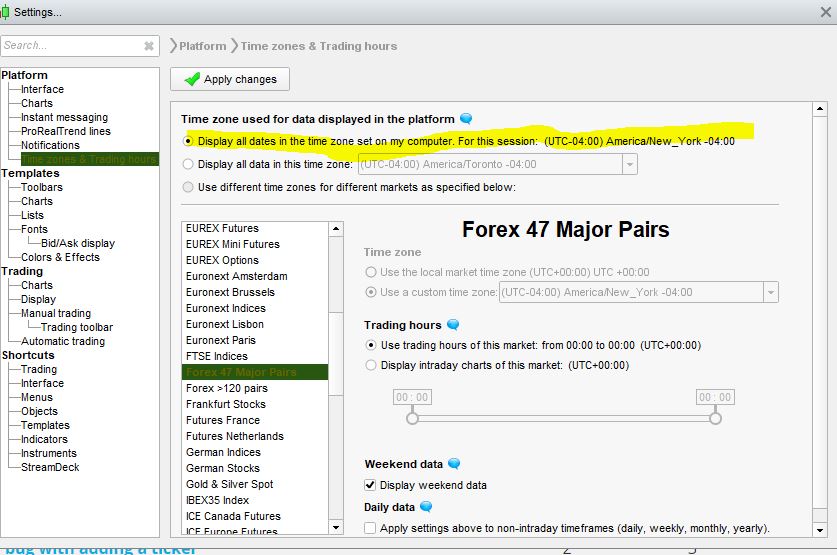
    Since last few weeks the charts are displaying data in UTC timezone for Forex pairs  instead of my computer timezone.

    As always my default option  selected the for trading hours is  as below :

    Display all dates in the timezone set on my computer UTC -4 ( newyork ) 

    On the charts ,  I expect  new Forex day to start at 8pm new york time becuase of the above option selected

    but since last 2 weeks it is only starting new forex day chart at 00:00  New york time and this is completely wrong .

    Same problem is with the hourly charts.

    I am using Prorealtime for 10 years and never had this problem, It appears a bug has been introduced recently.


    Please address this urgently.

    preolrealtime.jpg preolrealtime.jpg
    #132505 quote
    sfiqbal
    Participant
    New

    will trial and error i was able to figure out .

    I changed the timezone selected to UTC +00   instead of my computer timezone and now its ok

    #132551 quote
    RafaelN
    Moderator
    Senior

    Hi sfiqbal,
    There should be no issue in setting the time of Forex.
    Have you checked the time of your computer also? You may try to use the automatic setting of your clock…

    If that doesn’t work, could you try sending a report to ProRealTime via your platform?
    From your platform go to the Help menu:
    – Technical support
    – Mention your issue in the text box.

    Cheers,

Viewing 3 posts - 1 through 3 (of 3 total)
  • You must be logged in to reply to this topic.

Wrong Time Zone used for displayed charts data


Platform Support: Charts, Data & Broker Setup

New Reply
Author
author-avatar
sfiqbal @sfiqbal Participant
Summary

This topic contains 2 replies,
has 2 voices, and was last updated by RafaelN

5 years, 9 months ago.

Topic Details
Forum: Platform Support: Charts, Data & Broker Setup
Language: English
Started: 05/21/2020
Status: Active
Attachments: 1 files
Logo Logo
Loading...
