Hi all,
I modify and combine technical Indicators to compose a stock screener based on my preferences. So I first use the Indicator program and then transfer my Indicators to the Screener program part. Day candles is fine for me.
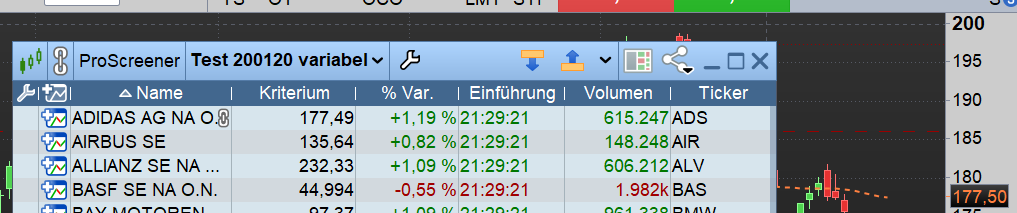
Following an old suspicion, I created a “check” with an EMA, to see if Chart/Indicator program and in PRT Screener program really use the same calculation values. Therefore, I “stripped” an EMA Indicator and used the command lines both for screener and Indicator. A a tweak, I used the (…) in the last SCREENER line to display the EMA in the results list and thus, make it visible.
Unfortunately, I found a mismatch for my results – which puts the feasability of using the scanner for my purposes into question… This is where I need your help.
– What went wrong ?
– Do I use the program appropiately; can I use the screener with selfmade indicators using EMA, RSI etc, which will be calculated over a series of candels at all ?
This is my code plus results:
// ———————————————-
// Comparisation of PRT Screener and PRT Indicator program
// by öse
// for check of the same indicator ouput both in “Screener” and in “Indicators” program section
// –> similar period & codelines used in both
// Sample Indicator = EMA[N] periods –> Variable: N = EMAperiod
// Sample Market = DAX40
// MinPrice & MinVolume only in this case intentionally set to “0” for testing
// Result A : Are indicator values the same ?
// Result B : Is full stock list in output (eg. for export (50 lines))
// Including (EMAline) in the screener output will display the EMAline value in output list to make it visible for comparisation
// you can “play” by additionally activating line (2) in Screener & Indicator code (and adjusting SCREENER line accordingly)
//
// ——-Prerequsites————————–
//
// Variable: MinPrice , type = integer , default = 0 –> all stocks will be included 🙂
// Variable: MinVolume , type = integer , default = 0 –> all stocks will be included 🙂
// Variable: EMAperiod , type = integer , default = 20
//
TIMEFRAME(daily)
//
//——-calculations————————–
//
EMAline = ExponentialAverage[EMAperiod](close) // line (1)
//
//EMAslope = (EMAline – EMAline[1]) / EMAline[1] * 100 // line (2) … activate or deactivate for testing
//
PriceCondition = (close) > 0 // –> all stocks will match criteria 🙂
//
// Screener ——————————————————————————–
SCREENER[PriceCondition AND close > MinPrice AND Volume > MinVolume ](EMAline)
//
——————-
This is what I found for the example Stock Addidas as per 22 Jan 2024 :
Prerequisite: / Indicator: / Screener:
line(1), EMAperiod = 1 / 164,68 / 164,68
line(1), EMAperiod = 20 / 165,43 / 176,62
line(1), EMAperiod = 100 / 172,48 / 177,71
As you you see, except if I put [EMAperiod] down to [1] the results differ. It gets even worse if I add further calculations such as line (2)
Prerequisite: / Indicator: / Screener:
line(1,2), EMAperiod = 1 / 0,0729 / -0,17
line(1,2), EMAperiod = 20 / -0,0475 / -0,71
line(1,2), EMAperiod = 100 / -0,0913 / -0,15
Thanks a lot in advance / meci