Where is the code saved?

Viewing 15 posts - 1 through 15 (of 22 total)
  • Author
    Posts
  • #114850 quote
    J.
    Participant
    Average

    Hello, my IG says that my demo trading account is not available “Demo accounts are currently not available. Please try again later.”.

    I always accessed proreal in demo mode from my IG account. However, I can’t acces proreal now because I can’t access my demo account anymore for some reason.

    How can I access the code that I have written in proreal without having acces to my demo account?

    #114852 quote
    Vonasi
    Moderator
    Master

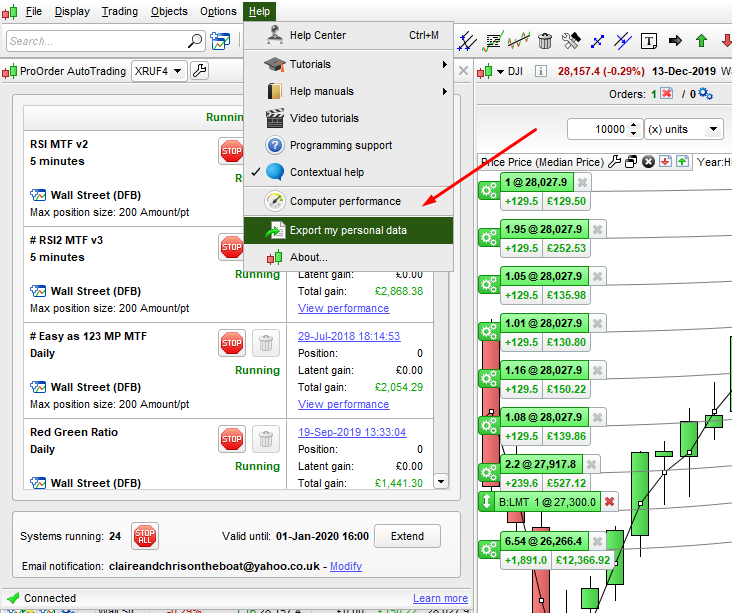
    Your code is stored on the PRT server. You can export it and save it as an ITF file on your own drive but will need the platform to open it. There is an option to do a backup on the platform and this saves all your code as TXT if you use it.

    #114853 quote
    robertogozzi
    Moderator
    Master

    You cannot, they are on their servers.

    I also happen sometines. After the first time I started doing copy & paste to a text file whenever I wrote something new or modified some code.

    You could also export ITF files, but it’s just for backup, since they are encrypted.

    #114854 quote
    robertogozzi
    Moderator
    Master

    AhAhAh… Vonasi’s superfast! 🙂

    #114855 quote
    robertogozzi
    Moderator
    Master

    Where is that option Vonasi, I don’t know anything about it?

    #114856 quote
    Vonasi
    Moderator
    Master
    #114858 quote
    robertogozzi
    Moderator
    Master

    Ok, I knew that.

    I thought there was an option to automatically save as text files anytime you write and save something.

    #114859 quote
    J.
    Participant
    Average

    Thank you guys, fortunately my demo started working again this morning.

    I will be backing up all my code in a virtual locker from now on.

    #114861 quote
    Vonasi
    Moderator
    Master

    I thought there was an option to automatically save as text files anytime you write and save something.

    Yes that would be a better way – also it would be nice if we could auto backup ITF files as well as TXT files. Exporting individually is such a pain and if we ever needed to then converting individual TXT files back to ITF files would also be a real pain. The perfect set up would be automatic backup of ITF and TXT files with a block import option on ITF files to re-install everything in the event of loss or if switching to a new account.

    I guess what we have now is better than what we had before but way from ideal.

    #114862 quote
    GraHal
    Participant
    Master

    this saves all your code as TXT if you use it.

    Thanks for the reminder! I did save as text once ages ago, had kinda forgotten! :0

    In what file (in the zip folder) are running Systems stored (running in the Auto Trading window)?

    I can find Backtest Systems, but can’t find any running Systems!?

    #114863 quote
    robertogozzi
    Moderator
    Master

    Mine is “Strategie PRT (robertogozzi – demo).zip“, but it’s because I chose a name, default should be MyData.

    And it is always overwritten without asking, whenever you export data.

    #114864 quote
    GraHal
    Participant
    Master

    In your zip file do you have .txt versions of Forward Test Running Systems??

    If Yes, which file (in the zip) are the above saved in??

    #114865 quote
    robertogozzi
    Moderator
    Master

    Nope, just the code itself.

    It’s just a basic backup to spare you hours re-coding, not a professional tool.

    #114866 quote
    GraHal
    Participant
    Master

    Nope, just the code itself.

    Systems Running in the Auto Trade window are not backed up at all … yes?  Not even backed up as .txt versions I mean?

    #114867 quote
    robertogozzi
    Moderator
    Master

    Well…. since all strategies written are saved, then those in autotrading are included, but you cannot tell which one.

    I keep a folder of my own to store all my strategies in both TXT and ITF format, so I keep on their servers only those active in autotrading.

Viewing 15 posts - 1 through 15 (of 22 total)
  • You must be logged in to reply to this topic.

Where is the code saved?


ProBuilder: Indicators & Custom Tools

New Reply
Author
author-avatar
J. @j_slowly Participant
Summary

This topic contains 21 replies,
has 5 voices, and was last updated by Nicolas

6 years, 1 month ago.

Topic Details
Forum: ProBuilder: Indicators & Custom Tools
Language: English
Started: 12/14/2019
Status: Active
Attachments: 2 files
Logo Logo
Loading...