When a signal is generated in one indicator, check back on another

Viewing 3 posts - 1 through 3 (of 3 total)

  • Author
    Posts
  • #196963 quote
    normbeefnormbeef
    Participant
    New

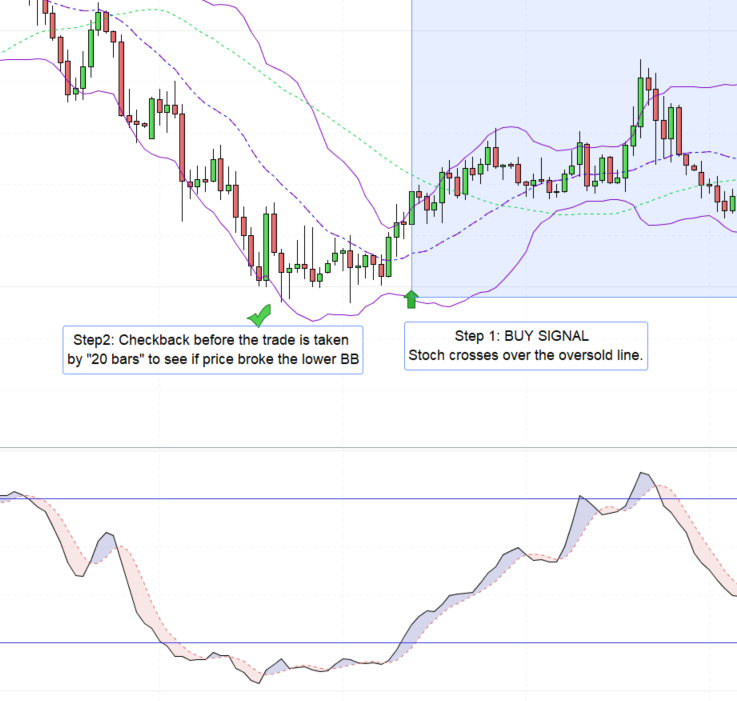
    Hi all,   I would really appreciate some help on a little issue im having..  I need a “check back ” to confirm if a condition had happened prior to a new signal being generated by a different indicator..

    i.e.

    Step 1:

    When the Stochastic crosses above the oversold line (20),

    Step 2:

    Check back the Bollinger bands over 20 periods to see if the Price broke below the down band.

    Step 3:

    Take the trade based on both conditions

    Checkback.png Checkback.png
    #197025 quote
    JSJS
    Participant
    Master

    Hi @normbeef

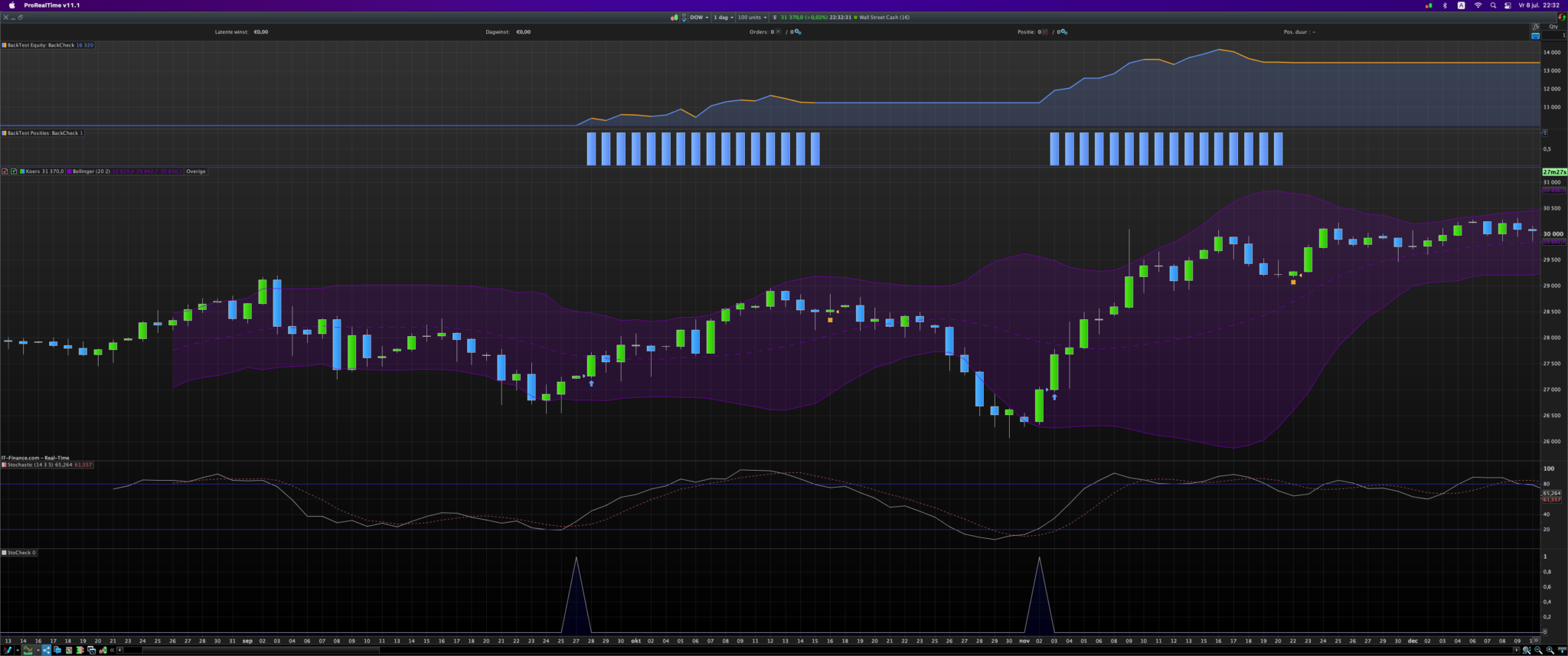
    DefParam CumulateOrders = False
    
    N=20
    UnSet($BackCheck)
    
    Sto = Stochastic[14,3](close)
    LowerBB = Average[20](Close) - 2 * Std[20](Close)
    
    If Sto Crosses Over 20 then
    StoCheck = 1
    else
    StoCheck = 0
    EndIf
    
    If StoCheck = 1 then
    For i = 0 to N-1
    $BackCheck[LastSet($BackCheck)+1] =  (LowerBB[i]/Close[i])
    If $BackCheck[i] > 1 then
    Buy 1 contract at Market
    EndIf
    Next
    EndIf
    
    If Sto Crosses Under 80 then
    Sell at Market
    EndIf
    
    Schermafbeelding-2022-07-08-om-22.32.33.png Schermafbeelding-2022-07-08-om-22.32.33.png
    #197046 quote
    robertogozzirobertogozzi
    Moderator
    Legend

    Try this version:

    DefParam CumulateOrders = False
     
    N=20
     
    Sto = Stochastic[14,3](close)
    LowerBB = Average[20](Close) - 2 * Std[20](Close)
     
    If Sto Crosses Over 20 then
       StoCheck = 1
    EndIf
    
    IF OnMarket THEN
       StoCheck = 0
    ENDIF
     
    If StoCheck = 1 then
       BBcheck = 0
       IF Summation[N](close < LowerBB) THEN
          BBcheck = 1
       EndIf
    ENDIF
    If StoCheck AND BBcheck AND Not OnMarket then
       BUY 1 Contract at Market
    EndIf
    set target pprofit 600
    set stop   ploss   200
Viewing 3 posts - 1 through 3 (of 3 total)
  • You must be logged in to reply to this topic.

ProRealAI ProRealAI New

Stuck on this ProBuilder code?

Describe what this topic is trying to build, in plain English, and ProRealAI writes the ProRealTime™ indicator, screener or system for you.

Available in 7 languages
Try ProRealAI

When a signal is generated in one indicator, check back on another


ProOrder: Automated Strategies & Backtesting

New Reply
Author
author-avatar
normbeef @normbeef Participant
Summary

This topic contains 2 replies,
has 3 voices, and was last updated by robertogozzirobertogozzi
4 years, 2 months ago.

Topic Details
Forum: ProOrder: Automated Strategies & Backtesting
Language: English
Started: 07/07/2022
Status: Active
Attachments: 2 files
ProRealCode ProRealCode
Loading...