I think that the point is that no real advices exist on this subject. Best could be explicit questions, and “is this a good idea in the first place ?” or something like that.
I may have one hint that is not so common, but the application itself maybe also is not : I have over 20 Systems on one Instrument, and have a monitor of 1m20 of height and 30cm width for that. It stands (vertically) upright. This is “necessary” because else all the order labels overlap each other. So you need a real high screen for that. But not wide.
The main reason why I myself would not have other hints, is because you can virtually store an infinite number of charts on your screen(s). At least with PRT this works very well. Of course it requires some smart laying out with many charts overlapping, which works at various levels. The general hints for these are :
- Click on the surface area of a chart, to bring only that chart forward. Focus on the right margin (vertical) area, and know that this will bring forward that chart and nothing else (read on to understand this).
- Practice the above with a mix of a. charts of one and the same account, b. with other main programs/windows you may have (e.g. Bloomberg TV) so that you can overlay one chart on the area of that other main program/window you don’t want to see anyway (like the right hand part of Bloomberg TV) and c. with charts and lists of one or more other PRT accounts. With this latter, organize yourself such that functional groups of one account become visible together (example : ProOrder stuff).
- Know that clicking on the top-left corner of a chart (where the PRT logo is), always brings that chart forward but in a harder fashion, so that ALL charts of that account come forward (come on top of other applications). Again look at your functional groups, and see how they may be overlaid by the account you just brought forward. Think over carefully what is to be overlaid by which and what you actually want to accomplish by bringing forward the whole account (all the lists and charts). Do you require really all to come on top ? for me it does not and no chart will overlay another chart anyway except within the one account actually subject to #1. But the ProOrder screens I never want to see all together from all the accounts (I only need to reach them when I need to do something in there).
Because of the “smart arrangements” I have 50 or so Charts and Lists and Detailed Reports open in one of the 3 accounts (which 3 accounts are almost always active). The other accounts contain less but always still ~20 charts/lists. Things become more wild if I am backtesting and such. The results are always on one of my screens, and the editing stuff on an other. Again arrange for clicking underlaying charts, because for me it is an example that charts are overlaid. Thus, let top-left corners of them stick out to quickly bring forward all of the overlaid account, or let right margins stick out for a few mm so that you can bring forward that one chart (and e.g. the Detailed Report from your backtest is overlaid now).
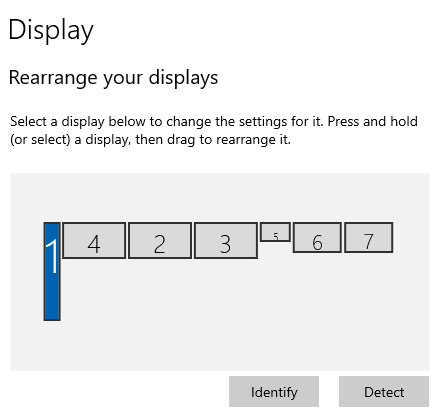
Below you see a representation of what I use, but showing it is actually not useful. Still it may be a little useful, knowing that the the rightmost 3 screens are cheap tablets. This is about an application I don’t think anyone uses (nor can get physically done as a normal human being), but this allows for my main charts and statistics to carry around to anywhere I want under the scope of my domestic WiFi. Like in the kitchen during cooking, via the dinner table for the real important stuff (always out of sight of the family) up to next to the couch and watching TV. The tablets can of course touch-control PRT. Anyway, one such a tablet again contains a functional group of PRT elements, like all the Detailed Reports of the Systems I have running. Am I out of space on a tablet, then I buy a next one. These extensions can be virtually infinite and do not depend on a video interface card.
On a side note : I have been asked to describe in detail how to set up such an environment, so that PRT can make a general guideline for it (YouTube). They themselves had never heard of it. Next you may expect a PRT version explicitly made for Touch operation (says me, not PRT – but who knows).
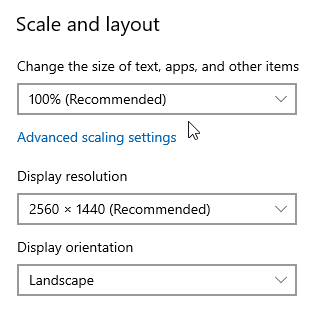
Last hint : get yourself monitors with a useful resolution. Most people may not even think about this, but the higher the resolution, the less useful a monitor becomes. Also of course : the lower the resolution, the less will fit on the screen. These are not really trade offs, but choices. My three main monitors are 2560×1440 at 32 inch and it is thus on purpose that their resolution is so relatively low. So the thing to keep in mind is that a higher resolution will not allow normal reading other stuff any more (while PRT can scale to anything of your choice) and THUS you will start to set the monitor(s) to 125% or higher for DPI in order to make all larger again. But THAT PRT can not cope with really, though V12 has vastly improved on it. Anyway, it will give anomalies all over the place so it is always best (for all applications) to leave the DPI setting at 100%. See at the mouse pointer in the 2nd attachment (I bet that anyone with a laptop these days has the setting at higher than 100%).
Anticipate a nice phone where you can run IBKR Mobile as well as IG Mobile. They are a must for when travelling. But … in the end those are “screens” (monitors) for in the kitchen just the same. The newer Androids allow decently operating split-screen so that you can run both versions on one phone screen (older versions will let run one of the two stuck after a while). I find IG Moibile quite useless for observing without selecting instruments/positions (and you can’t while driving), while IBKR Mobile gives all the overviews you’d want (like gain of the day and such), with the ability to select accounts (or have them all totalized). Notice that this requires additional subscription to data (the same data you already subscribed to for PRT, but it costs almost nothing).
Anything else ?
🙂