WARNING – Different executions same systems

Viewing 13 posts - 1 through 13 (of 13 total)
  • Author
    Posts
  • #8936 quote
    Adolfo
    Participant
    Senior

    Hey everyone, I found this morning a mistake.

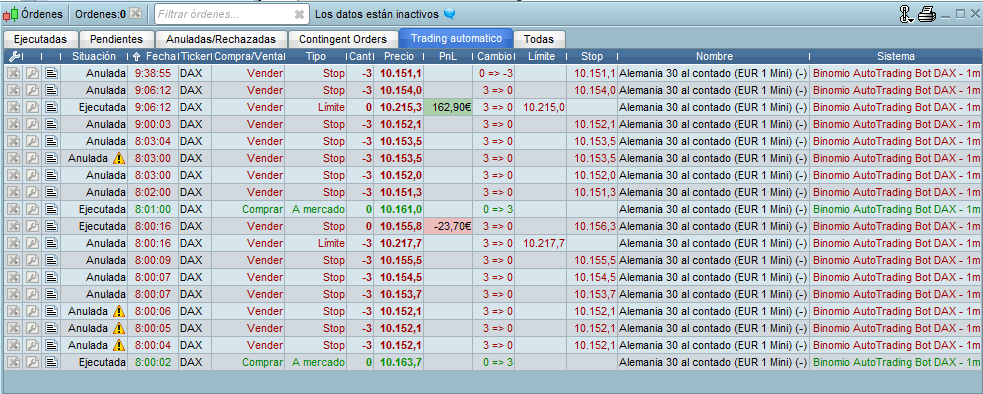
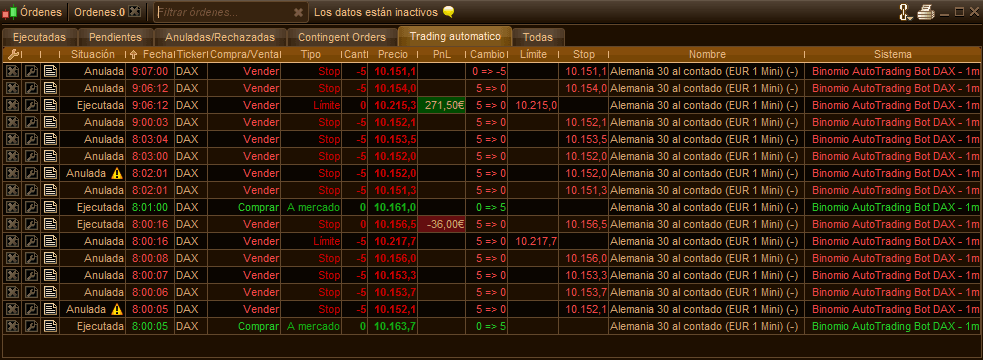
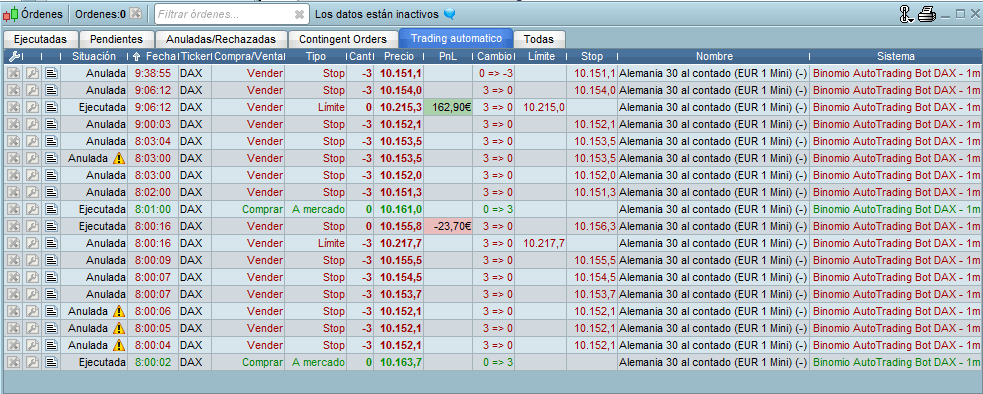
    I started same robot on 2 different accounts, one of them didn’t execute cancel order at the same time, so I’d to remove stop order mannually, as you can see in the attached picture.

    Both robots exited at 09:06:12 with limit orders and after that, only one of them canceled stop order at 09:07:00 and the other had to be closed manually.

    Would this order have been a remaining sell order on market without an stop for that one?

    Strategy link: http://www.prorealcode.com/prorealtime-trading-strategies/alex-autotradingbot-index/

    robot1-auto.png robot1-auto.png robot2-auto.png robot2-auto.png
    #8940 quote
    Nicolas
    Keymaster
    Master

    First, are you sure the 2 automated strategies share the same codes? (same version).

    #8943 quote
    Adolfo
    Participant
    Senior

    Yes, the only difference between them is %risk. Any ideas?

    #8945 quote
    Nicolas
    Keymaster
    Master

    What STOP order? I only see LIMIT ones in the strategy code.

    #8946 quote
    Adolfo
    Participant
    Senior

    Stop ploss order.

    First line in attached file

    robot2-auto-1.png robot2-auto-1.png
    #8949 quote
    Adolfo
    Participant
    Senior

    Sorry Nicolas… my fault… I sended you to the wrong link strategy…

    Is this one: http://www.prorealcode.com/prorealtime-trading-strategies/dax-trading-strategy-breakoutfakeout/

    #8953 quote
    grizzly
    Participant
    Average

    Are these the same ?[attachment file=8954]

    Screen-Shot-2016-06-07-at-11.33.17-PM.png Screen-Shot-2016-06-07-at-11.33.17-PM.png
    #8956 quote
    Nicolas
    Keymaster
    Master

    Pending orders need to be set at each new bar, they normally don’t remain on market. So I believe that a variable are stuck in a  state that continuously place a stop order, .. somewhere in the code.. ?

    But I understand that is weird since you are trading the same strategy on 2 different accounts.

    Are we talking about pending orders or stoploss one made by ‘set stop ploss’ instruction?

    #8959 quote
    Adolfo
    Participant
    Senior

    Not sure but I bet is an stop entry order

    lines 167-169

    if longonmarket then

    if enter2=0 then

    sellshort….

    It should be cancelled after exitted, like the other account did, or maybe the other one should keep it on market if the mistake is in another place.

    like:

    if not onmarket and enter2=0…

    I really don’t know where mistake is atm, but one or another failed coz didn’t do the same with same code.

    Thanks!

    #8960 quote
    Adolfo
    Participant
    Senior
    #8964 quote
    Adolfo
    Participant
    Senior

    Yes Nicolas, I’m a bit afraid… I started one of them, save, export and import in the other account, checked and changed risk %, that’s all I did. 🙁

    #8973 quote
    Nicolas
    Keymaster
    Master

    It’s a pending order, so if your variable “enter2” is still equal to 0, then this order will remain. The best you can do is to graph all your variables to see if some still have values even if they don’t need to..

    #8979 quote
    Adolfo
    Participant
    Senior

    Thanks Nicolas, that was what I thought…

    In this case, why the other one closed it at 09:07:00??

    Should keep it open like the other one… We will see tomorrow!

Viewing 13 posts - 1 through 13 (of 13 total)
  • You must be logged in to reply to this topic.

WARNING – Different executions same systems


ProOrder: Automated Strategies & Backtesting

New Reply
Author
author-avatar
Adolfo @adolfo_onrubia Participant
Summary

This topic contains 12 replies,
has 3 voices, and was last updated by Adolfo
9 years, 8 months ago.

Topic Details
Forum: ProOrder: Automated Strategies & Backtesting
Language: English
Started: 06/07/2016
Status: Active
Attachments: No files
Logo Logo
Loading...