Visualizzatore Target StopLoss e Takeprofit

Viewing 4 posts - 1 through 4 (of 4 total)
  • Author
    Posts
  • #179335 quote
    cventurer
    Participant
    Average

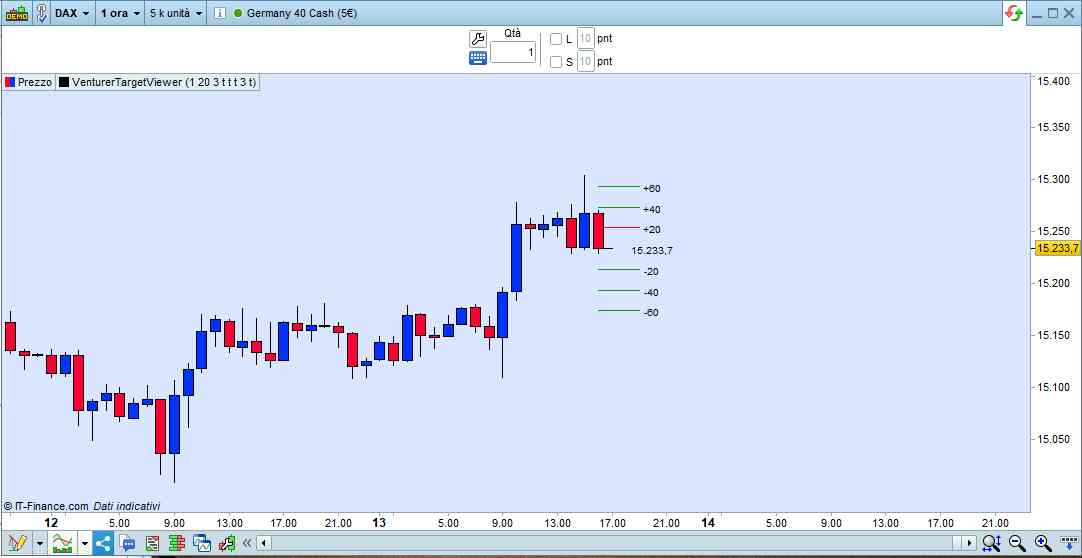
    Ciao ho sviluppato questo “visualizzatore” per avere un riferimento visivo sugli eventuali Tp e SL.

    In pratica disegna delle righe su livelli predefiniti in base alla configurazione, ad esempio se lavoriamo con SL fissi e Tp con RR multipli dello SL possiamo utilizzare questo indicatore per visualizzare i livelli di target.

    Può essere utilizzato in tempo reale (quindi si muove seguendo il prezzo attuale) o fisso impostando il prezzo di entrata per seguire il trade


    I parametri di configurazione sono:

    -EntryPrice: Questo è il prezzo di entrata dell’eventuale trade (se FollowPrice non è selezoinato)

    -PointTarget: questo è il target in punti sul quale saranno fatti i calcoli (ad esempio 5 punti, verrà visualizzato lo SL a 5pt, e i TP a 5*PointRR)

    -PointRR: è il moltiplicatore per i livelli (esempio PointTarget a 5, PointRR a 3 i livelli di Tp saranno 5,10,15)

    -FollowPrice: Se viene selezionato il visualizzatore segue il prezzo in tempo reale

    -ShowLong,ShowShort: visualizza le informazioni per long o short

    -LineExt: La lunghezza delle linee disegnate

    -ShowEntryPrice: Visualizza il livello di prezzo


    Spero possa essere utile, se avete idee per migliorarlo sono a disposizione.

    VenturerTargetViewer_V1.itf VenturerTargetViewer_1.jpg VenturerTargetViewer_1.jpg
    #179596 quote
    robertogozzi
    Moderator
    Master

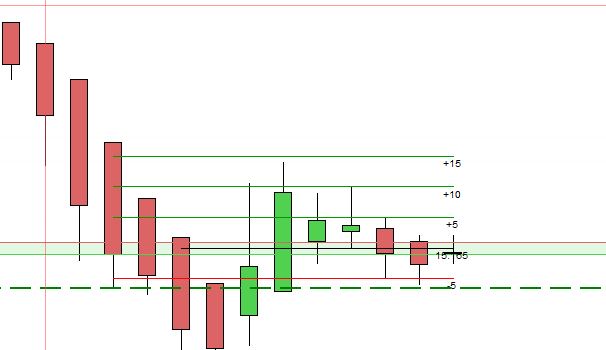
    Ho fatto una prova modificando la stampa dei dati nel FUTURO, invece che nel passato (vedi la foto con 1 barra di distanza):

    if ShowLong then
    
       MySL1=MyPrice-(PointTarget*pipsize)
    
       for i=1 to PointRR
          MyPointTarget=PointTarget*i
          MyTP=MyPrice+(MyPointTarget*pipsize)
          DRAWSEGMENT(BarIndex+LineExt,MyTP, BarIndex, MyTP) COLOURED(0,153,0)
          drawtext("+#MyPointTarget#",barindex+LineExt+1,MyTP-(1*pipsize),sansserif,standard,10)
       next
    
       DRAWSEGMENT(BarIndex+LineExt,MySL1, BarIndex, MySL1) COLOURED(255,0,10)
       drawtext("-#PointTarget#",barindex+LineExt+1,MySL1-(1*pipsize),sansserif,standard,10)
    
       DRAWSEGMENT(BarIndex+LineExt-2,MyPrice, BarIndex, MyPrice) COLOURED(0,0,0)
       drawtext("#MyEntryPrice#",barindex + LineExt+1,MyPrice-(1*pipsize),sansserif,standard,10)
    endif
    
    
    if ShowShort then
    
       MySL1=MyPrice+(PointTarget*pipsize)
    
       for i=1 to PointRR
          MyPointTarget=PointTarget*i
          MyTP=MyPrice-(MyPointTarget*pipsize)
          DRAWSEGMENT(BarIndex+LineExt,MyTP, BarIndex, MyTP) COLOURED(0,153,0)
          drawtext("-#MyPointTarget#",barindex+LineExt+1,MyTP-(1*pipsize),sansserif,standard,10)
       next
    
       DRAWSEGMENT(BarIndex+LineExt,MySL1, BarIndex, MySL1) COLOURED(255,0,10)
       drawtext("+#PointTarget#",barindex+LineExt+1,MySL1-(1*pipsize),sansserif,standard,10)
    
       DRAWSEGMENT(BarIndex+LineExt-2,MyPrice, BarIndex, MyPrice) COLOURED(0,0,0)
       drawtext("#MyEntryPrice#",barindex+LineExt+1,MyPrice-(1*pipsize),sansserif,standard,10)
    endif

    mi è sembrato più leggibile.

    Grazie per il tuo lavoro e per averlo condiviso 🙂

    x-6.jpg x-6.jpg VenturerTargetViewer2.itf
    #179635 quote
    cventurer
    Participant
    Average

    Bellissimo! pensavo non si potesse fare. Grazie mille per la modifica

    #179636 quote
    cventurer
    Participant
    Average

    Ho aggiornato alla versione 2, aggiungendo la modifica suggerita da Roberto, quindi estendere le righe in avanti, ma ho mantenuto anche l’estensione indietro.

    Ho sistemato un bug quando si selezionava sia Short che Long mostrava la riga dello SL Long verde adesso è rossa.

    Ho aggiunto nella configurazione il parametro per la trasparenza delle righe (Alpha)

    robertogozzi thanked this post
    VenturerTargetViewer_V2.itf
Viewing 4 posts - 1 through 4 (of 4 total)
  • You must be logged in to reply to this topic.

Visualizzatore Target StopLoss e Takeprofit


ProBuilder: Indicatori & Strumenti Personalizzati

New Reply
Author
author-avatar
cventurer @cventurer Participant
Summary

This topic contains 3 replies,
has 2 voices, and was last updated by cventurer
4 years, 5 months ago.

Topic Details
Forum: ProBuilder: Indicatori & Strumenti Personalizzati
Language: Italian
Started: 10/11/2021
Status: Active
Attachments: 5 files
Logo Logo
Loading...