if intradaybarindex=0 then
ContFR=0
ContFV=0
CN=0
CV=0
endif

LR = LinearRegression[13](close)

// Condizioni di setup orario mattina e pomeriggio
SetupOrarioAM = time > 090000 and time < 110000

ColoreVerde = LR < LR [1]
ColoreNero = LR > LR [1]
// condizioni di Setup Long
SetupLong = LR > LR [1] and close > LR

SetupShort = LR < LR [1] and close < LR

rge = averagetruerange[10](close)

if time >= 090000 then
if ColoreVerde then
CV=1
endif
if ColoreNero then
CN=1
endif
endif

if SetupShort and SetupOrarioAM and CN=1 and ContFR<1 then
DRAWARROWDOWN(barindex,high+rge/2)coloured(255,10,10) // rosso
ContFR=ContFR+1
endif

if SetupLong and SetupOrarioAM and CV=1 and ContFV<1 then
DRAWARROWUP(barindex,low-rge/2)coloured(10,255,10) // verde
ContFV=ContFV+1
endif

RETURN CV as "CV", CN as "CN", intradaybarindex as "intradaybarindex"
Ho il seguente problema.
Il codice postato si riferisce al codice di un indicatore che ho scritto ma che non riesco a far girare correttamente.
Il problema principale (ve ne sono anche altri ma partirei da questo) è che le variabili ContFR, ContFV, CN e CV dovrebbero azzerarsi ad ogni inizio di nuova giornata ma non lo fanno tutte.
ContFR e ContFV si azzerano regolarmente, mentre CN e CV si azzerano alternativamente: quando si azzera CN, CV vale 1 e viceversa.
Lo applico al grafico future Dax a 20 tick.
Qualcuno mi sa dare uno spunto per risolvere il problema?
Grazie.
… dimenticavo: CN e CV vengono poste pari ad 1 nel corso della giornata ma, come si può vedere dal codice, solo a partire dalle 9:00. Perchè, in corrispondenza della prima barra del grafico, non vengono entrambe azzerate?
Ancora grazie.
Non conosco il funzionamento a TICK, hai provato a fare il debug usando GRAPH?
RETURN CV as "CV", CN as "CN", ContFR as "ContFR", ContFV as "ContFV"
Salve Roberto,
grazie per la tua risposta.
No, non conosco GRAPH ed ora me lo vado a vedere, ti ringrazio.
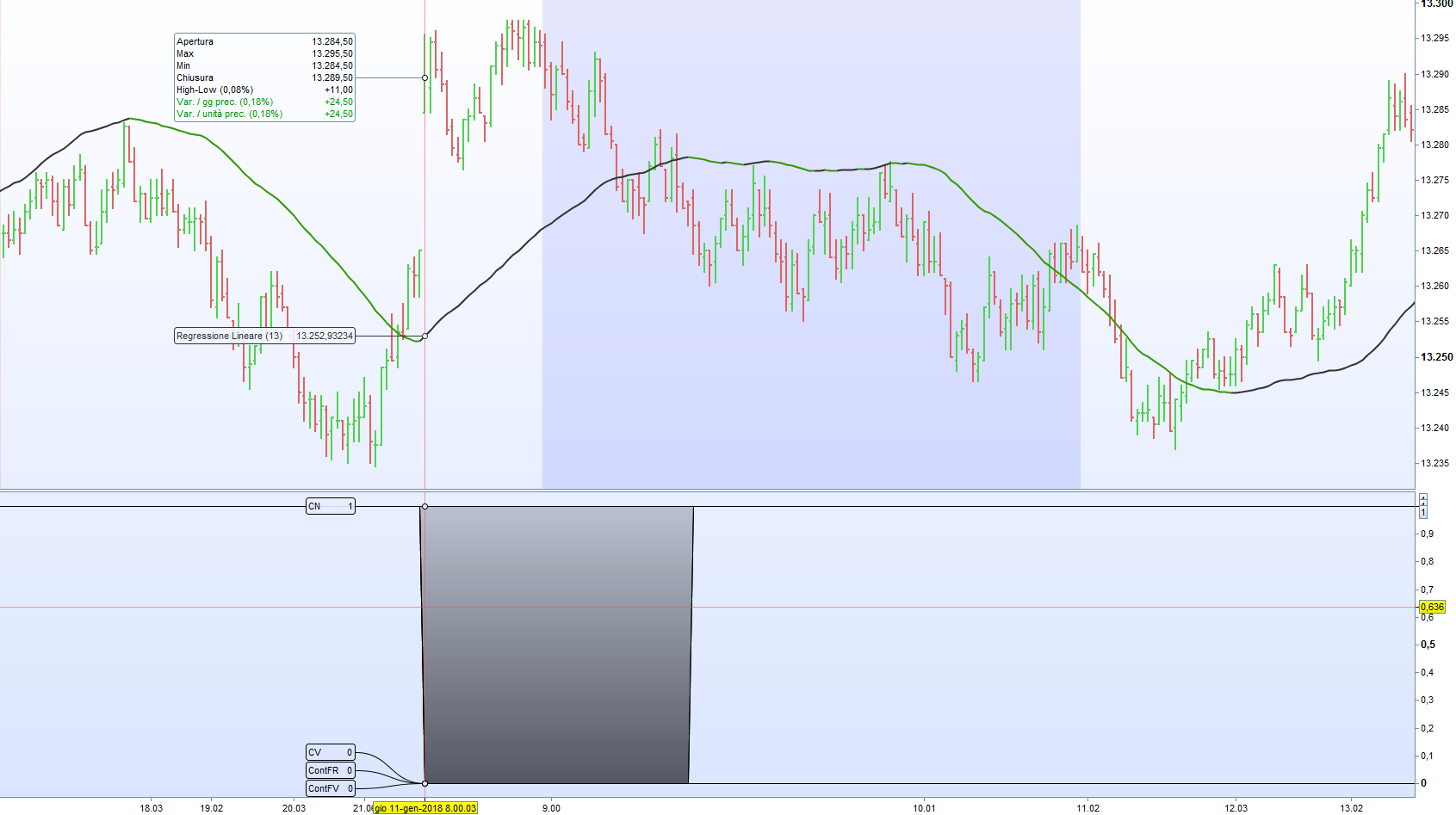
Comunque, per avere una sorta di debugger, che in PRT è assente, ho modificato l’istruzione RETURN come indicato sopra:
Nell’immagine che accludo si nota, infatti, che le variabili in questione, in corrispondenza della barra intraday eguale a zero, ovvero la prima della giornata, non si azzerano tutte.
A beneficio di chi volesse capire come risolvere il problema che avevo sottoposto all’attenzione del forum, pubblico qui il listato modificato.
if intradaybarindex=0 then
ContFR=0
ContFV=0
CN=0
CV=0
endif

LR = LinearRegression[13](close)
cambio=time > 090000
// Condizioni di setup orario mattina e pomeriggio
SetupOrarioAM = time > 090000 and time < 110000
SetupOrarioPM = time > 153000 and time < 173000
ColoreVerde = LR < LR [1]
ColoreNero = LR > LR [1]
// condizioni di Setup Long
SetupLong = LR > LR [1] and close > LR
// condizioni di Setup Short
SetupShort = LR < LR [1] and close < LR

if time > 110000 and time < 153000 then
ContFR=0
ContFV=0
CN=0
CV=0
endif
rge = averagetruerange[10](close)

if cambio then
if ColoreVerde then
CV=1
endif
if ColoreNero then
CN=1
endif
endif

if SetupShort and SetupOrarioAM and CN=1 and ContFR<1 then
DRAWARROWDOWN(barindex,high+rge/2)coloured(255,10,10) // rosso
ContFR=ContFR+1
endif

if SetupLong and SetupOrarioAM and CV=1 and ContFV<1 then
DRAWARROWUP(barindex,low-rge/2)coloured(10,255,10) // verde
ContFV=ContFV+1
endif

if SetupShort and SetupOrarioPM and CN=1 and ContFR<1 then
DRAWARROWDOWN(barindex,high+rge/2)coloured(255,10,10) // rosso
ContFR=ContFR+1
endif

if SetupLong and SetupOrarioPM and CV=1 and ContFV<1 then
DRAWARROWUP(barindex,low-rge/2)coloured(10,255,10) // verde
ContFV=ContFV+1
endif
//if time > 214500 then
//CN=0
//CV=0
//endif


RETURN CV as "CV", CN as "CN", ContFR as "ContFR", ContFV as "ContFV"
In sostanza ho dovuto togliere dal ciclo IF la condizione time > 090000.
Ho aggiunto la variabile logica:
cambio = time > 090000
ed ho inserito nella condizione dell’IF la variabile cambio.
Evidentemente, con i grafici ad n-tick si rende necessario.
Grazie comunque.
Scusami, mi ero confuso, GRAPH funziona solo con ProOrder.