


v11 Saving size adjusted detailed report as a template for all reports

Viewing 6 posts - 1 through 6 (of 6 total)

  • Author
    Posts
  • #151524 quote
    KovitKovit
    Participant
    Senior

    Hello,

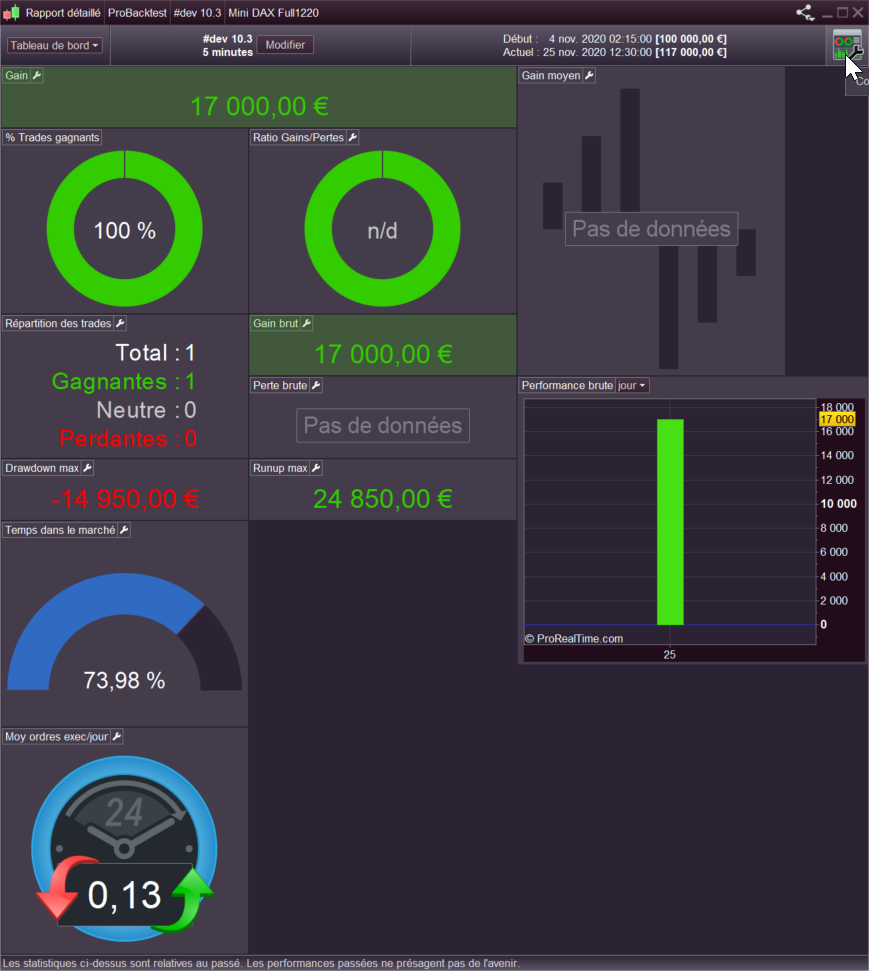
    Please could someone direct me where to look to configure a new saved sized version of the detailed report as a template for all automated trading strategies?

    Thanks in advance.

    #151539 quote
    NicolasNicolas
    Keymaster
    Legend

    You can modify the size and move each modules of the detail report by clicking on the “dashboard configuration” button at the right upper side of the detailed report window (see attached picture). Then you will be able to save your different settings as separated templates.

    detailed-report-prt-v11.png detailed-report-prt-v11.png
    #151546 quote
    KovitKovit
    Participant
    Senior

    Hi Nicolas

    Thank you for your reply but I’ve done that bit I just wondered if there is somewhere in the settings where I can apply the newly sized template configuration to all existing autotrading strategies and any newly created ones or do I have to go in and resize each individually?

    #151607 quote
    GraHalGraHal
    Participant
    Legend

    do I have to go in and resize each individually?

    Yeah I want to know this asap … I have saved – with the name, Trial – my preferred layout for the Detailed Report.

    However, my layout – Trial – is not available for selection after doing a backtest when I want to display my Trial settings??

    It is going to be so much wasted time if this layout has to be set up and repeated over and over again!!??

    Kovit thanked this post
    #151646 quote
    GraHalGraHal
    Participant
    Legend

    My conclusion is that preferred settings for Detailed Report (Dashboard) is available only for that area of the Platform where we save it … either in ProOrder AutoTrading or in Backtest area, but not available to both areas!

    I guess that is understandable as there will be different data available to each of the two areas?

    #152466 quote
    KovitKovit
    Participant
    Senior

    No worries, thanks guys.

Viewing 6 posts - 1 through 6 (of 6 total)
  • You must be logged in to reply to this topic.

ProRealAI ProRealAI New

From idea to ProBuilder code in seconds.

Your coding copilot for ProRealTime™. Ask in plain English — get clean, ready-to-paste indicators, screeners and systems.

Available in 7 languages
Try ProRealAI

v11 Saving size adjusted detailed report as a template for all reports


Platform Support: Charts, Data & Broker Setup

New Reply
Author
author-avatar
Kovit @kovit Participant
Summary

This topic contains 5 replies,
has 3 voices, and was last updated by KovitKovit

5 years, 10 months ago.

Topic Details
Forum: Platform Support: Charts, Data & Broker Setup
Language: English
Started: 11/25/2020
Status: Active
Attachments: 1 files
ProRealCode ProRealCode
Loading...


