In un TS che ha come “una” delle varie condizioni di uscita un uscita in stopLoss se il prezzo è sotto un certo livello – x punti, come posso scrivere la formula per far uscire il TS al raggiungimento di questo limite senza attendere la chiusura della barra (ossia che mi rispetti gli x punti)?
Penso che dovrei utilizzare un ordine stop, ma non so come inserirlo nella condizione sotto (non uso insertPrt in quanto sarebbe una formula molto più complicata, mentre la logica dell’esempio è chiara)
Esempio:
marginError=10
c1BuyExit= close<(resistenza-marginError)
c2Buy Exit=….
cLongExit= c1BuyExit and c2BuyExit
//———————————
If cLongExit then
sell 1 contract at market
endif
GRAZIE
Grazie
L’ordine stop deve essere solo per c1BuyExit, NON per c2BuyExit
Devi calcolare lo SL in forma di prezzo quando entri in posizione ed inserire un ordine pendente STOP ad ogni barra finché sei a mercato.
Quando non sei a mercato azzera il prezzo di stoploss che avevi calcolato:
If Not OnMarket then
   StopLoss = 0
Endif
If MieCondizioni then
   Buy .....
   StopLoss = close - X * pipsize
Endif
If StopLoss > 0 then
   Sell at StopLoss STOP
Endif
Grazie per la risposta Roberto, ma essendo condizioni raggruppate non mi sembra così facile come nel tuo esempio da singola condizione. Dovrei inserire l’ordine STOP nella condizione long: c1BuyExit (che in pratica è uno SL) e nella condizione short: c1SellExit).
Se non è troppo complesso prova ad inserirlo nella parte del codice sotto riportato, mi servirebbe più come esempio per future prove che per il singolo caso riportato. Grazie
marginError=6
//----------------------------------------------------------------        PATTERN
greenZone=vcH>vcH2
violetZone=vcH<vcH2
//----------------------------------------------------------------
c1Buy=greenZone                                                                     //Buy
c2Buy=(close[1]<bkL[1] and close>bkL) OR (close[1]<bkH[1] and close>bkH)
c3Buy=high<upperChannelLine and high[1]<upperChannelLine[1]
c1BuyExit=close<(vcL2-marginError)                                                  //Buy Exit
c2BuyExit= vcH<vcH2 and close>tradePrice(1)and myMacd <= myKama
c3BuyExit= vcH<vcH2 and close<tradePrice(1)
//---------------
c1Sell=violetZone                                                                   //Sell
c2Sell=(close[1]>bkH[1] and close<bkH) OR (close[1]>bkL[1] and close<bkL)
c3Sell= low>lowerChannelLine and low[1]>lowerChannelLine[1]
c1SellExit=close>(vcH2+marginError)                                                 //Sell
c2SellExit=vcL>vcL2 and close<tradePrice(1) and mymacd >= myKama
c3SellExit=vcL>vcL2 and close>tradePrice(1)
// ------------------------------------------------------------------                               CONDIZIONI RAGGRUPPATE
cLongEntry=c1Buy and c2Buy and c3Buy and limitHour
cShortEntry=c1Sell and c2Sell and c3Sell and limitHour

cLongExit=c1BuyExit or c2BuyExit or c3BuyExit
cShortExit=c1SellExit or c2SellExit or c3SellExit
// -------------------------------------------------------------------
IF  cLongEntry  THEN
BUY 1 CONTRACTS AT MARKET
ENDIF
IF   cLongExit then
SELL 1 CONTRACTS AT MARKET
endif
If  cShortEntry   THEN
SELLSHORT 1 CONTRACTS AT MARKET
ENDIF
If cShortExit then
EXITSHORT 1 CONTRACTS AT MARKET
ENDIF
//----------------------------------------------------------------
graph greenZone coloured(0, 238, 0)
graph violetZone coloured(238, 130, 238)
//----------------------------------------------------------------
In pratica alla riga 9 e 16 ( non so perchè quando si inserisce un codice con insertPrt non si vedono i numeri sulla sinistra).
Si, però devi inserirlo tra la riga 30 e la 31:
c1BuyExit=close-X*pipsize-MarginError*pipsize
lo stesso per il sell tra la 33 e la 34:
c1SellExit=close+X*pipsize+MarginError*pipsize
e, all’inizio, li azzeri quando non sei a mercato.
Alla fine, prima di GRAPH, piazzi uno dei due ordini STOP (dipende se sei Long o Short) come ho fatto io.
Ho provato questo ma non funziona (non esce in STOP)
If not onMarket then
c1BuyExit=0
c1SellExit=0
endif
//--------------------------------------------------------------------
IF  cLongEntry  THEN
BUY 1 CONTRACTS AT MARKET
c1BuyExit=close-1*pipsize-MarginError*pipsize
ENDIF
IF   cLongExit then
SELL 1 CONTRACTS AT MARKET
endif
//------------------------------------------------------------------
If  cShortEntry   THEN
SELLSHORT 1 CONTRACTS AT MARKET
c1SellExit=close+1*pipsize+MarginError*pipsize
ENDIF
If cShortExit then
EXITSHORT 1 CONTRACTS AT MARKET
ENDIF
//----------------------------------------------------------------
If c1BuyExit>0 then
sell at c1BuyExit STOP
endif
if c1SellExit>0 then
exitShort at c1SellExit STOP
endif

//----------------------------------------------------------------
graph greenZone coloured(0, 238, 0)
graph violetZone coloured(238, 130, 238)
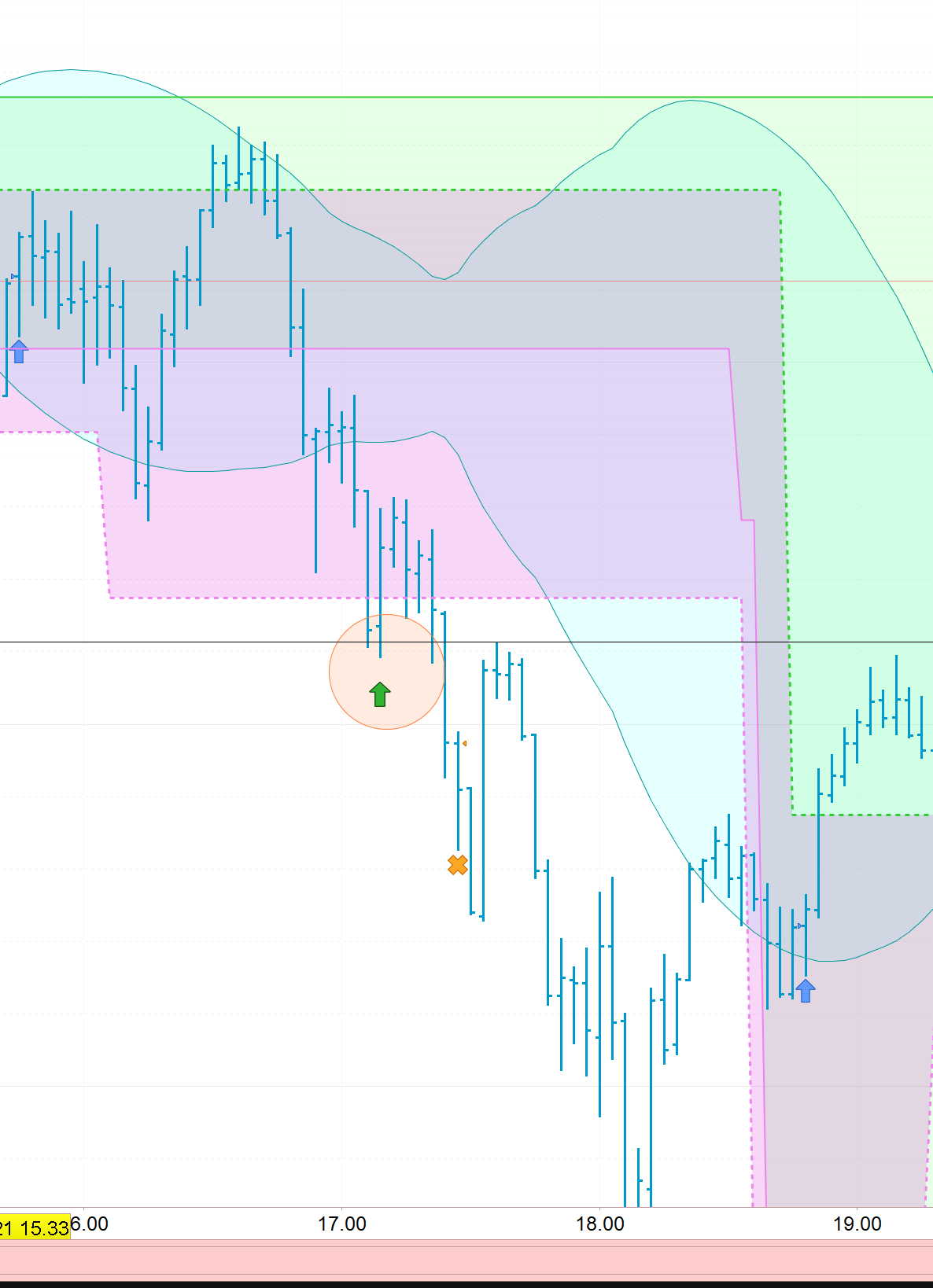
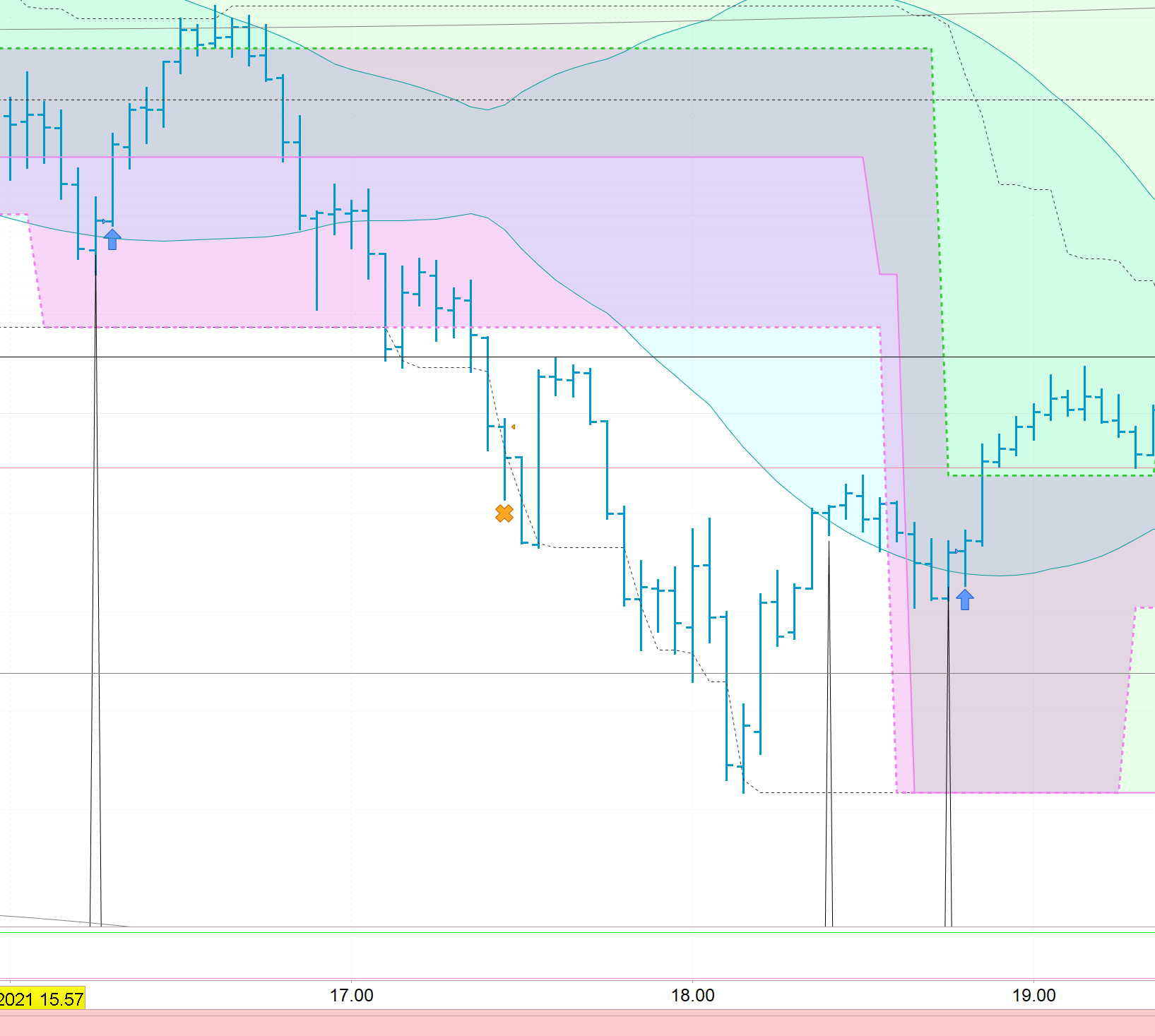
In questo esempio in cui il TS entra long (freccia blu) si dovrebbe uscire in SL al prezzo della linea dove c’è la freccia verde in cui si perdono 6 punti (marginError) dalla linea viola tratteggiata (vcL2)
Usa GRAPH o, meglio, GRAPHONPRICE con le due variabili c1BuyExit e c1SellExit.
Verifica che le due variabili non vengano modificate DOPO l’entrata a mercato, perché vedo che non hai messo AND Not OnMarket alle righe 6 e 14.
Ecco con :
graph greenZone coloured(0, 238, 0)
graph violetZone coloured(238, 130, 238)
graphOnPrice c1BuyExit
graphOnPrice c1SellExit
Ho provato, ma non mi funziona. Me lo puoi correggere (solo parte long per semplicità)?
marginError=6
//----------------------------------------------------------------
greenZone=vcH>vcH2
//----------------------------------------------------------------
c1Buy=greenZone
c2Buy=(close[1]<bkL[1] and close>bkL) OR (close[1]<bkH[1] and close>bkH)
c3Buy=high<upperChannelLine and high[1]<upperChannelLine[1]
c1BuyExit=close<(vcL2-marginError)
c2BuyExit= vcH<vcH2 and close>tradePrice(1)and myMacd <= myKama
c3BuyExit= vcH<vcH2 and close<tradePrice(1)

cLongEntry=c1Buy and c2Buy and c3Buy and limitHour
cShortEntry=c1Sell and c2Sell and c3Sell and limitHour

// -------------------------------------------------------------------
IF  cLongEntry and not onMarket THEN
BUY 1 CONTRACTS AT MARKET
c1BuyExit=close-1*pointSize-MarginError*pointSize
ENDIF
IF   cLongExit then
SELL 1 CONTRACTS AT MARKET
endif

If c1BuyExit>0 then
sell at c1BuyExit STOP
endif
Ho risolto in questo modo, puoi controllare se va bene?
marginError=6*pointSize

IF  not onMarket and cLongEntry THEN
BUY 1 CONTRACTS AT MARKET
stopLossBuy=vcL2-marginError
ENDIF
IF   cLongExit then
SELL 1 CONTRACTS AT MARKET
endif
If stopLossBuy>0 then
sell at stopLossBuy STOP
endif
//------------------------------------------------------------------
If  not onMarket and cShortEntry THEN
SELLSHORT 1 CONTRACTS AT MARKET
stopLossSell=vcH2+marginError
ENDIF
If cShortExit then
EXITSHORT 1 CONTRACTS AT MARKET
ENDIF
if c1SellExit>0 then
exitShort at stopLossSell STOP
endif
Si, hai riassegnato alle due precedenti variabili un valore logico (io le avevo cambiate in stop loss), usandone altre due per lo stop loss.
L’aggiunta di OnMarket alle condizioni garantisce che le righe 5 e 16 non siano eseguite quando già a mercato (questo perché DEFPARAM CumulateOrders=FALSE impedisce di accumulare posizioni ignorando BUY/SELLSHORT, ma tutte le eventuali altre istruzioni che ci sono entro IF…ENDIF vengono comunque eseguite).
Ok perfetto, ti chiedo un altra cosa al volo che non mi funziona.
Puoi controllare se va bene questo codice formale per aprire una posizione contraria di un Ts che è uscito da una posizione long con profitto e permangono ancora certe condizioni.
Esempio:
cLongEntry= if not onMarket and c1 and c2 and c3
cLongExit = if longOnMarket and c4 //(es.: c4=close >average[50](close)
———
cShortEntry = if (not onMarket and onMarket[1]) and c4 and positionPerf(1)>0