


Unable to use variable across time frames

Viewing 6 posts - 1 through 6 (of 6 total)
  • Author
    Posts
  • #76600 quote
    VonasiVonasi
    Moderator
    Master

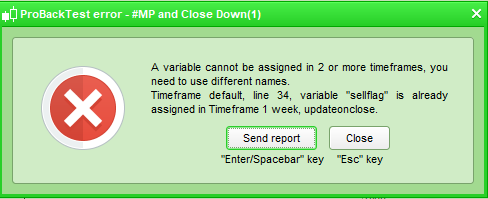
    I’m trying to get a strategy to decide on weekly candles to close a position but then not actually close it until the market opens the following Monday but I get this error:

    [attachment file=76601]

    This is the code:

    timeframe(weekly,updateonclose)
    if onmarket and (exit conditions) then
    sellflag = 1
    endif
    
    timeframe(default)
    if sellflag = 1 and time = 143000 and dayofweek = 1 then
    sell at market
    sellflag = 0
    endif

    It seems a bit odd to not be able to set a variable in one time frame and then use it in another. At the moment I cannot find a solution which makes the MTF rather limited for improved exit times. Maybe I am missing something obvious – any ideas?

    Screenshot_1-12.png Screenshot_1-12.png
    #76604 quote
    robertogozzirobertogozzi
    Moderator
    Legend

    Line 7 is fine since you are simply using it, while line 9 ASSIGNs a value to a variable first used in a different TF, which is not allowed!

    #76606 quote
    VonasiVonasi
    Moderator
    Master

    I think I found the solution:

    timeframe(weekly,updateonclose)
    c5 = (my exit conditions)
    
    timeframe(default)
    if c5 and time = 143000 and dayofweek = 1 then
    sell at market
    endif

    So a condition can be used across time frames but a variable cannot be altered across timeframes.

    #76608 quote
    VonasiVonasi
    Moderator
    Master


    I wanted to set the variable to 1 in one time frame and then use it to make a decision and then turn it off in another timeframe which is apparently not allowed. Setting a condition apparently is so I will just have to start thinking in a different way about how I code as I tend to like using ‘flags’ on or off. I guess another alternative is that I could have turned it off with:

    timeframe(weekly,updateonclose)
    if not onmarket then
    sellflag = 0
    endif
    
    if onmarket and (exit conditions) then
    sellflag = 1
    endif
     
    timeframe(default)
    if sellflag = 1 and time = 143000 and dayofweek = 1 then
    sell at market
    endif

    Same result but more code!

    #76685 quote
    robertogozzirobertogozzi
    Moderator
    Legend

    Actually you should not need to bother about setting a flag in a lower TF.

    You’d better set a flag from within the LOWER TF when conditions in the HIGHER TF are met, since when, say, a new day start, also a new hour or minute or 4-hour TF starts!

    That’s why, I guess, they require TFs to be multiple of the lowest one!

    So if you want to set a flag in a hourly TF, just set/clear it on a 1-minute (or 5-minute, whatever) TF and you’ll be able to read it elsewhere, be it daily, weekly….

    #76686 quote
    VonasiVonasi
    Moderator
    Master

    I fear my brain will need a little re-training. 🙂

Viewing 6 posts - 1 through 6 (of 6 total)
  • You must be logged in to reply to this topic.

ProRealAI ProRealAI New

Stuck on this ProBuilder code?

Describe what this topic is trying to build, in plain English, and ProRealAI writes the ProRealTime™ indicator, screener or system for you.

Available in 7 languages
Try ProRealAI

Unable to use variable across time frames


ProOrder: Automated Strategies & Backtesting

New Reply
Author
author-avatar
Vonasi @vonasi Moderator
Summary

This topic contains 5 replies,
has 2 voices, and was last updated by VonasiVonasi

8 years, 2 months ago.

Topic Details
Forum: ProOrder: Automated Strategies & Backtesting
Language: English
Started: 07/24/2018
Status: Active
Attachments: 1 files
ProRealCode ProRealCode
Loading...

