


Unable to use variable across time frames

Viewing 6 posts - 1 through 6 (of 6 total)
  • Author
    Posts
  • #76600 quote
    Vonasi
    Moderator
    Master

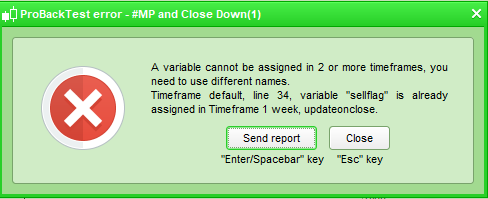
    I’m trying to get a strategy to decide on weekly candles to close a position but then not actually close it until the market opens the following Monday but I get this error:

    [attachment file=76601]

    This is the code:

    timeframe(weekly,updateonclose)
    if onmarket and (exit conditions) then
    sellflag = 1
    endif
    
    timeframe(default)
    if sellflag = 1 and time = 143000 and dayofweek = 1 then
    sell at market
    sellflag = 0
    endif

    It seems a bit odd to not be able to set a variable in one time frame and then use it in another. At the moment I cannot find a solution which makes the MTF rather limited for improved exit times. Maybe I am missing something obvious – any ideas?

    #76604 quote
    robertogozzi
    Moderator
    Master

    Line 7 is fine since you are simply using it, while line 9 ASSIGNs a value to a variable first used in a different TF, which is not allowed!

    #76606 quote
    Vonasi
    Moderator
    Master

    I think I found the solution:

    timeframe(weekly,updateonclose)
    c5 = (my exit conditions)
    
    timeframe(default)
    if c5 and time = 143000 and dayofweek = 1 then
    sell at market
    endif

    So a condition can be used across time frames but a variable cannot be altered across timeframes.

    #76608 quote
    Vonasi
    Moderator
    Master


    I wanted to set the variable to 1 in one time frame and then use it to make a decision and then turn it off in another timeframe which is apparently not allowed. Setting a condition apparently is so I will just have to start thinking in a different way about how I code as I tend to like using ‘flags’ on or off. I guess another alternative is that I could have turned it off with:

    timeframe(weekly,updateonclose)
    if not onmarket then
    sellflag = 0
    endif
    
    if onmarket and (exit conditions) then
    sellflag = 1
    endif
     
    timeframe(default)
    if sellflag = 1 and time = 143000 and dayofweek = 1 then
    sell at market
    endif

    Same result but more code!

    #76685 quote
    robertogozzi
    Moderator
    Master

    Actually you should not need to bother about setting a flag in a lower TF.

    You’d better set a flag from within the LOWER TF when conditions in the HIGHER TF are met, since when, say, a new day start, also a new hour or minute or 4-hour TF starts!

    That’s why, I guess, they require TFs to be multiple of the lowest one!

    So if you want to set a flag in a hourly TF, just set/clear it on a 1-minute (or 5-minute, whatever) TF and you’ll be able to read it elsewhere, be it daily, weekly….

    #76686 quote
    Vonasi
    Moderator
    Master

    I fear my brain will need a little re-training. 🙂

Viewing 6 posts - 1 through 6 (of 6 total)
  • You must be logged in to reply to this topic.

Unable to use variable across time frames


ProOrder: Automated Strategies & Backtesting

New Reply
Author
author-avatar
Vonasi @vonasi Moderator
Summary

This topic contains 5 replies,
has 2 voices, and was last updated by Vonasi

7 years, 6 months ago.

Topic Details
Forum: ProOrder: Automated Strategies & Backtesting
Language: English
Started: 07/24/2018
Status: Active
Attachments: 1 files
Logo Logo
Loading...
