


TrendChaser 2.0 ProBuilder>ProOrder

Viewing 3 posts - 1 through 3 (of 3 total)

  • Author
    Posts
  • #29588 quote
    m-zeter
    Participant
    Senior

    Hello,

    can somebody here make an indicator out of this trading strategy of the Libary? So making a ProOrder system out of this ProBuilder system.
    For example instead of “buy 1 contract…” making sth like “DRAWARROWUP” or sth else and so on? My tries failed, because I have no programming skills…

    Kind regards,
    Michael

    TrendChaser-v2.0.itf
    #29659 quote
    Nicolas
    Keymaster
    Master

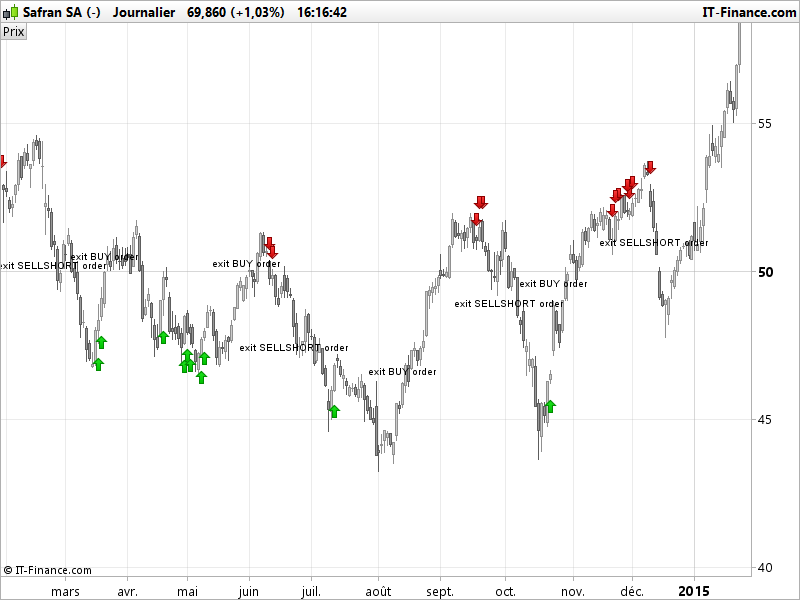
    Here is a rough version of an indicator made of this strategy. Supertrend periods and multiplier were not defined in the strategy (because of their optimisation), so I set them to Supertrend default value (3,10).

    // Indicators
    COI = WEIGHTEDAVERAGE[10](ROC[14] +ROC[11])
    MAC = MACDline[12,26,9](close)
    STO = Stochastic[14,3](close)
    ST = Supertrend[3,10]
    atr = averagetruerange[10]
    
    // Conditions to enter long positions
    c1 = COI > COI[1] AND COI < 0
    c2 = MAC > MAC[1] AND MAC < 0
    c3 = STO > 20 AND STO < 40
    
    IF c1 AND c2 AND c3 THEN
    DRAWARROWUP(barindex,low-atr/2)coloured(0,200,0)
    lastorder=1
    ENDIF
    
    // Conditions to exit long positions
    c5 = close crosses over ST
    
    IF c5 and lastorder>0 THEN
    DRAWTEXT("exit BUY order",barindex,high+atr/2)
    ENDIF
    
    // Conditions to enter short positions
    c11 = COI < COI[1] AND COI > 0
    c12 = MAC < MAC[1] AND MAC > 0
    c13 = STO < 80 AND STO > 60
    
    IF c11 AND c12 AND c13 THEN
    DRAWARROWDOWN(barindex,high+atr/2)coloured(200,0,0)
    lastorder=-1
    ENDIF
    
    // Conditions to exit short positions
    c15 = close crosses under ST
    
    IF c15 and lastorder<0 THEN
    DRAWTEXT("exit SELLSHORT order",barindex,low-atr/2)
    ENDIF
    
    RETURN
    manel thanked this post
    trend-following-strategy-signals-on-chart.png trend-following-strategy-signals-on-chart.png
    #29710 quote
    m-zeter
    Participant
    Senior

    Hello Nicolas,

    Thank you :). That is exactly, what I thought of. Great done! Now I understand, what I did wrong.

    I tried your code at the Dax, but there I get the the written text with “exit..” only at the end. So I removed the “lastorder” parts and now it works there too.
    One last question to this: How can I make an alert for the “exit SELLSHORT order” case. With the normal alert I can’t make an alert for this. So is it possible to code an alert or sth?

    Best wiches,

    Michael

Viewing 3 posts - 1 through 3 (of 3 total)
  • You must be logged in to reply to this topic.

TrendChaser 2.0 ProBuilder>ProOrder


ProBuilder: Indicators & Custom Tools

New Reply
Author
author-avatar
m-zeter @m-zeter Participant
Summary

This topic contains 2 replies,
has 2 voices, and was last updated by m-zeter

8 years, 11 months ago.

Topic Details
Forum: ProBuilder: Indicators & Custom Tools
Language: English
Started: 03/23/2017
Status: Active
Attachments: No files
Logo Logo
Loading...
