


TrendChaser 2.0 ProBuilder>ProOrder

Viewing 3 posts - 1 through 3 (of 3 total)

  • Author
    Posts
  • #29588 quote
    m-zeterm-zeter
    Participant
    Senior

    Hello,

    can somebody here make an indicator out of this trading strategy of the Libary? So making a ProOrder system out of this ProBuilder system.
    For example instead of “buy 1 contract…” making sth like “DRAWARROWUP” or sth else and so on? My tries failed, because I have no programming skills…

    Kind regards,
    Michael

    TrendChaser-v2.0.itf
    #29659 quote
    NicolasNicolas
    Keymaster
    Legend

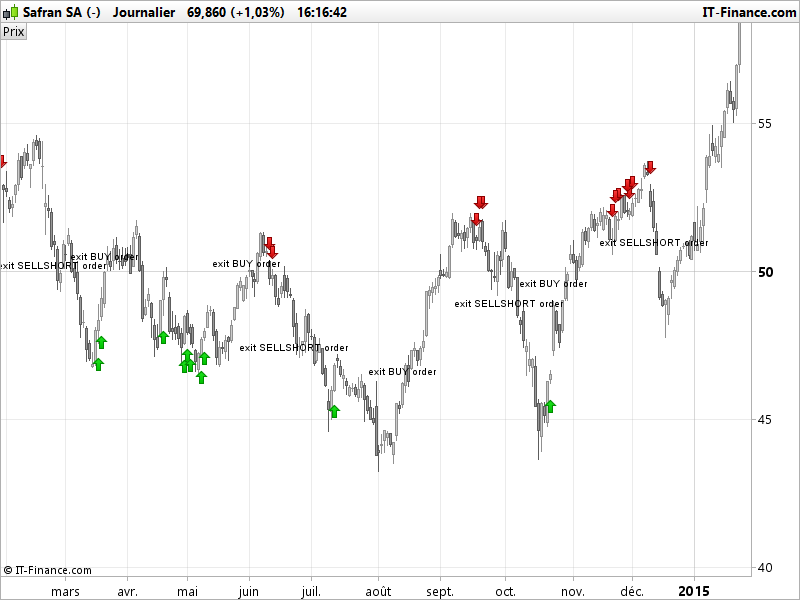
    Here is a rough version of an indicator made of this strategy. Supertrend periods and multiplier were not defined in the strategy (because of their optimisation), so I set them to Supertrend default value (3,10).

    // Indicators
    COI = WEIGHTEDAVERAGE[10](ROC[14] +ROC[11])
    MAC = MACDline[12,26,9](close)
    STO = Stochastic[14,3](close)
    ST = Supertrend[3,10]
    atr = averagetruerange[10]
    
    // Conditions to enter long positions
    c1 = COI > COI[1] AND COI < 0
    c2 = MAC > MAC[1] AND MAC < 0
    c3 = STO > 20 AND STO < 40
    
    IF c1 AND c2 AND c3 THEN
    DRAWARROWUP(barindex,low-atr/2)coloured(0,200,0)
    lastorder=1
    ENDIF
    
    // Conditions to exit long positions
    c5 = close crosses over ST
    
    IF c5 and lastorder>0 THEN
    DRAWTEXT("exit BUY order",barindex,high+atr/2)
    ENDIF
    
    // Conditions to enter short positions
    c11 = COI < COI[1] AND COI > 0
    c12 = MAC < MAC[1] AND MAC > 0
    c13 = STO < 80 AND STO > 60
    
    IF c11 AND c12 AND c13 THEN
    DRAWARROWDOWN(barindex,high+atr/2)coloured(200,0,0)
    lastorder=-1
    ENDIF
    
    // Conditions to exit short positions
    c15 = close crosses under ST
    
    IF c15 and lastorder<0 THEN
    DRAWTEXT("exit SELLSHORT order",barindex,low-atr/2)
    ENDIF
    
    RETURN
    manel thanked this post
    trend-following-strategy-signals-on-chart.png trend-following-strategy-signals-on-chart.png
    #29710 quote
    m-zeterm-zeter
    Participant
    Senior

    Hello Nicolas,

    Thank you :). That is exactly, what I thought of. Great done! Now I understand, what I did wrong.

    I tried your code at the Dax, but there I get the the written text with “exit..” only at the end. So I removed the “lastorder” parts and now it works there too.
    One last question to this: How can I make an alert for the “exit SELLSHORT order” case. With the normal alert I can’t make an alert for this. So is it possible to code an alert or sth?

    Best wiches,

    Michael

Viewing 3 posts - 1 through 3 (of 3 total)
  • You must be logged in to reply to this topic.

ProRealAI ProRealAI New

Stuck on this ProBuilder code?

Describe what this topic is trying to build, in plain English, and ProRealAI writes the ProRealTime™ indicator, screener or system for you.

Available in 7 languages
Try ProRealAI

TrendChaser 2.0 ProBuilder>ProOrder


ProBuilder: Indicators & Custom Tools

New Reply
Author
author-avatar
m-zeter @m-zeter Participant
Summary

This topic contains 2 replies,
has 2 voices, and was last updated by m-zeterm-zeter

9 years, 6 months ago.

Topic Details
Forum: ProBuilder: Indicators & Custom Tools
Language: English
Started: 03/23/2017
Status: Active
Attachments: No files
ProRealCode ProRealCode
Loading...

