Trend analysis screener help for code

Viewing 10 posts - 1 through 10 (of 10 total)
  • Author
    Posts
  • #17942 quote
    Sascha
    Participant
    Average

    Hi Nicolas,
    I have a different problem which may not be a big thing, but somehow a screener that I created (based on an indicator that I also created which was based partly on your feedback) doesn’t always provide correct results. I just can’t find the reason because the code is actually very simple. Maybe you can take a look at it.

    First, I can give you the code for the indicator. It’s called “TA” which stands for Trend Analysis and the indicator shows the different types of trends (bull, bear, megaphone, pennant).

    Second, I provide the code for the screener. The results should only show those stocks that change from a megaphone to a bull market.
    The screener code actually consist of more elements, but I’ll only send one element which already creates false search results. So it should be easier for you to find the mistake. Maybe there is a systematic error the way I created the scanner.

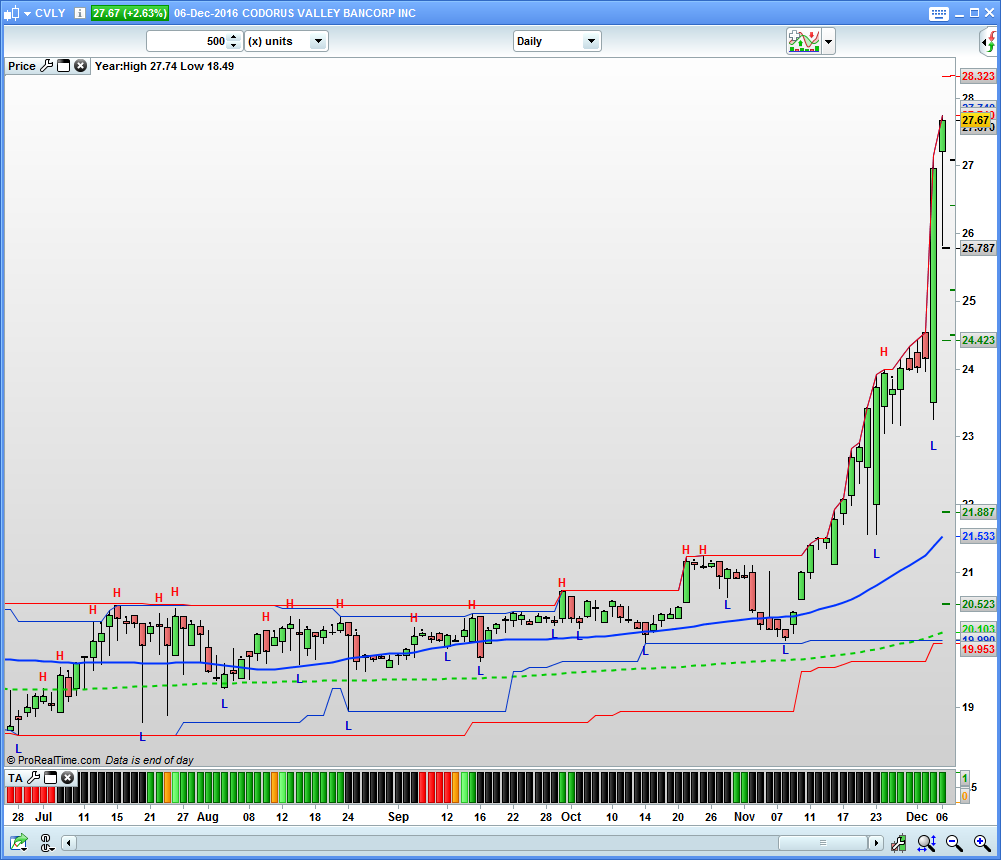
    When I ran the scan for example on the predefined list “US NASDAQ stocks” today, I get the stock CVLY which should not show up as a result because it’s been in an uptrend for some time.

    Code for the TA indicator:

    cbar=Dhigh(0)
    ybar=Dhigh(1)
    t1bar=Dhigh(2)
    t2bar= Dhigh(3)
    t3bar=Dhigh(4)
    rig=ybar>cbar
    lef1=ybar>t1bar
    lef2=ybar>t2bar
    lef3=ybar>t3bar
    if rig AND lef1 AND lef2 AND lef3 then
    i= 1
    else
    i= 0
    endif
    cbor=Dlow(0)
    ybor=Dlow(1)
    t1bor=Dlow(2)
    t2bor= Dlow(3)
    t3bor=Dlow(4)
    rog=ybor<cbor
    lof1=ybor<t1bor
    lof2=ybor<t2bor
    lof3=ybor<t3bor
    if rog AND lof1 AND lof2 AND lof3 then
    j= -1
    else
    j= 0
    endif
    
    if i=1 then
    previousswinghigh=lastswinghigh
    lastswinghigh=ybar
    endif
    
    if j=-1 then
    previousswinglow=lastswinglow
    lastswinglow=ybor
    endif
    
    //Uptrend
    condition1=lastswinghigh > previousswinghigh and lastswinglow >= previousswinglow and low[0]>=lastswinglow or lastswinghigh = previousswinghigh and lastswinglow >= previousswinglow and high[0]>lastswinghigh or lastswinghigh < previousswinghigh and lastswinglow > previousswinglow and high[1]>lastswinghigh
    
    //Downtrend
    condition2=lastswinghigh < previousswinghigh and lastswinglow < previousswinglow
    if condition2 then
    if high[0] > lastswinghigh then
    condition2 = condition4
    endif
    endif
    
    //Pennant
    condition3=lastswinghigh <= previousswinghigh and lastswinglow >= previousswinglow and low[0]>=lastswinglow and high[0]<=lastswinghigh
    
    //Megaphone
    condition4=lastswinghigh > previousswinghigh and lastswinglow < previousswinglow or (lastswinghigh >= previousswinghigh and lastswinglow > previousswinglow and low[0]<lastswinglow) or (lastswinghigh >= previousswinghigh and lastswinglow < previousswinglow) or (lastswinghigh >= previousswinghigh and lastswinglow = previousswinglow and low[0]<lastswinglow) or lastswinghigh < previousswinghigh and lastswinglow > previousswinglow and high[0]>lastswinghigh and low[0]<lastswinglow
    
    //Megaphone_broken up trend
    condition5=(lastswinghigh > previousswinghigh and lastswinglow > previousswinglow) and (low[0]<lastswinglow)
    
    //Megaphone_broken down trend
    condition6=(lastswinghigh < previousswinghigh and lastswinglow <= previousswinglow) and (high[0]>lastswinghigh)
    
    //Downtrend_broken pennant
    condition7=(lastswinghigh < previousswinghigh and lastswinglow >= previousswinglow) and (low[0]<lastswinglow) and high[0]<=lastswinghigh
    
    //Uptrend_broken pennant
    condition8=(lastswinghigh < previousswinghigh and lastswinglow > previousswinglow) and (high[0]>lastswinghigh) and low[0]>=lastswinglow and (high[1]<lastswinghigh)
    
    return condition1 as "bull", condition2 as "bear", condition3 as "pennant", condition4 as "megaphone", condition5 as "megaphone_broken up trend", condition6 as "megaphone_broken down trend", condition7 as "downtrend_broken pennant", condition8 as "uptrend_broken pennant"


    Code for the Screener:

    indicator1, ignored, ignored, ignored, ignored, ignored, ignored, ignored = CALL TA
    c1 = (indicator1 = 1)
    
    ignored, ignored, ignored, indicator2, ignored, ignored, ignored, ignored = CALL TA
    c2 = (indicator2[1] = 1)
    
    indicator3 = Average[50](close)
    c3 = (close > indicator3)
    
    SCREENER[c1 AND c2 AND c3] ((close/DClose(1)-1)*100 AS "%Chg yest.")


    I attach a screenshot just to show you how I colour the TA indicator.
    Thanks very much for your help.

    Kind regards,
    Sascha

    #17990 quote
    Nicolas
    Keymaster
    Master

    I think condition1 (bull) and condition4 (megaphone) may overlap each other, that’s why these 2 conditions are tested true at the same time.

    Also, in your screener code, the c1 condition only test if we are in a bull market accordingly to your indicator, not if it were not the case the candlestick before.

    This is a quick conclusion while reading the code, not tested I must admit 🙂

    #18081 quote
    GraHal
    Participant
    Master

    This looks interesting, but I met with a few ‘challenges’! 🙂

    First off I couldnt copy and paste it directly, even copied 10 rows only bit still wouldn’t paste??

    I dumped the Indicator into Outlook (just happened to be open) then copied into PRT and all pasted okay … weird??

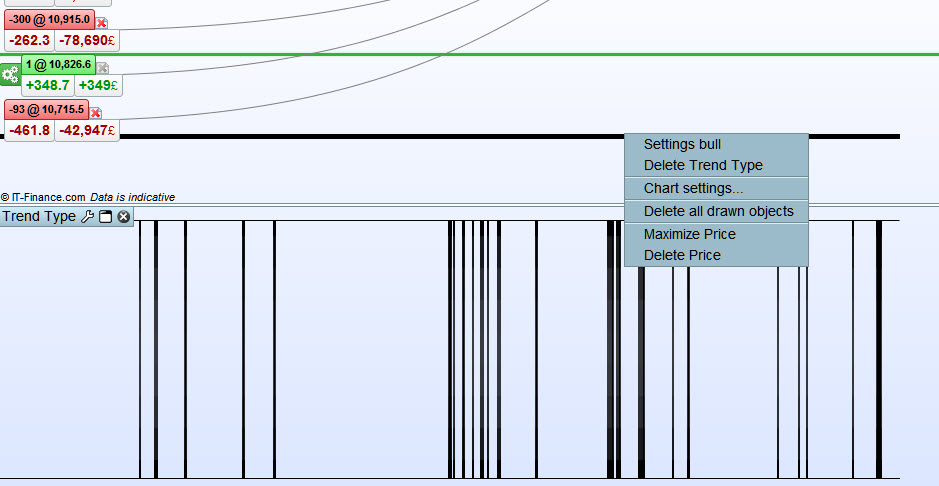
    Anyway attached is what I get … a horizontal black line only with ‘Indicator on Price’ and vertical lines when ‘Indicator separate from Price’.

    Its probably me doing something wrong or not doing something right??

    #18085 quote
    Sascha
    Participant
    Average

    Hi Nicolas,

    I made a quick 4 minute video to explain my view but when wanted to upload the file it said that it’s not allowed.

    Do you have an email address I can sent it to?

    If not, please let me know, then I would describe it in another message.

    Thanks.

    Sascha

    #18093 quote
    Nicolas
    Keymaster
    Master

    What is the extension of your video file please? You can always ZIP-it and upload here, it must be no more than 4Mo.

    #18098 quote
    Sascha
    Participant
    Average

    It has the extension wmv (Windows Media Audio / Video file)

    When I zip it, it also gives me the same error message that I can’t upload the file

    #18133 quote
    Nicolas
    Keymaster
    Master

    Well, you can also upload your video somewhere else and put the link here. Google Drive, Dropbox or even YouTube! 🙂

    #18153 quote
    Sascha
    Participant
    Average

    Hi Nicolas,

    I don’t know why I didn’t think of that myself. Here is a link to a Google Drive folder where I uploaded the short video.

    https://drive.google.com/open?id=0B9k7VdzutxCCdnR1NmJNYTQzOW8


    Thanks.

    Sascha

    #18369 quote
    Sascha
    Participant
    Average

    Hi Nicolas,

    Have you had a chance to look at the short video I made?

    Thanks.

    Sascha

    #19959 quote
    Sascha
    Participant
    Average

    Hi Nicolas,

    Happy New Year 2017!

    Did you have the time to watch the short 5-min video that I made?

    Thanks.

    Sascha

Viewing 10 posts - 1 through 10 (of 10 total)

  • You must be logged in to reply to this topic.

Trend analysis screener help for code


ProScreener support

New Reply
Author
author-avatar
Sascha @goedelsa Participant
Summary

This topic contains 9 replies,
has 3 voices, and was last updated by Sascha

9 years, 1 month ago.

Topic Details
Forum: ProScreener support
Language: English
Started: 12/07/2016
Status: Active
Attachments: No files
Logo Logo
Loading...